inflearn logo

Now I'm a profiler too! To Do, manage your tasks

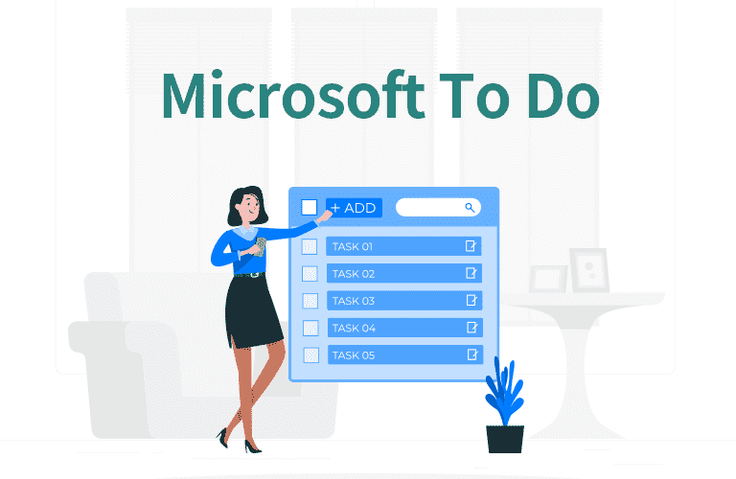
There's too much to do! I can't figure out what to do first! I keep forgetting things to do! I make mistakes even though I write them down! I'm still worried and anxious about the remaining work after work! If so!! Manage your tasks conveniently and smartly with Microsoft To Do!

(4.9) 7 reviews

66 learners

Level Beginner

Course period 3 months

MS-Office
MS-Office
MS-Office
MS-Office

Reviews from Early Learners

Reviews from Early Learners

4.9

5.0

이다솜

100% enrolled

5.0

움직이는YM

100% enrolled

This is a great course that will help you learn how to use ToDo very quickly. I was looking for a schedule management app, and it was great to be able to learn a good app quickly.

5.0

kim.seonil

100% enrolled

It helped me a lot.

What you will gain after the course

  • How to use Microsoft To Do

  • Managing your tasks with Microsoft To Do

  • Introduction and Installation of Microsoft To Do

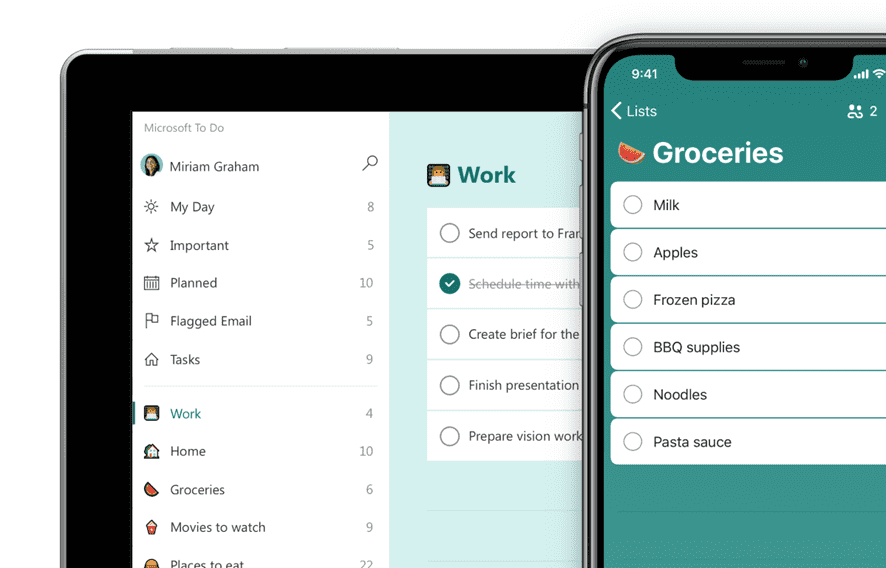
  • Create lists and tasks, to-dos

  • Convenient to use with mobile connection

  • Use in conjunction with Outlook, Planner, and Teams

Lecture Introduction 📝

- There's so much to do!
- I can't figure out what to do first!
-
I keep forgetting things to do!
-
I make mistakes even though I clearly write them down!
-
Even after work, I still worry and feel anxious about the remaining work!

Is this perhaps the situation right now?

Because we're humans, not machines, our memories are inherently limited . Even if you absolutely must do something, you'll inevitably forget it if you're caught up in other pressing matters . Even if you pride yourself on having a good memory, as your workload grows, you'll inevitably miss things or make mistakes .

So, to reduce these mistakes, I look for ways to manage my to-do list and find and install to-do list apps.

Microsoft To Do is a very convenient and smart service for managing your tasks.


Course Introduction 📺


What I learned in class ✏️

In this course, you will learn how to manage your tasks smartly by:

Lecture Table of Contents

  • Course Introduction
  • Introduction and Installation of Microsoft To Do
  • Understanding Microsoft To Do Screens and Menus
  • Microsoft To Do Settings
  • Make a list
  • Create a task
  • Create a critical task
  • Fixed at start
  • Add a task step
  • search
  • Use in conjunction with Outlook, Planner, Teams, and Mobile

Tools covered in the lecture 💡 

    1. Microsoft To Do
    2. Go to the To Do homepage


    3. Many of you may have used Wunderlist to manage your tasks. Wunderlist was acquired by Microsoft in 2015, and officially ended its service in May 2020. This is Microsoft To Do, a to-do management app that was launched.


What you need to take this course 🙋🏻‍♂️

  • Internet
  • Windows or Mac computer
  • Mobile (iOS or Android)
  • License
    • Microsoft 365 work or school account
    • Microsoft personal account

Recommended for
these people

Who is this course right for?

  • People with a lot to do

  • People who can't decide which task to do first

  • People who keep forgetting things to do

  • A person who forgets and makes mistakes even though he or she writes it down

  • People who are concerned and worried about remaining work after work

  • For those who want to manage their tasks systematically

Need to know before starting?

  • No prior knowledge required! It proceeds step by step, from installation to understanding the menu.

Hello
This is omas

2,652

Learners

300

Reviews

165

Answers

4.6

Rating

47

Courses

Nice to meet you! We are "Omas", Microsoft 365 experts.
As Microsoft 365 experts, we will help you work more easily and smartly.

Introducing Omas's instructors!!

Instructor Hyunjung Ko
Microsoft MVP (Microsoft 365 Apps & Services, 2016 – Present)


Official Blog & Café


YouTube


Books 

  • Microsoft 365 Business for Users & Admins

  • OMAS: My Smart Work using Office 365

  • Office 365 Quick Guide Series 1. Creating a SharePoint Site for Collaboration

  • Office 365 Quick & Easy Series 2. BI that business users can apply to work immediately without expert help

  • Office 365 Quick & Easy Series 3. From Basics to Advanced All at Once! OneDrive for Business

  • Office 365 Quick Series 4. Creating mobile apps your company needs: PowerApps

  • Office 365 in SMBs: My Smart Work using Office 365

  • Using OneNote 2016! - Basic Edition

  • OneNote 2016 Utilization! - Advanced Guide

  • Female office workers, never do this! A cheerful look at how to succeed in your professional life by thinking outside the box.


Recognitions

  • MS-102 - Microsoft 365 Certified: Administrator Expert

  • MS-100 - Microsoft 365 Identity and Services

  • Teams Meetings and Meeting Rooms Technical Assessment

  • MS-700 - Microsoft 365 Certified: Teams Administrator Associate

  • MS-900 - Microsoft 365 Certified: Fundamentals

  • AZ-104 - MS Azure Administrator Associate

  • AZ-900 - Microsoft Certified: Azure Fundamentals

  • SC-900 - Microsoft Certified: Security, Compliance, and Identity Fundamentals

  • PL-900 - Microsoft Certified: Power Platform Fundamentals

  • Exam 347: Enabling Office 365 Services

  • Microsoft Office Specialist Word 2016 Expert

  • Microsoft Office Specialist PowerPoint 2016 Core

  • Certificate of Qualification. Presentation Speech 1st  Level

Other Qualifications

  • Presentation Speech Level 1 (Korea Vocational Skills Certification Association, Ministry of Employment and Labor)

  • CS Instructor Level 1 (Korea Vocational Competency Assessment Association, Ministry of Trade, Industry and Energy)

  • e-Learning Senior Consultant (Korea U-Learning Association)

  • e-Learning Instructor Level 2 (Korea U-Learning Association)

  • Computer Science Teacher Certificate (Minister of Education)

  • Lifelong Education Specialist Level 2 (Seoul University of Buddhism and Culture)

More

Curriculum

All

7 lectures ∙ (1hr 0min)

Published: 
Last updated: 

Reviews

All

7 reviews

4.9

7 reviews

  • chp07202171님의 프로필 이미지
    chp07202171

    Reviews 1

    Average Rating 5.0

    5

    71% enrolled

    • kt5030kim1825님의 프로필 이미지
      kt5030kim1825

      Reviews 4

      Average Rating 4.3

      4

      100% enrolled

      It was a good lecture

      • omas
        Instructor

        Thank you~ ^^ I will support you to become a professional worker through To Do!

    • dslee3534님의 프로필 이미지
      dslee3534

      Reviews 2

      Average Rating 5.0

      Edited

      5

      100% enrolled

      • bjhuh4545님의 프로필 이미지
        bjhuh4545

        Reviews 1

        Average Rating 5.0

        5

        100% enrolled

        • nomadlearner1472님의 프로필 이미지
          nomadlearner1472

          Reviews 9

          Average Rating 4.7

          5

          100% enrolled

          This is a great course that will help you learn how to use ToDo very quickly. I was looking for a schedule management app, and it was great to be able to learn a good app quickly.

          • omas
            Instructor

            Yes~ It's a very convenient app~ I hope that managing your tasks becomes more convenient through To Do~ ^^ Thank you.

        omas's other courses

        Check out other courses by the instructor!

        Similar courses

        Explore other courses in the same field!

        $8.80