inflearn logo

Mastering Word Task Automation with Python

This is a practical course where you will learn how to directly control and automatically generate Word documents using Python and pywin32. You will understand the workflow of generating documents through code rather than manual writing, with the goal of creating an automation structure that can handle reports and documentation tasks with a single click.

1 learners are taking this course

Level Beginner

Course period Unlimited

Python
Python
MS-Office
MS-Office
Word
Word
automation
automation
pywin32
pywin32
Python
Python
MS-Office
MS-Office
Word
Word
automation
automation
pywin32
pywin32

What you will gain after the course

  • Python Basics

  • Automation of repetitive document tasks

  • The ability to control Word with code

  • Understanding the structure of automated report generation

  • Practical automation skills applicable to real-world tasks


Word tasks, are you still clicking?

Automate repetitive Word document tasks with code
and acquire practical automation skills that will
drastically reduce your work hours.


Are you still copying and pasting numerous paragraphs every time you write a business report?

Are you staying late at work because you're manually filling in content to fit a fixed report template?

Instead of repetitive document tasks, experience automating report generation with a single click using Python code.

The pain of repetitive tasks can be fully resolved with a better approach.
Become an office automation expert through this course.


Learn practical automation techniques to control Word documents through code—from creation to inserting text, tables, and images—using Python and the pywin32 library.


Break free from repetitive document tasks and
become a 'work automation expert' who completes reports with a single click.


By the end of this course, you will be able to


You can automate Word tasks using Python.

You can directly handle repetitive Word tasks using
Python and pywin32-based automation.
Everything from opening files, copying/pasting data, organizing, and saving
can be performed automatically without manual labor.


You can reduce repetitive tasks and increase work efficiency.

Through Python-based Word automation,
you can reduce repetitive task time
and create an environment where you can focus on more important work.


You can learn practical Word control methods using pywin32.

Beyond simply using libraries, you can understand the automation method of directly controlling Word through pywin32
and learn to a level where you can apply it to
actual work.


It can be integrated with the automation of other MS Office product families.

Even for Word automation, when taking related courses on Excel, PowerPoint, and Outlook, you will be able to understand them more easily based on pywin32. Furthermore, you will be able to consider designing and building various automations that integrate with other product suites.


✔️

Stop repetitive Word tasks now with Python

Mastering Work Automation
with Python and pywin32

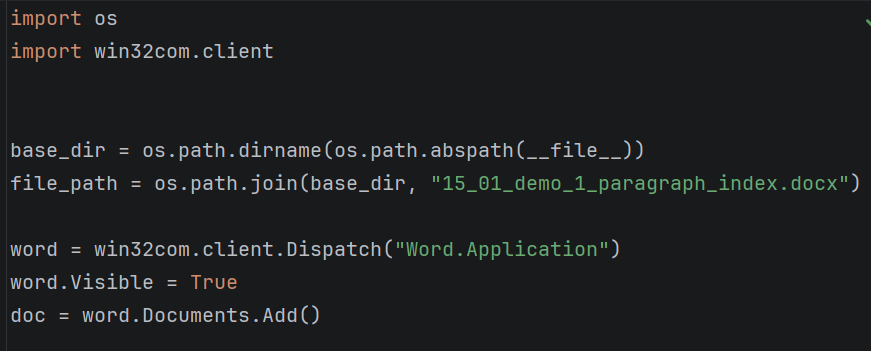
You will learn how to automate repetitive Word tasks using Python and the pywin32 library with a focus on practical application. You can master specific code to efficiently automate the entire process, from opening files to data processing, inspection, consolidation, and saving.

Example of Word automation code using pywin32

Practical Word Automation Project

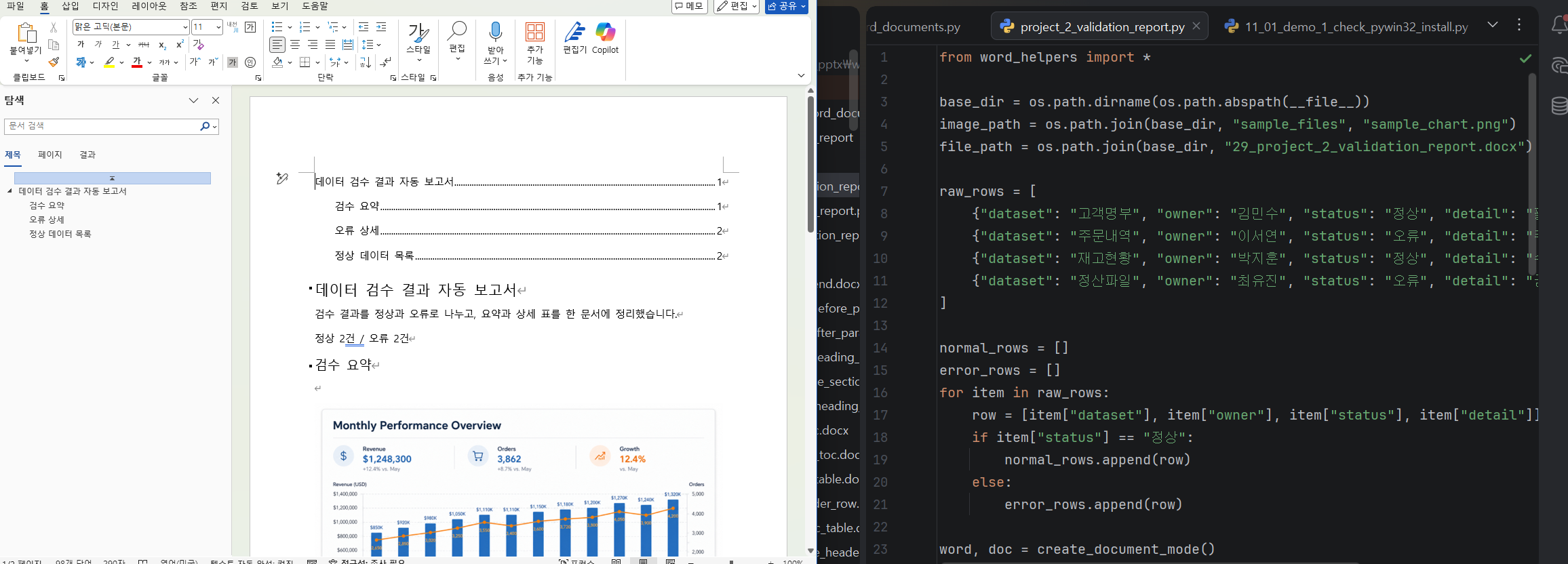
You will directly implement various practical functions using pywin32, such as creating Word documents, applying heading styles to reports, automatically generating tables of contents, inserting tables and filling them with data, and inserting images/objects. Additionally, you will build practical skills through projects involving dynamic document generation using Word templates and the automatic merging of multiple documents.

Practical project code and result files

Ready-to-use automation codes and functions

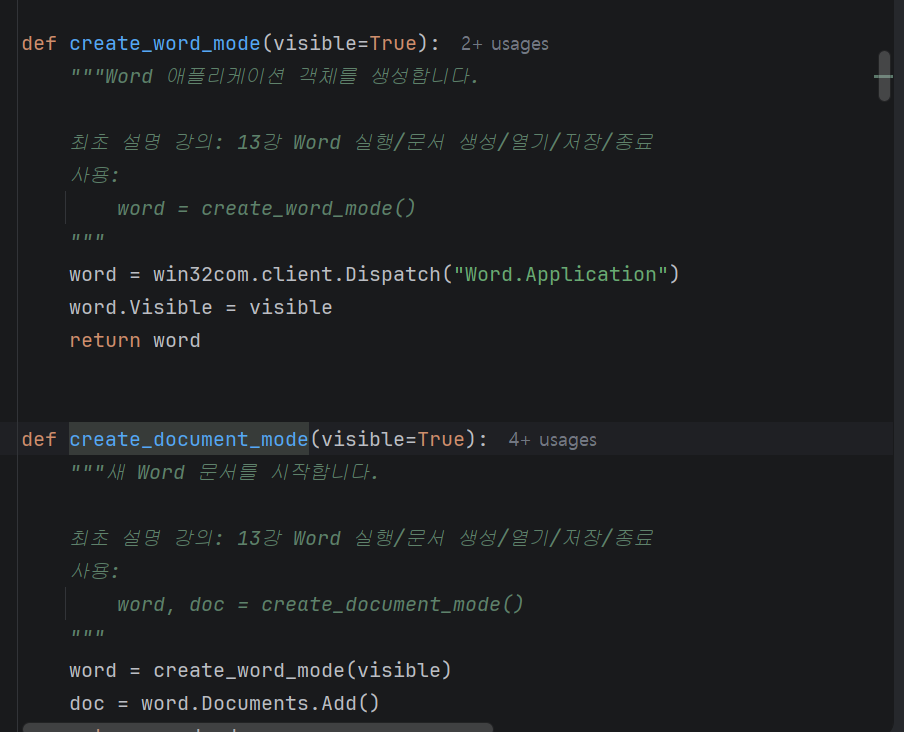
In this course, we provide all source code, ranging from basic Python syntax for Word automation to the usage of pywin32. Through the 'Word_helper' functions and sample codes necessary for building automation, along with other guide PDF materials, we help you quickly master the learning content and apply it to your actual work.

Automation codes and functions for immediate use (word_helper code)


📚

Building a Practical Word Automation
Process


Section 1

Download Lecture Materials

You can download the PDFs, example codes, and results used in the lecture.

Section 2

Core Python Basics (Essential Grammar for Word Automation)

In this section, we will summarize the basic Python syntax required to implement Word automation.
Since this course does not cover Python itself in depth, we will not explain every aspect of the grammar. Instead, we will focus on selecting and learning only the core syntax essential for implementing automation.

Rather than focusing on complex theories, the focus is on understanding the actual flow of code and building a minimum foundation for implementing Word automation features later on. It is structured so that even those unfamiliar with Python can follow along without feeling overwhelmed.


Section 3

Starting Word Automation (Controlling Word with Pywin32)

In this section, you will learn how to directly control Word using Python and pywin32.
You will learn the basic flow of automation step-by-step, from launching the Word application to creating, opening, and saving documents.

Additionally, by understanding the structure of Word objects such as Document, Paragraph, and Range, you will gain a perspective on Word not just as a simple document creation tool, but as an automation tool that can be controlled through code. Through this process, you will be able to understand the overall flow of Word automation.


Section 4

Word Automation Features for Immediate Practical Use

This section covers Word automation features that can be immediately applied to real-world tasks.
You will learn how to automatically enter text, insert content at desired locations, and create document structures by applying Heading styles.

Furthermore, it covers the process of creating tables and automatically inputting data, as well as the functionality to insert images and various objects, reaching a level where you can automatically compose actual reports.

This section focuses on going beyond simply learning functions and instead aims to create a document automation workflow that can be used in practice by combining various features.


Section 5

Practical Projects and Wrap-up

In the final section, you will carry out an actual automation project based on what you learned previously.
By directly implementing the entire flow of automatically generating a report, you will experience the process of organizing the document structure and filling in the content based on data.

Through this process, you will go beyond simply using features and complete automation results that can be applied to actual work. Upon finishing the course, you will possess the practical capability to automate repetitive document tasks.


We can solve the concerns
of people like this!

📌

Office workers tired of repetitive tasks

Those who repeat dozens or hundreds of reports or document tasks every day,
losing the time they should be spending on truly important work

📌

Marketers/Planners who want to increase work efficiency

Those who are spending too much time on document tasks that must be generated regularly, such as advertising performance reports and market analysis reports,
making it difficult to improve the quality of their work.

📌

Non-IT majors who are interested in automation

Those who have little to no coding experience but want to use tools like Python to
reduce repetitive office tasks yet feel overwhelmed about where to start


📌 Continuous Updates + Scalability

thoughtful This course is not just a one-time lecture. To increase its practical utility, I plan to continuously supplement and update the content. While this course focuses on Word automation, it can be expanded into a business automation workflow that connects data processing to document generation when used alongside Excel, PowerPoint, and Outlook automation in the future.


Notes before taking the course


Practice Environment

  • Windows operating system is required.

  • Microsoft 2016 or a later version must be installed.

  • The practice sessions will be conducted in a Python development environment, and the explanations are based on using PyCharm Community Edition.

Prerequisites and Important Notes

  • An understanding of basic Python syntax is required.

  • I recommend this to those who feel inconvenienced by repetitive document tasks.

  • If you want to learn automation skills that can be applied immediately to your work, choose this course.

Learning Materials

  • Python basics and Word automation sample codes are provided.

  • A detailed PDF guide for Word automation is provided.

  • Includes code and explanatory materials for practical projects.


Recommended for
these people

Who is this course right for?

  • Office workers spending time on repetitive document tasks

  • Those who want to use Word more efficiently

  • Those who want to automate practical tasks using Python

Need to know before starting?

  • Basic experience using Word

  • It is better if you have experience installing and running Python, but beginners can also take the course.

  • Understanding basic file concepts (concepts of file paths, opening files, and saving)

Hello
This is fasthome
Hello. This is the On-Time Departure Automation Lab.

Having worked in SW practice for about 15 years,
I have been contemplating "ways to reduce repetitive tasks and bring forward the time to leave work."

In this course,
we focus on automation techniques that can be applied immediately in real-world tasks, rather than just theory.

Rather than complex explanations,
we focus on the flow of "Why it's needed → How to use it → Immediate application."

We will save you time through Excel, Word, and various task automations.

More

Curriculum

All

33 lectures ∙ (6hr 19min)

Course Materials:

Lecture resources
Published: 
Last updated: 

Reviews

Not enough reviews.
Please write a valuable review that helps everyone!

Similar courses

Explore other courses in the same field!

Limited time deal

$60,830.00

30%

$67.10