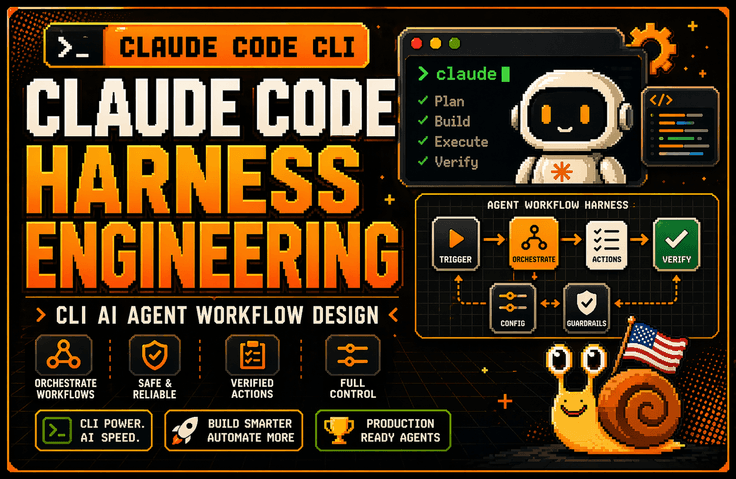

Claude Code Harness & Graph Engineering: Advanced Claude Code CLI Harness Engineering Practice

The lecture explains why the harness is more important than the model through the Claude Code architecture. It covers how to design the Claude Code task system using six structures: Context Harness, Permission Harness, Verification Harness, Tool Harness, Subagent & Worktree Harness, and Debugging Harness. Afterward, it connects these concepts to CLAUDE.md, session management, large codebase control, worktree parallel operations, error log analysis, and tracking environment variables and configuration scope issues, establishing the standards for continuously using Claude Code in practical backend and DevOps workflows.

(4.3) 41 reviews

657 learners

Level Basic

Course period Unlimited

AI
AI
claude
claude
Vibe Coding
Vibe Coding
harness
harness
AI
AI
claude
claude
Vibe Coding
Vibe Coding
harness
harness

Reviews from Early Learners

4.3

5.0

이태용

61% enrolled

It's great because it allows for a solid understanding of the basic knowledge of harness engineering.

5.0

안준우

32% enrolled

It is great that you list many key words for each step and situation. It is also very helpful that you repeat those words.

5.0

김민재

61% enrolled

You explain how to use Claude Code so well! I love that you also explain the conceptual parts so that even non-majors can use it effectively! (Though I'm not sure if I'll understand everything...)

What you will gain after the course

  • Harness design criteria for integrating Claude Code CLI into real-world projects

  • Ability to design workflows for large codebases through CLAUDE.md, session management, and context control

  • Ability to design permissions and authorization policies that define the scope of actions Claude can perform.

  • Practical sense of using a Verification Harness to verify Claude's outputs through tests, diffs, and counterexamples rather than trusting them blindly.

  • Subagent & Worktree operational capabilities to safely isolate multi-tasks using worktrees and parallel sessions

  • Practical skills in creating a Debugging Harness to organize error logs, environment variables, configuration scopes, and hard-to-reproduce bugs so that Claude can solve them.

Claude Code can be fun in a GUI.

However, in the harness design of the CLI, Claude Code becomes profitable.

This course does not introduce Claude Code CLI as a simple AI coding tool. Instead, it covers how to integrate Claude Code into actual backend and DevOps workflows through the perspectives of Context, Permission, Verification, Tool, Subagent, and Debugging Harness. You will learn how to design a work system where Claude can operate safely in real-world projects, connecting everything from log analysis, bug fixes, and test recovery to CLAUDE.md design, session management, and parallel worktree operations.

Recommended for these people

Developers who have installed Claude Code but struggle to use it consistently in real-world projects

If you found yourself comfortably asking and receiving answers in the GUI, only to return to the terminal to read logs, run tests, review diffs, and clean up Git branches in actual practice, then you need this course. This course provides the standards to transform Claude Code from a "tool you try out briefly" into a "tool you use continuously in real-world projects."


A non-major developer who spent 5 hours on something Claude could have done in 30 minutes in a large codebase

The problem is likely not just model performance, but a lack of design regarding what information Claude should see and within what scope it should operate. This course covers practical patterns—such as Context Harness, CLAUDE.md, session management, and context redesign—to prevent Claude from getting lost in large codebases.

Developers and non-majors who want to elevate their use of AI coding tools from "using them well" to "operating them at a professional system level"

I recommend this to those who need practical standards beyond simple feature introductions—such as which tasks to delegate to Claude versus which to judge yourself, which results to verify through tests and diffs, and which automations to extend using Hooks/MCP/Skills. It is especially suitable for backend developers, DevOps engineers, and tech leads.

After taking this course,

After taking this course, you will no longer view Claude Code simply as a "tool for inputting good prompts." Instead, you will be able to determine what Claude should look at, the extent to which it can act, how to verify specific results, when to clear/compact/restart if a session becomes contaminated, and how to manage worktrees and parallel sessions.

Specifically, you will be able to structurally fix project rules and prohibitions in CLAUDE.md, organize log, environment variable, and configuration scope issues into a format that Claude can solve, and review Claude's proposed fixes through a loop of testing, diffing, and counter-example verification. In other words, you will elevate Claude Code from a GUI-based auxiliary tool to a level where it can be integrated into actual backend and DevOps workflows.

Features of this course

1. We do not just explain features; we teach from a "Harness Engineering" perspective based on research papers.

This course does not simply list the features of Claude Code like an official documentation. Instead, it explains how to design Context, Permission, Verification, Tool, Subagent, and Debugging Harnesses so that Claude Code can work safely in real-world projects. As a result, you will be less affected by rapidly changing version updates and will be left with standards that are applicable to actual projects.

2. Covers large codebases and real-world practical issues as the standard

We cover more than just building simple demo apps; we dive into how to keep Claude from getting lost in large codebases, how to reduce session pollution, how to safely manage worktrees and parallel sessions, and how to connect the GitHub Issue → PR workflow with Claude. We start from the actual pain points encountered in real-world practice.

What you will learn

Getting Started with Claude Code CLI in Practice /

Architecture / Memory / CLAUDE.md / Plan Mode / Skills

In the first section, we clearly define the differences between the GUI-based Claude and the CLI. Rather than simply comparing interface differences, we explain why the GUI often limits you to "asking and receiving answers," whereas the CLI allows you to connect directly to actual logs, tests, Git, and deployment preparation. Afterward, through the Claude Code architecture, you will understand why the harness is more important than the model itself, and we will explore the roles of memory and CLAUDE.md between sessions, as well as the differences between Plan/Thinking Mode and Subagents, and Skills versus Tool use.

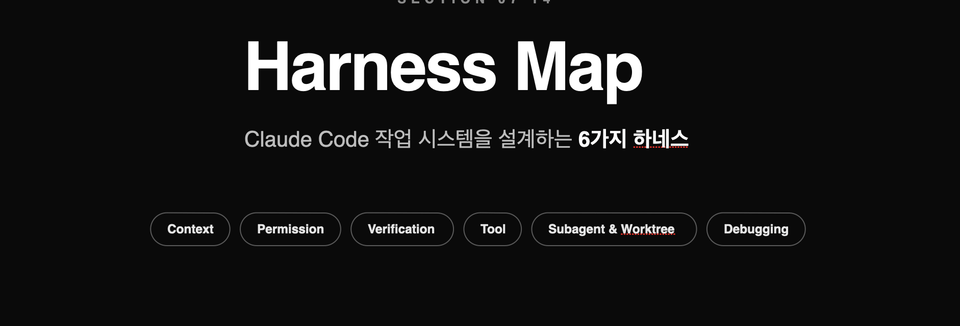
Harness Map / Context Harness / Permission Harness / Verification Harness / Tool Harness / Subagent & Worktree / Debugging Harness

The second section is the core of this lecture.

It explains the six types of harnesses required to integrate Claude Code into an actual project as a single unified work system. It provides a big-picture overview of what information Claude needs to see, the extent of its permitted actions, how to verify results, the structure for integrating tools, how to isolate parallel tasks, and how to transform logs and environment variables into a format suitable for troubleshooting. You will implement this map in the subsequent hands-on sections.


Harness configuration files for immediate copy-and-paste use

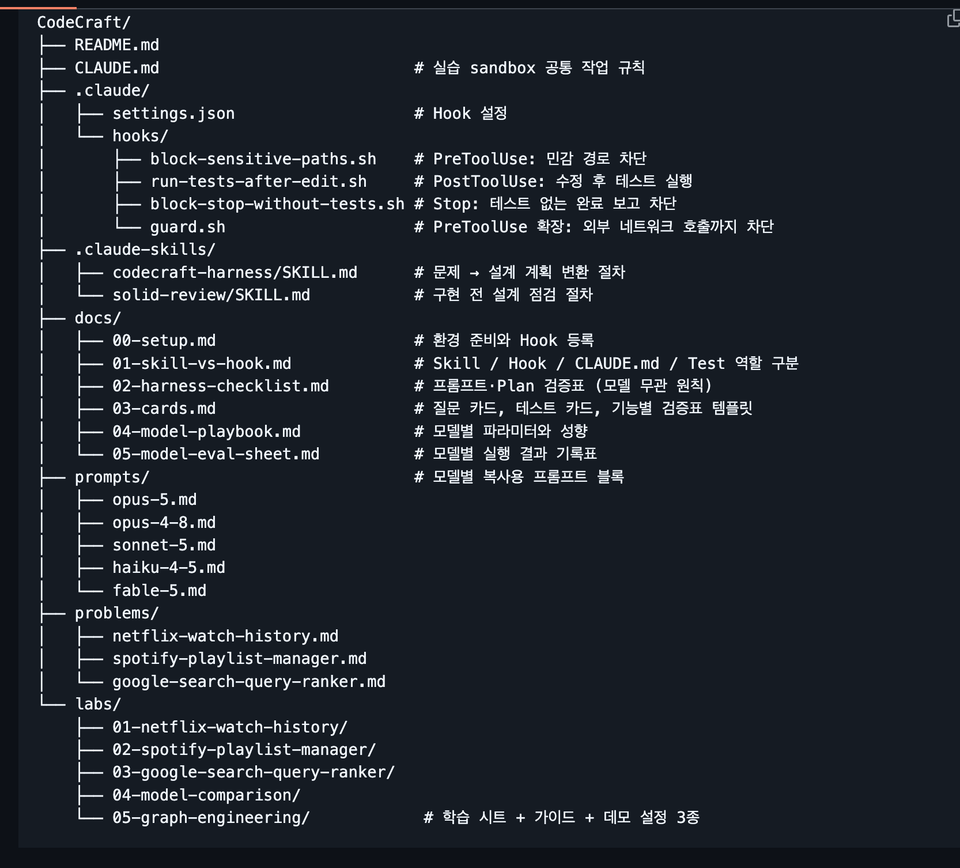
All harness settings created in the lecture are provided as complete files.
After taking the lecture, you don't need to rewrite them from scratch; you can simply copy and apply them directly to your own projects.

The provided settings are as follows.

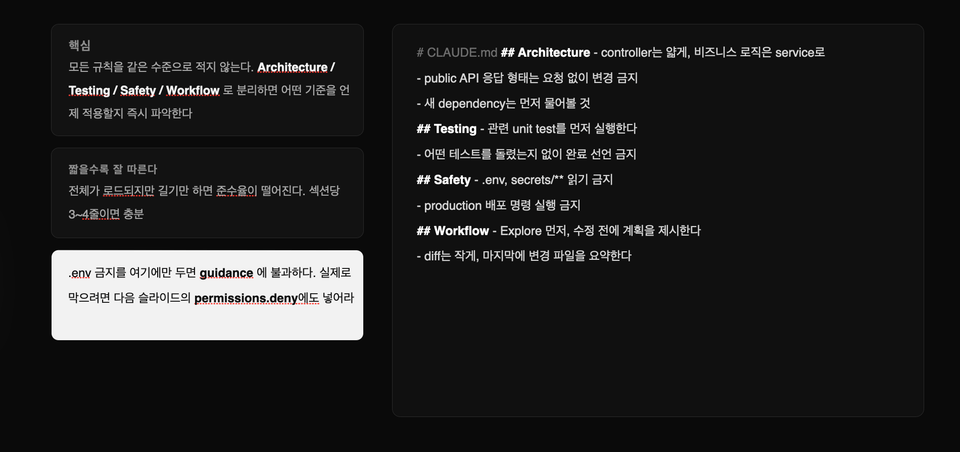
  • CLAUDE.md
    Defines the working rules that Claude should follow within the project.

  • codecraft-harness/SKILL.md
    Transforms short, ambiguous one-sentence requests into concrete designs and implementation plans.

  • solid-review/SKILL.md
    Before starting implementation, check if the separation of concerns is appropriate and ensure the design is not unnecessarily complex.

  • block-sensitive-paths.sh
    Blocks access to sensitive files and paths, such as .env, SSH keys, and parent folders of the project., SSH Key và các thư mục cấp cao hơn của dự án.

  • run-tests-after-edit.sh
    Automatically runs relevant tests whenever Claude modifies a file.

  • block-stop-without-tests.sh
    Prevents reporting the task as complete if tests have not been run or if the tests have failed.

  • guard.sh
    It blocks unauthorized external network requests to configure a secure execution environment.

The hooks included in the lecture are not just simple example codes.
They have all been executed and verified to work in a real environment.

Once you register the configuration file, tests will run automatically every time Claude modifies the code, and it will be unable to arbitrarily end the session by claiming "Task complete" if the tests are in a failed state.

In other words, you will learn how to go beyond simply asking Claude to verify via prompts and instead make the system forcibly execute the verification process.


3. Model-Specific Prompt Playbooks

Even when using the same harness, the instructions that each model follows well and the instructions they are likely to miss differ.

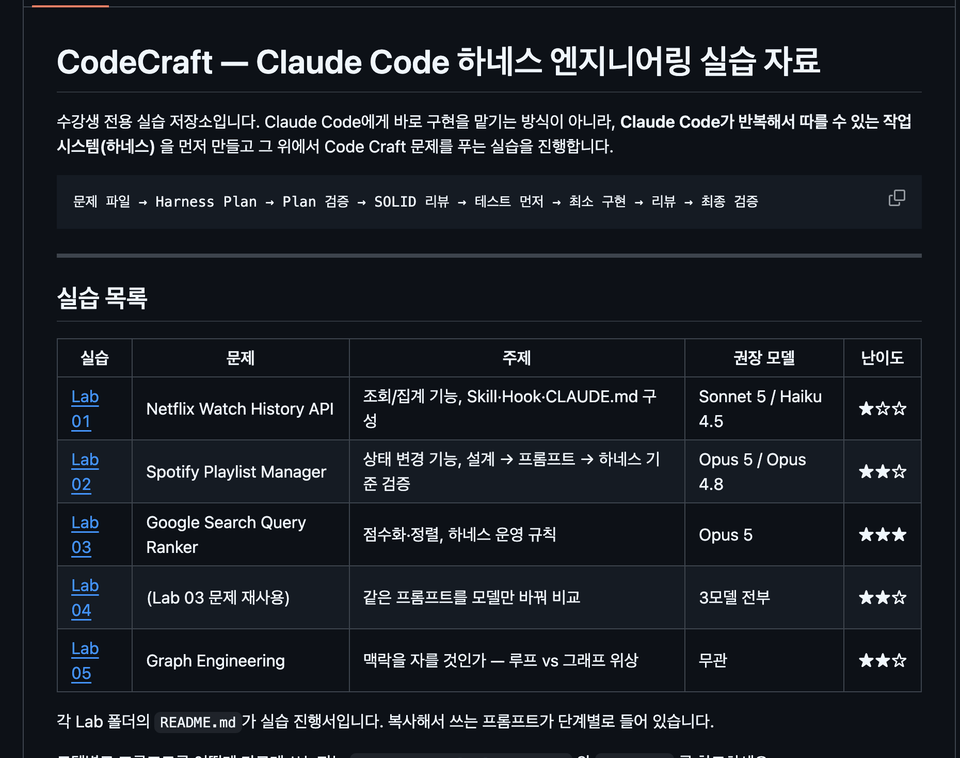
In this course, instead of using the same prompt for all models, we provide 5 types of copy-and-paste prompt blocks that outline which instructions to remove and which to add to suit the characteristics of each model.

  • Opus 5
    Reduce the self-verification instructions performed by the model to prevent unnecessary redundant work.

  • Opus 4.8
    Specifies tool execution conditions more clearly to ensure necessary tools are used at the exact right time.

  • Sonnet 5
    Covers how to write the files to be modified and the scope of application in literal and specific detail.

  • Haiku 4.5
    Write out the execution procedures step-by-step to ensure stable operation even on models without the effort option.

  • Fable 5
    We provide, for your reference, a method of leaving only the necessary prescriptions without giving excessive instructions to the model.

Each playbook also includes the following:

  • Parameter combinations that cause a 400 Error upon request

  • Differences in default parameters and behavior by model

  • A record table for comparing results while changing the effort value

  • Lab 04 Practice: Running the same prompt on multiple models and comparing the results

Rather than simply explaining "which model is better," you will learn how to find the optimal settings for each model yourself by repeatedly executing the same tasks and recording the results.


Graph Engineering Practice Materials — Lab 05

Directly compare the method of processing complex tasks sequentially all at once with the Graph Engineering method, which divides multiple tasks based on their dependencies.

Interactive Learning Sheet

You can use it by opening the HTML file in your browser without any separate installation or server execution.

You can play back step-by-step how the same request is processed differently in the following two methods.

  • Loop-type execution that repeats a single flow

  • Graph-based execution, which divides tasks into multiple nodes and dependencies

By selecting each step, you can also check the configuration file that created the corresponding action, allowing you to immediately understand the relationship between the execution results and the settings.

Step-by-step learning guide

A total of 645 lines of learning guides are provided.

Instead of explaining theories at length from the beginning, it is organized in the following order.

Check Conclusion → 30-Minute Practice → Core Concepts → Advanced Theory

The learning paths are also separated into one for non-majors and another for students with prior development experience.

With Vibe Coding, even those using Claude Code for the first time can start with hands-on practice, while developers can dive deeper into internal operations and design principles.

3 types of demo projects you can run yourself

Instead of just reading configuration files, you will run claude in an actual project folder to see firsthand how hooks block tasks and perform validations.

Each project intentionally includes the following issues.

  • Type error

  • Test failure

  • Logic bugs that appear normal on the surface

Students will experience the following flow firsthand.

Problem Detection → Task Blocked → Code Fix → Run Test → Verification Passed

Loop-type projects and graph-type projects use the same code, with only the harness settings configured differently.

Therefore, you can accurately compare how results differ based on the way tasks are organized, rather than due to differences in the code itself.


Reference Documents

Practical documentation is provided so that you can refer to it when configuring projects or solving problems even after completing the course.

  • Environment Setup Guide
    Provides a summary of execution environment preparation, Hook registration methods, and common errors with their solutions.

  • Skill / Hook / CLAUDE.md / Test Role Differentiation
    Explains what each component is responsible for and which tool to use for specific problems.

  • Harness Inspection Checklist
    You can verify whether prompts, design, implementation, testing, and completion conditions are all included.

  • Question Cards and Test Cards
    Provides questions to use when requirements are ambiguous, test design criteria, and verification table templates.

  • Model-specific Playbook Documents
    Organize parameters, behavioral characteristics, and prompt writing standards for each model in one place.

  • Model Evaluation Record Sheet
    You can run the same task with multiple models and settings, then compare and record the results.

These materials are not just simple lecture supplements, but are organized as a Claude Code Harness Operation Manual that can be used repeatedly in actual projects.


The person who created this course

  • Silicon Valley Survivor | US Snail

    Based on experience and know-how accumulated at the forefront of the global tech scene, I present a path for non-majors to overcome technical barriers and become masters of their own business.

    • Current) Founder of a Silicon Valley AI Coding Agent Startup

      • Operating self-developed AI tool 'Snailer CLI' (18K+ downloads)

      • Selected for the Google for Startups Program

    • Former) Engineer career at US Big Tech and promising startups

      • Reached the final stage at Amazon, but gave it up to start a business

      • Silicon Valley AI Fintech Startup Engineer

      • OpenAI / Meta / Apple / Adobe / Amazon Full-Stack Fellowship

      • Domestic search engine portal, fintech development

      • AI startup AR/B2B/SDK development

    • Proven Educational Capabilities

Do you have any questions?

Q. I've used Claude Code a little bit before; will this lecture still be helpful?

Yes. In fact, those who have already used Claude Code, even briefly, are more likely to find this lecture deeply impactful. If you’ve experienced the frustration of Claude initially seeming convenient but then losing its way when applied to real projects—or if you felt let down because the final steps like testing, Git, and deployment still had to be done manually—this lecture addresses exactly those issues. Rather than just introducing features, this course focuses on the "structure that makes it sustainable to keep using."

Q. Can't I just look at the official documentation?

Official documentation is the most up-to-date and accurate reference point. However, reading the documentation alone makes it difficult to gain practical judgment criteria, such as "when to use which feature," "why it fails in large codebases," "which rules should go into CLAUDE.md versus which should be moved to permissions," and "how to recover when a session becomes corrupted." While this course references official documentation, it is based on research papers. It provides a structure and criteria that can be immediately applied to real-world practice.

Q. To what level does this course cover?

This course is not an introductory "build an app quickly" type of lecture.

This is an intermediate-level practical course designed to integrate the Claude Code CLI into actual projects and workflows such as mobile app development, backend, frontend, and DevOps. Therefore, it will cover topics ranging from log analysis, session management, CLAUDE.md, context redesign, and parallel worktree operations, to bonus lectures on model routing and context budget management.

Notes before taking the course

Hands-on Environment

  • macOS is the most recommended operating system, and Windows users are encouraged to use a WSL environment. You can follow along similarly in a Linux environment as well. The practice sessions will center around the Claude Code CLI, so prior experience with using a terminal will make things much easier. Since we will be handling project structures and using Git/worktree to some extent, it is best to have a basic development environment already set up.

Learning Materials

  • PPT, Notion

  • The course provides materials centered around templates and standard tables that can be applied directly to practical work, rather than just a collection of simple links. For example, materials such as the CLAUDE.md template, context pack examples, session summary prompts, worktree operation playbooks, and model routing standard tables are structured so that you don't have to re-watch the videos from the beginning when reviewing.

  • Provided Materials


    ▎ GitHub Repository for Students (33 documents · 5,540 lines)


    ▎ - 5 Practice Sessions — Step-by-step guides + 29 prompts for copying + sample data


    ▎ - Completed Harness Setup — 2 Skills, 4 Hooks, CLAUDE.md (Operation Verified)


    ▎ - 5 Types of Prompt Blocks per Model — Opus 5 / 4.8 / Sonnet 5 / Haiku 4.5 / Fable 5


    ▎ - Graph Engineering Materials — Interactive learning sheets + 3 types of executable demo projects


    ▎ - 6 Reference Documents — Environment Setup, Validation Checklist, Question/Test Cards, Record Sheet

Prerequisites and Important Notes

  • It is best if you have basic development experience, experience using CLI, and an understanding of Git concepts.

  • Rather than a course for just "dipping your toes" into Claude Code for fun, this course focuses on creating a structure that can be used continuously in real projects, providing Harness Engineering techniques suitable for all students, regardless of whether they are non-majors or majors.

Recommended for
these people

Who is this course right for?

  • Developers who have installed Claude Code but haven't been able to make it a consistent part of their actual projects.

  • Developers who feel limited by the GUI version of Claude and need practical CLI-based usage methods.

  • Those who want to learn about CLAUDE.md, permissions, hooks, MCP, and subagents based on practical application rather than just feature introductions.

  • Developers who want to elevate their use of AI coding tools from "just trying them out" to "operating them as a core workflow system."

Need to know before starting?

  • Experience using LLMs such as ChatGPT and Claude is preferred.

Hello
This is americasnail

Inflearn Verified

1,750

Learners

93

Reviews

76

Answers

4.4

Rating

6

Courses

  • Silicon Valley Survivor | American Snail

    Based on the experience and know-how gained at the forefront of the global tech scene, I show non-majors the way to overcome technical barriers and become masters of their own business.

    • Current) Founder of a Silicon Valley AI Coding Agent Startup

      • Operating the self-developed AI tool 'Snailer CLI' (18K+ downloads)

      • Selected for the Google for Startups Program

    • Former) Engineer career at U.S. Big Tech and promising startups

      • Reached the final stage at Amazon, but gave it up to start a business

      • Silicon Valley AI Fintech Startup Engineer

      • OpenAI / Meta / Apple / Adobe / Amazon Full-Stack Fellowship

      • Domestic search engine portal, fintech development

      • AI startup AR/B2B/SDK development

    • Proven Educational Expertise

      • Double major in Computer Science and Business Administration at a 4-year university in Seoul, with extensive entrepreneurial experience

      • Produced 1,700+ cumulative students, with 4.5K+ followers on Threads and 470+ followers on Substack

More

Curriculum

All

49 lectures ∙ (6hr 38min)

Course Materials:

Lecture resources
Published: 
Last updated: 

Reviews

All

41 reviews

4.3

41 reviews

  • jbsh님의 프로필 이미지
    jbsh

    Reviews 13

    Average Rating 5.0

    5

    32% enrolled

    It is great that you list many key words for each step and situation. It is also very helpful that you repeat those words.

    • americasnail
      Instructor

      Hello Junwoo Ahn, thank you for your detailed and valuable course review. I hope you have a great day today :)

  • wowmen17577817님의 프로필 이미지
    wowmen17577817

    Reviews 2

    Average Rating 5.0

    5

    61% enrolled

    It's great because it allows for a solid understanding of the basic knowledge of harness engineering.

    • americasnail
      Instructor

      Hello Taeyong Lee, thank you for your valuable course review. I hope you have a wonderful day today. Please look forward to this month's update as well!

  • jinp19933808님의 프로필 이미지
    jinp19933808

    Reviews 6

    Average Rating 5.0

    5

    32% enrolled

    I tried to apply Harness in practice but failed every time and only wasted time, so this was the first time I realized it needs to be built so systematically. In particular, I didn't know when to use things like agent skills or hooks and even asked AI to write those features for me, but now that I know their purpose and how to use them, I think I'll be able to utilize them much better.

    • americasnail
      Instructor

      Thank you so much for your valuable review. ☺️ I will continue to reinforce the content with practical methods for using Claude Code more stably in real-world tasks, based on research papers and actual case studies.

  • kevinx64님의 프로필 이미지
    kevinx64

    Reviews 2

    Average Rating 5.0

    5

    61% enrolled

    You explain how to use Claude Code so well! I love that you also explain the conceptual parts so that even non-majors can use it effectively! (Though I'm not sure if I'll understand everything...)

    • americasnail
      Instructor

      Thank you for your valuable review. We are currently establishing an update plan based on various feedback. We will make sure to create it in a way that is easy for everyone to understand. Thank you. Have a great day.

  • hoojunlee7658님의 프로필 이미지
    hoojunlee7658

    Reviews 1

    Average Rating 3.0

    Edited

    3

    37% enrolled

    The instructor's level of knowledge is high, but the delivery of the lecture fell short of expectations, so I am leaving feedback focused on drawbacks and areas for improvement. 1. The teaching materials are poor. Regarding the attached PPT materials: I can tell they were made with Claude, but shouldn't there at least be some post-editing for line breaks or broken blocks? (It's only a few pages, so it wouldn't even take 30 minutes.) The font in the video materials is too small to see clearly, and the focus keeps shifting, so I gave up trying to follow along visually. The explanation and the materials feel disconnected. 2. There is too much redundant and unnecessary theoretical explanation from the beginning through the middle. (It felt like being teased, wondering when we would finally get to the main point.) It seems like you have a lot of information to share, but from a learner's perspective, it is difficult to summarize or organize the core points. 3. I was expecting hands-on practice in the latter half, but it ultimately felt like just watching the instructor's demo presentation. It would be much better if you organized the curriculum to be more core-focused, added practical explanations, and guided students to actually type out sample code or markdown files while explaining. I've only skimmed parts of the latter half, but I still have high hopes and will definitely finish the course.

    • americasnail
      Instructor

      Hello jjun1004, First of all, thank you very much for your suggestions for improvement. We will review the points you mentioned and update the service by reflecting those improvements in the latter half of July. We apologize for any disappointment caused. Thank you for taking the course, and we wish you a wonderful day.

americasnail's other courses

Check out other courses by the instructor!

Similar courses

Explore other courses in the same field!

Limited time deal

$1,391,182.00

24%

$68.20