강의

멘토링

커뮤니티

BEST
Design

/

3D Modeling

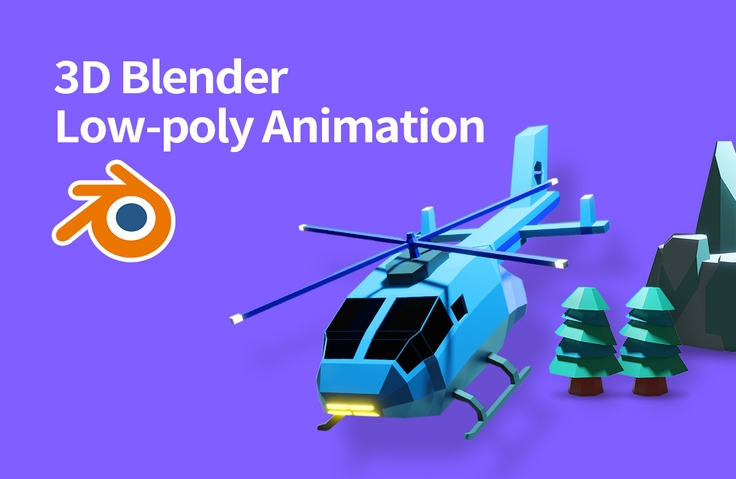
From Blender Beginner to Low-Poly 3D Animation

A course that will teach you everything from the basics of Blender to creating low-poly 3D animations.

(4.8) 23 reviews

407 learners

  • AZTechnology
Blender

Reviews from Early Learners

What you will gain after the course

  • Blender Complete Basics

  • Blender Modeling

  • Blender particle system

  • Blender Animation

3D animation too
Nothing's scary with a blender! 😎

3D animation, I can do it too 😁

I'm not a graphic design/animation major, but I'm a complete non-major. I understand the challenges of getting started with Blender better than anyone, so I created this course to help those considering getting started. I thought it would be even more fun if they could learn not only the basics of Blender software but also simple 3D animation, so I've put it all together in one course.

This course is designed for complete beginners, but it covers everything from the basics of Blender 3D's interface, modeling, shading, particle systems, lighting, and animation . Follow along step by step, and you'll be on your way to creating your own low-poly 3D animations !

This course's unique features ✨

  • Detailed instructions for those new to Blender! We'll explain shortcuts repeatedly, especially confusing ones for beginners.
  • We'll cover everything from Blender basics to animation production in one course.
  • The Blender files used in the lecture are provided as learning materials .
  • Additional lectures will be continuously updated .

Why Blender? 🧐

With free software
Anyone can easily use it
Installation is also really simple .

3D modeling, VR/AR,
3D product design, 3D printing, etc.
It is used in various places .

More and more companies are using blenders.
Also featured in Samsung Electronics' 2022 recruitment notice !

If you do 3D modeling/animation as a hobby,
It's really fun 😁


I recommend this to these people 🙋‍♀️

For those new to Blender software

Anyone who wants to create 3D animation in low-poly style

For those new to 3D modeling and animation

Anyone looking for a design tool that's free to learn and easy to use.

MD's Pick! Recommended by MD Mary 🎀

Have you ever wanted to create beautiful 3D images, but somehow it felt like a specialized area and too difficult? Now, get started with the free tool Blender! While you won't know everything about Blender from the start, what's more important than having fun and gaining confidence by creating images with your own hands? This course will make your first impression of Blender an interesting one . Let's get started step by step!


What you'll learn 📚

  1. Blender Complete Basics - Blender screen layout, interface, editor types, navigation, and preferences
  2. Blender 3D Basics - Transformation (Move / Rotate / Scale), Add / Delete Objects, Outliner Settings
  3. Blender 3D Modeling - Edit Tools / Modifiers
  4. Low-poly 3D modeling - helicopter modeling / background object modeling
  5. Shading Basics - Introduction to Basic Shading Concepts / Helicopter / Background Object Shading
  6. Particle Systems - Particle System Basics (Emitter/Hair) / Creating Large-Scale Scenes
  7. Lighting Basics - Introduction to Basic Lighting / Applying Lighting to Low-Poly 3D Scenes
  8. Animation - Introduction to Animation Basics / Creating Animation Scenes / Final Rendering

📢 Things to note before taking the course

  • This course was developed for Windows. Please note this before attending.

Expected Questions Q&A 💬

Q. Is there anything I need to prepare before attending the lecture?

You will need a computer that can run Blender and a mouse to take the course smoothly.

Q. Is this a course that non-majors can also take?

You can take the course even if you have no prior knowledge of computer graphics/animation.

Q. Why should I learn Blender?

Gaining the ability to do 3D modeling and animation opens up a wealth of exciting possibilities. It can be applied to a wide range of fields, including computer graphics, animation, architectural interior design, and 3D product modeling. Future applications are also endless, including VR/AR/metaverse.


Introducing the Knowledge Sharer ✒️

History

I've been running the YouTube channel AZTechnlogy since September 2020 (18,000 subscribers) and uploading tutorial videos about Blender and other software.

Portfolio/Personal Videos

YouTube Channel


Recommended for
these people

Who is this course right for?

  • For those who are new to blender

  • Anyone curious about Blender particle systems and animations

Need to know before starting?

  • passion

Hello
This is

3,542

Learners

80

Reviews

23

Answers

4.8

Rating

3

Courses

안녕하세요.

YouTube 채널 AZTechnology 를 운영하면서 다양한 소프트웨어 기술에 관한 강의 영상을 업로드 하고 있습니다. 

특히 Blender 3D 소프트웨어의 모든 기능을 A 부터 Z 까지 다루는 걸 목표로 하고 있습니다.

(Basic, Modeling, Sculpting, Shading, Animation, Rendering, Grease Pencil, VFX)

블렌더가 처음이신 분들도 천천히 따라하고 연습하면 멋진 3D 애니메이션을 자유롭게 만들 수 강의를 만드는게 목표 입니다. 

앞으로 인프런에 체계적으로 블렌더 강의 영상을 업로드 하려고 하고 있습니다.  많은 관심 부탁 드립니다.


YouTube 채널 : https://www.youtube.com/c/AZTechnology2021



Curriculum

All

39 lectures ∙ (5hr 38min)

Course Materials:

Lecture resources
Published: 
Last updated: 

Reviews

All

23 reviews

4.8

23 reviews

  • kimseongwonrt3223669님의 프로필 이미지
    kimseongwonrt3223669

    Reviews 1

    Average Rating 5.0

    5

    100% enrolled

    Very useful video

    • aztechnology
      Instructor

      We sincerely appreciate you for completing the lecture and even leaving a review.

  • co436875442님의 프로필 이미지
    co436875442

    Reviews 6

    Average Rating 4.5

    4

    100% enrolled

    This is a lecture that feels like it summarizes basic functions. It feels like there is a little less content compared to the price.

    • aztechnology
      Instructor

      Hello. Thank you for taking the class and leaving a review. I will try my best to improve the content.

  • smk199558386님의 프로필 이미지
    smk199558386

    Reviews 1

    Average Rating 5.0

    5

    100% enrolled

    It was fun and easy to watch. Thank you.

    • aztechnology
      Instructor

      Hello. Thank you very much for taking the course, watching it to the end, and leaving a review.

  • popipa님의 프로필 이미지
    popipa

    Reviews 7

    Average Rating 4.0

    5

    100% enrolled

    Basically, the explanations are very good. I started with no experience in graphics and completed it without any problems.

    • aztechnology
      Instructor

      Hello. Thank you for taking the class and leaving a review!

  • hyoju님의 프로필 이미지
    hyoju

    Reviews 3

    Average Rating 5.0

    5

    100% enrolled

    It was great to be able to learn in detail the basics needed for Blender.

    • aztechnology
      Instructor

      Hello. Thank you very much for taking the course and leaving a review.

Limited time deal

$34,650.00

30%

$38.50

AZTechnology's other courses

Check out other courses by the instructor!

Similar courses

Explore other courses in the same field!