


강의

멘토링

커뮤니티

BEST
Game Dev

/

Game Programming

[Unity 6] Learning by Doing: Dr. Go's Unity Hyper-Casual Game Series 01

This course is designed for beginners who want to create various games using Unity. You can easily and thoroughly learn how to make hyper-casual games, which are small in scale. (All resources and PPTs used in the lecture can be downloaded from the first video [Project Basic Settings] of each course.)

(4.7) 40 reviews

628 learners

  • unitynote
3시간 만에 완강할 수 있는 강의 ⏰
C#
Unity

Reviews from Early Learners

What you will gain after the course

  • Creating a commercially successful hyper-casual game using Unity

  • Making a "Pin Circle" Game (2D)

  • "Wave.io" Game Development (2D)

  • Making a "Zigzag" Game (3D)

Create your own simple game!
Easy and fun, Dr. Goh's Unity Series 🎲

This lecture!

The first in Dr. Ko's Hyper Casual Game series, made with the Unity engine and C# ! This is the 2D "Pin Circle", "Wave.io" game production, and the 3D "Zigzag" game production.


For beginners
Game development that you learn by following.

I know a little bit about how to use the Unity engine, but...
Those of you who were wondering, 'So what do I do now?' and those of you who were at a loss as to how to actually make a game, pay attention!

Beginner's worries about game development,
Solve it with this lecture!

Unity, I learned the basics
How to play the actual game
If you are at a loss as to what to create?

of commercialized games
Development method
If you were curious?

A real example
Try making it by following the instructions
Want to learn while having fun ?

This course was created for those who wanted to create various games with Unity.
This course is designed to help you learn the structure of commercial games in an easy and fun way and get a feel for game development by creating several simple hyper-casual games with your own hands.


Used in practice
All resources and
We provide PPT!

You can download the lecture PPT from [Project Preferences] in each section.

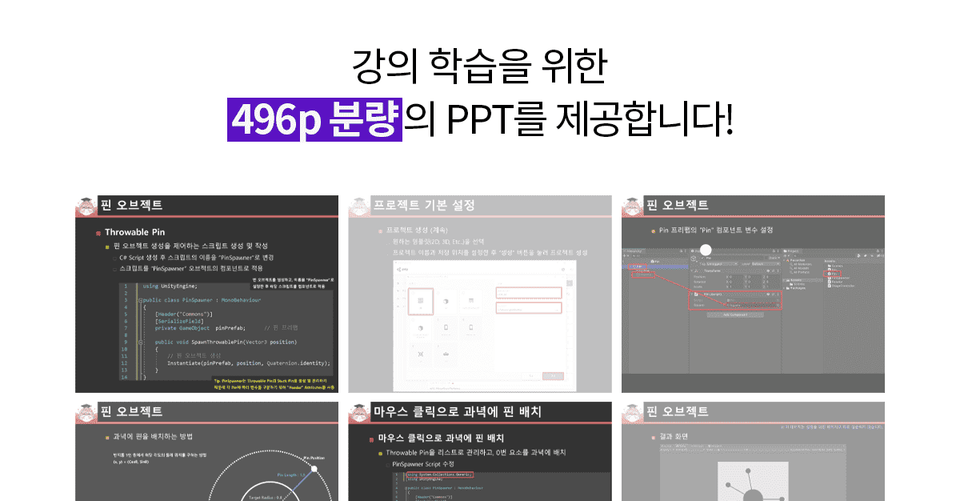
We provide all the resources used in the practice, as well as a 532-page lecture PPT . Instead of having to repeat the cumbersome play/pause while listening to the lecture, just look at the carefully organized PPT and follow the examples.


Making small games
The required features
It's easy to learn.

Section 1 - 2D Pin Circle Game

  • Learn how to set the position of a Stuck Pin on a target using the formula for finding the circumference of a circle, and place the pin on the target with a mouse click.
  • Place the Text-TextMeshPro UI at the pin location using the WorldToScreenPoint() method, which obtains the coordinate values on the screen based on world coordinates.
  • Configure game over, game clear, and main menu, and set the number of pins to be placed at the bottom and target to make it easy to implement the stage.
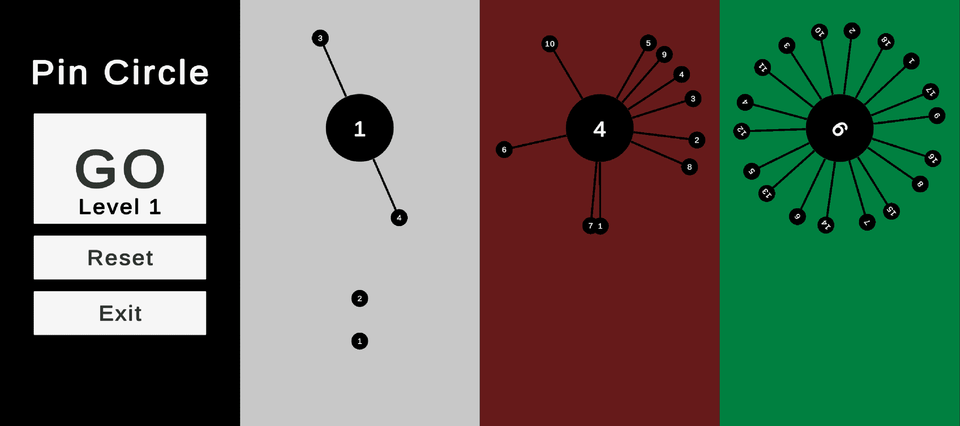
It is a 2D game where you have to insert number pins into a rotating plate as set.

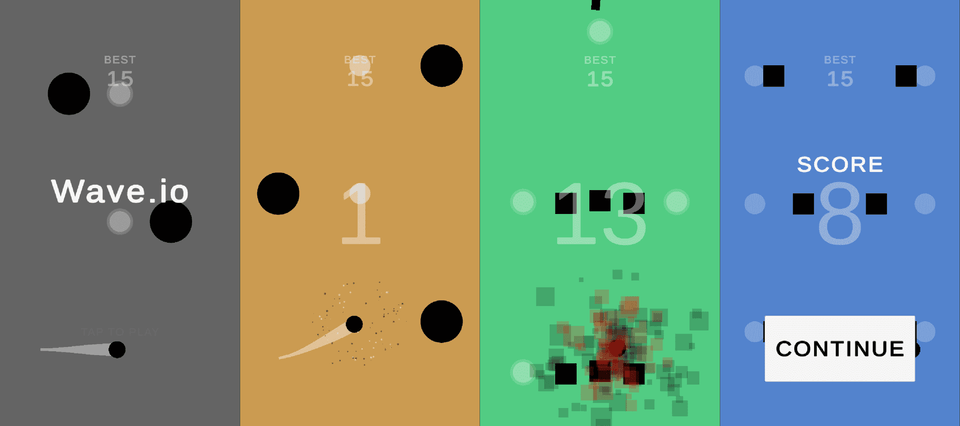
Section 2 - 2D Wave.io Game

  • The movement of the player and obstacles is implemented in a round-trip motion like a Sin graph using the Mathf.Sin() method.
  • Implement a camera that smoothly tracks the player using the Vector3.SmoothDamp() method.
  • Learn how to create Mover, Rotator, and Resizer classes that will act as obstacles placed within the game.
  • Create several zones to be used in the game and randomly place them as the game is played.
  • Prints game start, game over, current score, and maximum score.
  • Change the background color when obtaining an item, and use TrailRenderer to display the player's tail.
  • Implements player death effects (Particle, Camera Shake), item effects (Idle Animation, Particle).

It's a 2D game where you have to avoid obstacles and get through the levels.
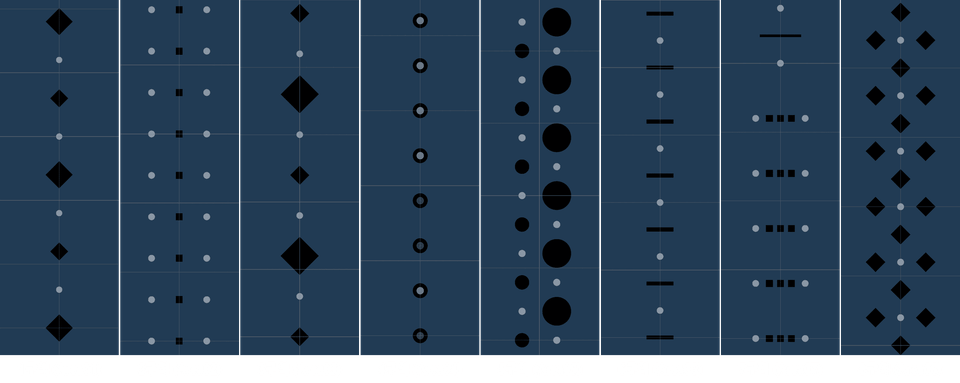
8 types of areas placed within the game
Game Screenshots

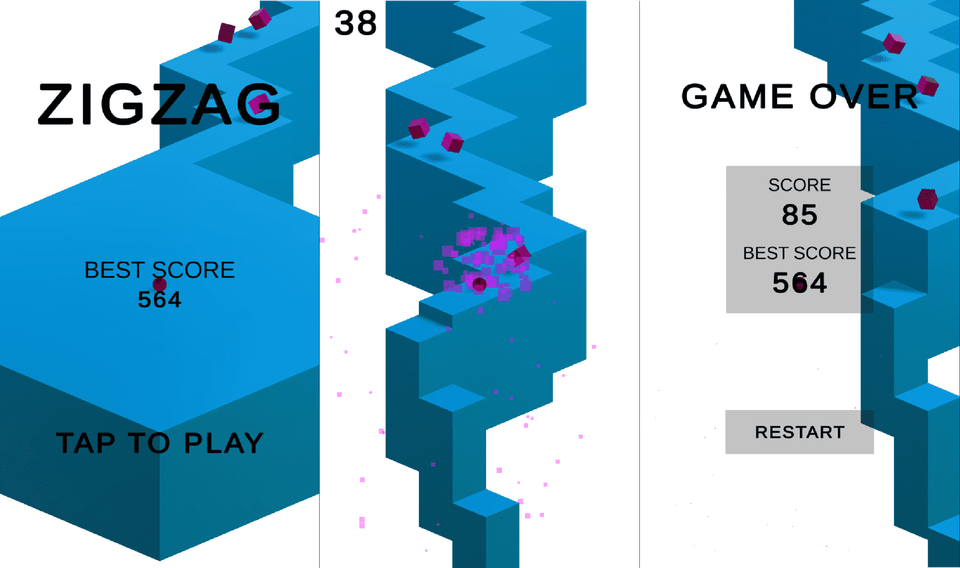
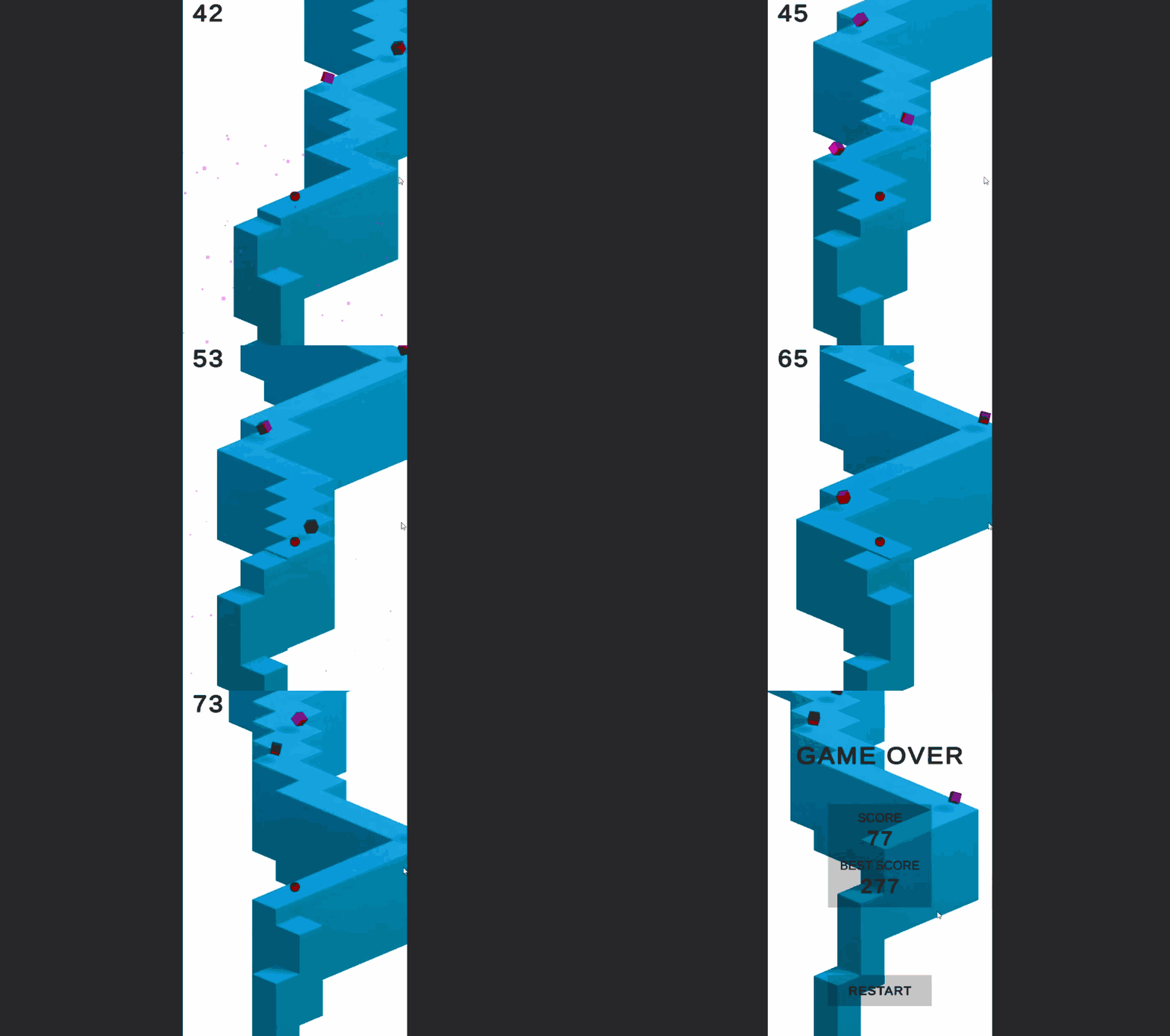
Section 3 - 3D Zigzag Game

  • Let's implement a tile management system where when a player passes by a tile, it falls down and is re-arranged at the very end of the map.
  • Handles player and camera movement.
  • Implements game start, game over, current score, high score, and when an item is acquired, particle playback and player movement speed increase.
Game Screenshots
A 3D game where you break through zigzag tiles by clicking.

YouTube Channel
Dr. Koh's Unity Note!

Go to “Dr. Koh’s Unity Note” channel (click)

You can watch various videos related to Unity game development on YouTube's "Dr. Go's Unity Note" channel 😊


Expected Questions Q&A.

Q. Can non-majors also take the course?

This is possible because we have produced videos and PPTs so that even non-majors can follow along.
However, non-majors and Unity beginners can only "create the same game as in the lecture."

Creating this game requires understanding the various principles and knowledge to apply them to other games.
Non-majors are recommended to first study the course “Dr. Koh’s Unity Basics: Learn by Following” before taking this course.

Q. What are the benefits of taking this course?

Learn how to create games with Unity.
To develop the game you want, you need to understand the logic of many games and be able to apply the code and techniques you know.
Applying these techniques requires exposure to many games developed by other people.

Please check before taking the class!

  • This course was created using Unity 6 (6000.0.36f1). (As of 2025. 04. 03)
  • You can do the same thing in Unity 5 (2017-2023).

Knowledge sharer's
Are you curious about the last lecture?

If you are new to Unity game development! Free lecture pre-course

Recommended for
these people

Who is this course right for?

  • Those who have taken the "Learn Unity Basics with Dr. Ko" course.

  • For those curious about commercialized hyper-casual game development methods

Need to know before starting?

  • Unity Basics

  • C# Language Basics

Hello
This is

13,976

Learners

247

Reviews

137

Answers

4.9

Rating

8

Courses

주요 경력

 2014 ~ 2015, 2022 ~ 호서대학교 게임학과 초빙교수

現 2016 ~ 공주대학교 게임디자인학과 강의전담교수

現 2022 ~ 유니티 공식 인증 강사 (Unity Certified Instructor)

2023 포항공과대학교 전자전기공학과 외래교수

前 2022 우송대학교 테크노미디어융합학부 (게임멀티미디어전공) 외래교수

前 2019 공주대학교 컴퓨터공학부 외래교수

前 2018 상명대학교 사진영상콘텐츠학과 외래교수

前 2017 계원예술대학교 게임미디어과 외래교수

前 2016, 2020~2021 배재대학교 게임학과 외래교수

前 2016남서울대학교 VRAR 외래교수

前 2016 한국영상대학교 게임애니메이션과 외래교수

前 2015 ~ 2018 백석대학교 정보통신학부 외래교수


"고박사의 유니티 노트" 유튜브 운영

https://www.youtube.com/@unitynote


소개

게임 프로그래밍 전공으로 게임 개발, 유니티 엔진 강의를 하고 있습니다.

강의 분야 : 유니티 엔진(기초, 2D/3D 게임 개발, VR/AR), 서버, 인공지능, 셰이더, 게임학개론 등

Curriculum

All

28 lectures ∙ (4hr 18min)

Course Materials:

Lecture resources
Published: 
Last updated: 

Reviews

All

40 reviews

4.7

40 reviews

  • wlsthf09060225님의 프로필 이미지
    wlsthf09060225

    Reviews 3

    Average Rating 5.0

    5

    66% enrolled

    I am the person who purchased 10 lectures related to Unity from Inflearn. If you have taken the Unity Engine Basics lecture, this is the lecture to listen to next. It is not only rare to find an intermediate lecture like this, but the content is also this good. Of all the lectures I have, this is the only one. The length is appropriate. If there are people who are worried about the length of about 3 hours, I would like to tell you that the content is packed tightly, so if you actually follow the lecture, it will take more than 10 hours. It will feel cheap even in terms of length. Those who are vague about what to do after learning the basics, if you listen to this, you will get the hang of it right away. It is full of game structure, know-how, and tips. There are other intermediate lectures, but please listen to this first. Then, the other lectures will be more helpful. Honestly, if you just listen to this lecture, you will gain confidence in Unity.

    • unitynote
      Instructor

      I was touched by the very detailed and sincere comments, as if I had asked an acquaintance. Also, since you pointed out in detail the amount of lectures compared to the amount of content I pursue when producing lectures, I felt like you really knew me well. ㅎㅎ;; Judging from the content of the comments you left, it seems that even if it is not my lecture, Jinsol Lee would understand the lecture well and utilize the lecture content 200% no matter what lecture he takes^^ Thank you again for leaving such a valuable and good lecture review. :)

  • ominseok님의 프로필 이미지
    ominseok

    Reviews 1

    Average Rating 5.0

    5

    53% enrolled

    After learning the basics of Unity, this is a lecture that only provides the necessary practical exercises and compact explanations to learn how to create a hyper-casual game. I think this lecture will be perfect for those who want a lecture that goes on smoothly without unnecessary small talk. 👍

    • unitynote
      Instructor

      Thank you for evaluating the lecture^^ I always try to explain only the necessary parts so that the lectures are not boring and not too long.

  • woojjajja님의 프로필 이미지
    woojjajja

    Reviews 6

    Average Rating 5.0

    5

    100% enrolled

    I highly recommend this to beginners. The examples and lecture content that help you grasp the concepts were very helpful. I'm looking forward to the next lecture^^

    • unitynote
      Instructor

      Thank you for your valuable lecture evaluation^^ For the next series, I will try to select more fun and popular hyper-casual games and make them.

  • kyung86098513님의 프로필 이미지
    kyung86098513

    Reviews 6

    Average Rating 5.0

    5

    91% enrolled

    It was explained in a way that was easy for beginners to follow~ I think it's great because I can do it while looking at the PPT~ Thank you :)

    • unitynote
      Instructor

      Thank you for your lecture evaluation^^ I have prepared a PPT that you can use when you have difficulty following along while watching the video :)

  • jenty521님의 프로필 이미지
    jenty521

    Reviews 2

    Average Rating 4.0

    3

    100% enrolled

    This is a personal review. It felt more like a lecture where they read a book than a video lecture, which was disappointing.

    • unitynote
      Instructor

      Thank you for your review^^ Since I explained it all at once instead of using the method of showing the code by typing it in, the screen may feel unnecessarily static ㅠㅠ I will try to think of a better way.

Limited time deal ends in 7 days

$3,925.00

29%

$34.10

unitynote's other courses

Check out other courses by the instructor!

Similar courses

Explore other courses in the same field!