
inflearn logo
강의

강의

N
챌린지

챌린지

멘토링

멘토링

N
클립

클립

로드맵

로드맵

지식공유

한 입 크기로 잘라 먹는 리액트(React.js) : 기초부터 실전까지

안녕하세요 감정일기 글 수정간 slice is not a function 으로 나와서 진도가 막혀있네요 ㅠ slice(0,25)부분에 에러가뜹니다

해결된 질문

1431

kyn00018

작성한 질문수 4

0

DiaryItem.js부
 
import MyButton from "./MyButton";
import {useNavigate} from "react-router-dom";
const DiaryItem = ({ id, emotion, content, date}) => {

    const env = process.env;
    env.PUBLIC_URL = env.PUBLIC_URL || "";    
    const navigate = useNavigate();
    const strDate = new Date(parseInt(date)).toLocaleDateString();
    const goDetail = ()=>{
        navigate(`/diary/${id}`);
    }
    const goEdit = ()=>{
        navigate(`/edit/${id}`);
    }

    return(
    <div className="DiaryItem">
        <div
        onClick={goDetail}
        className={[
        "emotion_img_wrapper",
        `emotion_img_wrapper_${emotion}`,
        ].join(" ")}>
            <img src={process.env.PUBLIC_URL + `assets/emotion${emotion}.png`}></img>
        </div>
        <div
         onClick={goDetail}
         className="info_wrapper">
            <div className="diary_date">{strDate}</div>
            <div className="diary_content_preview">{content.slice(0,25)}</div>
        </div>
        <div className="btn_wrapper">
            <MyButton onClick={goEdit} text={"수정하기"} />
        </div>
    </div>

    );
};

export default DiaryItem;


---------------------------------------------------------------------------------------------------
DiaryEditor.js
 
import {useNavigate} from "react-router-dom";
import {useState,useRef,useContext, useEffect} from "react";
import {DiaryDispatchContext} from "./../App.js";

import MyButton from './MyButton';
import MyHeader from './MyHeader';
import EmotionItem from "./EmotionItem";
export const getStringDate = (date) => {

    let year = date.getFullYear();
 
    let month = date.getMonth() + 1;
 
    let day = date.getDate();
 
    if (month < 10) {
 
      month = `0${month}`;
 
    }
 
    if (day < 10) {
 
      day = `0${day}`;
 
    }
 
    return `${year}-${month}-${day}`;
 
  };
const emotionList =
[
  {
    emotion_id : 1,
    emotion_img : process.env.PUBLIC_URL + `/assets/emotion1.png`,
    emotion_descript:'완전 좋음',
  },
  {
    emotion_id : 2,
    emotion_img : process.env.PUBLIC_URL + `/assets/emotion2.png`,
    emotion_descript:'좋음',
  },
  {
    emotion_id : 3,
    emotion_img : process.env.PUBLIC_URL + `/assets/emotion3.png`,
    emotion_descript:'보통',
  },
  {
    emotion_id : 4,
    emotion_img : process.env.PUBLIC_URL + `/assets/emotion4.png`,
    emotion_descript:'나쁨',
  },
  {
    emotion_id : 5,
    emotion_img : process.env.PUBLIC_URL + `/assets/emotion5.png`,
    emotion_descript:'매우 나쁨',
  },
]
   
const DiaryEditor = ({isEdit,originData}) =>
{
   
    const navigate = useNavigate(new Date(getStringDate));
   
 
    const contentRef = useRef();
    const [content,setContent]=useState("");
    const [emotion,setEmotion] =useState(3);

    const [date, setDate] = useState(getStringDate(new Date()));
   
    const {onCreate,onEdit} = useContext(DiaryDispatchContext);
    const handleClickEmotion = (emotion)=>{
      setEmotion(emotion);
    };
 
    const handleSubmit = () => {
      if(content.length <1){
        contentRef.current.focus();
        return;
      }
      if(window.confirm(
        isEdit? "일기를 수정하시겠습니까?" :"새로운 일기를 작성하시겠습니까?")){
        if(!isEdit)
        {
          onCreate(date,content,emotion);
        }
        else
        {
          console.log(originData);
          onEdit(originData.id, date, content, emotion);
        }
      }
     
      navigate("/",{ replace : true });
    };

    useEffect(() => {
      if(isEdit){
        setDate(getStringDate(new Date(parseInt(originData.date))));
        setEmotion(originData.emotion);
        setContent(originData.content);
      }
    }, [isEdit, originData]);

    return(
       
    <div  className="DiaryEditor">
        <MyHeader
        headText = {isEdit ? " 일기수정하기 " : " 새 일기쓰기 "}
        leftChild = {
        <MyButton text={"< 뒤로가기"} onClick={()=>navigate(-1)}/>
        }
        />
        <div>
            <section>
            <h4>오늘은 언제인가요?</h4>
            <div className="input_box"></div>
            <input className="input_date" value={date}
            onChange ={(e)=>setDate(e.target.value)}
            type="date"
            />
            </section>
            <section>
              <h4>오늘의 감정</h4>
              <div className="input_box emotion_list_wrapper">
                {emotionList.map((it)=> (
              <EmotionItem
              key={it.emotion_id}
              {...it}
              onClick={handleClickEmotion}
              isSelected={it.emotion_id  === emotion}
              />
                ))}
              </div>
            </section>
            <section>
              <h4>오늘의 일기</h4>
              <textarea placeholder="오늘 하루 어땠어요?"
              ref={contentRef}
              value={content}
              onChange={(e)=>setContent(e.target.value)}/>
            </section>
            <section>
                  <div className="control_box">
                    <MyButton text={"취소하기"} onClick={() => navigate(-1)}/>
                    <MyButton text={"작성하기"} type={'positive'} onClick={handleSubmit}/>

                  </div>

            </section>
        </div>
    </div>
    );
}
export default DiaryEditor;


javascript react nodejs

답변 1

1

이정환 Winterlood

안녕하세요

강사 이정환입니다


구체적인 오류의 원인은 CodeSandbox를 통해 코드를 직접 살펴봐야 알겠지만

slice is not function 오류는 거의 content가 undefined이기 때문에 발생합니다.

DiaryItem에서 받은 props 중 content의 값이 정상적으로 문자열이 들어오는지 확인 해 보세요
0

kyn00018

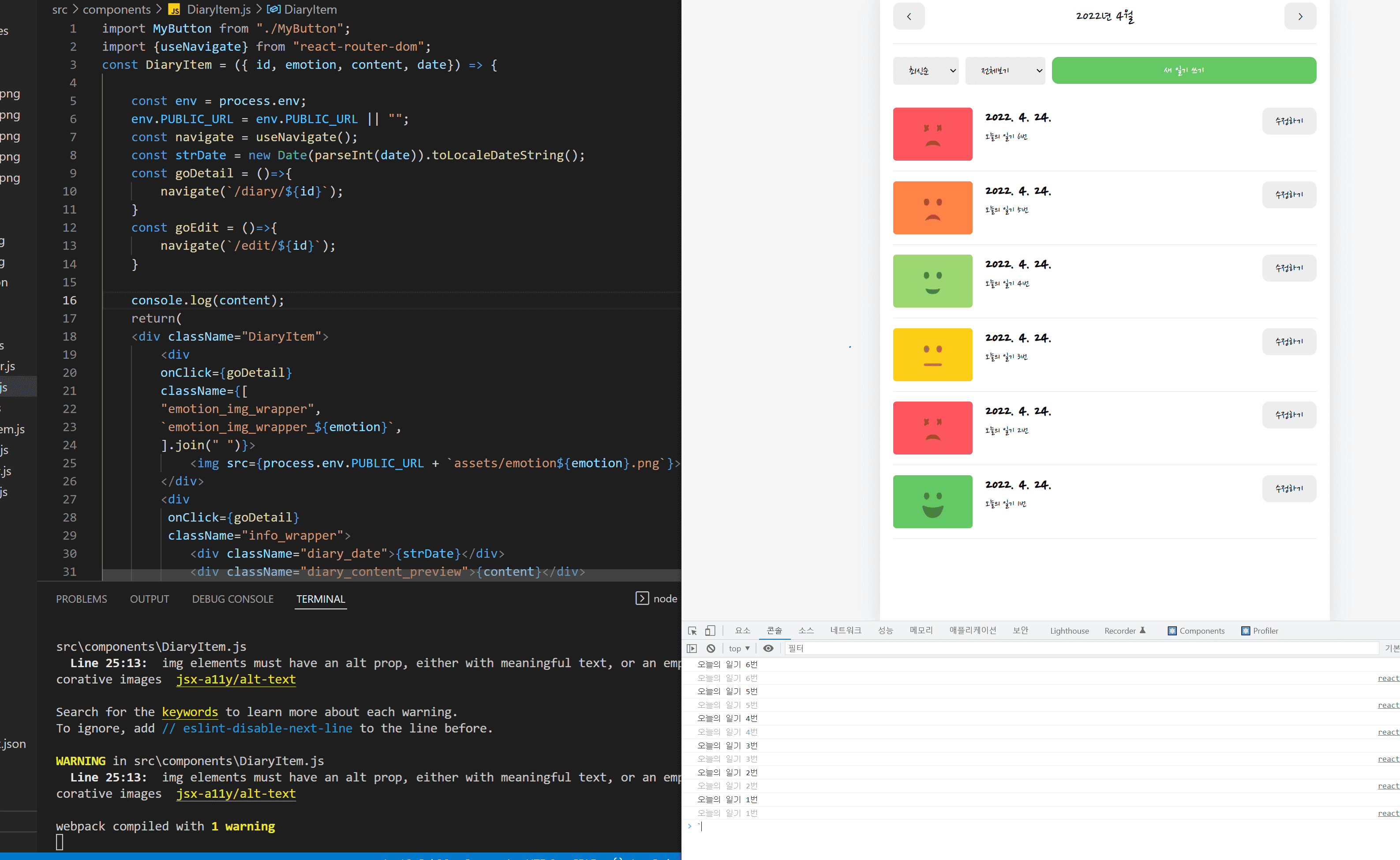
content 값 확인해보니 더미게시물 6개중 6개 들어오는것 확인했습니다.. 

0

kyn00018

글쓰기는 정상인데 수정할때에 문제가있는거면  수정화면, diaryItems부분을 보면될까요?

0

kyn00018

그래서 혹시나해서 content slice빼고 console.log찍어봤습니다.

0

kyn00018

번거롭게 해드리는것 같아서 죄송하기도 하네요 ..!

강의 여러번 영상돌려보면서 해봤지만 아직 해결이 안된것 같아서 ..
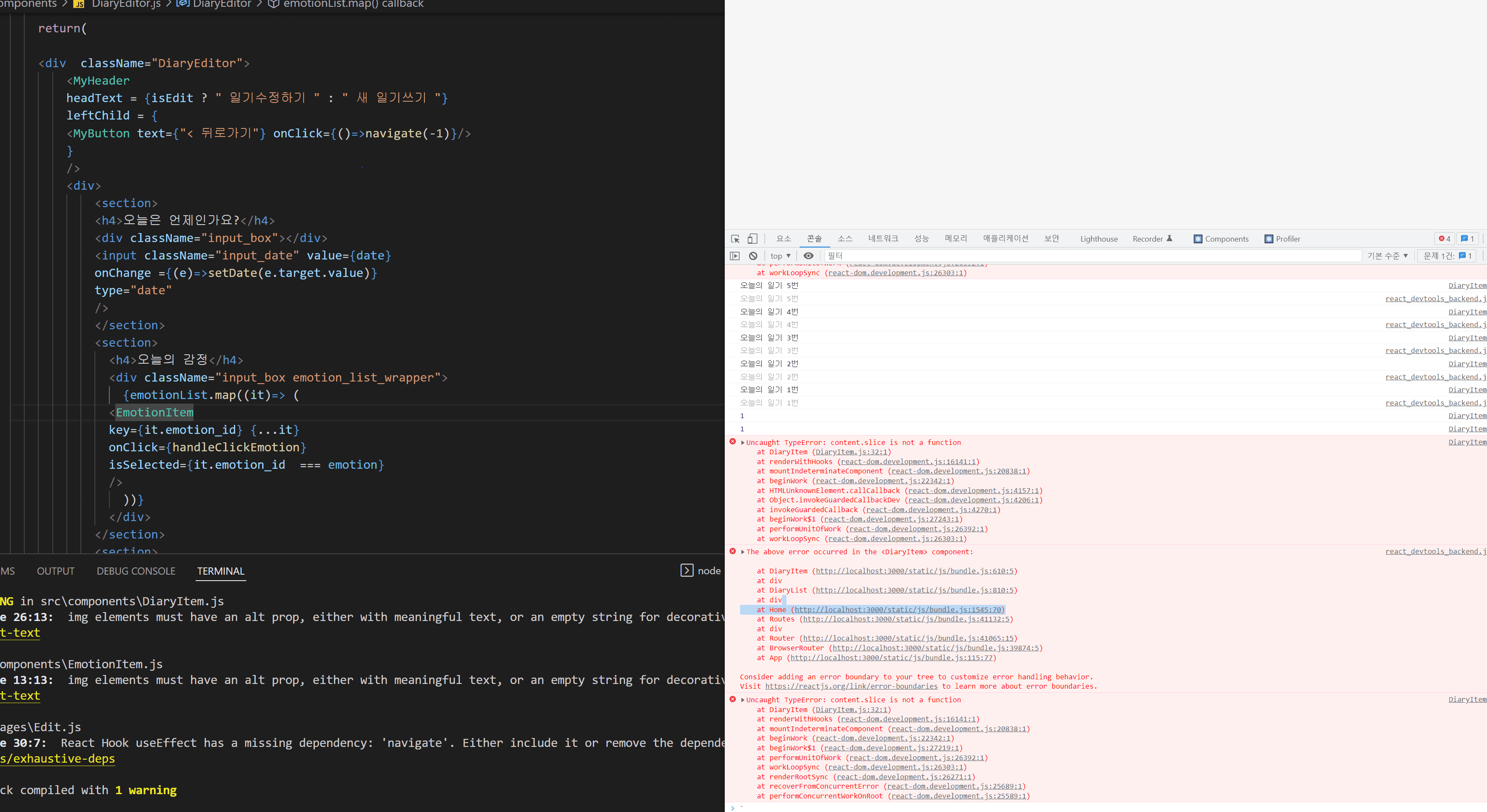
1)DiaryItem.js:32 Uncaught TypeError: content.slice is not a function

2)react_devtools_backend.js:3973 The above error occurred in the <DiaryItem> component:

Consider adding an error boundary to your tree to customize error handling behavior.

Visit https://reactjs.org/link/error-boundaries to learn more about error boundaries.


이 두가지가 뜹니다. DiaryItem부분 컴포넌트에서 문제가 있다는것 같은데 컴포넌트 불러오는 DirayEditor,DiaryItem 모두확인해 봤으나 아직 답이 안나오네요 ㅠ


혹시 가능하시면 강의에 사용된 소스코드 공유 부탁드려도될까요?

useEffect와 lifecycle문의

0

32

2

프론트엔드 학습 수준 문의

0

44

2

리액트 챕터별 코드에서 eslint 설정파일이 없어요

0

51

2

데이터 로딩중 화면만 계속 나와요!!

0

56

2

퍼블리셔일경우 어느정도 수준까지 강의를 들어야할까요

0

80

2

이후의 커리큘럼 문의

0

102

2

실슬환경 설정에서 save후 console.log 부분이 새로고침이 안되는현상입니다.

0

50

2

최적화 관련 질문있습니다 (useMemo 등)

0

85

3

프로바이더 컴포넌트의 위치는 어떤 기준인가요?

1

82

3

Date 객체에 관련하여 질문드립니다.

0

85

2

리액트 개정판 교재 질문

0

60

2

예제코드가 안나와요!

0

78

2

select a variant 선택에서 javascript와 javascript+react compiler 중 무엇을 선택해야하나요? com

0

109

2

onMouseEnter 관련 문의 드립니다

0

93

3

배열의 렌더링 관련 질문 드립니다.

0

73

2

2:40초 refObj를 콘솔로 출력시 오류가 발생합니다.

0

113

2

TS, 리액트 강의중에 뭘 먼저 수강하는게 좋을까요?

0

137

2

useCallback 적용한 onCreate, onUpdate, onDelete 함수..

0

71

1

vs code 자동완성관련 문의

0

113

2

91강 useEffect내에서 상태변화함수 호출시 발생하는 에러

1

181

2

87강 필터 함수 질문

0

69

2

useRef, useState count 비교

0

67

2

안된다고했던 이유가 무엇이었는지 모르겠습니다

0

91

2

85강에서 객체를 왜 클래스로 만들어서 new 하지 않는건지 궁금합니다.

0

76

2