
강의

멘토링

커뮤니티

Productivity

/

Task Automation

Excel Crawling: Starting Without Coding. From WEB to ChatGPT API

You can easily learn how to collect and process data using Excel's Power Query feature, even if you don't know coding. You will learn Excel crawling skills by practicing the project below together.

(4.7) 12 reviews

75 learners

Level Beginner

Course period Unlimited

  • huhjuang5228
Excel PowerQuery
Excel PowerQuery
Web Crawling
Web Crawling
Web Scraping
Web Scraping
openAI API
openAI API
RPA
RPA
Excel PowerQuery
Excel PowerQuery
Web Crawling
Web Crawling
Web Scraping
Web Scraping
openAI API
openAI API
RPA
RPA

Reviews from Early Learners

Reviews from Early Learners

4.7

5.0

배기태

100% enrolled

I learned practical Excel application methods. Taking this course would greatly help those in Excel-using roles.

5.0

yo

100% enrolled

I listened to the lecture and applied it to my usual copy-and-paste work. It was great. I think my work efficiency will increase if I practice more. Thank you for the great lecture.

5.0

Vinssy Kim

30% enrolled

It feels like I'm learning the crawling knowledge I had in pieces easily and in one go. Thank you~

What you will gain after the course

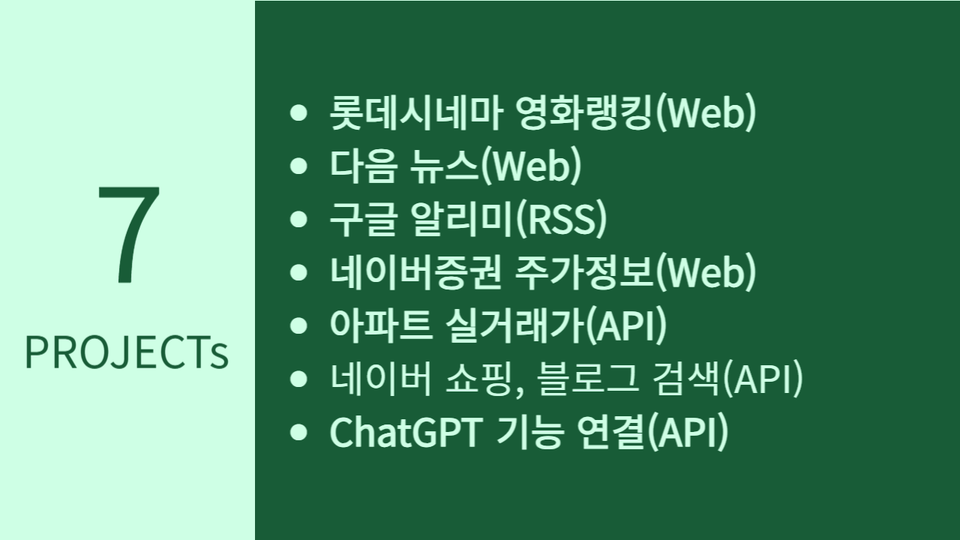
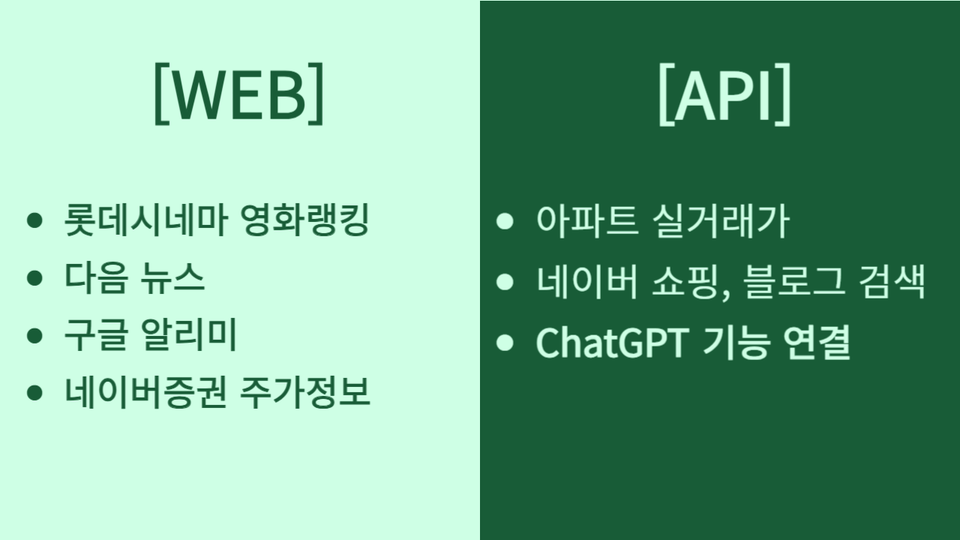
  • 1. Movie Ranking Collection (Web)

  • 2. Daum News Gathering (Web)

  • 3. Google Alert Collection (RSS)

  • 4. Naver Finance Daily Price (Web)

  • 5. Public Data Portal Apartment Actual Transaction Price (API)

  • 6. Collection of Naver Shopping and Blog Search Results (API)

  • 7. Excel and ChatGPT Connection (API)

If you only have basic knowledge of Excel,
Easy crawling that anyone can succeed at 🧑‍💻

I recommend this to these people

People who find coding difficult

Even if you want to be good at coding but are still new to it, you can still succeed.

For those who want to upgrade their work skills

You can crawl various data using Excel that you use for work.

Excel is still good though...

Now you need to derive insights from your data. Challenge yourself.

After class

  • You can web crawl data provided from various web pages and APIs in real time into your Excel file.

  • You will gain confidence in data collection and data analysis without having to learn Python or VBA.

  • You can utilize Power Query in various ways, such as with Power BI.

  • You can use Excel to automate business processes (RPA).

Features of this course

Let's start from the perspective of non-development and no coding.

pq_in-gang-yong-002

I only use Excel.

From start to finish, we collect data using only Excel (Excel Power Query). Using web scraping technology, we not only do simple web crawling, but also collect complex structured web pages and APIs.

8 different case projects. Including ChatGPT API.

Starting from the second lecture, we will start with 8 projects. You can apply it to your work after taking the course through various case projects that can be used in practice. We will also introduce how to do repetitive processing (RPA) of ChatGPT API connection.

Not only web pages but also APIs

GET, POST method web pages and header processing. You can experience Naver, public data portal, ChatGPT API (OpenAI API) that are widely used in Korea through hands-on projects. It is not a case that ends after testing, but an in-depth project that can actually be used.

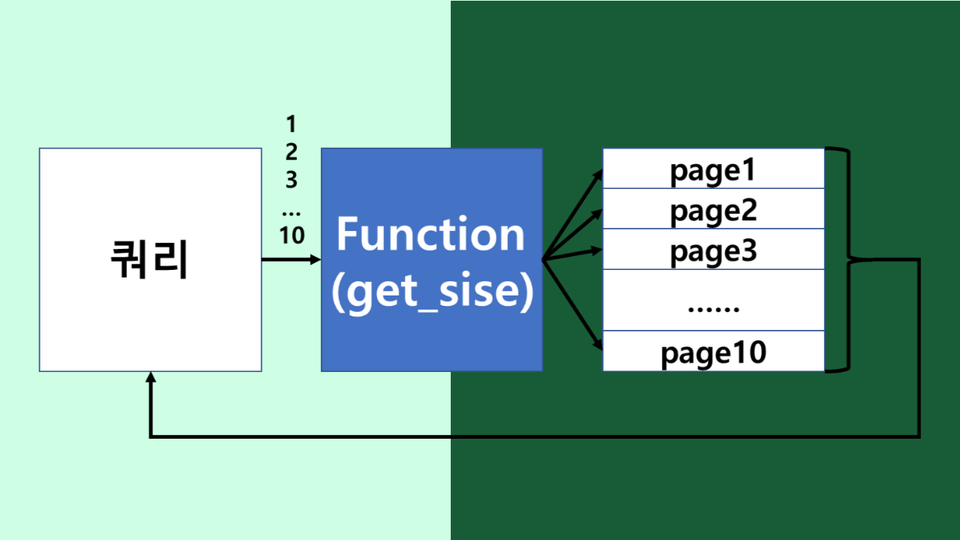
Multi-keyword, paging processing for big data collection

We will introduce a method for collecting large amounts of data (web scraping) so that you can use the data right away in practice. We will practice case projects corresponding to each case to prepare for cases where you need to integrate and process multi-keyword search results and integrate and process content from multiple pages and content from multiple periods.

Who created this course

Things to note before taking the class

Practice environment

  • Operating System and Version (OS): Windows

  • Excel version: 2016 or later recommended. 2010 and 2013 require additional plugin installation.


Learning Materials

Player Knowledge and Notes

  • Anyone who knows how to use Excel's basic menus and copy and paste or drag can get started.

  • If you have any other suggestions or comments, please feel free to send me a message at any time.

Recommended for
these people

Who is this course right for?

  • Want to freely crawl data in Excel

  • Excel: Handle big data without limits

  • Want to automate Excel data processing

  • Those who want to experience diverse data sets

  • Those who find Python crawling difficult

Need to know before starting?

  • Excel Beginner

Hello
This is

204

Learners

22

Reviews

20

Answers

4.8

Rating

2

Courses

I want to share my experiences in practical AI analysis, big data analysis, and app development with all of you.

Even if I have some shortcomings, I would appreciate your support, and I will work even harder. Thank you.

Curriculum

All

36 lectures ∙ (2hr 51min)

Course Materials:

Lecture resources
Published: 
Last updated: 

Reviews

All

12 reviews

4.7

12 reviews

  • choerge0599님의 프로필 이미지
    choerge0599

    Reviews 5

    Average Rating 4.4

    4

    31% enrolled

    • taehyoungkang6562님의 프로필 이미지
      taehyoungkang6562

      Reviews 2

      Average Rating 5.0

      5

      100% enrolled

      • ktbae9916님의 프로필 이미지
        ktbae9916

        Reviews 6

        Average Rating 5.0

        5

        100% enrolled

        I learned practical Excel application methods. Taking this course would greatly help those in Excel-using roles.

        • huhjuang5228
          Instructor

          Hello? I'm also glad it helped your work. I'll try even harder.

      • seongyounchoi5044님의 프로필 이미지
        seongyounchoi5044

        Reviews 20

        Average Rating 4.5

        5

        31% enrolled

        • jihae612196님의 프로필 이미지
          jihae612196

          Reviews 2

          Average Rating 5.0

          5

          31% enrolled

          $53.90

          huhjuang5228's other courses

          Check out other courses by the instructor!

          Similar courses

          Explore other courses in the same field!