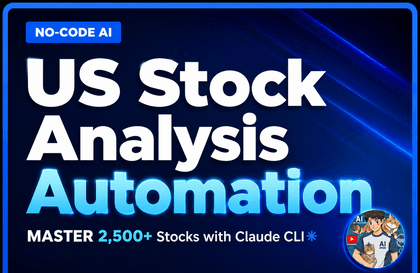
Building an automated stock analysis system without writing a single line of code feat. Claude CLI

How long are you going to manually look through 2,500 stocks every day? Searching through Naver Finance to find surging stocks after the market closes, Reading news to judge whether it's good or bad news, Checking foreign/institutional supply and demand one by one, Opening charts to analyze patterns... Aren't you repeating this every single day? I used to do that too. I spent 2 to 3 hours after work analyzing stocks, and yet I still missed more stocks than I found. With over 2,500 stocks across KOSPI and KOSDAQ combined, it's impossible for a human to see them all every day. --- So, I built a system. I created a system that automatically analyzes 2,500 stocks every day after the market closes. - Automatically collects market prices, supply/demand, and news - AI (Gemini) reads the news and determines if it's positive or negative - Scores stocks out of 15 points based on 6 factors - Selects only the stocks that pass the criteria and calculates entry, stop-loss, and take-profit prices - Sends notifications via Telegram Now, I just check my phone after work. Additionally, every Saturday, the system analyzes its own performance from the past week and automatically adjusts stop-loss lines, take-profit lines, and holding periods. It is a structure where the system learns and improves on its own. --- But I am not a developer. I didn't write the code for this system myself. I gave all the instructions to the AI verbally. "Filter out stocks that rose more than 5% today with a trading volume exceeding 50 billion won." "Send these 3 news articles to Gemini and have it judge if they are positive." "Create a scheduler so this runs automatically every day at 4 PM." When I speak like this, the AI (Claude) generates the code. This is "Vibe Coding." --- In this course, we will build this exact system. Over 58 lessons, we will build the system I actually use every day from start to finish. Starting from data collection, AI news analysis, scoring engine, signal generation, Flask API server, Next.js web dashboard, Telegram automatic notifications, and even the self-learning system. The final product is not a Jupyter Notebook. The final product is a web dashboard and Telegram notifications that actually run every day. You don't need to know how to code. In every lesson, I will show you how to talk to Claude, and if you follow along, you will get the same results. --- Recommended for: - Office worker investors who lack the time to analyze stocks every day - Those who want an automated system but don't know how to code - Those curious about quant/system trading but don't know where to start - Those curious about how to utilize AI in practice --- ⚠️ This course does not guarantee investment returns. This is a programming course on building your own stock analysis tools. Actual investment decisions are the responsibility of the student.

(4.9) 46 reviews

351 learners

Level Basic

Course period Unlimited

Python
Python
Flask
Flask
Next.js
Next.js
AI
AI
Python
Python
Flask
Flask
Next.js
Next.js
AI
AI

Reviews from Early Learners

4.9

5.0

텐브라운DESSERT

33% enrolled

It's a bit difficult for a beginner, but I will review the course repeatedly until I understand it.

5.0

Choi Abe

18% enrolled

I have high expectations for the future. If you upload many good lectures, I will work hard to follow along~~

5.0

알거없잖아

17% enrolled

I signed up for the course because I found it so fascinating after following along with a YouTube video and downloading files from Discord. It feels like I'm seeing a whole new world. I'm currently using the paid version of Gemini, but I should take this opportunity to try Claude as well. I look forward to your great lectures.

What you will gain after the course

  • My own stock analysis system that runs automatically every day

  • The ability to create desired programs by giving verbal instructions to AI

  • Real web dashboard and automatic notification system

  • An auto-tuning structure where the system learns on its own

[Hodu's AI Lab] Building a Practical Stock Analysis System with Claude CLI


You must use the Sonnet 4.6 model to ensure you do not exceed the usage limits.

The free Google API has been discontinued as of March 2026.


⚠️ Investment Disclaimer (Disclaimer)

- This course covers the methodology for anyone to create a system that quickly analyzes stocks through Vibe Coding, and was created for the purpose of teaching how to build an automated analysis system using widely used strategies in the current market, such as closing price betting, VCP pattern analysis, Smart Money screening, and ML prediction. It does not recommend the buying/selling of specific stocks or guarantee investment returns.

- The returns, win rates, and backtest results shown in the lecture are simulations based on sample and test data, and past performance does not guarantee future returns.

- The stock names, scores, and ratings mentioned during the lecture are examples for system demonstration purposes and are not investment recommendations.

- This lecture does not constitute investment advisory or investment management services under the Financial Investment Services and Capital Markets Act.

- All responsibility for profits and losses resulting from actual investments lies with the investor themselves, and the course creator bears no legal responsibility for the student's investment results.

-AI and data analysis tools are merely means to assist in investment judgment; final investment decisions must be made based on your own judgment and responsibility.


[Curriculum Guide]
Currently, Parts 1 and 2 are available, and one part will be updated sequentially every week. (A total of 10 parts are scheduled for completion.)


Part 1: Installing Claude Code and Setting Up the Development Environment (Using Antigravity)

Part 2: Python Basics Practice (Building a calculator and crawler by instructing AI)

Part 3: Lecture update completed (2/23)
Part 4: Lecture update completed (2/28)

Special Lecture: Telegram Integration Completed (3/5)

Part 5: Lecture Update Completed (3/8)

Part 6: Lecture update completed (3/18)

Part 7: Next.js_Dashboard Completed (3/27)

Part 8: Automation_Scheduler Completed (4/7)


"You don't need to know coding. Just learn how to 'properly' instruct the AI."


Hello, I am Hodu, the creator of the YouTube channel <Hodu's AI Analysis Lab>. While running the channel, there is one question I have received most frequently and consistently from my subscribers.


"Can I also build the stock analysis system you use?" "I don't know anything about coding; is there a lecture that teaches me from start to finish?"


I created this course to quench that thirst of yours. These are not just simple examples. I have captured, without filter, the entire process of building the 'Automated Stock Analysis System' that I use for actual trading every morning from scratch using Claude CLI.


Why 'Claude CLI'?

Don't be fooled by those '5-minute coding' videos on YouTube anymore. You cannot build complex systems through the manual labor of copying and pasting code line by line from a web chat window.

In this course, we use the latest AI development tool, Claude CLI. You will experience true automated development, where the AI directly creates project files, modifies code, and even fixes errors within the terminal environment.


Key Course Point: Real-world Full-stack Workflow


In lessons 1 to 3, you will experience creating a stock program exactly as shown using the prompts provided in my files.

From Lesson 4 onwards, you will begin learning how to use prompts and the "Why" behind writing them this way.


Real Data Handling Building a pipeline to collect and process real-time price data for all 2,500 stocks

Advanced Logic Implement a scoring engine that crawls news data, performs sentiment analysis using AI, and quantifies your own investment strategies

Full Automation From building an API server to web dashboard visualization, and even Telegram reports automatically delivered every morning


After taking this course

Instead of simply typing along with the code, you will gain the 'ability to design like a developer.'

  • Scalability: When new analysis indicators or strategies come to mind, you will be able to add them with confidence.

  • Structuring: You will gain the power to conquer complex systems by breaking them down step by step.

  • Adaptability: You can build any data analysis system, whether for real estate or cryptocurrency, not just stocks, using the same structure.

The fastest way to turn your ideas into reality, start now with Hodu using the Claude CLI.

👉 Go to Hodu's AI Analysis Lab YouTube Channel: https://www.youtube.com/@두두감자


After taking the course, you will be able to create results like this


Telegram Automated Messages


Domestic Stock Summary

Daily VCP Signal


VCP Stock Cumulative Analysis and Results

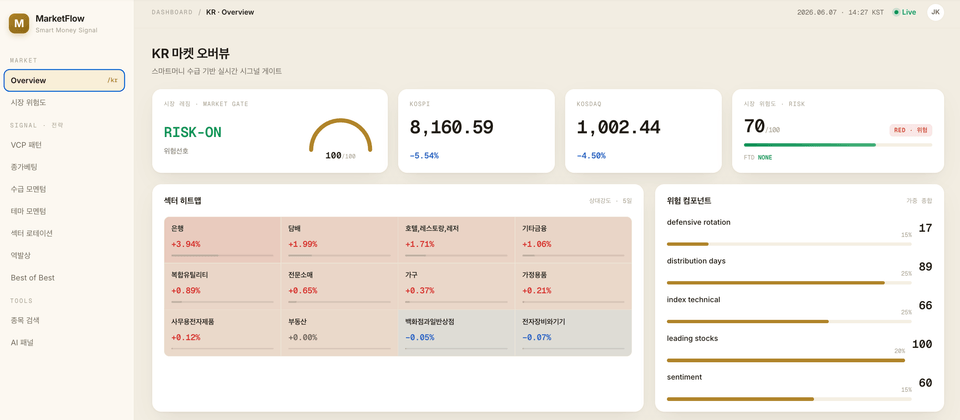
Part 3 Creating a Real-World Data Dashboard

  • After taking this course, what will I understand and be able to do well?


  • Explain in as much detail as possible how the student can transform and what they will be able to achieve.

Learning Content

1-2. Chart Data Analysis (Technical Analysis)

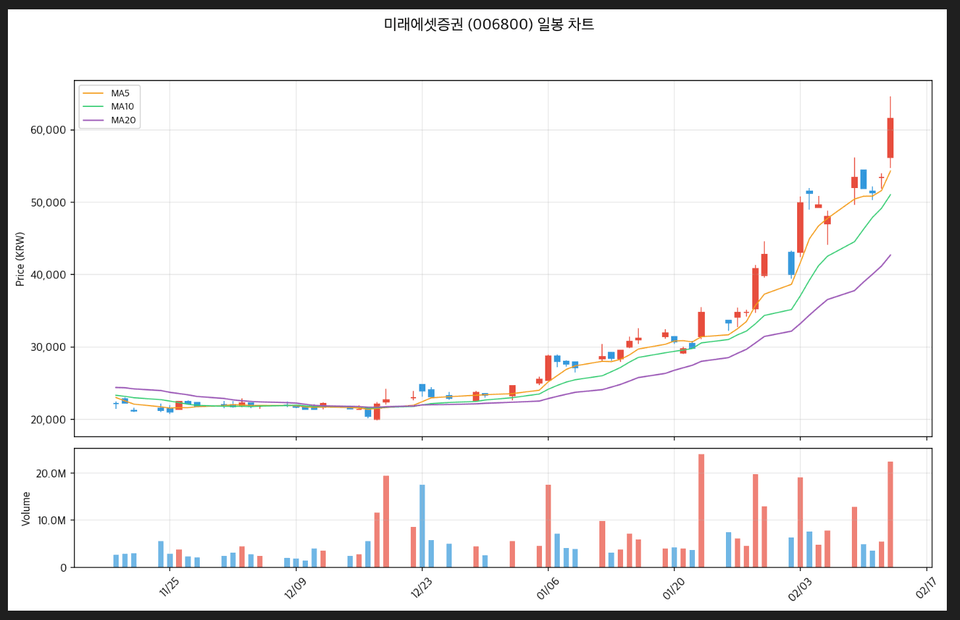
"By analyzing moving averages (MA) and trends based on daily chart data, we extract stocks in a bullish alignment and automatically send the charts and stock information via Telegram."

1-3. Supply and Demand Data (Major Entities) 💰

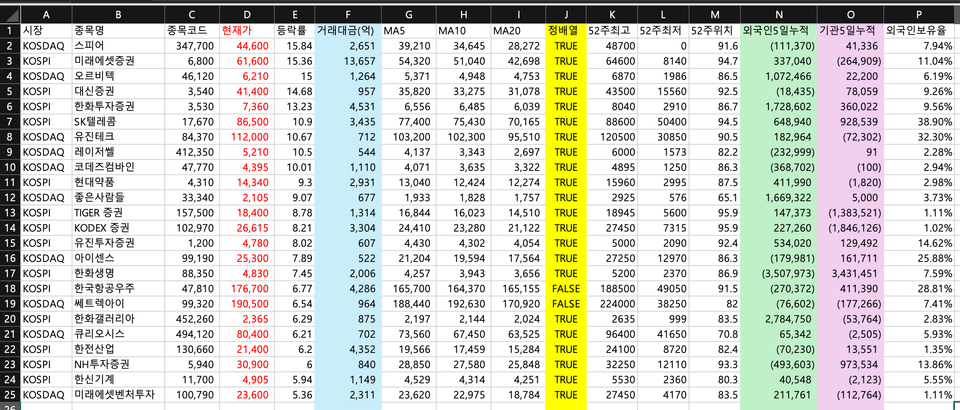
"It analyzes various indicators such as current price, trading value, fluctuation rate, moving averages (5/20/60 days), and net buying by foreigners and institutions over the past 5 days. Immediately after the market closes, data meeting the criteria is sent via Telegram, and automatic notifications are provided with filters that can be freely expanded as needed."

1-4 Comprehensive Analysis Report on Rising Stocks

Based on real-time financial data, it automatically filters only the stocks among the day's KOSPI/KOSDAQ gainers that meet specific criteria for transaction value, fluctuation rate, and price range. For the selected stocks, it analyzes the 60-day moving average alignment, 52-week high/low positioning, and the 5-day net buying trends of foreign and institutional investors, providing all the information in a single comprehensive report.


Notes before taking the course


🛠️ Hands-on Practice Environment Guide

Check before you start! This course was filmed in a macOS environment, but Windows and Linux users can also take it without any issues. A standard office or development laptop without a GPU (graphics card) is sufficient.


1️⃣ Operating System (OS)

The course is conducted based on macOS, but 99% of the content is the same regardless of the OS.

Differences between operating systems (such as scheduler settings) will be kindly explained separately within the lecture.

OS Recommended Version Remarks macOS macOS 13 (Ventura) or higher Standard environment for the course (utilizes native features like launchd) Windows Win 10/11 + WSL2

After installing WSL2 (Ubuntu), you can follow the same hands-on practice.


(For the scheduler, use Windows Task Scheduler)

LinuxUbuntu 22.04 or higher. Fully compatible using cron, etc.


2️⃣ Essential Tools and Software

Since AI handles the coding, you only need to prepare the tools to give instructions (Prompts).

Core Tool: Claude Code (CLI) Paid ($20/month~)

The core engine of Vibe Coding. Backend. Python (3.9 or higher) Free. Data analysis, crawling, and server operation.

Frontend Node.js (18 or higher)FreeRuns Next.js-based dashboard screens

Editor VS Code FreeCode verification and terminal execution (Optional)


3️⃣ External APIs (No additional cost)

Instead of using complex paid data services, we maximized cost-effectiveness by utilizing free crawling and API free tiers.

  • Google Gemini API: News AI summarization and sentiment analysis (utilizing free tier)

  • Naver OpenAPI: News search (25,000 requests per day for free)

  • Telegram Bot API: Sending buy/sell notifications (completely free)

  • 🚫 Stock price data: Handled via web crawling without a separate paid API.


4️⃣ Recommended PC Specifications

Since you won't be running machine learning training yourself, a high-spec PC is not required.

  • CPU: Dual-core or higher (Recommended: Apple M1~M3 or Intel i5 or higher)

  • RAM: 8GB (Recommended: 16GB or higher)

  • Disk: 10GB or more of free space

  • Internet: Stable wired/Wi-Fi environment required


📚 Learning Materials Guide

To ensure the successful system construction for all students, we provide both the exclusive prompts and source code.


📦 Provided Materials

  1. Prompt Collection (Notion file provided)(Core Material)

    • This is the alpha and omega of the course. We provide over 120 commands to be entered into Claude Code for each part, along with a troubleshooting guide. Experience building a system simply by copying and pasting.

  2. Lecture Notes & Slides

    • It includes the full architecture diagram, a summary of core concepts, and a checklist.

  3. Completed Source Code

    • This is a reference (answer key) you can consult in case you get lost.


💡 Tips for Using the Materials

  • Try creating it yourself: The provided complete code is for reference only. Even if the code you create by entering prompts yourself has slightly different variable names, if the functionality works, that is the correct answer.

  • Maintenance Guide: If the code stops working because the target crawling site (such as Naver Finance) has been updated, simply provide the error message to Claude Code, and it will fix it for you. (This method is also covered in the lecture!)


🎯 Prerequisites & Learning Guide

"Is it okay if I don't know how to code?" 👉 Yes, it is possible!

This course is not about becoming a developer, but about using AI as a tool to achieve the desired result (a stock analyzer).

  • Programming experience (Not required): Claude writes the code using the 'Vibe Coding' method.

  • Python/Terminal knowledge (Not required): I will guide you step-by-step starting from basic terminal usage (Part 0).

  • Stock Basics (Recommended): Knowing basic terms like moving averages and trading volume will help you understand investment strategies.


🚀 Recommended Learning Roadmap

  1. Type it yourself: Don't just watch with your eyes. You must experience the process of entering prompts yourself and seeing the AI spit out code for it to truly become yours.

  2. Follow the order: The structure is designed to build up step-by-step from Part 1. Skipping parts may lead to errors.

  3. Don't be afraid of errors: If an error occurs, don't panic; copy the error message and ask Claude. That is the core skill you are learning in this course.

  4. Reviewing: In particular, Part 4 (Closing Price Betting Engine), Part 7 (Dashboard), and Part 9 (Backtesting) contain deep content. I recommend taking your time and reviewing them 1–2 times.


📢 Q&A & Updates

Q&A and Feedback

  • Please use the [Inflearn Q&A board] for questions.

  • When asking a question, please include the entire error message and the OS you are using to receive a much faster and more accurate response.


Lecture Update Policy

  • Responding to Site Structure Changes: Prompts and code are updated when the structure of a crawled site changes.

  • Claude Code Updates: We check and announce compatibility during major tool updates.

  • Copyright Notice: Please use the prompts and materials from this lecture for the student's personal learning purposes only. (Unauthorized distribution/sharing is prohibited)


⚠️ Investment Precautions (Disclaimer)

The closing price betting strategy, VCP pattern analysis, and automated trading system covered in this lecture were created for the purpose of educating on system construction methodology.

Following the course content does not guarantee profits, and the student bears full responsibility for all gains and losses resulting from actual investments. Please use this wisely as a supplementary tool utilizing AI and data.

Recommended for
these people

Who is this course right for?

  • An office worker investor who spends 2–3 hours every day after work analyzing stocks.

  • Those who don't know how to code but want to have their own automation system

  • Those who took a quant course but found it ended at the Jupyter Notebook stage.

  • 4. Those who want to use AI in practice but don't know what to create.

Need to know before starting?

  • Basic Stock Terms: If you are familiar with basic stock terminology such as opening/closing prices, transaction value, foreign/institutional supply and demand, and moving averages, you will be able to understand the lecture content more quickly.

  • Operating System: Based on macOS (Most steps are the same for Windows, and any differences will be noted separately)

Hello
This is skysungsisi0926

Inflearn Verified

459

Learners

54

Reviews

146

Answers

4.9

Rating

2

Courses

Curriculum

All

73 lectures ∙ (6hr 56min)

Course Materials:

Lecture resources
Published: 
Last updated: 

Reviews

All

46 reviews

4.9

46 reviews

  • rlacjfn8788님의 프로필 이미지
    rlacjfn8788

    Reviews 1

    Average Rating 5.0

    5

    31% enrolled

    I like it

    • skysungsisi0926
      Instructor

      Thank you! We are continuing to add updates.

  • pyaya90357907님의 프로필 이미지
    pyaya90357907

    Reviews 1

    Average Rating 5.0

    Edited

    5

    45% enrolled

    This is a mid-course review after completing up to Part 3. I learned about this course through an acquaintance who practices trend-following trading. Looking at the collection of prompts, it seems the instructor uses a similar trading style, which made me realize why my acquaintance recommended this specific course. I immediately felt that it is great to be able to start with a complete framework for an analysis system. However, the course I was expecting was one where I could learn how to build a customized system through "Vibe Coding." In contrast, I felt that this course focuses more on following a pre-determined system (methods/parameters) exactly as they are. In fact, while listening to the lectures, I found myself busy just copying and pasting the provided prompts into Antigravity. While the instructor explains the structure and why such a system was created, I find myself asking: "Am I actually understanding the parts needed for personalization later on through these lectures?" From that perspective, I think it would have been better if the course provided the coding programs to build the system identically first, but then focused on how to expand or modify each step for personalization. As it stands, I don't know which parts of the various .py files—which I assume(?) are working organically—are essential areas that shouldn't be touched, or which specific parts can be modified. This makes me wonder how I can go about changing this system. (On the other hand, I also wonder if Vibe Coding would just handle everything if I simply requested it...) It might be because I haven't finished the entire course yet. I hope to leave a more helpful follow-up review after completing all the lectures. *Below are the parts I wanted to build that seem to align with this course: 1) Stock Filtering: Accumulating stocks retrieved from a brokerage API's conditional search or personally picked stocks (manual picks registered via Telegram integration). 2) Chart Patterns: Updating methods to digitize various setups through conversation with a separate LLM to determine if they match daily chart patterns. 3) Telegram notifications when a specific price point is reached after a matching pattern occurs. -Additional Content- I see the following in the course description. Since I built it using Gemini in Antigravity instead of the Claude CLI, there might have been more things I had to check manually in between... For now, I should continue with the lectures. In Lectures 1–3, you will experience creating a stock program exactly as it is using the prompts in the files I provide. From Lecture 4, you will begin to learn how to use prompts and the "Why" behind writing them this way. ✅ Real Data Handling: Building a pipeline to collect and process real-time price data for all 2,500 stocks. ✅ Advanced Logic: Implementing a scoring engine that crawls news data, performs AI sentiment analysis (positive/negative), and quantifies your own investment strategy. ✅ Full Automation: From building an API server to web dashboard visualization and automated Telegram reports delivered every morning.

    • skysungsisi0926
      Instructor

      Hello student! Thank you for the great feedback! First of all, many of the things you mentioned are included starting from Part 4! After creating the dashboard in Part 7, I plan to add methods on how to actually implement the logic you want. The Telegram special lecture is also already uploaded, so I think you will be satisfied when you watch it. Please feel free to leave any questions at any time!

  • autolee76101님의 프로필 이미지
    autolee76101

    Reviews 1

    Average Rating 5.0

    5

    31% enrolled

    The lecture is great. Thank you.

    • gge12741163님의 프로필 이미지
      gge12741163

      Reviews 1

      Average Rating 5.0

      5

      61% enrolled

      I am learning a lot.

      • skysungsisi0926
        Instructor

        Thank you! We are continuing to add updates.

    • chunjaeorg844085님의 프로필 이미지
      chunjaeorg844085

      Reviews 1

      Average Rating 5.0

      5

      31% enrolled

      You are following along very well.

      • skysungsisi0926
        Instructor

        Thank you! We are continuing to add updates.

      • I have one request. The thing is, even when I follow Walnut Potato's lectures exactly, the results sometimes turn out differently. So, after finishing a part, I usually download the result files you provided to continue. I downloaded the final materials uploaded for Lecture 28, but there is no .env file... and I can't seem to proceed with the lecture using these files. ㅠㅠ Could you please re-upload the complete final materials for Lecture 28 one more time?

    Similar courses

    Explore other courses in the same field!