



inflearn logo

Build Your Own AI Agent for the Cost of One Month’s AI Subscription (feat. One That Runs on Your PC Without Internet)

Are you unable to use ChatGPT because you’re on an internal or isolated network, concerned about the subscription cost, or worried about company data being sent to external servers? In this course, you’ll build an AI agent directly on your PC that runs without an internet connection, using just one 8GB graphics card released in 2017. Even if you don’t know any commands, installation is complete after double-clicking three files. We’ll disclose everything, including errors encountered during the setup process and how they were resolved, as well as directly measured speeds and records of external communications.

20 learners are taking this course

Level Beginner

Course period Unlimited

Python
Python
Deep Learning(DL)
Deep Learning(DL)
agents
agents
AI
AI
LLM
LLM
Python
Python
Deep Learning(DL)
Deep Learning(DL)
agents
agents
AI
AI
LLM
LLM

What you will gain after the course

  • My own AI agent that works without the internet and keeps conversations from leaving my PC (file reading/writing, command execution)

  • A local AI coding assistant that explains and fixes code within VS Code (integrated with Continue)

  • How to choose an AI model that matches my PC’s specifications and how to check whether its license allows use in a company

  • The ability to understand how an agent built with approximately 170 lines of Python works and to add functionalities (tools) yourself.

  • Installation procedures for PCs on internal or closed networks, along with measured evidence that can be presented to security personnel

It's not just an assistant for programmers.

Ask your own AI within VS Code and get the results you want!


Can’t you use ChatGPT at your company?

They say artificial intelligence (AI) is changing the way we work, but in reality, there are often situations where I can’t use it.

  • Because the corporate network, defense network, or safety room blocks external internet access, you cannot connect to cloud AI at all.

  • I'm worried that information might be sent to external servers when I paste company documents or customer information into ChatGPT.

  • Subscription fees and usage charges keep adding up, making the cost a burden for the entire team.

There is one answer to these three problems: bringing AI directly onto your PC.

Without the internet, without ongoing costs, and without data leaks

In this course, you will build your own AI Agent that runs entirely on your PC, from start to finish.

  • Without the internet: Once installation is complete, no internet is required. We also cover how to transfer and install it on PCs in internal or air-gapped networks.

  • No cost: All tools are free, and no API keys or paid subscriptions are required. Electricity is the only expense.

  • Without data leakage: Neither your questions, answers, nor the files the AI reads and writes leave your PC.

This is not merely a promise. During operation, we record each program’s network connections at 0.1-second intervals, and show the results in the lecture exactly as they are, directly confirming that there are no connections going out externally.

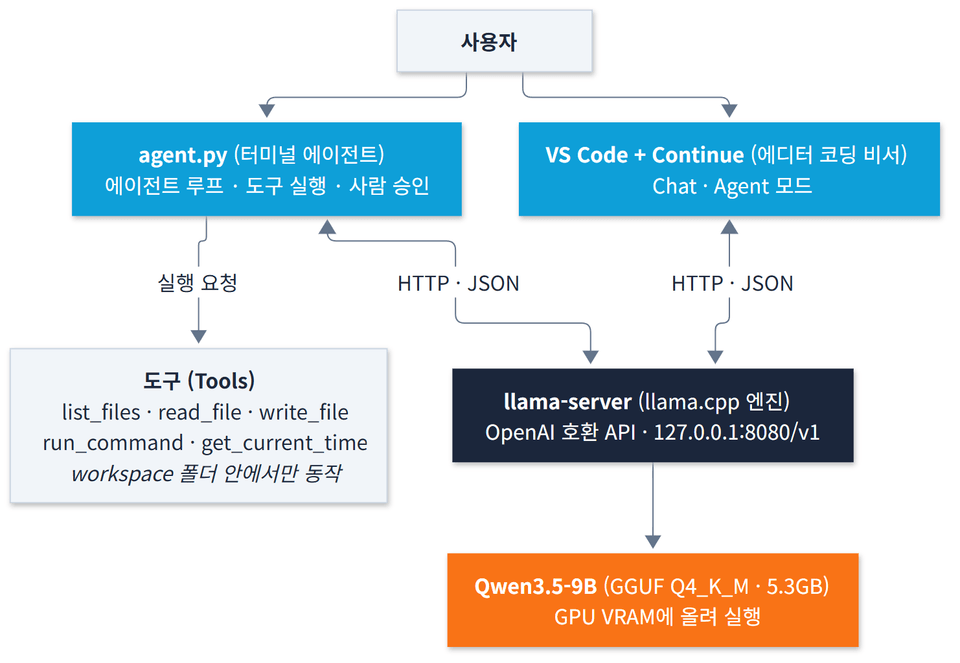
Overall architecture showing how the user asks questions to the AI server and Qwen3.5 model on my PC through a terminal agent or VS Code

Expensive equipment is not necessary.

The graphics card in the demonstration PC is a GTX 1070 Ti (8GB) released in 2017. The results measured directly with this card are as follows.

ItemActual measurementAnswer generation speed29.4 tokens per second (faster than human reading speed)CPU only, without a graphics card5.5 tokens per secondGraphics card memory usage6.8GB (fits comfortably on an 8GB card)

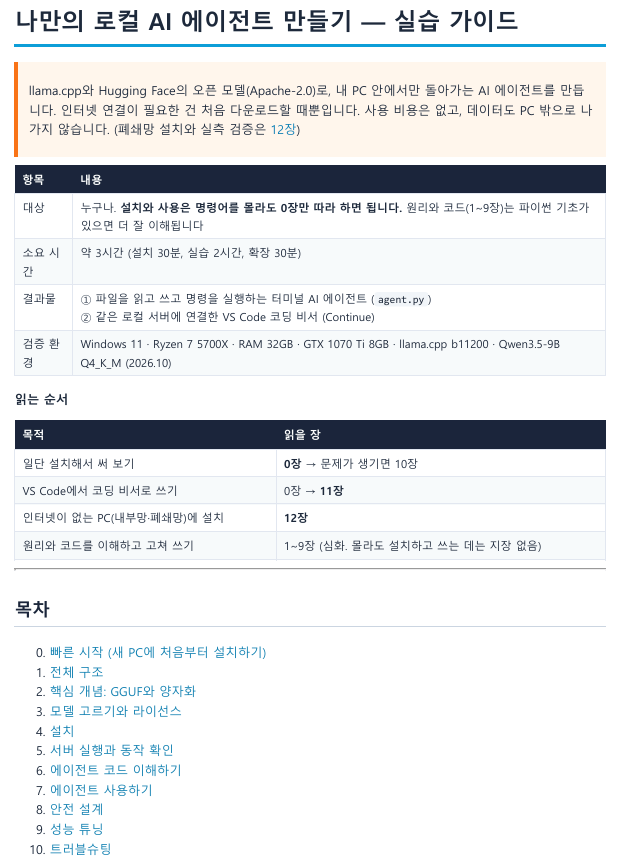
The model used is Qwen3.5-9B. It is an LLM under the commercially permissive Apache-2.0 license that handles Korean and tool calling reliably. For PCs without a graphics card or with limited memory, the installer automatically selects a smaller model, so you can follow along even without a GPU.

You don't need to know any commands: just three double-clicks

Even if you’re not a developer, we’ve simplified the installation process so you can follow along to the end.

  1. 1_Install: It detects your graphics card, downloads the appropriate engine and model, and automatically installs Python and VS Code if they are not already installed.

  2. 2_Turn on the AI server: Turn on the AI server on your PC.

  3. 3_Start the Agent: Enter a question, and the AI agent will create files and execute commands.

If the download is interrupted, double-click the same file again to resume. If you do something out of order or run into a problem, the screen will explain in simple terms what to do. Additionally, the lecture videos are supplementary, and you can simply follow along using only the guide documents. If you still have questions, we will respond promptly in the open chat room.

By the end of the lecture, you will have the following result.

1. A Terminal AI Agent That Works on My PC

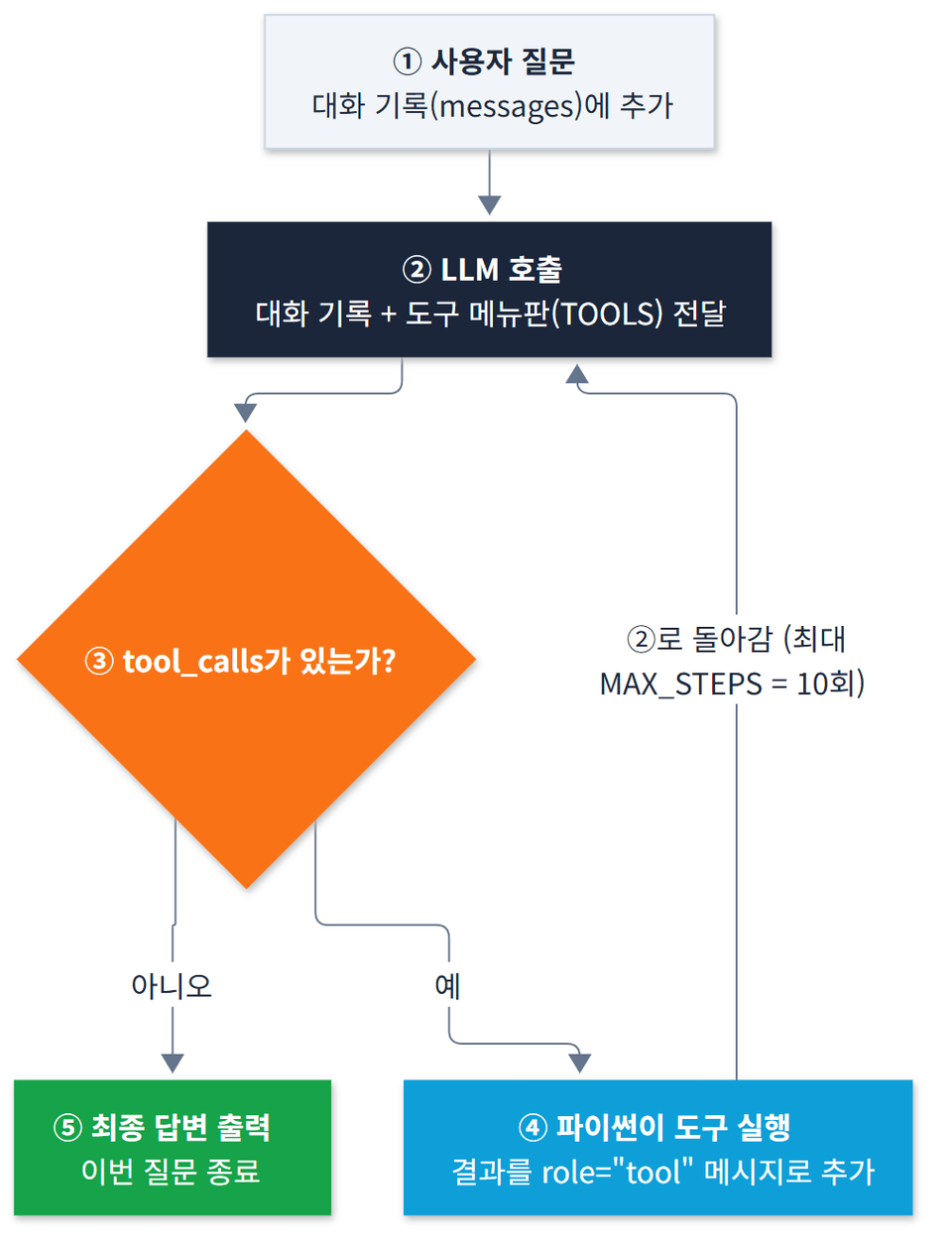
When asked, "Save and run code that calculates the sum of the prime numbers from 1 to 100, and tell me the result," the agent plans on its own, saves the file, runs it, checks the result, and then responds. It always obtains human approval before writing files or executing commands.


Flowchart of the iterative process in which the agent that receives a question calls the LLM, executes any tool calls, and then asks the LLM again

2. A Local Assistant Inside VS Code

Connect the same AI server to the Continue extension in VS Code. Within the editor, you can have it explain code, fix bugs, and read and modify files in agent mode. This is especially useful in environments where cloud tools cannot be used.

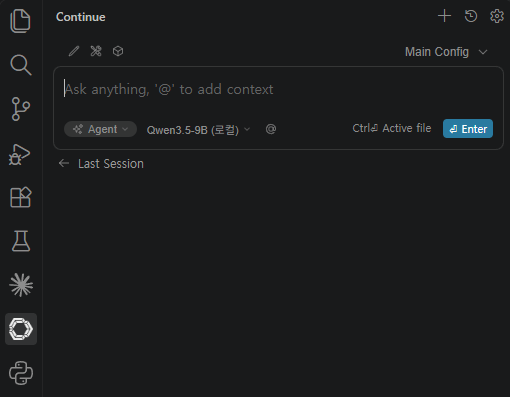
The Continue panel open on the left side of VS Code, with Agent mode and the Qwen3.5-9B local model selected

3. An Agent Codebase of 170 Lines You Can Modify Yourself

You will directly implement the principles of an agent in approximately 170 lines of Python. Because the code is short, you can understand every line, and even after completing the course, you can add any functionality (tools) you want.

4. A detailed guide document is provided for you to follow along yourself.

5. If you post your questions in the community for the relevant course, we will respond as soon as possible.


Learning Content

Core Concepts of Local LLMs

We’ll break down only the essential concepts for choosing a model—such as GGUF model files, quantization, context, and tokens—in simple terms. You’ll learn why reducing a deep learning model to 4 bits doesn’t significantly degrade its quality, and the formula for choosing the right file for your graphics card.

Choosing a Model You Can Use at Your Company

"Can be downloaded" and "can be used freely" are different. Learn the differences between the Apache-2.0, MIT, Llama, and Gemma licenses, as well as a 3-step method for checking the license on a model page.

Turn Your PC into an AI Server with llama.cpp

Set up a local server that communicates in the same format as OpenAI. This lets you connect code and apps built for OpenAI simply by changing the address.

Build Your Own AI Agent Directly

We directly implement the basic structure of agents, where the program executes tools on the LLM’s behalf when it requests their use. We verify in code everything from the tool menu and iterative loop to the flow in which the AI fixes errors on its own. Going beyond simply chatting with AI, you can experience AX (agent experience)—where AI works directly—on your own PC.

Using It in an Internet-Free Environment

It covers the verified results showing that there is no external communication after installation, the setting to disable usage statistics for the VS Code extension, how to transfer and install it on a closed-network PC with no internet access from the outset, and the information to provide to your company’s security team.

Provided materials

  • localAgent.zip: Double-click executable, agent code, VS Code connection settings, and exercise files

  • Practice Guide (33-page PDF): A document covering the entire course, from installation and troubleshooting to installation on closed networks. It organizes the on-screen text and tasks into tables so you can follow along without the video.

Recommended for these people

  • Office workers in environments without internet access, such as internal corporate or defense networks, who cannot use cloud AI.

  • Professionals who are unable to use AI for work because they feel uneasy about putting company materials into it

  • Those who want to freely try out AI on their own PC without paying a subscription fee

  • Developers who want to understand how AI agents actually work through code

  • IT and security professionals considering the adoption of in-house AI without security concerns

Do I need any prior knowledge?

  • No prior knowledge is required for installation and use. Proceed by double-clicking, without using commands.

  • A Windows 10/11 PC is required. An NVIDIA graphics card (8GB or more) is recommended, but you can follow along without one.

  • Internet is only needed during installation (approximately 6GB download).

  • The code explanation section will be easier to understand if you know basic Python syntax (not required).

  • No paid services are used.

Recommended for
these people

Who is this course right for?

  • Office workers in environments without internet access, such as internal corporate or defense networks, who cannot use cloud AI.

  • Professionals who can’t use AI for work because they’re uneasy about putting company documents or customer information into ChatGPT

  • For those who want to use AI as much as they like on their own PC, without subscription or usage fees.

  • A developer who wants to understand how “AI agents” actually work at the code level

  • IT and security professionals considering the adoption of AI within their organization without security concerns

Need to know before starting?

  • No prior knowledge is required for installation or use. Simply double-click to proceed—no command-line input is needed.

  • A Windows 10/11 PC is required. An NVIDIA graphics card (with at least 8GB of VRAM) is recommended, but you can still follow along with a CPU and a small model if you don’t have one (it will be slower).

  • Internet is only required during installation (approximately 6GB download). After installation, it works without an internet connection.

  • The code explanation section is easier to understand if you know basic Python syntax (not required).

  • We do not use paid services or API keys. All tools are free.

Hello
This is kmmom591

Career Verified

951

Learners

88

Reviews

4

Answers

4.6

Rating

9

Courses

Hello.
I am a developer working as a defense researcher and SW developer at a defense contractor.

I majored in Computer Science in college,
and since joining a defense contractor, I have been participating in actual defense SW development projects.
Currently, I develop software linked to weapon systems and defense systems,
performing system development based on C++ and Java.

More

Curriculum

All

3 lectures ∙ (1hr 17min)

Course Materials:

Lecture resources
Published: 
Last updated: 

Reviews

Not enough reviews.
Please write a valuable review that helps everyone!

kmmom591's other courses

Check out other courses by the instructor!

Similar courses

Explore other courses in the same field!

25% off for new members

$18.70

25%

$18.70