inflearn logo
inflearn logo

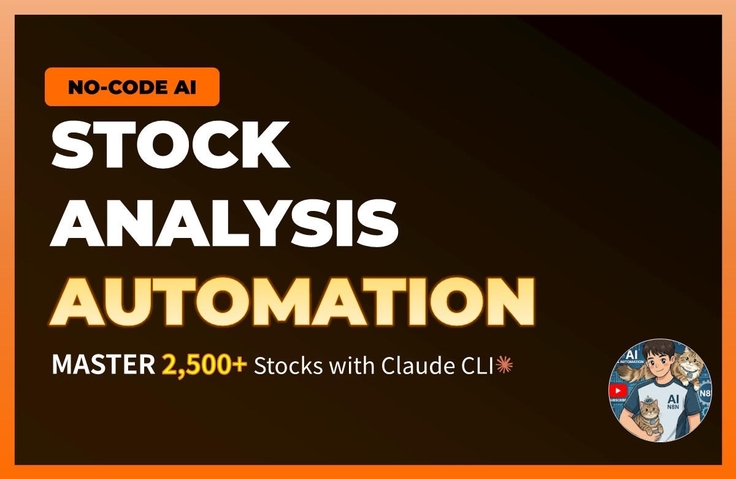
Building an automated stock analysis system without writing a single line of code feat. Claude CLI

How long are you going to manually look through 2,500 stocks every day? Searching through Naver Finance to find surging stocks after the market closes, Reading news to judge whether it's good or bad news, Checking foreign/institutional supply and demand one by one, Opening charts to analyze patterns... Aren't you repeating this every single day? I used to do that too. I spent 2 to 3 hours after work analyzing stocks, and yet I still missed more stocks than I found. With over 2,500 stocks across KOSPI and KOSDAQ combined, it's impossible for a human to see them all every day. --- So, I built a system. I created a system that automatically analyzes 2,500 stocks every day after the market closes. - Automatically collects market prices, supply/demand, and news - AI (Gemini) reads the news and determines if it's positive or negative - Scores stocks out of 15 points based on 6 factors - Selects only the stocks that pass the criteria and calculates entry, stop-loss, and take-profit prices - Sends notifications via Telegram Now, I just check my phone after work. Additionally, every Saturday, the system analyzes its own performance from the past week and automatically adjusts stop-loss lines, take-profit lines, and holding periods. It is a structure where the system learns and improves on its own. --- But I am not a developer. I didn't write the code for this system myself. I gave all the instructions to the AI verbally. "Filter out stocks that rose more than 5% today with a trading volume exceeding 50 billion won." "Send these 3 news articles to Gemini and have it judge if they are positive." "Create a scheduler so this runs automatically every day at 4 PM." When I speak like this, the AI (Claude) generates the code. This is "Vibe Coding." --- In this course, we will build this exact system. Over 58 lessons, we will build the system I actually use every day from start to finish. Starting from data collection, AI news analysis, scoring engine, signal generation, Flask API server, Next.js web dashboard, Telegram automatic notifications, and even the self-learning system. The final product is not a Jupyter Notebook. The final product is a web dashboard and Telegram notifications that actually run every day. You don't need to know how to code. In every lesson, I will show you how to talk to Claude, and if you follow along, you will get the same results. --- Recommended for: - Office worker investors who lack the time to analyze stocks every day - Those who want an automated system but don't know how to code - Those curious about quant/system trading but don't know where to start - Those curious about how to utilize AI in practice --- ⚠️ This course does not guarantee investment returns. This is a programming course on building your own stock analysis tools. Actual investment decisions are the responsibility of the student.

(4.6) 11 reviews

110 learners

Level Basic

Course period Unlimited

Python
Python
Flask
Flask
Next.js
Next.js
AI
AI
Python
Python
Flask
Flask
Next.js
Next.js
AI
AI

Reviews from Early Learners

Reviews from Early Learners

4.6

5.0

텐브라운DESSERT

33% enrolled

It's a bit difficult for a beginner, but I will review the course repeatedly until I understand it.

5.0

Choi Abe

18% enrolled

I have high expectations for the future. If you upload many good lectures, I will work hard to follow along~~

5.0

알거없잖아

17% enrolled

I signed up for the course because I found it so fascinating after following along with a YouTube video and downloading files from Discord. It feels like I'm seeing a whole new world. I'm currently using the paid version of Gemini, but I should take this opportunity to try Claude as well. I look forward to your great lectures.

What you will gain after the course

  • My own stock analysis system that runs automatically every day

  • The ability to create desired programs by giving verbal instructions to AI

  • Real web dashboard and automatic notification system

  • An auto-tuning structure where the system learns on its own

[Hodu's AI Analysis Lab] Building a Practical Stock Analysis System with Claude CLI


You must use the Sonnet 3.5 model to ensure you do not exceed the usage limit.


You may find the lecture a bit fast-paced. If there is anything you don't understand, please feel free to ask questions at any time, and I will provide answers. If a single response isn't enough to resolve the issue, I will help you through Discord 1:1 direct messages.


⚠️ Investment Disclaimer (Disclaimer)

The closing price betting strategy, VCP pattern analysis, and automated trading system covered in this lecture were created for the purpose of educating on system construction methodology.

Following the lecture content does not guarantee profits, and the student is solely responsible for all profits and losses resulting from actual investments. Please use this wisely as an auxiliary tool utilizing AI and data.


[Curriculum Guide]
Parts 1 and 2 are currently available, and one part will be updated sequentially every week. (Total of 10 parts scheduled for completion)


If you enroll now, you can follow the entire course at the lowest price.

Part 1: Installing Claude Code and Setting Up the Development Environment (Using Antigravity)

Part 2: Python Basics Practice (Building a calculator and crawler by directing AI)

Part 3: Lecture Update Completed (2/23)
Part 4: Lecture Update Completed (2/28)

Part 5: Lecture update scheduled (3/8)

Part 6 ~ 10: (Weekly updates scheduled) Data collection, DB construction, algorithm implementation, Telegram bot, web dashboard deployment, etc.


The number of lectures in each part may be subject to change.


"You don't need to know coding. Just learn how to 'properly' instruct the AI."


Hello, I am Hodu, the creator of the YouTube channel . While running the channel, there is one question I have received most frequently and consistently from my subscribers.


"Can I also build that stock analysis system you use, Hodu?" "I don't know anything about coding; is there a course that teaches everything from start to finish?"


I created this course to quench that thirst. These are not simple examples. I have captured the entire process of building the 'Automated Stock Analysis System' that I use for actual trading every morning from scratch using Claude CLI, without leaving anything out.


Why 'Claude CLI'?

Don't be fooled by "5-minute coding" videos on YouTube anymore. You cannot build complex systems through the "grunt work" of copying and pasting code line by line from a web chat window.

In this course, we use Claude CLI, the latest AI development tool. You will experience true automated development, where the AI directly creates project files, modifies code, and even fixes errors within the terminal environment.


Key Course Point: Real-world Full-stack Workflow


In lessons 1 to 3, you will experience creating a stock program exactly as shown using the prompts provided in the files I give you.

From Lesson 4 onwards, we will begin learning how to use prompts and the "Why" behind writing them this way.


Real Data Handling Building a pipeline to collect and process real-time price data for all 2,500 stocks

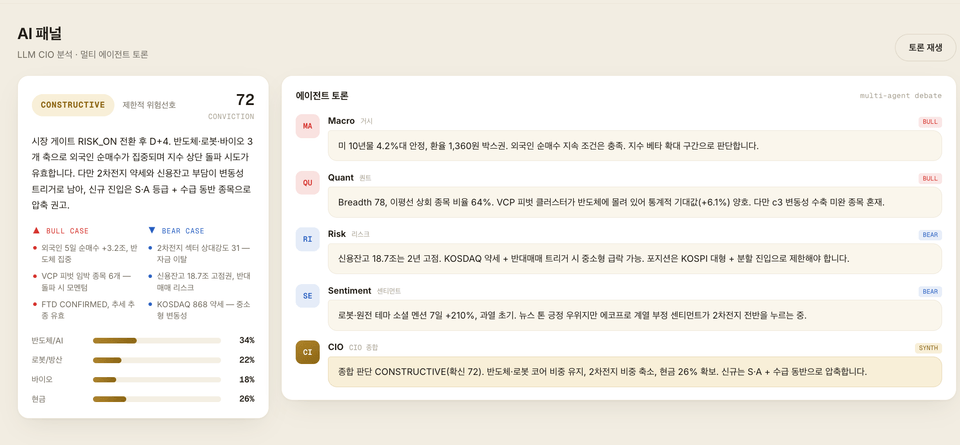
Advanced Logic Implement a scoring engine that crawls news data, performs sentiment analysis using AI, and quantifies your own investment strategies.

Full Automation From building an API server to web dashboard visualization, and even Telegram reports delivered automatically every morning.


After taking this course

Instead of simply typing along with the code, you will gain the 'ability to design like a developer.'

  • Scalability: When new analysis indicators or strategies come to mind, you will be able to add them with confidence.

  • Structuring: You will gain the power to conquer complex systems by breaking them down step by step.

  • Adaptability: You can build data analysis systems for anything—not just stocks, but also real estate, cryptocurrency, and more—using the same structure.

The fastest way to turn your ideas into reality, start now with Hodu using the Claude CLI.

👉 Go to Hodu's AI Analysis Lab YouTube Channel: https://www.youtube.com/@두두감자


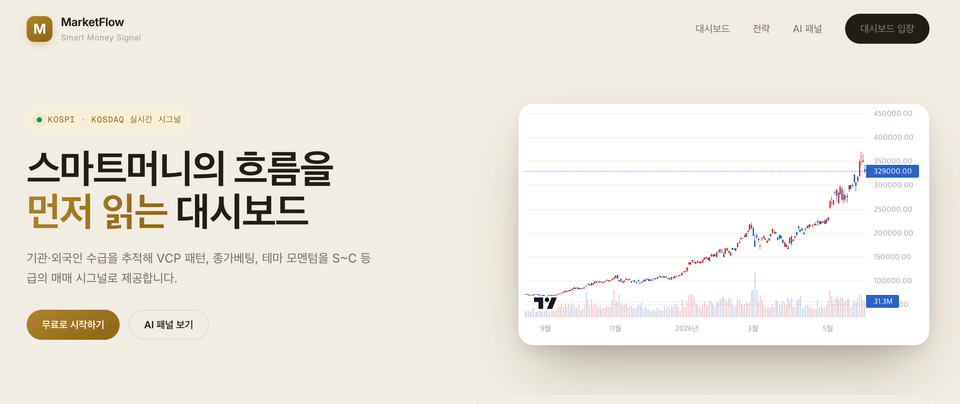
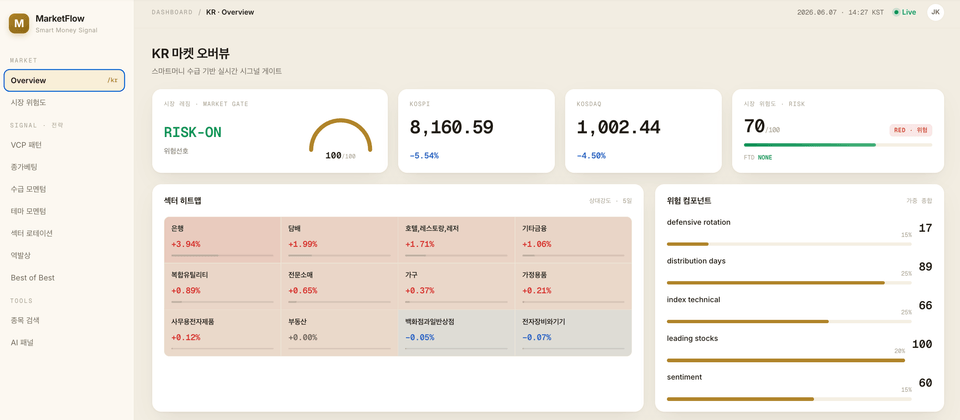
After taking this course, you will be able to create results like this

Telegram Automated Messages


Domestic Stock Summary

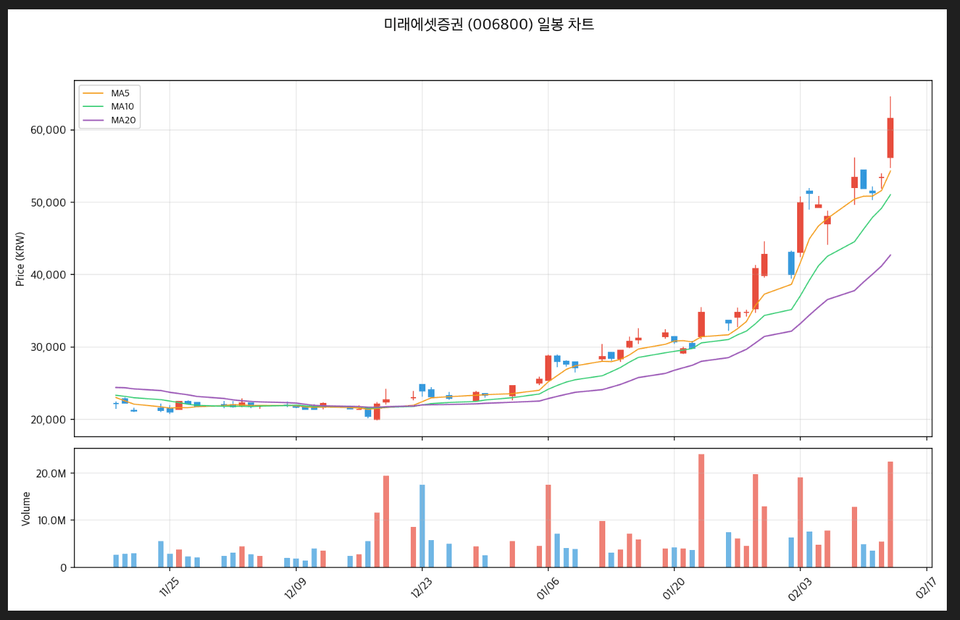
Daily VCP Signal


Cumulative VCP Stock Analysis and Results

Part 3: Creating Real-World Data Dashboards

  • After taking this course, what will I understand and be able to do well?


  • Explain in as much detail as possible how the students will be transformed.

Learning Content

1-2. Chart Data Analysis (Technical Analysis)

"By analyzing Moving Averages (MA) and trends based on daily chart data, we extract stocks in a bullish alignment and automatically send the charts and stock information via Telegram."

1-3. Supply and Demand Data (Major Entities) 💰

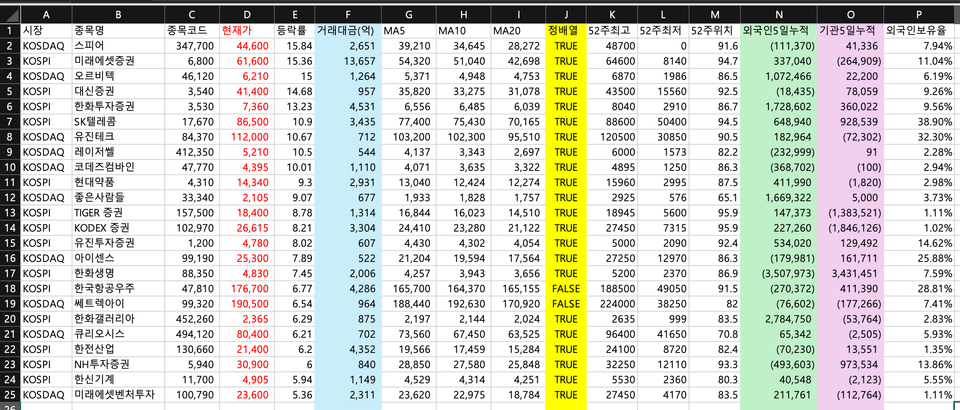
"It analyzes various indicators such as current price, trading volume, fluctuation rate, moving averages (5/20/60 days), and net buying by foreigners and institutions over the past 5 days. Data meeting the criteria is sent via Telegram immediately after the market closes, and automatic notifications are provided with filters that can be freely expanded as needed."

1-4 Comprehensive Analysis Report on Rising Stocks

Based on real-time financial data, it automatically filters only the stocks among the day's KOSPI/KOSDAQ gainers that meet specific criteria for transaction value, fluctuation rate, and price range. For the selected stocks, it analyzes the 60-day moving average alignment, 52-week high/low positioning, and the 5-day net buying trends of foreign and institutional investors to provide a comprehensive report.


Notes Before Taking the Course


🛠️ Practice Environment Guide

Check before you start! This course was filmed in a macOS environment, but Windows and Linux users can also take it without any issues. A standard office or development laptop without a GPU (graphics card) is sufficient.


1️⃣ Operating System (OS)

The course is conducted based on macOS, but 99% of the content is the same regardless of the OS.

Differences between operating systems (such as scheduler settings) will be kindly explained separately within the lecture.

OSRecommended VersionNotesmacOSmacOS 13 (Ventura) or higherStandard environment for the course (utilizes native features like launchd)WindowsWin 10/11 + WSL2

After installing WSL2 (Ubuntu), you can follow the same hands-on practice.


(For the scheduler, use Windows Task Scheduler)

LinuxUbuntu 22.04 or higher. Fully compatible using cron, etc.


2️⃣ Essential Tools and Software

Since AI handles the coding, you only need to prepare the tools to give instructions (Prompts).

Core Tool: Claude Code (CLI) Paid ($20/month~)

The core engine of Vibe Coding: Backend. Python (3.9 or higher)FreeData analysis, crawling, and server operation

Frontend Node.js (18 or higher) Free Run Next.js-based dashboard screen

Editor VS Code FreeCode verification and terminal execution (Optional)


3️⃣ External APIs (No additional cost)

Instead of using complex paid data services, we maximized cost-effectiveness by utilizing free crawling and API free tiers.

  • Google Gemini API: AI news summarization and sentiment analysis (utilizing the free tier)

  • Naver OpenAPI: News search (25,000 requests per day for free)

  • Telegram Bot API: Sending buy/sell notifications (completely free)

  • 🚫 Stock price data: Handled via web crawling without any separate paid APIs.


4️⃣ Recommended PC Specifications

Since you are not running machine learning training yourself, a high-spec PC is not required.

  • CPU: Dual-core or higher (Recommended: Apple M1~M3 or Intel i5 or higher)

  • RAM: 8GB (Recommended: 16GB or higher)

  • Disk: 10GB or more of free space

  • Internet: Stable wired/Wi-Fi environment required


📚 Learning Materials Guide

To ensure your successful system construction, we provide all exclusive prompts and source codes.


📦 Materials Provided

  1. Prompt Collection (Notion File Provided)(Core Material)

    • This is the alpha and omega of the lecture. We provide over 120 commands to be entered into Claude Code for each part, along with a troubleshooting guide. Experience building a system simply by copying and pasting.

  2. Lecture Notes & Slides

    • It includes the full architecture diagram, a summary of core concepts, and a checklist.

  3. Completed Source Code

    • This is a reference (answer key) you can consult in case you get lost.


💡 Tips for Using the Materials

  • Try creating it yourself: The provided final code is for reference only. Even if the code you create by entering your own prompts has slightly different variable names, if the functionality works, that is the correct answer.

  • Maintenance Guide: If the code stops working because a target site like Naver Finance is updated, simply provide the error message to Claude Code and it will fix it for you. (This method is also covered in the lecture!)


🎯 Prerequisite Knowledge & Learning Guide

"Is it okay if I don't know how to code?" 👉 Yes, it's possible!

This course is not about becoming a developer, but rather a course on using AI as a tool to achieve a desired result (a stock analyzer).

  • Programming Experience (Not Required): Claude writes the code using the 'Vibe Coding' method.

  • Python/Terminal knowledge (Not required): We will guide you step-by-step, starting from basic terminal usage (Part 0).

  • Basic Stock Knowledge (Recommended): Knowing basic terms like moving averages and trading volume will help you understand investment strategies.


🚀 Recommended Learning Roadmap

  1. Type it yourself: Don't just watch. You must experience the process of entering prompts yourself and seeing the AI spit out code for it to truly become yours.

  2. Follow the order: The structure is designed to build up step-by-step from Part 1. Skipping parts may lead to errors.

  3. Don't be afraid of errors: When an error occurs, don't panic; copy the error message and ask Claude. That is the core skill you are learning in this course.

  4. Review: In particular, Part 4 (Closing Price Betting Engine), Part 7 (Dashboard), and Part 9 (Backtesting) contain in-depth content. I recommend taking your time and reviewing them 1–2 times.


📢 Q&A & Updates

Q&A and Feedback

  • Please use the [Inflearn Q&A Board] for your questions.

  • When asking a question, please include the entire error message and the OS you are using to receive a much faster and more accurate response.


Lecture Update Policy

  • Responding to Site Structure Changes: Prompts and code will be updated when the target crawling sites undergo changes.

  • Claude Code Updates: We check for compatibility and provide announcements during major tool updates.

  • Copyright Notice: Please use the prompts and materials from this lecture for personal learning purposes only. (Unauthorized distribution/sharing is prohibited)


⚠️ Investment Disclaimer (Disclaimer)

The closing price betting strategy, VCP pattern analysis, and automated trading system covered in this lecture were created for the purpose of teaching system construction methodology.

Following the lecture content does not guarantee profits, and the student bears full responsibility for all gains and losses resulting from actual investments. Please use this wisely as a supplementary tool utilizing AI and data.

Recommended for
these people

Who is this course right for?

  • An office worker investor who spends 2–3 hours every day after work analyzing stocks.

  • Those who don't know how to code but want to have their own automation system

  • Those who took a quant course but found it ended at the Jupyter Notebook stage.

  • 4. Those who want to use AI in practice but don't know what to create.

Need to know before starting?

  • Basic Stock Terms: If you are familiar with basic stock terminology such as opening/closing prices, transaction value, foreign/institutional supply and demand, and moving averages, you will be able to understand the lecture content more quickly.

  • Operating System: Based on macOS (Most steps are the same for Windows, and any differences will be noted separately)

Hello
This is skysungsisi0926

110

Learners

11

Reviews

21

Answers

4.6

Rating

1

Course

Curriculum

All

29 lectures ∙ (2hr 51min)

Course Materials:

Lecture resources
Published: 
Last updated: 

Reviews

All

11 reviews

4.6

11 reviews

  • huvoice3778님의 프로필 이미지
    huvoice3778

    Reviews 1

    Average Rating 4.0

    4

    30% enrolled

    It's flying by.

    • skysungsisi0926
      Instructor

      Thank you. I will try to proceed a bit more slowly!

  • mamibj1121348님의 프로필 이미지
    mamibj1121348

    Reviews 1

    Average Rating 5.0

    5

    32% enrolled

    This is the best lecture. I'm so curious about the next one that I think I'll finish them all in one day haha.

    • skysungsisi0926
      Instructor

      Thank you! I am preparing additional special lectures, so I will upload a course that you will be satisfied with.

  • bkyangaruba6139님의 프로필 이미지
    bkyangaruba6139

    Reviews 1

    Average Rating 5.0

    5

    32% enrolled

    • skysungsisi0926
      Instructor

      Thank you! I will post diligently.

  • bitbul2524님의 프로필 이미지
    bitbul2524

    Reviews 1

    Average Rating 5.0

    5

    33% enrolled

    • skysungsisi0926
      Instructor

      Thank you

  • sofansil3751님의 프로필 이미지
    sofansil3751

    Reviews 1

    Average Rating 5.0

    5

    30% enrolled

    • skysungsisi0926
      Instructor

      Thank you! I will post diligently.

Similar courses

Explore other courses in the same field!

$118.80