강의

멘토링

커뮤니티

BEST
Productivity

/

Office

Excel Basics: Only the core practical skills are selected and finished in 3 hours

This training course selects only the essential Excel functions that you need to know when working with Excel, so that you can learn them easily and quickly.

(4.9) 89 reviews

2,484 learners

Level Beginner

Course period Unlimited

  • onwings
Excel
Excel
MS-Office
MS-Office
Excel
Excel
MS-Office
MS-Office

Reviews from Early Learners

Reviews from Early Learners

4.9

5.0

de33904

81% enrolled

It only teaches features that you'd actually use at work 😆😆😆 While utilizing the features would largely depend on individual discretion based on specific tasks, it's well-organized with only the highly practical parts. It was easy at the beginning, but it gets much harder as you progress.

5.0

최보정

69% enrolled

I switched to a new job as an experienced hire, but since it had been a long time since I used Excel, I was worried my lack of skills would be exposed. So I decided to learn in advance before starting and made the purchase. The course taught exactly the practical and important things, so I was able to learn quickly without wasting time.

5.0

hattman

25% enrolled

It's truly excellent. The delivery is among the best of the lectures I've ever heard. This time, I applied for this lecture and the "100x Faster Work" lecture, and I wish I had applied for other recent lectures too 😭. Even though I majored in computer science, I applied because I'm not familiar with Excel. I'll watch them all during the holidays.

What you will gain after the course

  • How to input and manage data types in Excel without errors

  • How to format tables to fit your report using cell formatting

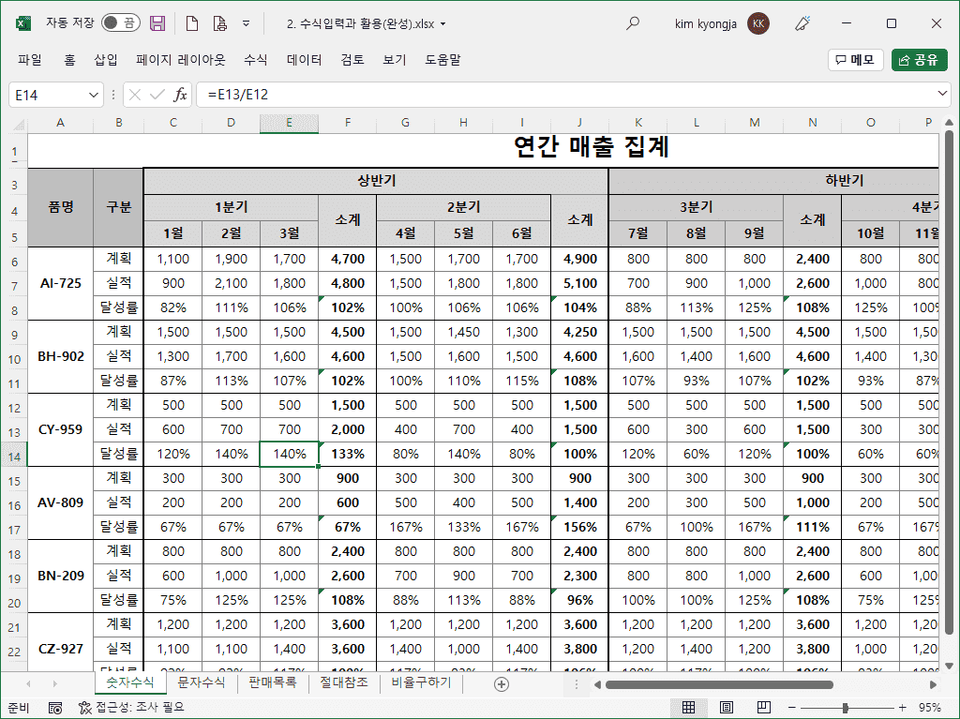
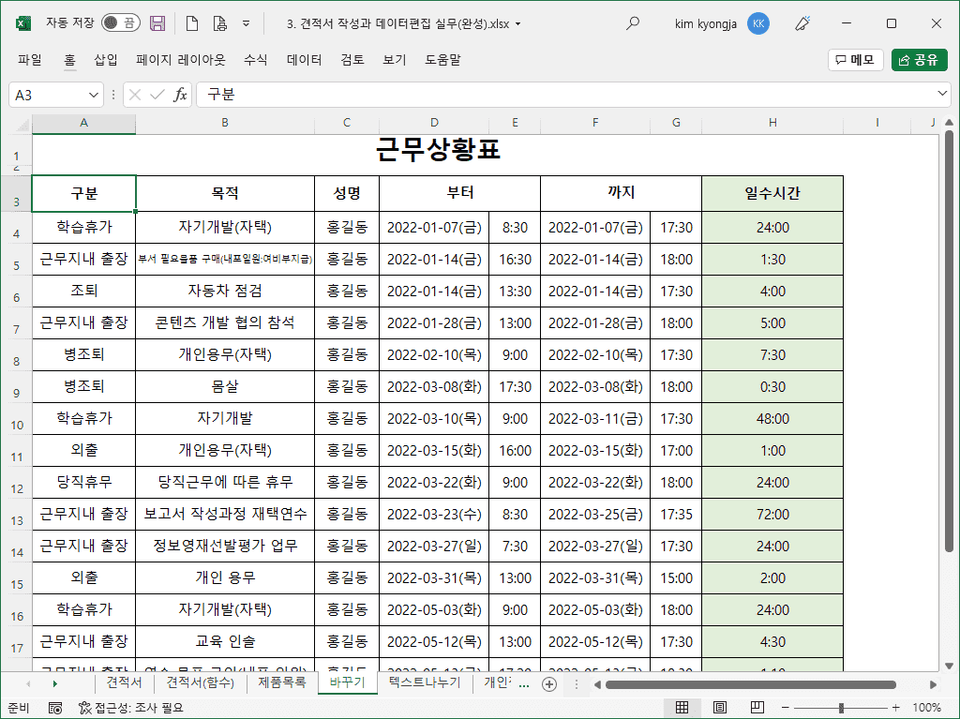
  • Practical learning with examples used in real workplaces

  • How to reference cells to enter formulas without errors

  • Ability to quickly process and convert external data

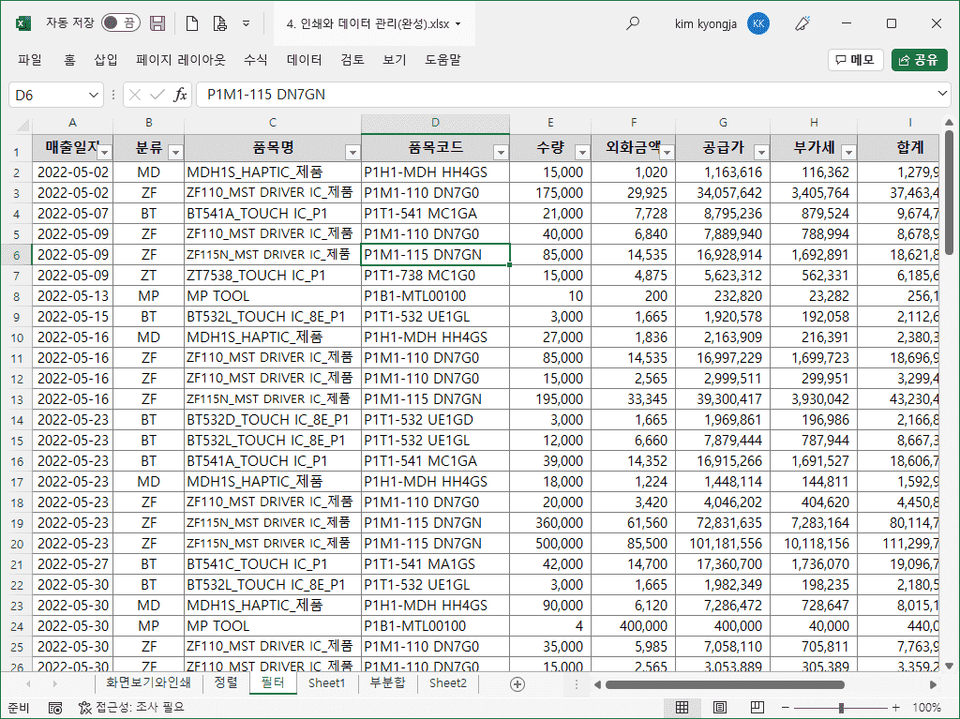
  • Sort, filter, and subtotal required for data management

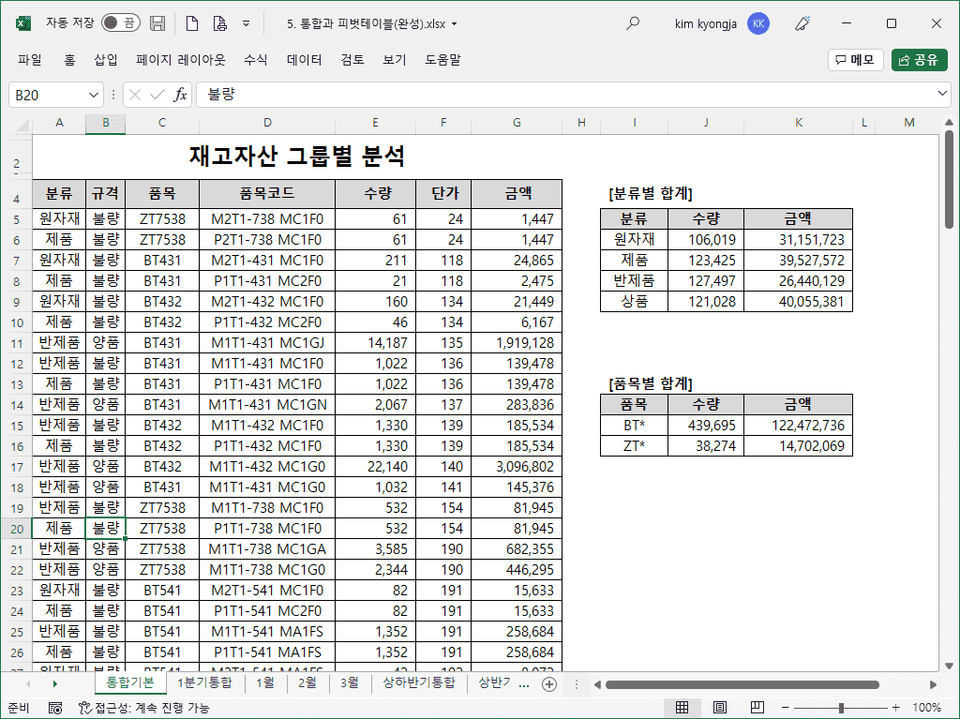
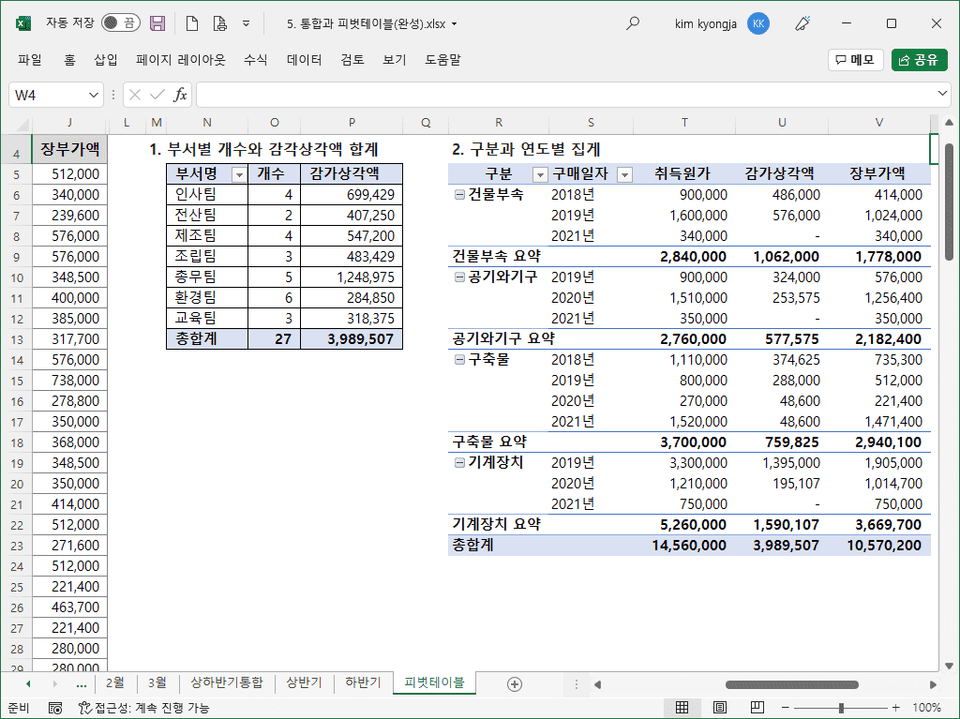
  • Integration and pivot tables required for summarizing and aggregating disjointed data

Learn only the key points 📌
Real practical Excel!

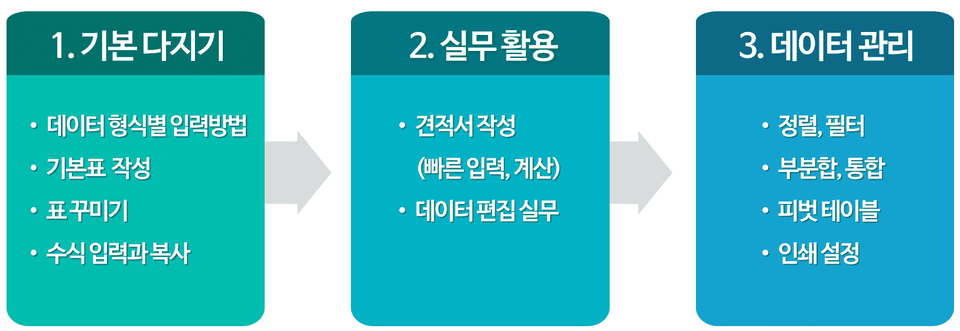
3 Steps to Practical Excel 🎢

Excel has so many features! It's difficult to master them all, and it's even harder to figure out which ones are truly useful. This course focuses on the essential Excel features you need to know for your work, so you can quickly and easily master them. If you want to learn only the essential features in a short period of time, this is the perfect opportunity to get started!


This course's unique features ✨

  • Rich content composition
    • We've organized the content based on the most frequently asked questions from basic Excel users!
  • Systematic basic concepts
    • We'll lay the foundation for you to be able to solve problems you encounter while working with Excel on your own!
  • Learning examples for practice
    • We help you learn how to apply the basic skills you've learned in real-world work situations!

Recommended for these people! 🙋‍♀️

You will be able to think and solve problems on your own to get things done faster and more efficiently.

Exrin

Excel beginners who want to learn Excel from the basics

I'm writing it now

Office workers who want to learn Excel properly by using it in their work.

Save time

Those who want to learn only the functions that are frequently used in practice in a short period of time

awe

People who are afraid of working with Excel because they don't know how to solve Excel problems


Learn things like this 📚

Step 1. Basic preparation
It consists of creating tables to make them look nice and entering formulas to perform calculations .


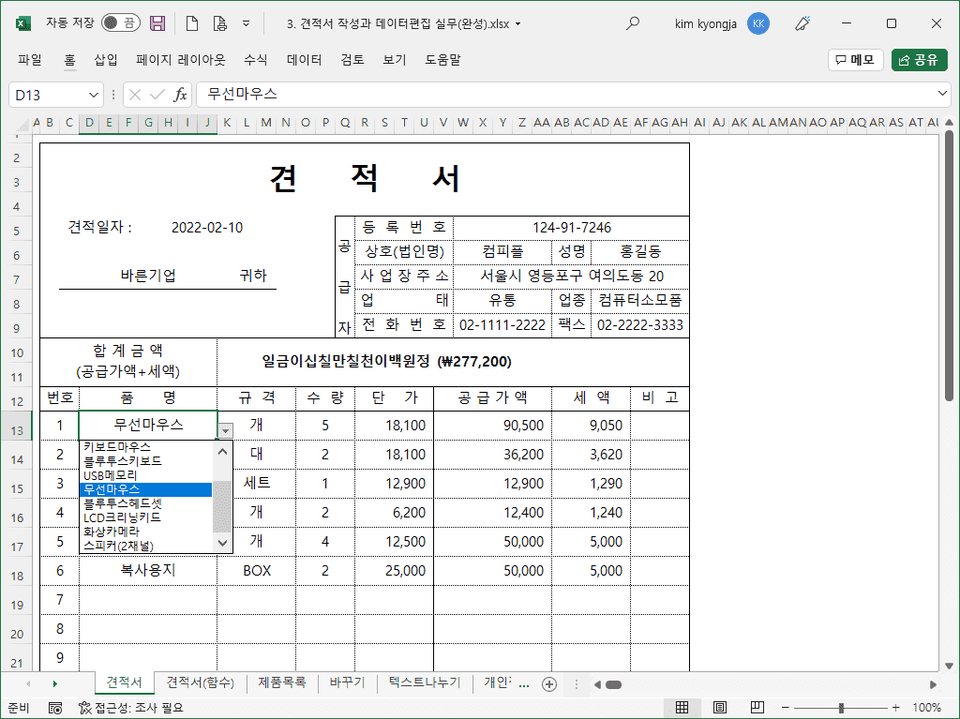
Step 2. Deeper Learning Through Examples

Building on what you learned in Step 1 , you'll delve deeper into practical examples used in real-world work . Even if you know Excel's functions, you won't be able to apply them if you don't know how to use them in real-world work . This step addresses that issue .


Step 3. Data Management

Learning will focus on sorting required for data management , filters to extract only the necessary data , subtotals that can aggregate by group , consolidation , and pivot tables .


A word from a knowledge sharer ☝️

Hello. This is Kim Kyung-ja.
This course was created for those who want to learn Excel but are too busy to invest the time. Simply mastering the content in this course will allow you to work with Excel without any difficulties.


Recommended for
these people

Who is this course right for?

  • For those who are new to Excel

  • Those who have not systematically studied Excel

  • For those who want to learn accurately, focusing on the core Excel functions required for practical work

  • Anyone who wants to learn how to create Excel documents efficiently

Hello
This is

6,606

Learners

677

Reviews

162

Answers

4.9

Rating

6

Courses

Kim Kyung-ja / CEO of Compeople, Adjunct Professor at Yeonsung University, Excel Goddess (http://blog.naver.com/onwings)

While working at the LG Electronics Learning Center, I began my career in IT education. Currently, I deliver lectures at organizations such as Samsung Group, Kia Group, Udemy, the Financial Supervisory Service, Kim & Chang, and the National Human Resources Development Institute. I am the CEO of Compeople, a company specializing in IT and information technology training, and I also serve as an adjunct professor at Yeonsung University.


- Excel Data Utilization and Analysis for the Workplace (Hanbit Media, 2025)
- Surviving with Excel at the Workplace (Hanbit Media, 2023)
- Excel Practical Functions + Formulas (Hanbit Media, 2021)
- Excel Practical Macros and VBA (Hanbit Media, 2020)
- Excel Practical Data Utilization + Analysis (Hanbit Media, 2019)
- Excel 2016 Basic + Practical Completion (Booksholic, 2018)
- Practical Lecture on Excel Functions for Professionals (Hanbit Media, 2017)
- Excel 2016 Macros and VBA for Empowering Workplace Tasks (Jungbo Munhwasa, 2016)
- Excel Data Utilization + Analysis Immediately Applicable at Work (Hanbit Media, 2016)
- Excel 2013 Basic Practical Completion (Booksholic, 2014)
- Keynote & Numbers Step-by-Step (Gilbut, 2014)
- Excel 2010 Macros and VBA (Youngjin.com, 2012)
- Excel 2010 Basic Practical Completion (Booksholic, 2011)
- Excel 2007 Macros & VBA Basic + Practical (Sungan-dang, 2009)
- Excel 2007 Basic + Practical (Sungan-dang, 2007)
- Strong Practical Excel Macros and VBA (Cyber Publishing, 2005)

Curriculum

All

16 lectures ∙ (3hr 18min)

Course Materials:

Lecture resources
Published: 
Last updated: 

Reviews

All

89 reviews

4.9

89 reviews

  • ushnnn님의 프로필 이미지
    ushnnn

    Reviews 1

    Average Rating 5.0

    5

    81% enrolled

    It only teaches features that you'd actually use at work 😆😆😆 While utilizing the features would largely depend on individual discretion based on specific tasks, it's well-organized with only the highly practical parts. It was easy at the beginning, but it gets much harder as you progress.

    • fake41315234님의 프로필 이미지
      fake41315234

      Reviews 1

      Average Rating 5.0

      5

      69% enrolled

      I switched to a new job as an experienced hire, but since it had been a long time since I used Excel, I was worried my lack of skills would be exposed. So I decided to learn in advance before starting and made the purchase. The course taught exactly the practical and important things, so I was able to learn quickly without wasting time.

      • hattman9841님의 프로필 이미지
        hattman9841

        Reviews 6

        Average Rating 4.5

        5

        25% enrolled

        It's truly excellent. The delivery is among the best of the lectures I've ever heard. This time, I applied for this lecture and the "100x Faster Work" lecture, and I wish I had applied for other recent lectures too 😭. Even though I majored in computer science, I applied because I'm not familiar with Excel. I'll watch them all during the holidays.

        • sawd1239715님의 프로필 이미지
          sawd1239715

          Reviews 1

          Average Rating 5.0

          5

          100% enrolled

          The explanation is easy and simple, so I can listen to the key points without getting bored!!

          • jhchoi74109860님의 프로필 이미지
            jhchoi74109860

            Reviews 2

            Average Rating 5.0

            5

            63% enrolled

            The basic concepts of Excel are explained in detail with examples, so it's easy to understand!!

            $22.00

            onwings's other courses

            Check out other courses by the instructor!

            Similar courses

            Explore other courses in the same field!