[SharePoint] Creating a remittance request system for our company with Microsoft List
Through hands-on practice of creating a remittance request system for our company using a List in SharePoint, we will learn to understand List and create various systems necessary for our company.
It was very helpful. MS 365 is good enough that even mid-sized companies don't need to do any unnecessary internal development, but I gave up because it was too hard to understand the structure. The lecture content was good, and the answers were very helpful.
5.0
ogsung.hyun
92% enrolled
It helped me a lot in understanding MS List. And thank you for answering my questions.
What you will gain after the course
Structure of a Microsoft List (SharePoint List)
Overview of the remittance request system created with List
Create a Site for List
Create a Microsoft List
Design of a remittance request system
Create a business partner management list
Create a remittance request list
Setting up the list and entering data
Conditional Formatting
Share Site
Teams Integration with Teams
Automate advance notifications
Set up notification rules for new requests and status changes
List Data Analysis through BI
Create a remittance request using the Mobile App
Apply search filters to the search list
Work Less, Do More Create and use the system you need yourself.
Learn Microsoft Lists through Practice Welcome to the lecture!
Via Microsoft List in SharePoint Creating a remittance request system 👩🔧
There's likely a vast amount of data , including customer support schedules, support results lists, product or inventory lists, customer address books, checklists for specific projects or events, employee KPIs and task management lists, andeven things like field work management, vacation management, business trip reports, and expense reports. How does your company and team manage all of this?
Are you struggling to manage your database, website, and maintain it with Excel alone? While this approach may be necessary for large-scale projects, it's often unnecessary. However, many people experience numerous inconveniences because Excel is the only viable alternative.Even with a system in place, significant time and money are still being spent.Microsoft List is the solution to these challenges.
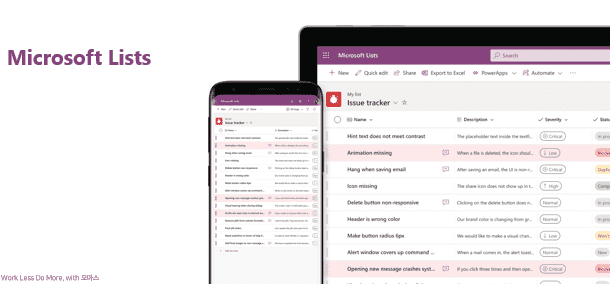
Microsoft List is a service that adds additional features and a more user-friendly separate service to the existing SharePoint List app, making it possible to use SharePoint lists more intuitively.
In this lecture, we'll create a remittance request system for our company using Microsoft List. Through hands-on practice, we'll gain a deeper understanding of List and be able to create various systems needed by our company in the future.I'm learning.
Learn things like this📚
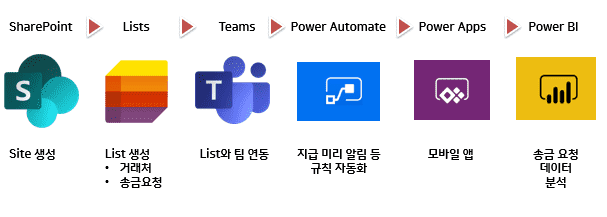
1. Create a site using SharePoint to create a remittance request system. 2. Create a list of business partners and remittance requests on the site created through Lists. 3. Set up and configure the created List to make it easy to use. 4. Integrate your remittance request list so it can be used in Teams. 5. Automate payment reminders, new request notifications, and more. 6. Submit a request through the mobile app. 7. View the remittance request data analyzed in BI.
Microsoft List Overview → Microsoft List Templates and Use Cases → Overview of a Remittance Request System Created with Lists → Creating a SharePoint Site → Designing a Remittance Request System → Creating a List (Managing Business Partners, Remittance Requests) → Setting Up a List → Additional Configuration and Sharing of the Remittance Request System → Additional Utilization (Teams Integration, Power Automate, Power Apps, Power BI)
What you need for the lecture✒️
SharePoint Online license (included with Microsoft 365 Business Basic license or higher)
A Microsoft 365 Business or Enterprise trial license that includes SharePoint Online
SharePoint creation permissions
PC with internet access
headset or speakers
Preview Q&A 💬
Q. Do I need to purchase a license to attend the lecture?
No, you can practice with a free license (Business Standard trial or higher). If you're worried about setting up an actual company account, you can try setting up various settings with a trial version first and then apply it to your company!
Q. Do I need any prior knowledge to take the course?
No prior knowledge is required, but if you're already using SharePoint, you'll understand it much faster. Therefore, it's a good idea to first take the course on creating collaborative sites with SharePoint!
Q. Do I need permission to attend the lecture?
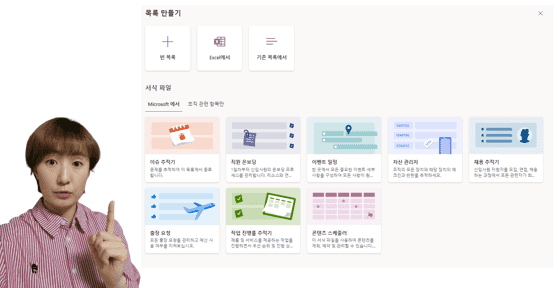
Anyone can create a site, unless your company's administrator has specifically blocked the creation of SharePoint sites. Log into SharePoint first to check if you can create a site. You should see the Create Site button, as shown below.
Introducing the knowledge sharer 🙋♀️
Recommended for these people
Who is this course right for?
For those of you who are curious about Microsoft Lists
Anyone who wants to create a system that suits their company with Microsoft Lists
For those who want to list data through Microsoft Lists
Anyone who wants to create a remittance request system for their company
It was very helpful. MS 365 is good enough that even mid-sized companies don't need to do any unnecessary internal development, but I gave up because it was too hard to understand the structure. The lecture content was good, and the answers were very helpful.
I'm so glad it was helpful! 😊 I'm so glad you caught the exact point we always say during our training, "There's no need for useless development"!! I hope you'll create a system that your company needs based on what you've learned and work really smartly~🙏









![[Office 365] Setting up and understanding Admin CenterCourse Thumbnail](https://cdn.inflearn.com/public/courses/324935/course_cover/6580912e-13aa-4939-92d0-c3b6fded1a43/omas-admincenter.png?w=420)





![[Latest version update] Project and task management to become a pro at planning - MS PlannerCourse Thumbnail](https://cdn.inflearn.com/public/courses/336001/cover/9368db08-c64b-42ca-8ad1-e7a872bffc0e/336001.jpg?w=420)

![[Work Automation Using Free MS RPA] Power Automate Desktop - Automate Repetitive TasksCourse Thumbnail](https://cdn.inflearn.com/public/courses/332826/cover/fd9d8667-48a8-4d2e-b27d-1154f66df679/332826.png?w=420)






![[Work Automation Using Free MS RPA] Power Automate Desktop - Excel AutomationCourse Thumbnail](https://cdn.inflearn.com/public/courses/330201/cover/8adc841c-39de-4770-98d3-2439ed8881a3/330201-eng.png?w=420)
![[Work Automation Using Free MS RPA] Power Automate Desktop EssentialsCourse Thumbnail](https://cdn.inflearn.com/public/courses/329655/cover/8364da63-535b-4613-9b02-3dcdfc21791d/329655-eng.png?w=420)

![[Differentiation] Essential lecture on PPT productionCourse Thumbnail](https://cdn.inflearn.com/wp-content/uploads/ppt_differ.jpg?w=420)

![[Pass ITQ Excel A in One Go] in 3 daysCourse Thumbnail](https://cdn.inflearn.com/public/courses/329652/cover/b44e11b6-a47e-4993-86ea-a85da9836bb5/329652-eng.png?w=420)
![[For Beginners] Data Visualization with Power BICourse Thumbnail](https://cdn.inflearn.com/public/courses/327055/cover/455b54c1-3e63-439b-9b60-5d12e12bc303/PowerBI-001 (1).png?w=420)