Guide to building a virtual environment for multi-OS use (Docker + Kubernetes)

Understand the basic knowledge required to build a virtual environment, create a virtual environment suitable for your environment using tools called Vagrant + VirtualBox, and build a Docker and Kubernetes Cluster. You can also introduce and practice virtualization SW suitable for macOS environments using Apple silicon chips.

(4.9) 97 reviews

3,879 learners

Level Basic

Course period Unlimited

Virtualization
Virtualization
virtualbox
virtualbox
vagrant
vagrant
Kubernetes
Kubernetes
Docker
Docker
Virtualization
Virtualization
virtualbox
virtualbox
vagrant
vagrant
Kubernetes
Kubernetes
Docker
Docker
Thumbnail

Reviews from Early Learners

4.9

5.0

teacheryo

69% enrolled

It was a really helpful lecture. However, I think the lecture name should be changed. I think it would be better to just call it Kubernetes Installation Guide. As of August 4, 2023, there is no Kubernetes Installation Guide in Korean. Of course, there is a video uploaded to YouTube by someone in May, but it is a boring video because the VM network configuration part is omitted. However, if you follow this lecture from beginning to end, you will be able to install Kubernetes, so I think it would be helpful to more people if the lecture name was changed.

5.0

WookHwan Kim

100% enrolled

I have learned a lot about the basics of virtualization that I have been interested in. Thank you, instructor.

5.0

똘똘이스머프

100% enrolled

Thank you for your valuable lecture. Take care of your health.

What you will gain after the course

  • Practice building a virtual environment in Windows and macOS environments

  • Practice building a virtual environment using Vagrant + VirtualBox

  • Practice building a virtual environment for using Docker + K8s

For building a virtualization environment
From basic knowledge to installation practice!

For beginner developers
Configuring a virtualization environment

  • Understand the basic concepts of virtualization environments and learn the process of installing virtual machines on your system.
  • Learn how to create virtual machines in Windows and macOS (Intel Chip, Apple Silicon Chip) environments.
  • Learn how to set up a Docker Engine and Kubernetes Cluster environment on a Linux (Ubuntu) virtual machine.

What is Virtualization?

pliability

Agility

Fault tolerance

Cost reduction

It refers to running multiple operating systems (OS) on a single physical machine. In cloud computing, virtualization refers to hardware virtualization, which creates virtual machines within an operating system.


To these people
I recommend it.

  • ✅ People who want to try using multiple operating systems
  • ✅ People who want to understand virtual environments
  • People who want to configure Docker and Kubernetes Cluster using virtual machines
  • People who want to create a virtual machine in Windows, macOS (Intel chip, Apple silicon chip) environment

Courses

  • We'll look at how to use other operating systems, such as Linux, in Windows and MacOS environments.
  • Through hands-on practice, you will create a virtual machine using virtualization SW that suits your environment.
  • You can build your own virtualization environment by following this step-by-step guide on how to install and configure Docker and a Kubernetes Cluster on an Ubuntu Linux server running as a virtual machine.

Learning Objectives

  • Understand the virtualization environment and create the virtual machines you need.
  • You can select the virtualization SW that is suitable for the operating system you are using, and install and configure the SW required for the container virtualization environment.
  • You can easily create a virtual machine and build a Kubernetes Clustesr environment using Vagrant + VirtualBox.

What you learn
Check it out.

Easy-to-learn virtualization environment

  • This explains how to install virtualization SW that suits your environment and tools that make using virtualization SW easier.
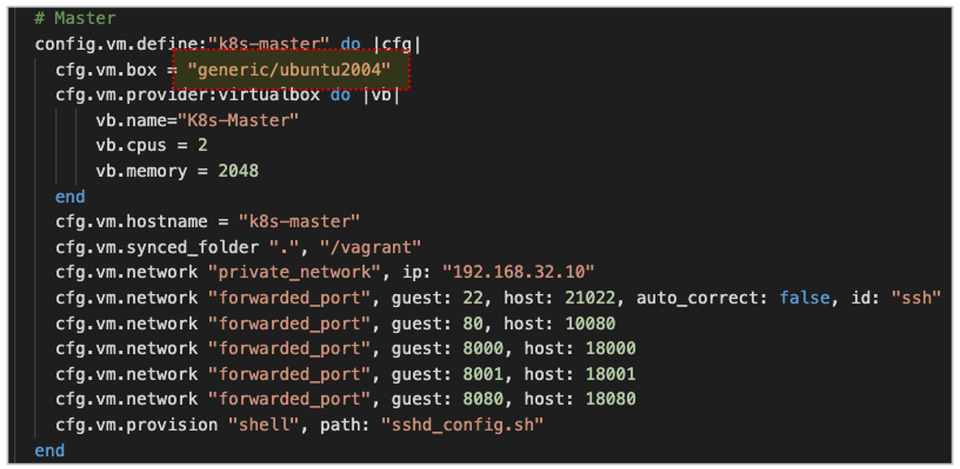
  • Windows and macOS Intel chip users can build a virtualization environment using a combination of Vagrant and VirtualBox. A Vagrantfile is also provided for hands-on practice, allowing you to create a virtual machine with just a few simple commands.
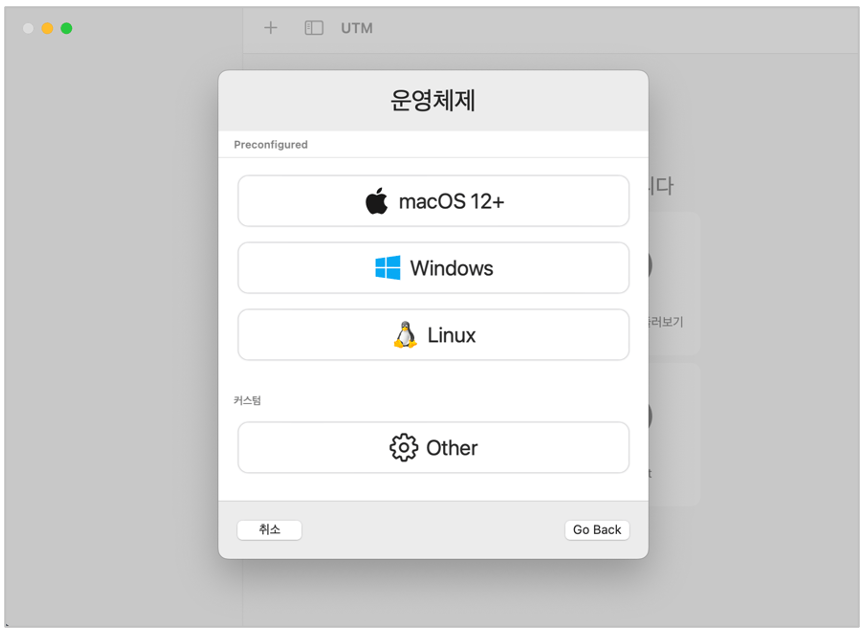
  • Additionally, macOS Apple Silicon Chipt users can install Ubuntu Server using a software called UTM and install Docker on the created virtual machine to build a container virtualization environment.
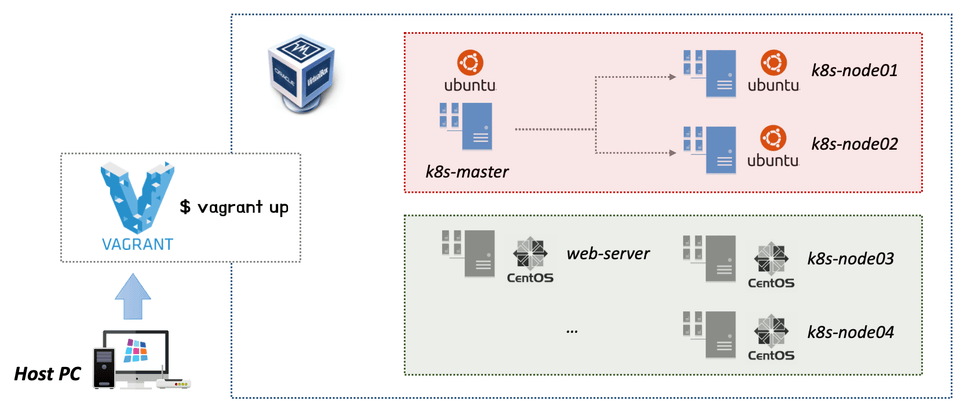
The entire virtualization environment configuration diagram constructed in the lecture
(Installing 3 Ubuntu Linux servers using Vagrant + VirtualBox)
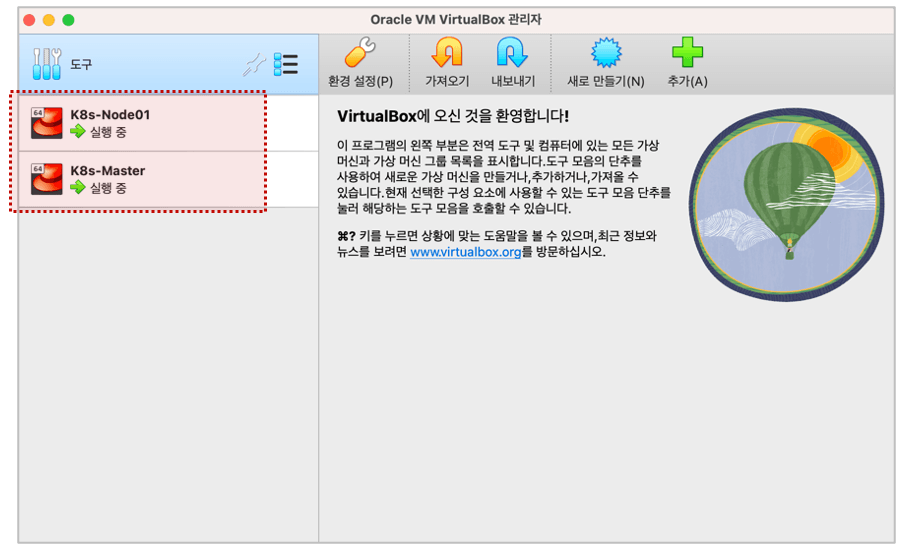
Using VirtualBox in a macOS (Intel Chip) environment

Easy learning centered on practice

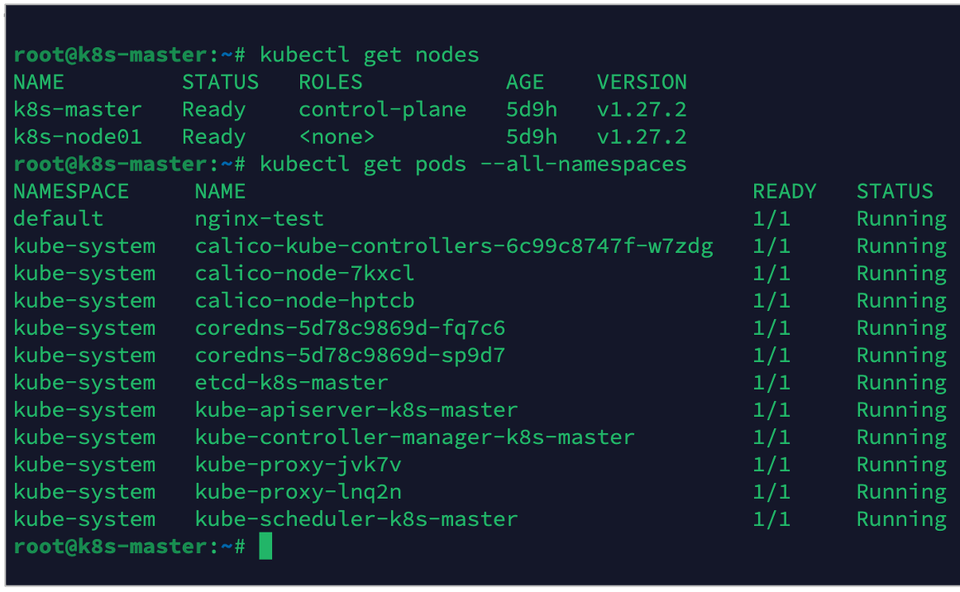
  • We will create three VMs consisting of Master + Node1 + Node2 and practice building a Kubernetes Cluster environment.
  • The ratio of theory to practice is approximately 3:7, so you can watch this lecture with a focus on practice.
  • We provide scripts used in practice, so you can easily configure your own virtualization environment.
  • In addition to the Docker and Kubernetes Cluster installation/configuration explained in the lecture, we recommend referring to separate external lectures and materials for usage methods and detailed explanations.
You can easily configure a Kubernetes Cluster using Vagrant + VirtualBox.
This article explains how to create a virtual machine using UTM for macOS (Apple Silicon Chip) users.

We provide a script file and installation guide for creating the virtual machine used in the lecture.


Q&A 💬

Q. What prerequisites or knowledge are required to take this course?

A basic understanding of IT knowledge and terminology is sufficient. Additionally, since simple scripting is included, familiarity with Visual Studio Code and editors like Vim and nano for Linux will make the course easier to follow. Of course, even if you don't have experience with these editors, you can still take the course.

Q. What kind of practical environment is required for the lecture?

This course explains how to install and use Vagrant and VirtualBox, software for Windows users and macOS users using Intel chips. MacOS users using Apple silicon chips (M1, M2) can create virtual machines using UTM, as described in Section 5.

Q. The course covers installing and configuring Docker and Kubernetes clusters. Will I also learn detailed usage methods?

This course was designed to facilitate the setup of a virtualized environment, which can be used in my other course, "Building a CI/CD Pipeline Using Jenkins." Therefore, it primarily covers building a virtualized environment and creating virtual machines, depending on the student's environment. While the course hands-on training covers installing and configuring Docker and Kubernetes clusters, it doesn't cover detailed usage methods or concepts.

💾 Class and practice environment

  • Operating system and version (OS): Windows, MacOS (Intel chip), MacOS (Apple silicon chip)
  • Tools used: Visual Studio Code, Vagrant, VirtualBox, Termius, UTM
  • PC specifications: We recommend using a CPU i5 or higher, 16G of memory, and 500GB or more of disk space.

📢 Things to note before taking the course

  • This course introduces how to configure a virtualization environment for beginners.
  • We have tried to encode the lecture video quality (audio/video quality) as uniformly as possible, but sometimes the audio quality may be uneven depending on the recording environment.
  • We will respond to questions posted through Q&A as quickly as possible.
  • The copyright of the lectures and learning materials belongs to the instructor and NJ One Company.
  • The lecture notes are provided as a separate PDF file. For additional installation guides and scripts, please refer to the GitHub repository .

Curious about other lectures by the knowledge sharer?

Recommended for
these people

Who is this course right for?

  • People who want to build a multi-OS environment on their system

  • People who want to build a virtual environment and run various services

  • People who want to build a virtual environment using Vagrant + VirtualBox

  • Anyone who wants to build a virtual environment to build Docker + Kubernetes

  • Anyone who wants to run a Linux server using VM on macOS

Need to know before starting?

  • Basic knowledge of IT services

Hello
This is Dowon Lee

Inflearn Verified

30,913

Learners

1,756

Reviews

1,381

Answers

4.8

Rating

8

Courses

I am an IT engineer. There was a time when I wondered which word I should choose for the occupation field: "office worker?", "developer?", or "instructor?" Then I came to think that “IT engineer” was the job title that suited me best, so I have continued to write "IT engineer" in the occupation field.

A profession represents the work you do, and I believe that work should be enjoyable and useful. Although no one can live by doing exactly the work they want, I am someone who likes the work I do and wants to do it well. Having worked as a developer, instructor, and consultant, I am constantly struggling to keep up with newly released and ever-changing IT technologies. Even so, I am one of those people who wants to encounter, share, and use them even a little earlier than others.

The field I have recently become interested in is online education consulting. The technologies I am interested in include Cloud Native Architecture, Blockchain, Machine Learning, Kafka, and Kuberbetes. I actually teach courses on these technologies and apply them in my work as well. However, since they are such vast topics, I am still continuously studying them.

They say that what you keep in your head is not true knowledge. I intend to share my knowledge and experience in various ways. And I will continue to be an IT engineer who takes on new challenges in new fields and with new technologies.


  • Current) CEO of NJ One Company

  • Current) Adjunct Professor, Department of Information Security, Graduate School of International Information, Dongguk University

  • Former) JP Morgan Chase AMJ Tech consultant (Japan)

  • Former) Samsung SDS CMS Business Division Lead Engineer



More

Curriculum

All

17 lectures ∙ (2hr 38min)

Course Materials:

Lecture resources
Published: 
Last updated: 

Reviews

All

97 reviews

4.9

97 reviews

  • sorayeon님의 프로필 이미지
    sorayeon

    Reviews 84

    Average Rating 5.0

    5

    100% enrolled

    It's a kind and good lecture.

    • hyongsu44님의 프로필 이미지
      hyongsu44

      Reviews 868

      Average Rating 5.0

      5

      100% enrolled

      Thank you for your valuable lecture. Take care of your health.

      • khani06277275님의 프로필 이미지
        khani06277275

        Reviews 1

        Average Rating 5.0

        5

        100% enrolled

        I have learned a lot about the basics of virtualization that I have been interested in. Thank you, instructor.

        • wjjune0678님의 프로필 이미지
          wjjune0678

          Reviews 2

          Average Rating 5.0

          5

          81% enrolled

          It was a really helpful lecture. Thank you.

          • teacheryo5385님의 프로필 이미지
            teacheryo5385

            Reviews 1

            Average Rating 5.0

            5

            69% enrolled

            It was a really helpful lecture. However, I think the lecture name should be changed. I think it would be better to just call it Kubernetes Installation Guide. As of August 4, 2023, there is no Kubernetes Installation Guide in Korean. Of course, there is a video uploaded to YouTube by someone in May, but it is a boring video because the VM network configuration part is omitted. However, if you follow this lecture from beginning to end, you will be able to install Kubernetes, so I think it would be helpful to more people if the lecture name was changed.

            Dowon Lee's other courses

            Check out other courses by the instructor!

            Similar courses

            Explore other courses in the same field!

            Free