


UE5 DeepDive : Render Tricks 01

Are PC effects breaking or slowing down on mobile? Based on know-how gained through countless trials and errors, I will share the core principles and optimization strategies.

1 learners are taking this course

Level Basic

Course period Unlimited

Android
Android
Unreal Engine
Unreal Engine
Android
Android
Unreal Engine
Unreal Engine

What you will gain after the course

  • 2 Practical Mobile Rendering Tricks

  • Dynamic Environmental Changes Implemented with Depth-Based Puddles

  • Blur Algorithms and Two Depth of Field Implementations

  • Implementing practical rendering tricks optimized for mobile environments

  • Mastering the Practical Guide to Android Build and Packaging

  • Creating and Utilizing Slider UI Widgets

PC effects on mobile, too
Implemented with practical rendering tricks!

Master 2 key rendering tricks and optimization strategies!


Have the brilliant effects of conventional PC games been breaking or slowing down in mobile environments?
Through know-how gained from countless trials and errors, you will learn the core principles and optimization strategies to implement
PC-level quality on mobile.
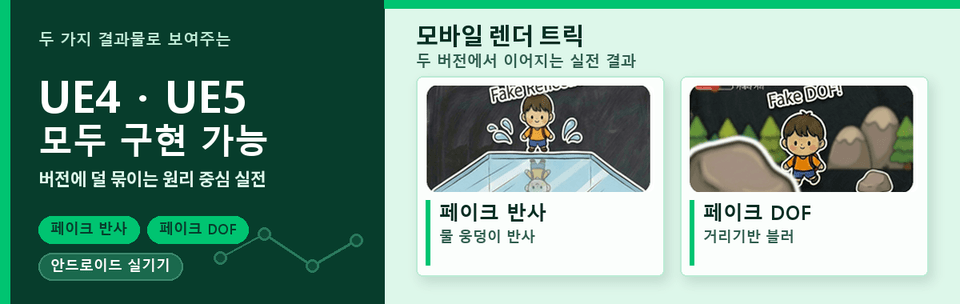
Through practical examples such as depth-based puddles, fake reflections, flipbook animations, and two types of fake depth of field,
you will learn how to
overcome the limitations of mobile rendering.

Mobile Rendering Deep Dive
Mastering core principles for implementing PC effects on mobile

Implement optimized rendering tricks such as Unreal Engine 5's Materials and Blueprints to create
depth-based puddles and fake reflections, and two types of fake depth of field.

Utilizing Materials and Blueprints


Creating Water Puddles


Depth-based Fade/Occlusion


Slider UI on Mobile

Going beyond simple tutorials, you will build water puddle height variations and realistic reflection effects yourself,
gaining rendering know-how optimized for the Android mobile environment.

Implementing a mode-switching UI to toggle DoF


Fake DoF 01


Fake DoF 02


Dof Debugging


Two types of fake DoF can be applied to projects depending on performance and platform.

Are PC effects breaking or slowing down on mobile?
This course was created specifically for people like you.


✔️ Beginner/Entry-level developers who know the basics of Unreal Engine

  • Those who want to implement the same brilliant rendering effects from PC on mobile

  • Those who want to learn rendering principles and practical tricks optimized for mobile environments

  • Those who want to implement dynamic environmental changes and realistic water effects using only Blueprints

✔️ Those who want to deeply understand the principles of mobile game rendering optimization

  • Those who want to learn depth-based rendering, dynamic environment changes, and the principles of implementing depth of field

  • Those who want to master blur algorithms and two methods of implementing Depth of Field


✔️ Programmers who want to prototype for mobile using Blueprints without C++

  • Those who want to learn everything from Unreal Engine Material Editor shortcuts to in-depth node utilization

  • Those who want to learn the differences between UE Blueprint classes and Level Blueprints, and how to use them effectively

  • Those who want to master the Android build and packaging process using a practical guide


Stop hitting the limits of mobile rendering.
Create captivating mobile experiences yourself with the powerful features of Unreal Engine 5.

Notes Before Taking the Course


Practice Environment

  • Unreal Engine 5 installation is required.

  • Android SDK and related tools are required.

  • A PC with certain specifications or higher is recommended for smooth practice.

Prerequisites and Important Notes

  • Experience with basic Unreal Engine operations is required.

  • An understanding of the Blueprint and Material Editor is helpful.

  • Proceed without C++ coding.

Learning Materials

  • You can download the project assets used for the practice session.

  • The tutorial videos help you understand the core principles.


Recommended for
these people

Who is this course right for?

  • Entry-level/beginner developers who are capable of basic Unreal Engine operations

  • Those who want to deeply understand the principles of mobile game rendering optimization

  • Programmers who want mobile prototyping with Blueprints without C++

  • Those who aspire to be Technical Artists and want to build knowledge in mobile rendering

  • Those who are looking to switch from Unity to Unreal development

Need to know before starting?

  • Unreal Editor Basic Controls (Viewport Navigation, Placing Actors, Using Content Browser)

  • Experience knowing what the Material Editor is and having opened it.

  • Understanding what Blueprint nodes are and having experience connecting them.

Hello
This is NanoSecond

Curriculum

All

31 lectures ∙ (3hr 52min)

Course Materials:

Lecture resources
Published: 
Last updated: 

Reviews

Not enough reviews.
Please write a valuable review that helps everyone!

Similar courses

Explore other courses in the same field!

Limited time deal

$98,560.00

30%

$108.90