

From 3 Hours of Daily Repetitive Work to 10 Minutes — How Non-Developers Can Design Workflow Automation

If you learned automation tools first but still don’t know what to automate, you’ve got the order backward. We’ll show you how to identify tasks in your company that can be automated without coding, map out the workflow, choose the right tool among n8n, Make, and Zapier, and calculate the costs and benefits. From the perspective of an information security major, we also cover the privacy and security checkpoints that are easy to overlook when automating.

1 learners are taking this course

Level Beginner

Course period Unlimited

Business Productivity
Zapier
Zapier
n8n
n8n
AI
AI
make
make
Business Productivity
Zapier
Zapier
n8n
n8n
AI
AI
make
make

What you will gain after the course

  • A prioritized list of tasks in our company’s operations selected for automation based on scores

  • One flowchart comparing the current process with the improved process

  • Criteria for choosing the right tool for our work among n8n, Make, Zapier, and AI

  • An ROI calculator that shows in numbers the time and costs you can save through automation

  • 2-Week Pilot Plan and Operations Checklist

  • How to Protect Personal Information When Using AI in Automation

I took a course on automation tools—so why is my company still the same?

The experience of learning how to use popular automation tools,
building along with them,
and then feeling overwhelmed about where to start when applying them to your own work.

Many small business owners and office workers
fail at automation not because they"can’t use the tools,"
but because they"never learned how to design automation."

So you sign up for n8n, Make, and Zapier one after another, but…

✔ You build it, but a month later no one uses it
✔ The automation stops because of a single exception
✔ In the end, you have to do it manually again

Why is that?
Because you chose the tool first.

This course does not teach you how to use automation tools.
This course covers
how to design “what to automate, in what workflow, and how much to save”, the essence of automation.

Automation isn’t about pressing a button;
it’s about designing the way work gets done from the ground up.
With a design, you can succeed with any tool,
but without one, you’ll fail with any tool.


In this course

  • How to identify which tasks in our company should be automated using a scoring system

  • How to map out a workflow and identify waste without coding

  • Criteria for choosing the right tool for our work among n8n, Make, Zapier, and AI

  • How to calculate in numbers the time and money you can save through automation

  • How to start small and operate without stopping

We cover this with a single real-world case study.


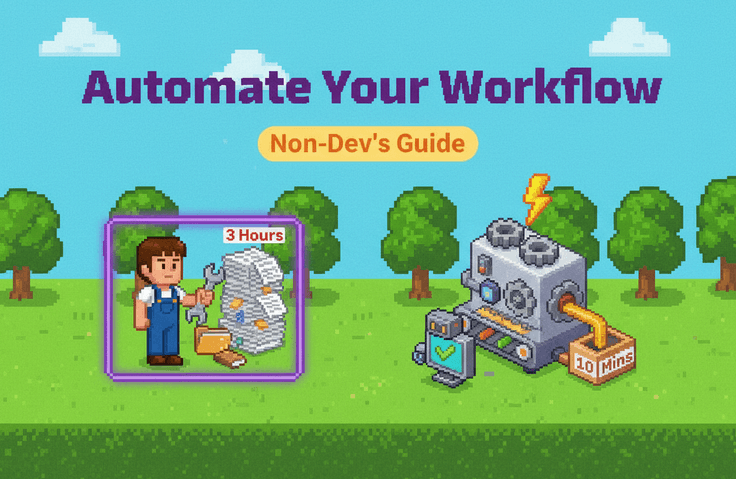
Follow the process of turning a task that used to take three hours a day into one that takes 10 minutes

The biggest feature of this course is
that rather than scattered theory, it is structured around following a single case from start to finish.

A business owner running an online flower shop with three employees.
They were spending three hours every day responding to inquiries, organizing orders, and sending shipping notifications.

Record your tasks, assign scores, draw flowcharts, choose tools, calculate, and even run a pilot.
We’ll go through the process together step by step
and apply it to your own work in the same way.


Complete your “automation plan for our company” as you take the course

Each lesson includes six materials you can fill out right away.

✔ Work inventory
✔ Automation suitability scorecard
✔ Flowchart symbol cards and templates
✔ Tool selection checklist
✔ ROI calculator
✔ Pilot plan and operations checklist

By the end of the course,
you will have a practical plan in hand that clearly lays out what to automate first, which workflow to use, which tools to choose, and how much you can save
.


Even the security perspective essential in the age of AI

AI is an essential part of automation these days.
But what if customer names, contact information, and addresses are passing directly through AI and external services?

In this course,

  • Where to use AI—and where not to use it

  • How to protect personal information before sending it to AI

  • Permission management for accounts connected to automation

We cover these topics to help you design automation that is both fast and secure.


Recommended for

  • Small business owners who spend hours every day copying, pasting, and sending notifications

  • A team leader who wants to automate team tasks but doesn’t know where to start

  • Planners who have taken courses on automation tools but have been unable to apply them in practice

  • Non-developer practitioners who need to request automation from a development team or an outsourced vendor


What changes after taking the course

  • You can distinguish between tasks to automate and those not to automate.

  • You won’t be at a loss when choosing tools.

  • You can explain the effects of automation with numbers.

  • We create automation that keeps running, not automation that’s made and discarded.


You don't need to know how to code.
All you need is one task that makes you think, "This is such a hassle every time."

Use the time you get back from repetitive tasks
for what really matters now.

Recommended for
these people

Who is this course right for?

  • Small business owners who spend hours every day copying, pasting, and sending notifications

  • A team leader who wants to automate team tasks but doesn’t know where to start

  • A planner who took a course on automation tools but was unable to apply them to their actual work

  • Professionals who need to request automation from a development team or external vendor but don’t know what or how to explain it

Need to know before starting?

  • No prior knowledge is required. You can take this course even if you know nothing about coding.

  • If you think of one task to automate during the lecture, you can fill in the provided materials right away.

Hello
This is sua28

Career Verified

292

Learners

16

Reviews

3.3

Rating

14

Courses

I research IT automation and productivity systems that can be applied immediately in practice.

Making complex concepts easy,

I enjoy organizing things into immediately actionable forms.

✔ Google Forms & Spreadsheet Automation

✔ Building no-code productivity systems

✔ Improving work efficiency using AI

✔ Practical IT Guide for Beginners

I pursue "execution over theory."

More

Curriculum

All

10 lectures ∙ (1hr 22min)

Course Materials:

Lecture resources
Published: 
Last updated: 

Reviews

Not enough reviews.
Please write a valuable review that helps everyone!

sua28's other courses

Check out other courses by the instructor!

Similar courses

Explore other courses in the same field!

Limited time deal

$30.80

69%

$102.30