

inflearn logo

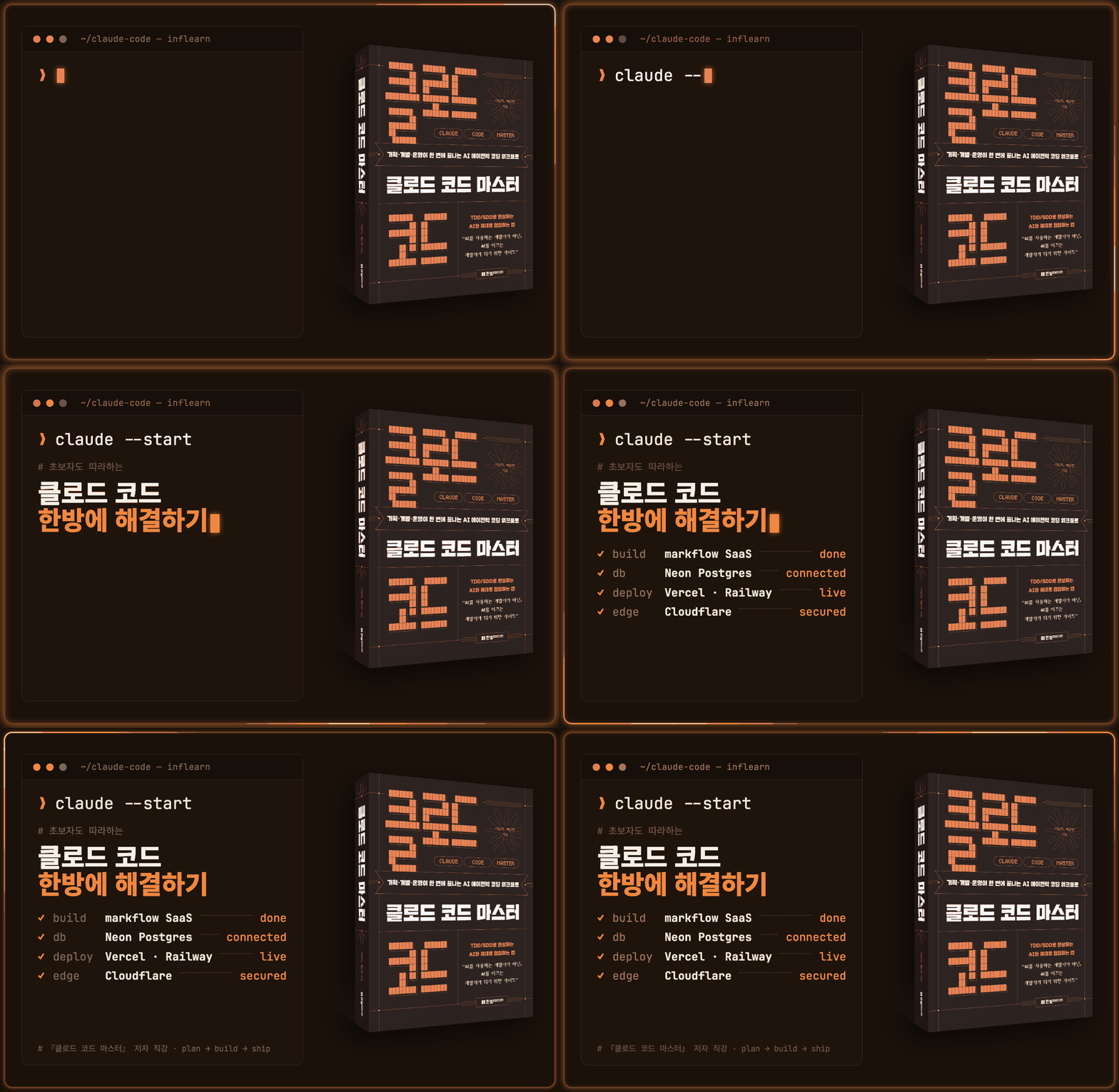
Solve Claude Code in One Go—Even Beginners Can Follow Along, Taught Directly by the Author of *Claude Code Master*

This is a tutorial-style Claude Code development course that beginners and those new to development can easily follow. Based on experience teaching planners, designers, and non-developers in offline classes, the course covers everything in one continuous flow—from beginner examples not covered in books to intermediate development examples. Using Claude Code, you will experience the step-by-step development process, starting with Hello World and progressing to a lucky draw, a device-optimized café menu management web page integrating Claude Design with Excel data, and a SaaS web application that can be connected to a database and deployed to cloud services. Tutorials are provided at each stage—theory, practice, and projects. Through hands-on exercises across 6 levels, you will learn AI-collaborative development methodologies and experience the entire development cycle, including cloud deployment and operations.

(4.9) 10 reviews

144 learners

Level Beginner

Course period Unlimited

cloudflare
cloudflare
vercel
vercel
prompt engineering
prompt engineering
AI Agent
AI Agent
claude
claude
cloudflare
cloudflare
vercel
vercel
prompt engineering
prompt engineering
AI Agent
AI Agent
claude
claude

Reviews from Early Learners

4.9

5.0

I love Tree

21% enrolled

I've been working in development for a long time, and it truly feels like a new paradigm is opening up. I was late to jump into AI-native because I was busy with projects, but while reading books and trying things out on my own, I decided that if I’m going to do this, I should learn it properly. So, I picked out a book at Kyobo Book Centre and even signed up for the course. At first, I hesitated to sign up for the lecture, thinking I could just go through the book on my own, but I eventually enrolled to save time. I’m about a third of the way through now, and I’m so glad I did. I was craving a systematic foundation rather than the countless fragmented tips and tutorials on YouTube, and this is helping me immensely. I can feel the instructor's effort and dedication to deeply exploring new things through their explanations, and I have a lot of respect for that. I’ll do my best just to keep up.

5.0

돌돌아 달려

30% enrolled

I am writing this review while still taking the course. I really liked how much effort was put into communication; the instructor makes the concepts and terminology clear so that even beginners can easily approach and understand exactly what is being explained. The explanations on how to use the terminal were so smooth that I was able to follow along and run the project exercises without any issues, which was very satisfying. Even if you lack basic knowledge, the explanations are easy to follow, so I highly recommend this to anyone starting out for the first time. Although I am still in the middle of the course, I am leaving this review early because there are so many great aspects to it.

5.0

망켄

100% enrolled

Having listened to the lecture, I think the content is good, but it doesn’t seem to be for beginners haha. It would probably be helpful for people who have some experience using it.

What you will gain after the course

  • Web Application Development and Cloud Deployment Using Claude AI

  • Practical Application of AI Collaborative Development Methodologies and Prompt/Context Engineering

  • Follow along with the lectures from the very beginning to the end of development—experience the entire development cycle, from troubleshooting errors to deployment and operations.

  • Video lectures are provided covering the terminal, Git, databases, project requirements design, and development environment setup.

  • Applying AI collaboration and advanced prompt engineering to solve complex web development problems

  • You can develop the ability to implement complex requirements through the SDD (Spec Driven Development) methodology.

  • Practical service operations experience, including email delivery, server setup, domain connection, and other tasks required for actual deployment and service operation.

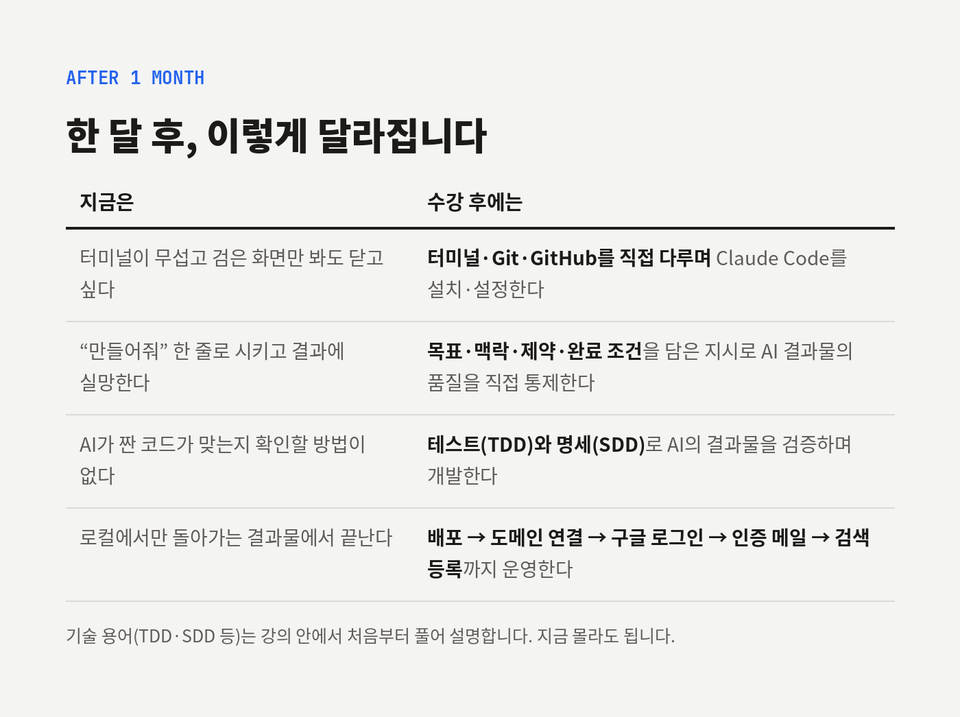
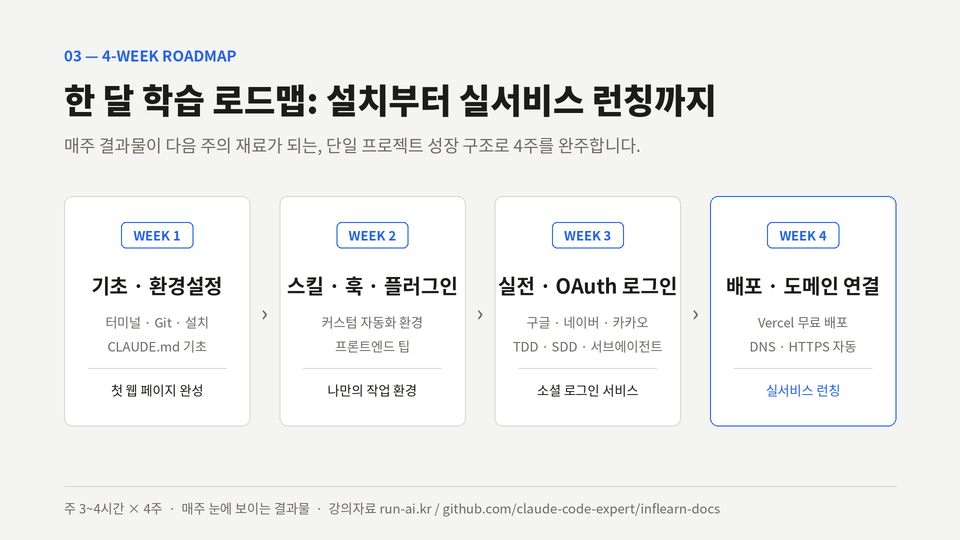
From terminal installation to Google login, email verification, and search visibility. Through a four-week curriculum of two hours a day,
follow the courses in order up to Level 6, and go from a "person who has built something" to a "person who has operated a service".

This is a development course using Claude Code that goes beyond vibe coding, helps you understand AI agents, and evolve from a beginner into an intermediate developer.

Not a course on simple task automation, prompt engineering, or how to use tools, but a project-based, follow-along course for practical development.

After 4 weeks of 2–3 hours of practice per day, you will see a difference in your implementation skills.

Even beginners and non-majors can easily follow along and build their own service.

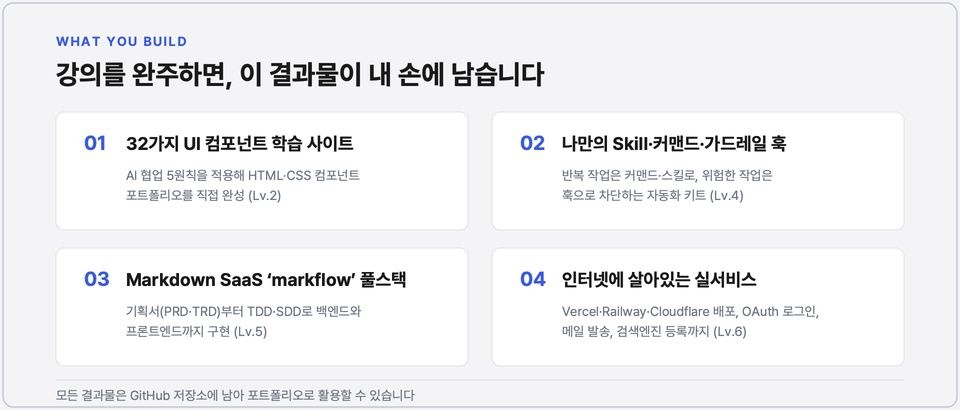
After taking the course, you’ll be able to create projects like these

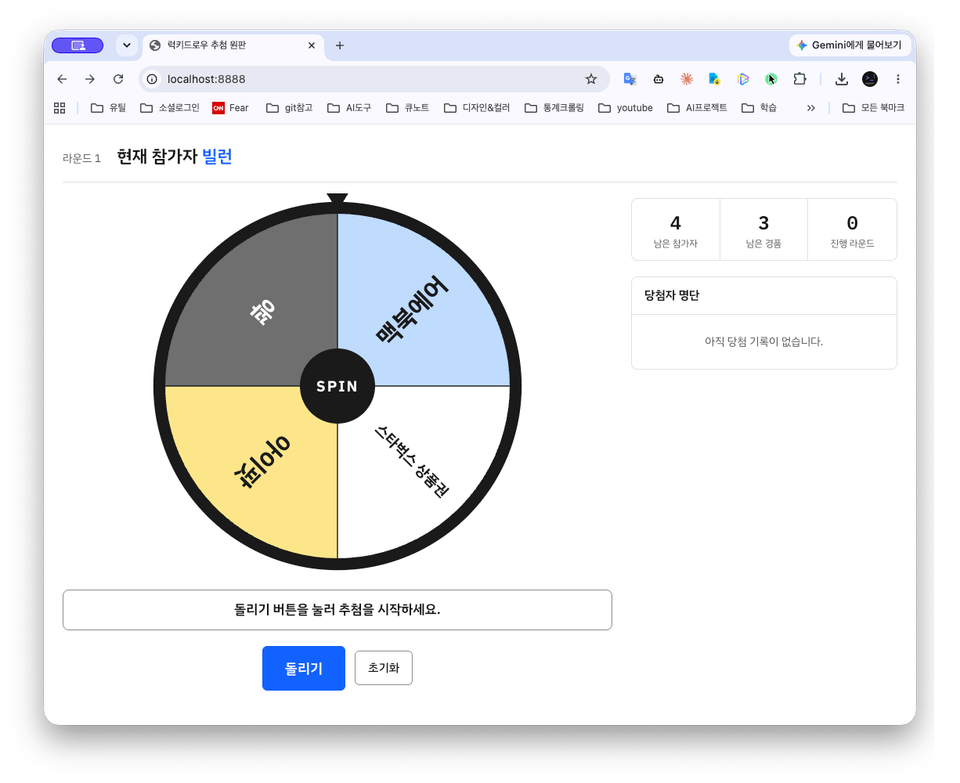
After the Level 1 lecture, we will build a Lucky Draw webpage together as our first hands-on project.

Each level consists of tutorial courses, with hands-on practice and follow-along projects provided.

As the lessons continue, you will experience a project that evolves into an interconnected result.

With each lesson, you will create a tangible result that applies the theory.

In LEVEL 5, you will complete your own knowledge management KMS SaaS.

Finally, in LEVEL 6, you’ll deploy a real service using free hosting services such as vercel and cloudflare, along with Google OAuth and Resend email verification.

Three reasons this course is different

1. A course redesigned by the author of 「Claude Code Master」 for non-majors interested in development
Starting with basic examples that could not be included in the book, a backend developer with 20 years of experience at Kakao and Coupang teaches in the exact order validated through his offline classes for non-developers.
2. Not how to use tools, but "a mindset for collaborating with AI"
Courses that make you memorize button locations become useless when the tool is updated. By learning how to break down tasks, communicate them to AI, and verify the results, you can apply the same skills to any AI coding tool that comes along.
3. Going beyond local execution to learning how to build and operate your own product using real-world development knowledge
Most introductory courses end after running something on your own computer. This course covers the entire process required to operate a real service, including deployment, domains, OAuth login, authentication emails, search registration, and security checks. Since it focuses on free services such as Vercel, Railway, and Cloudflare, the burden is also minimal.

What You’ll Learn

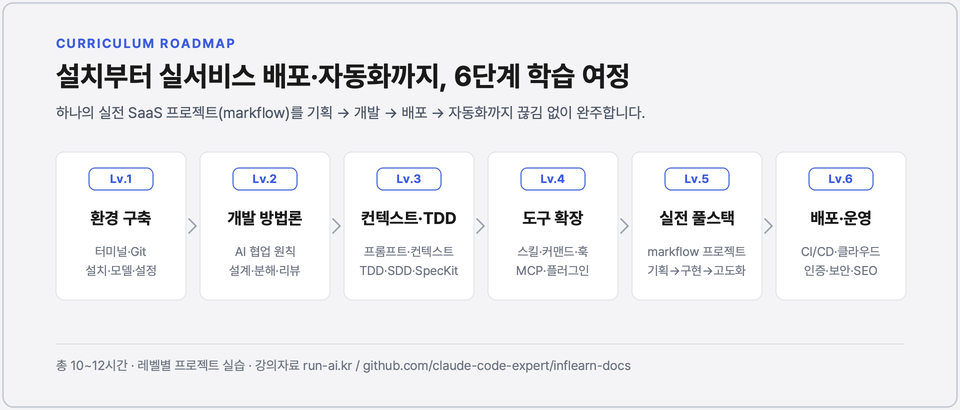
  • As you progress through the levels (sections), the difficulty gradually increases, and your ability to use Claude Code improves.

  • Don't be intimidated by the professional terminology. We explain everything step by step and show you in detail how to use it in practice.

  • Each level progresses from theory → practice → projects, and after completing the course, you will be able to launch your own production-grade service.


Lucky Draw Practice

Level 1 - Setting Up a Development Environment for Claude
Defining Requirements · Prompt Engineering

Build a solid foundation starting with terminal basics and signing up for GitHub, then learn how to install and set up Claude Code, the foundation of vibe coding. After printing “Hello, world,” understand the basic principles behind how Claude Code works, as well as the concepts of model selection, turns, sessions, and context. Then, complete the Lucky Draw web page through a follow-along project.

Level 2 - Methodologies for Collaborating with AI

Design first · Break tasks into small units · Five elements of clear instructions · CLAUDE.md · Context engineering

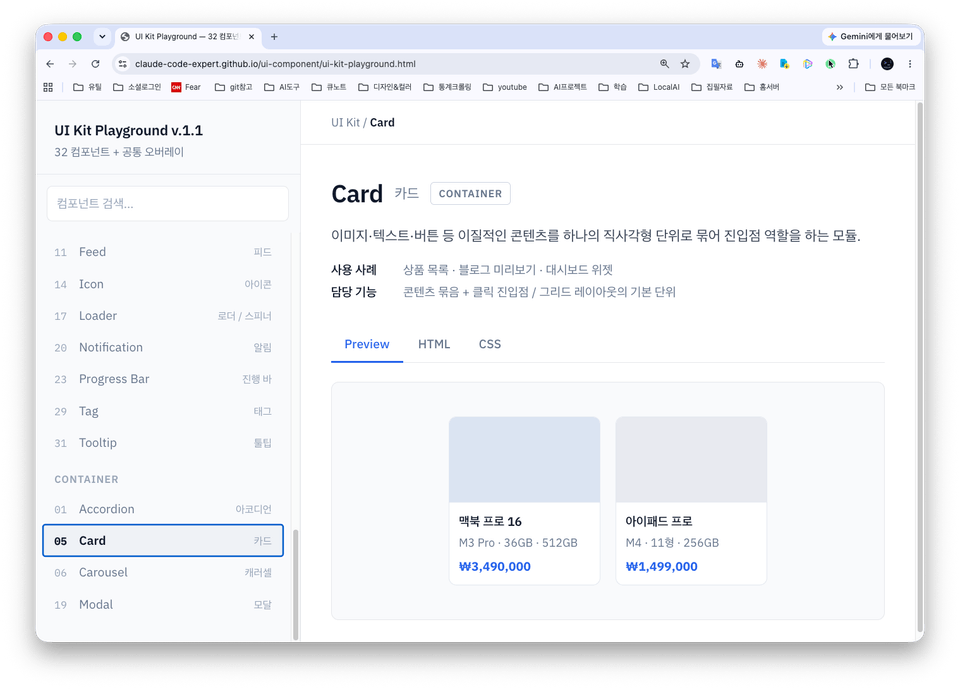
Understand the prompts and workflows that distinguish between "working code" and "good code," and gain a deeper understanding of Claude Code through simple skills and hooks. Deploy a 32-component UI system to Github Pages to understand unfamiliar frontend terms all at once.

Frontend UI Component Development Screen

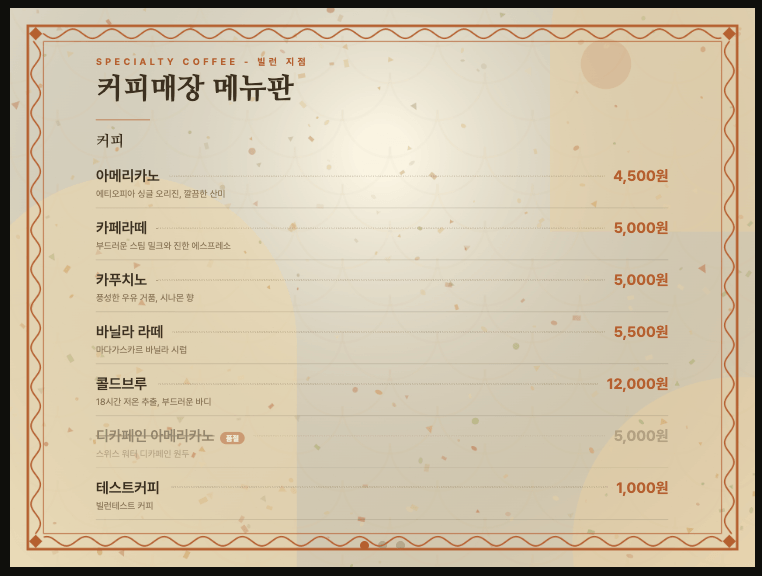
Café Menu Board Management Integrated with Excel Data

Level 3 - Practical Full-Stack Development: Building a Café Menu Board Integrated with Excel

TDD (Red·Green·Refactor) · SDD · SpecKit · Augmented Coding · PRD/TRD Specifications

Learn the concepts and workflows of TDD and SDD for carrying out full-scale development. Through hands-on projects, you will build a cafe menu management project by integrating Excel data and create a Markdown editor to build your own knowledge repository.

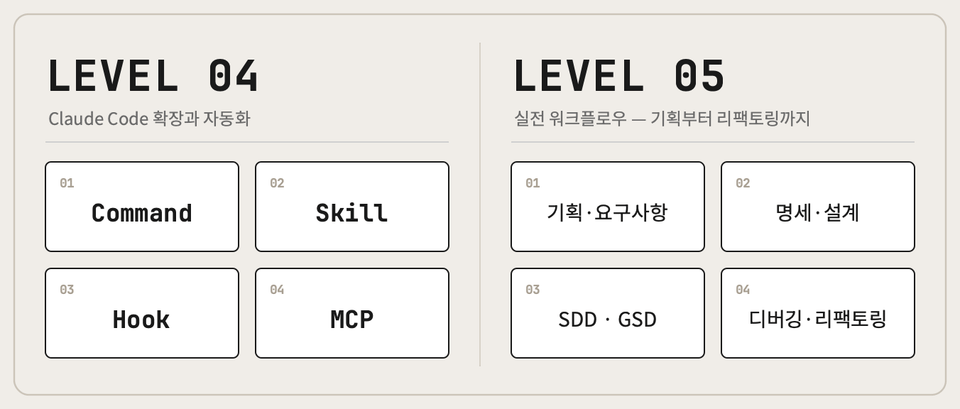
Claude Code Extension and System Enhancement

Level 4 - Extending and Automating Claude Code

Slash Commands · Agent Skills · Hooks (8 events) · MCP

Move from simply using Claude Code to learning how to extend it.

Learn four extension tools for implementing automation, reusability, and consistency in code: slash commands (shortcuts) that reduce repetitive instructions to a single word; skills (manuals) that the model retrieves and uses on its own based on the situation; hooks (speed bumps) that deterministically block dangerous commands and secret files; and MCP (a USB-C port) that connects external tools using a standard protocol.

Level 5 - Practical Workflow: Taking a Single Project from Planning to Enhancement (Full Stack)

Requirements analysis, database design, and frontend enhancement through the GSD SDD workflow and design system

We apply the tools and methodologies from L1–L4 to an entire continuous project (markflow).

Planning → specification (PRD/TRD/DB design) → implementation → debugging → refactoring → frontend enhancement: experience the entire process by actually developing with SDD.

With the GSD workflow, you separate context by phase and automate Handoffs and Changelogs with hooks. You gain hands-on experience developing from specifications from the very beginning.

Two hours a day for four weeks is enough to complete a project.

By following along step by step, you’ll become proficient at using Claude Code while completing a finished project.

  • From planning and design to frontend/backend enhancement, you will learn and work through the entire project step by step according to your skill level.

  • Requirements definition, user stories, database table concepts and design methods, and professional website development using database diagrams (covering the essentials needed for database integration from the basics)

  • Rather than simply building and running it locally, you will develop the service by following the entire process firsthand—from deploying it to an actual domain and integrating social login with Google OAuth, authenticating members via email, setting up free server hosting, and operating the service to registering it with search engines.


Practice environment

  • Operating system and version (OS): The hands-on exercises are based on macOS, but you can also follow along on Windows using WSL. (Separate course documentation for Windows is provided.)

  • Tools used: In addition to the paid Claude Code (Pro), we use free tools such as VSCode, Git, and the terminal.

  • The course primarily uses free services such as Vercel and Cloudflare, while costs for domains and other items may be incurred depending on the learner’s choices.


Learning materials

  • At the beginning of each Level, we provide the PPT slides for the first lecture converted into HTML.

  • All code and documents referenced in each project will be shared through GitHub.

  • Learning resources are provided through the learning support community site: https://www.run-ai.kr.


Notes

  • Claude Code is a tool that is updated frequently. The latest features will be continuously updated in the appendix, and the appendix lectures are provided free of charge.

  • The total course duration is expected to be at least 12 hours. Please understand that the course price may increase depending on the length and amount of the development lectures (supplementary lectures are excluded from the course fee calculation).

Recommended for
these people

Who is this course right for?

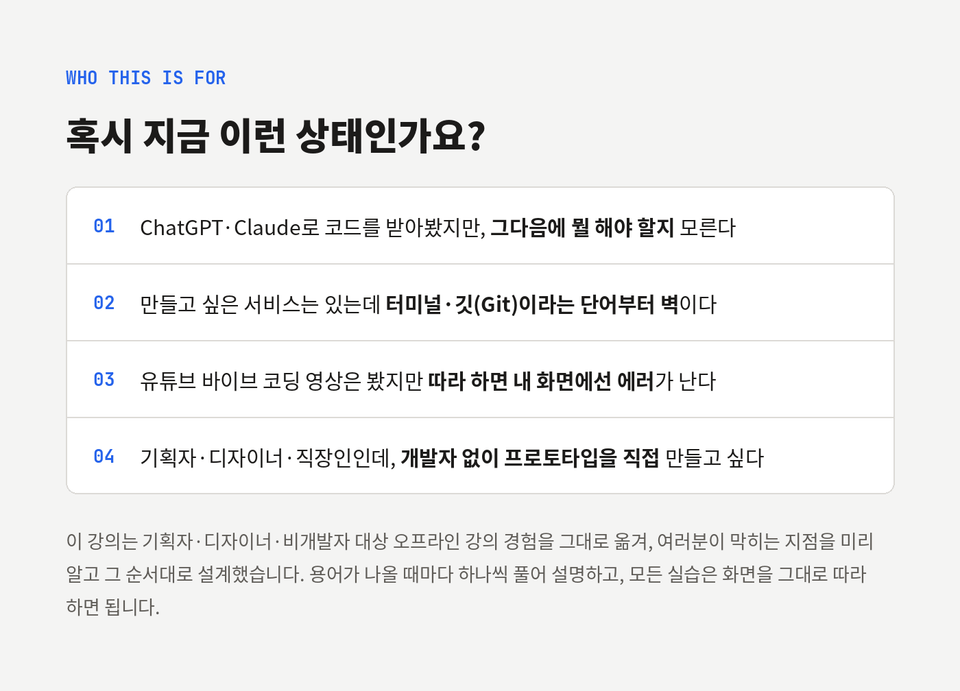
  • Non-majors, beginners, planners, and designers who want to start developing but find coding difficult

  • A working professional who wants to develop production-grade products using AI tools

  • A beginner developer who has studied programming but lacks real-world project experience

  • We’ll help ease your overwhelming fear of development with Claude Code.

  • Those who want to experience everything from the basics—login, email membership verification, and the actual service—to database integration and server launch.

Need to know before starting?

  • Basic computer skills and experience using office programs

  • Interest in AI tools and willingness to learn new technologies

  • Those who have used AI agents such as Claude, ChatGPT, or Gemini

Hello
This is codevillain

Career Verified

3,726

Learners

175

Reviews

45

Answers

4.9

Rating

6

Courses

Backend Developer with 20 years of experience


  • Kakao (2018 ~ 2026, Former Leader)

  • LF (LG Fashion, 2017, Deputy General Manager of IT Platform Team)

  • Coupang (2013~2017, Sr. Software Engineer)

  • Silver Award at the Open Source Developer Competition (2012. Ministry of Knowledge Economy, NIPA)

Main Fields
I have worked for a long time in Java, Spring, and MSA environments. Based on my experience in large-scale data processing, microservice architecture design, complex domain entity design, and team leadership, combined with over 10 years of experience as an interviewer, I would like to help you prepare for interviews and establish a career roadmap.


Lecturing Experience

  • 2026.06 DK Techin Claude Code Lecture

  • 2025.05 Pusan National University AI Utilization Lecture

  • 2024.11 Daegu University Gyeongsan Innovation Academy Career Special Lecture

  • 2024.10 Hanbit Media 2nd Job Seminar Special Lecture for Junior Developers

  • 2024.09 Pusan National University SW Convergence Education Center Career Special Lecture

  • 2024.04 Hanbit Media Career Seminar Special Lecture for Junior Developers


Books (Claude Code Master, Developer Technical Interview Notes, Hanbit Media)

More

Curriculum

All

85 lectures ∙ (13hr 1min)

Course Materials:

Lecture resources
Published: 
Last updated: 

Reviews

All

10 reviews

4.9

10 reviews

  • jek02216736님의 프로필 이미지
    jek02216736

    Reviews 1

    ∙

    Average Rating 5.0

    5

    21% enrolled

    I've been working in development for a long time, and it truly feels like a new paradigm is opening up. I was late to jump into AI-native because I was busy with projects, but while reading books and trying things out on my own, I decided that if I’m going to do this, I should learn it properly. So, I picked out a book at Kyobo Book Centre and even signed up for the course. At first, I hesitated to sign up for the lecture, thinking I could just go through the book on my own, but I eventually enrolled to save time. I’m about a third of the way through now, and I’m so glad I did. I was craving a systematic foundation rather than the countless fragmented tips and tutorials on YouTube, and this is helping me immensely. I can feel the instructor's effort and dedication to deeply exploring new things through their explanations, and I have a lot of respect for that. I’ll do my best just to keep up.

    • codevillain
      Instructor

      Hello, thank you so much for leaving a review. I'm glad to hear that your decision to sign up for the lecture—after wondering if the book alone would be enough—turned out to be a time-saving choice in the end. Despite my long career in development, this AI-native transition felt different to me as well. That’s why I wanted to create a curriculum that builds up from the principles in order, rather than just listing fragmented tips. I feel a great sense of reward knowing that you recognized that intention. Since new tools are pouring out constantly, I am also going through a process of re-verifying and updating everything each time. I will continue to build the remaining parts of the course with high quality so that you can level up sufficiently with this lecture alone. If you get stuck or have any questions while progressing through the course, please feel free to leave them anytime. Thank you again for leaving a course review.

  • un0087님의 프로필 이미지
    un0087

    Reviews 1

    ∙

    Average Rating 5.0

    5

    18% enrolled

    Thank you. Since I’m used to working with Windows, I had to use an unfamiliar tool called WSL to run the terminal, so the initial setup was a bit confusing, but I’m following along well!

    • codevillain
      Instructor

      un0087, thank you for leaving a course review. As you follow along, you’ll soon become familiar with it. I hope you finish it successfully to the end.

  • devkuka님의 프로필 이미지
    devkuka

    Reviews 334

    ∙

    Average Rating 5.0

    5

    5% enrolled

    I had been feeling anxious about whether I was using Claude Code effectively. It was a great help, and I hope to continue learning and applying it well in my work. Thank you for the excellent course.

    • codevillain
      Instructor

      Thank you, KYUNG TAE BAE, for leaving a course review.

  • dyjin12174671님의 프로필 이미지
    dyjin12174671

    Reviews 5

    ∙

    Average Rating 5.0

    5

    100% enrolled

    Having listened to the lecture, I think the content is good, but it doesn’t seem to be for beginners haha. It would probably be helpful for people who have some experience using it.

    • codevillain
      Instructor

      Thank you, Manken, for leaving a course review.

  • arms259116님의 프로필 이미지
    arms259116

    Reviews 2

    ∙

    Average Rating 5.0

    5

    31% enrolled

    It's easy and concise.

    • codevillain
      Instructor

      arm25, thank you for leaving a review.

codevillain's other courses

Check out other courses by the instructor!

Similar courses

Explore other courses in the same field!

25% off for new members

$82.20

25%

$112.20