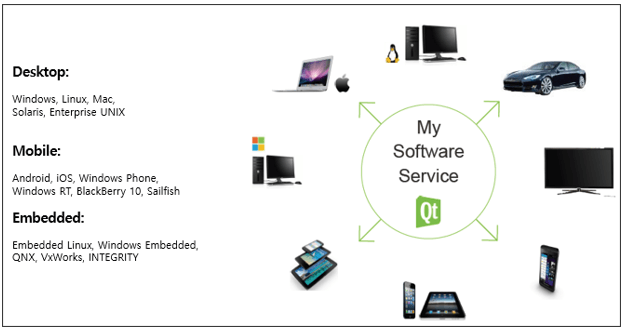
Qt allows you to develop SW that is compatible with various operating systems. In other words, you can develop SW that runs on various platforms with the source code developed once with Qt.
After working on Windows MFC programs for 20 years, I've recently started working on QT-related development. QT has a much better architectural structure than MFC, so there's no difficulty in development, but I took the class to see if there's anything I'm misunderstanding. It was very helpful because there was a lot of knowledge.
5.0
양석원
31% enrolled
I am really enjoying your great lectures.
5.0
이준현
31% enrolled
Great, I'm retaking it, great.
What you will gain after the course
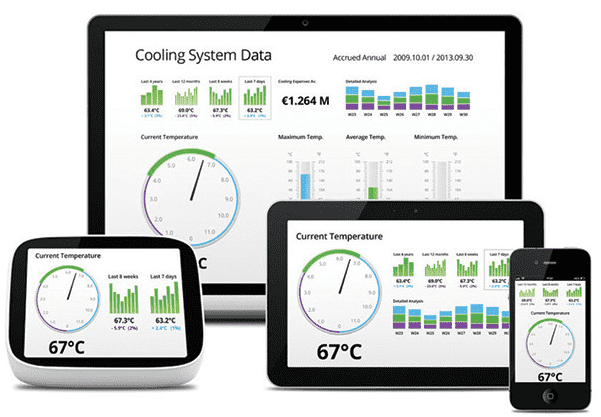
Learn how to develop SW that runs on various platforms, including desktop, mobile, and embedded, using Qt.
Learn how to develop SW using Qt on MS Windows, Linux, and MacOS.
Learn how to develop apps for the mobile Android platform using Qt.
Qt Programming One framework, one codebase, any platform.
What is Qt?
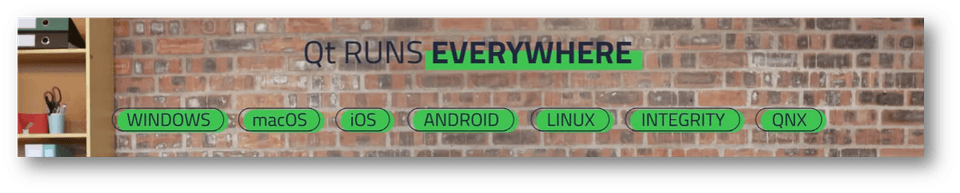
Qt is an application framework, andSW developed using Qt is compatible ( supported ) with MS Windows, MacOS, Android, iOS, Embedded Linux, QNX,etc. Therefore, there is no need to develop separate applications compatible with each operating system .
And Qt isn't just a development framework for GUIs. It offers a vast array of APIs that address the needs of a wide range of industries .
SW developed with Qt can be ported to each operating system . For example, to develop an app for Android , you need to use JAVA , Android SDK, and NDK , but if you develop using C++ , which Qt uses, you can develop an app that runs on Android.
Applications developed with Qt can be ported to desktop operating systems , mobile operating systems, and embedded operating systems . Therefore, it is a development framework that can minimize labor costs and time required for development, and it uses C++. The development framework even includes tools that support multiple languages and development tools that can create installation distributions ( installation files ).
What can you do with Qt?
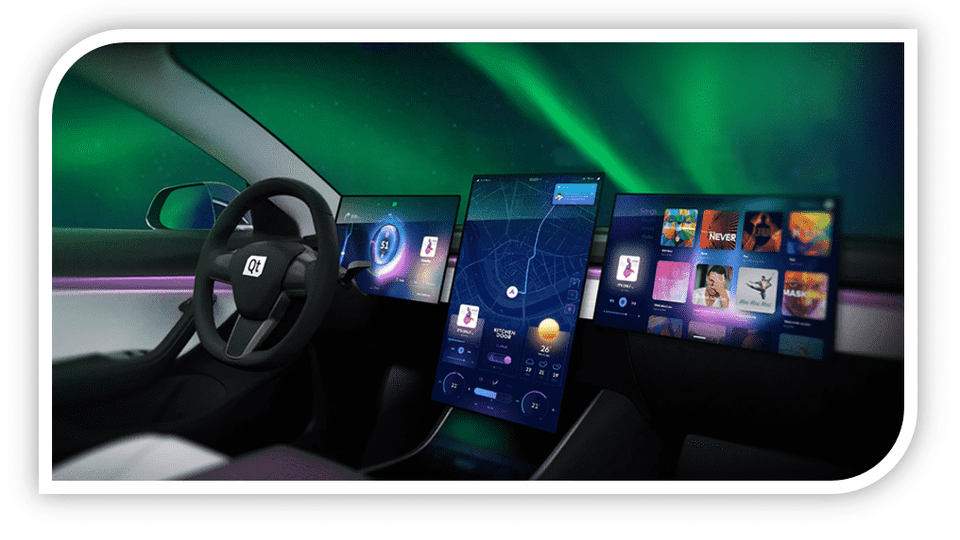
Qt can be used to develop software in a variety of industries . Tens of thousands of leading automotive OEMs use Qt. And countless other fields, including TVs, home appliances , and construction, are developing software using Qt.
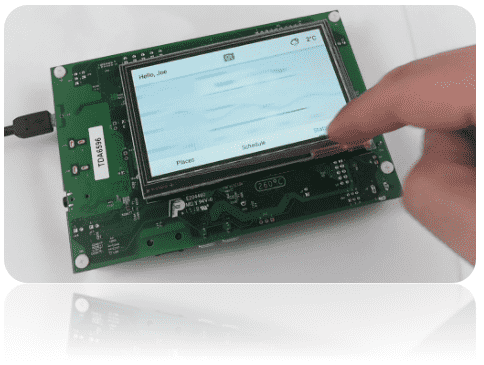
It is possible to port SW developed with Qt to operating systems that operate at the MCU level, such as the FreeRTOS operating system, which is a real-time OS.
Qt, how do I use it?
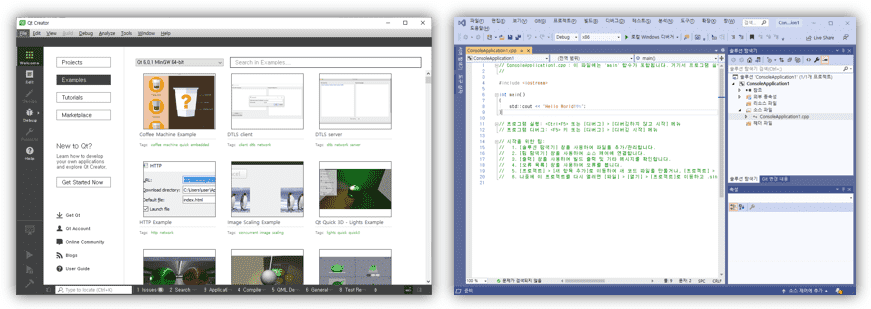
Qt provides the Qt Creator IDE tool as a development IDE tool . However, for developers familiar with the Visual Studio IDE tool, you can install the Qt Visual Studio Add-in to develop SW using Qt in the Visual Studio IDE tool .
Learn things like this
Developing with Qt minimizes time and cost by being compatible with various operating systems, and through this training course, you can learn how to develop SW using Qt.
Therefore, by taking this course, you can improve your ability to develop SW in various industrial fields and acquire Qt intermediate or higher level skills .
Learning the vast API provided by Qt
How to develop application software that works the same way on multiple platforms
Learn how to use the tools provided by Qt
I recommend this to these people
Those who need to develop SW compatible with various platforms
Those who want to develop SW required in various industrial fields using Qt
Lecture Structure 📖
Section 1. Introduction and Features of Qt 6 Let's take a look at the features and benefits of Qt. This section provides an overview of Qt before diving into the details.
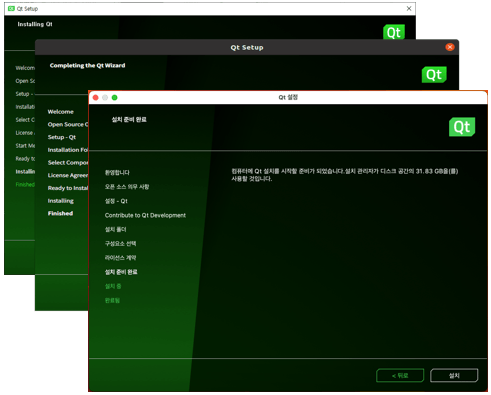
Section 2. Installing the Qt 6 Framework Qt supports cross-platform development, enabling applications to run on various platforms, including MS Windows, Linux, macOS, Android, iOS, QNX, and FreeRTOS. This section explains how to install Qt on various platforms and the differences between Qt versions.
Section 3. Getting Started with Qt Programming Learn how to create a sample application using Qt. You'll learn how to develop console-based applications (those that don't require a GUI) and GUI-based applications. Qt also provides a Designer tool, allowing you to easily use and arrange GUI widgets on the screen without coding. So in this section, you'll learn how to create a simple application using Qt and how to use the Designer tool.
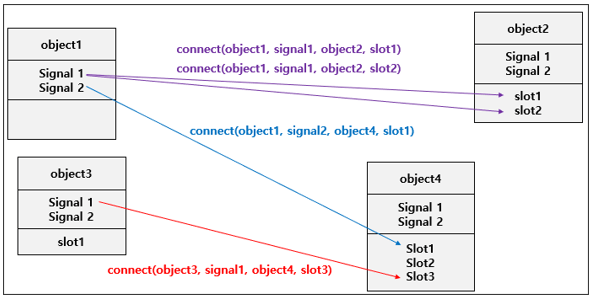
Section 4. Signals and Slots Signals and Slots are events used in Qt. A signal is an event, and a slot is a function that handles the event when it occurs. For example, if you have a button and click it, a click event occurs. This is called a signal. In other words, a button click signal is said to have occurred. And when a button is clicked, a function is executed, called a slot function. In this section, you will learn how to use signals and slots.
Section 5. GUI Programming, Widgets Elements like buttons, combo boxes, and check boxes are called "widgets" in Qt. All widgets inherit from QWidget. For example, QPushButton is a GUI class that provides button-like functionality. This class also inherits from QWidget. In this section, we'll focus on some of the most frequently used widgets provided by Qt.
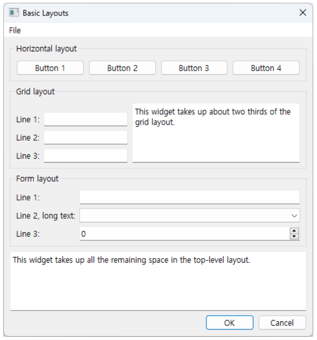
Section 6. GUI Programming, Layouts Layout is a method to arrange widgets provided by Qt on the screen and to dynamically (automatically) change the size of widgets when the size changes. In this section, we will learn about Layout provided by Qt.
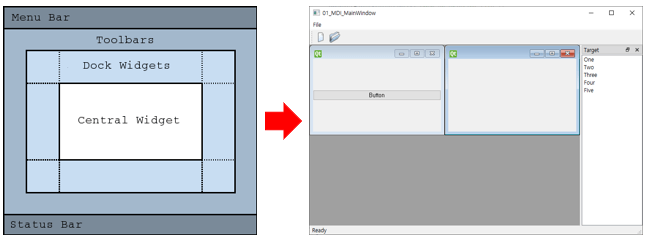
Section 7. GUI Programming, QMainWindow QMainWindow is used to implement desktop-style window-style GUIs. For example, learn about QMainWindow, which is useful for implementing standardized GUIs with menus, toolbars, main widget areas, left-right layout areas, and bottom status bars.
Section 8. Basic Data Types and Useful Types Learn about the types and useful type classes provided by Qt. For example, QString is a type class that can be used to store strings. Learn about useful and frequently used types and type classes provided by Qt.
Section 9. Container Classes A Container is a Template. Qt provides a variety of useful Container classes, including QList and QHash. In this section, we'll learn about the most commonly used Container classes in Qt. We'll also delve deeper into the Container classes through examples.
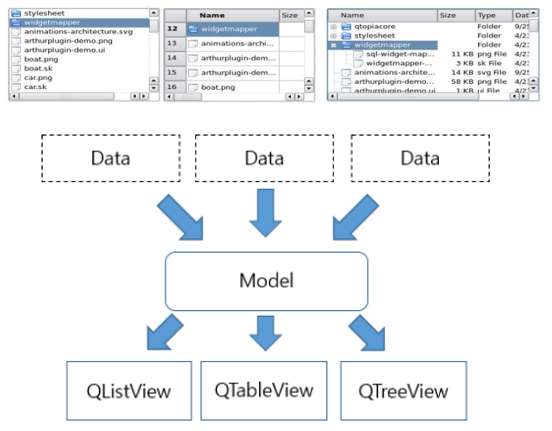
Section 10. Model / View Large amounts of data can be displayed on a GUI in various formats, such as tables or trees. Qt uses the concepts of Model and View to easily implement such functionality in a GUI. In this section, we'll learn about Model and View, which are provided by Qt.
Section 11. STREAM Processing large amounts of data can sometimes cause blocking. For example, reading a 100MB file can cause the application to momentarily block. Therefore, Qt provides STREAM to address this issue and make accessing large amounts of data easier. In this section, you'll learn how to use QDataStream and QTextStream, both provided by Qt.
Section 12. File Input/Output You'll learn how to handle files using classes provided by Qt. Qt uses QFile to handle files, and this class allows you to use STEAM to read or write data from files. Therefore, in this section, you'll learn how to handle files using QFile and STREAM.
Recommended for these people
Who is this course right for?
Those who need to develop SW compatible with various platforms and those who want to develop SW required in various industries
You can develop SW in various industries such as automobiles, medical, multimedia, and networks.
Work Experience Current: SW Team Leader in the Embedded field LG Electronics, VS Division IVI Advanced Platform/Module Development SW Maestro, SW Mentor
Teaching Experience Samsung Electronics, Qt & QML Lectures LG Electronics, In-house Instructor for Qt & QML Hancom Academy, Qt Guest Lecturer Guest Lecturer for Qt at numerous IT companies
After working on Windows MFC programs for 20 years, I've recently started working on QT-related development. QT has a much better architectural structure than MFC, so there's no difficulty in development, but I took the class to see if there's anything I'm misunderstanding. It was very helpful because there was a lot of knowledge.
This course systematically organized the core concepts of Qt 6, including widget structure, event handling, layouts, and signal-slot mechanisms, providing a solid foundation for desktop application development. It explained the fundamental elements that beginner and intermediate developers must know through clear examples, creating a structure that naturally leads to advanced learning in Part 2.












![[Level 3] From Beginner to Expert: Practical Application Master Class with Qt and PythonCourse Thumbnail](https://cdn.inflearn.com/public/courses/335355/cover/df1bb1b2-848a-430b-9eb3-087e418d0ffb/335355.png?w=420)

![[Level 2] Python Programming with Qt: QMLCourse Thumbnail](https://cdn.inflearn.com/public/courses/335346/cover/f8e06c2e-03bb-4e02-910d-965ee2e547b8/335346.png?w=420)

![[Level 1] Python Programming with Qt: IntroductionCourse Thumbnail](https://cdn.inflearn.com/public/courses/335089/cover/838ed04b-4bc0-4f9f-bd00-91361fcb6238/335089.png?w=420)
![[Beginner] Practical Qt/QML Programming for Stepping Up to Intermediate LevelCourse Thumbnail](https://cdn.inflearn.com/public/courses/334936/cover/4f53471f-7fc8-4602-a102-4bb4872dae35/334936.png?w=420)
![[Beginner] QML Programming Part 2Course Thumbnail](https://cdn.inflearn.com/public/courses/334674/cover/7f8b40af-9435-49f3-a498-d0fb87a8ca43/334674.png?w=420)
![[Beginner] QML Programming, Part 1Course Thumbnail](https://cdn.inflearn.com/public/courses/329512/cover/c86fe3de-d56e-4fb8-8d24-d92ccffc6b7d/329512.png?w=420)
![[Introduction] Qt 6 Programming Part 2Course Thumbnail](https://cdn.inflearn.com/public/courses/326823/cover/9c839f33-d59f-422a-9704-64534673a39c/커버이미지_Qt 6 프로그래밍_2편.png?w=420)