![[For Beginners] Data Visualization with QGISCourse Thumbnail](https://cdn.inflearn.com/public/courses/327036/cover/22665c92-3392-4ea7-9bc5-b49a779b663d/QGIS_복사본-001.png?w=420)
[For Beginners] Data Visualization with QGIS
dee
In the [Beginner's] Data Visualization with QGIS course, you will learn about basic spatial analysis methods using the QGIS program and spatial data.

Beginner
QGIS

From beginners, non-specialists, and early adopters,
Learning new things about MyTo data analysis!

The Python data analysis course starting with Mito is structured to compare data analysis using Python's pandas and seaborn with data analysis using Mito.

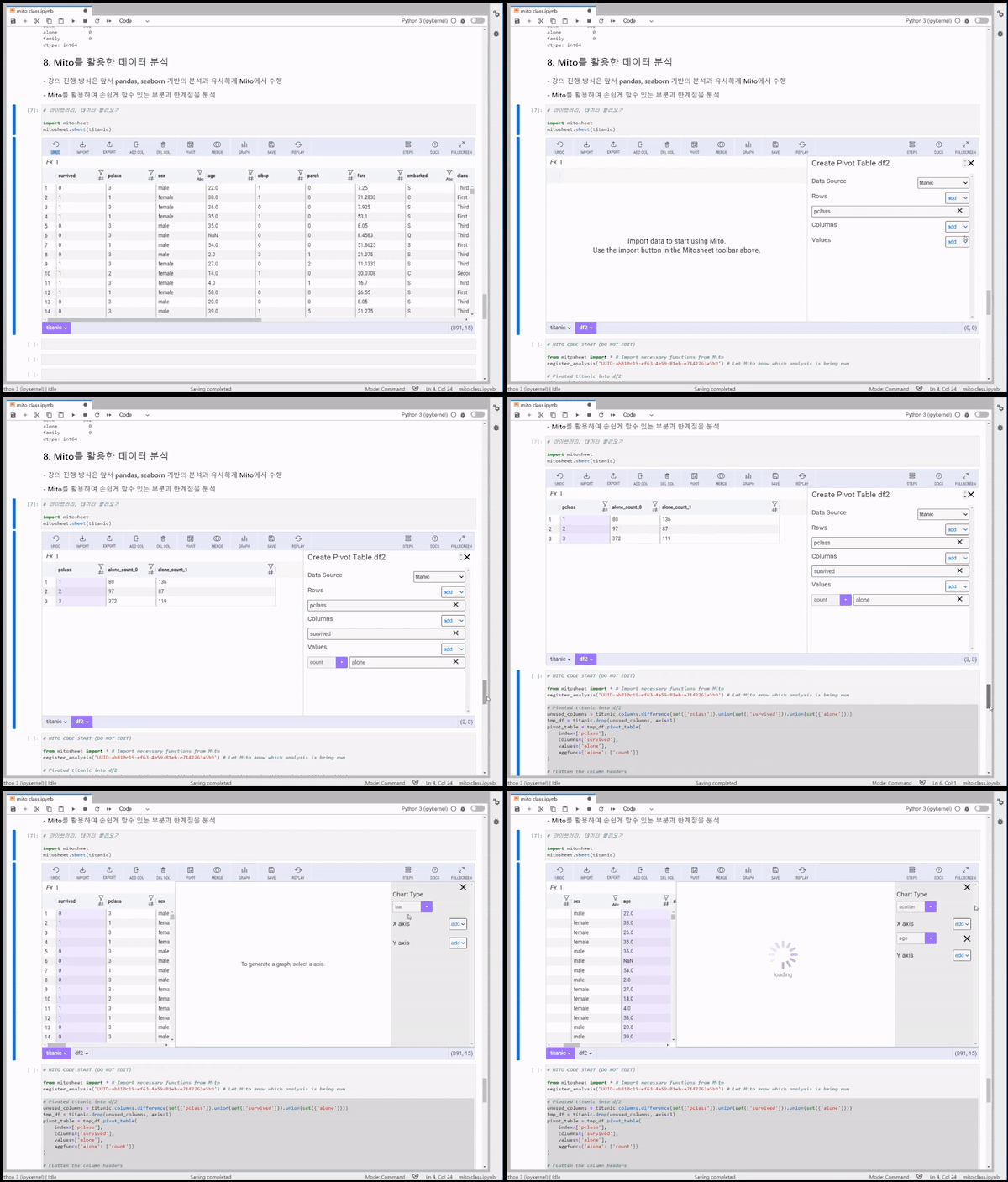
Mito is a Python library that allows you to easily create Python pivot tables using Excel and generate Python code. Mito uses an intuitive, Excel-like interface to group data and calculate summary statistics. Mito also provides data merging, filtering, and graphing, allowing you to use features previously available in Pandas. Mito then automatically generates the code for these functions, making data analysis easier.
While writing code directly using Pandas might be easy for data analysis majors, it can be challenging for beginners and non-experts. Mito allows not only data analysis majors but also beginners and non-specialists interested in data analysis to seamlessly perform data analysis.
1. You can perform various data preprocessing, such as data filtering and merging, using Mito.
.png?w=960)
2. You can automatically generate code using Mito.
.png?w=960)
3. You can draw various types of graphs using Mito.
.png?w=960)
.png?w=960)
4. You can manage and track codes using the History function provided by Mito.
.png?w=960)
Mito Demo
※ You can see that the Python code is automatically generated at the bottom.
.gif?w=960)
.gif?w=960)
.gif?w=960)

Thank you for the lecture.
I think it would have been better if you explained every step in detail so that even beginners could easily follow along. I hope you will give us another great lecture. Thank you.
I learned a lot about Mito! Thank you for the great lecture.
Thank you for the great lecture!
Thank you for the great lecture!
![[For Beginners] Data Visualization with Power BICourse Thumbnail](https://cdn.inflearn.com/public/courses/327055/cover/455b54c1-3e63-439b-9b60-5d12e12bc303/PowerBI-001 (1).png?w=420)

![[For Beginners] Machine Learning Analysis with AutoKerasCourse Thumbnail](https://cdn.inflearn.com/public/courses/327164/cover/2825a3d8-08a1-4baf-9a21-698f89e877e3/인프런 강의 이미지.png?w=420)
![[For Beginners] Machine Learning with Kaggle • Deep Learning AnalysisCourse Thumbnail](https://cdn.inflearn.com/public/courses/327034/cover/303d9d8a-4e3e-4654-b9fd-4000b7628324/캐글 _복사본-001.png?w=420)
![[DATA, ON] First Steps in Data AnalysisCourse Thumbnail](https://cdn.inflearn.com/public/courses/330035/cover/1ed22b3b-6709-4857-9139-ca5026217bf7/330035-eng.png?w=420)

![[Side Project After Work] Big Data Analysis Certification Practical Exam (Type 1, 2, 3)Course Thumbnail](https://cdn.inflearn.com/public/courses/329972/cover/dcfb28fd-48c1-4bb1-ab31-d59eac874194/329972-original.png?w=420)

![[Renewed] Python Machine Learning Bootcamp for Beginners (Easy! Learn by Solving Real Kaggle Problems) [Data Analysis/Science Part2]Course Thumbnail](https://cdn.inflearn.com/public/courses/327464/cover/55c4db7b-7764-43cc-ac75-d9e8d08098f1/327464-eng.png?w=420)



![Complete Mastery of Big Data Analysis Certification Practical Exam Past Questions [Includes all previous sessions · Continuous updates · Dedicated practice environment provided]Course Thumbnail](https://cdn.inflearn.com/public/files/courses/342117/cover/01krvz68s4a416j2pjefmyvrff?w=420)