RAG for an LLM Service by a Silicon Valley AI Developer
The limitations of LLMs? I’ll share practical solutions to real-world problems based on RAG trial and error and operational know-how from working in Silicon Valley.
I liked that it was structured to help learners understand Retrieval itself first, rather than immediately integrating an LLM. It covered not only vector search but also Hybrid Search and Reranking, which helped me understand the big picture of RAG and which techniques are needed in different situations.
I would recommend it to anyone new to RAG or looking to move from tutorial-level implementations to a real-world service architecture. In particular, I appreciated that it went beyond simply following individual technologies and made it possible to understand RAG from a holistic perspective.
If there is one thing I would personally hope for, it would be a more diverse practice dataset. Being able to compare the differences between each technique depending on the data would have helped me gain a deeper, more practical understanding of what I learned.
5.0
집돌이-JPA,코/접,AWS,우
34% enrolled
I’m about 30% through the course, and I’m very satisfied with how clearly and accessibly the theory has been explained from the beginning.
In particular, it was great to learn how vector DB coordinate transformation, the concept of embeddings, the differences from traditional databases, and the principles behind semantic search all work.
I’m also glad to have had the opportunity to work with ChromaDB and Ollama firsthand. After completing the course, I’m planning to take on GraphRAG, which you mentioned separately. I’m looking forward to finding many ways to apply what I’ve learned in various fields!
I’ll write an additional review after completing the entire course!
5.0
Deck
94% enrolled
This is a very hot topic lately, so I took the course with great interest. Even though I started with zero knowledge, it was very informative and helpful.
The market is quite difficult these days, but I think I'll be able to build a portfolio based on this content.. haha
Thank you!!
What you will gain after the course
Ability to directly implement a ChromaDB-based semantic search system
Experience building a document-upload RAG API server
Ability to apply reranking and hybrid search to improve search quality
The ability to understand and explain vector DBs, embeddings, and HNSW structures
Practical expertise in designing and operating RAG architectures
실리콘밸리 현직 AI 개발자 직강
Build with a Silicon Valley AI developer a course for mastering RAG
This hands-on course guides you through building a vector search and RAG (Retrieval-Augmented Generation) service from start to finish using TypeScript and ChromaDB. You’ll complete a RAG service that answers questions based on uploaded documents, covering everything from vector databases to advanced optimization entirely locally, without paying for external APIs.
3-stage beginner · practical · advanced trackHands-on focused courseRAG service completed from scratchBeginner → practical → advanced seamless single flow
0 won
Both the embedding model (bge-m3) and the LLM (llama3.2) run locally via Ollama. You can practice throughout the entire course without issuing API keys or worrying about charges.
Ollama · POST /api/embed
bge-m3 → 1024-dimensional vector
getOrCreateCollection({ hnsw:space: cosine })
collection.upsert({ ids, documents })
collection.query({ queryTexts })
where_document → document filter
HNSW M · ef_construction Tuning
llama3.2 · /api/chat → RAG response
Why does it find it even though the keyword isn't there??
This is the actual result run in Lecture 5.1. The query does not contain the word “coffee.”
QueryThe comfort provided by a warm beverage
The smaller the distance, the closer it is · Cosine distance
1Coffee offers a brief respite0.218
2A cup of latte fills the day0.387
3Espresso is short but intense0.412
There are no words overlapping between the query and the documents.
With keyword search, nothing would be returned.
They are sorted in order of semantic similarity, and that “similarity” is represented as a number.
We’ll start by learning how to read this number.
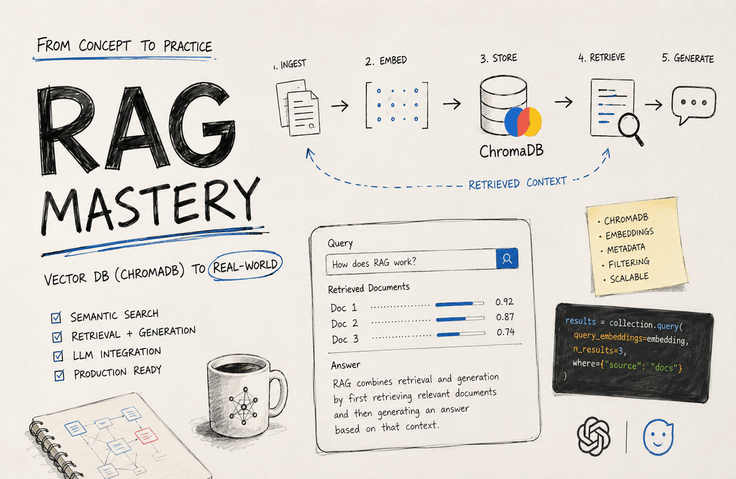
What is RAG (Retrieval-Augmented Generation)??
In one sentence, it means giving an LLM the ability to read our data.
How does it work
Question
The user asks a question.
→
Vector search
Finds the supporting evidence
→
Evidence + question
Pass them along together
→
LLM
Read and answer
→
Answers with sources
Know where it came from
What changes
With just the LLM
“Summarize last year’s fourth-quarter sales report.”
It only knows what it learned at the time of training. It can't see the internal company document you just uploaded.
When you add RAG,
“Summarize last year’s Q4 sales report.”
It retrieves that document and uses it as evidence. Sources are included with the answer.
Most people stop here
Why are the search results strange?How can I improve the quality?How can I deploy it as a real service?
You can quickly get to a working demo with a tutorial.
What this course fills in
01
Principles
Why embeddings and vector databases work the way they do
02
Implementation and Operations
Build semantic search with ChromaDB and run the server
03
Measurement
Measure and improve search quality with numbers
04
Complete
Build a RAG service from start to finish by integrating an LLM
Have you ever had these concerns?
You understand that RAG is important, but if you’re not sure how to get started, this course covers exactly that.
"They say RAG is the trend, but where on earth should I start?"-offsetof
"I followed the tutorial, but how do I deploy it as an actual service?"
"Your search results are strangely off, but you don't know why or what to fix."
"I’ve heard of terms like vector DB and embeddings… but the underlying principles are still unclear."
With this one course, you’ll progress seamlessly from concepts → hands-on services → advanced optimization.
Rather than a hundred words of explanation, see it for yourself.
Preview the results created in the course and the way it is conducted through the video and on-screen demonstration.
Similarity Search Basics — Query Search and Interpreting Distance FunctionsSearch Evaluation and Vector + Keyword Hybrid DesignBuilding an AI Search Service with an Express BackendReranking — A cross-encoder that surpasses the limitations of bi-encoders
What the job posting is actually asking
"Having used an LLM API" is no longer a differentiator. What companies really need are people who know how to make systems answer based on their own documents.
671 listingsrelated to 'RAG' are posted on JobKorea. They are especially common for internal document search, customer service bots, and knowledge platforms.
65% is the share of applied LLM job postings that require experience with RAG architecture. It is no longer optional.
51%The proportion of corporate AI adoption cases that use RAG. It was 31% a year ago.
5–9 weeksThis is the average time it takes to hire one RAG professional. It means there is that much of a talent shortage.
The number of JobKorea job postings was obtained through a direct search in August 2026 and may vary depending on the time of search. The remaining figures were cited from publicly available labor market surveys and adoption status reports.
Write it on your resume like this
Many people write, “I’ve tried using RAG.” Far fewer can describe in one line what they built and how they built it. By the end of the course, your portfolio and résumé will include sentences like this.
01Implement the principles of embeddings and vector search in code to complete a semantic search engine"Why similar meanings correspond to nearby vectors," and how 1024-dimensional vectors are actually compared.
02Design and operate ChromaDB collections, embedding functions, and document CRUD yourselfRather than stopping at an in-memory setup for learning, you’ll run it in server mode and cover data persistence as well as backup and restoration.
03Improve search quality with metadata filters and hybrid searchIdentify cases where semantic search alone falls short and restore accuracy by combining keyword conditions.
04Measure search quality with an evaluation set and improve it with reranking"It seems better" is not enough—we verify it with numbers. Add cross-encoder reranking to reorder the top results.
05Complete a RAG API service from scratch by combining Express with a local LLMBuild a backend yourself that answers based on uploaded documents and returns the sources as well.
06Tune the HNSW index and apply advanced RAG patternsSee how the M and ef_construction values trade off speed and accuracy, then add HyDE, Multi-Query, and Self-Querying.
When asked in an interview, "Why does vector search work that way?", only someone who has built it themselves can answer.
Why should it be this course?
There are many RAG courses on the market. But this course is different in four ways.
01 — SILICON VALLEY
A Practical Perspective from a Silicon Valley Practitioner
Not merely code that “works,” but a course designed from the perspective of a current AI developer who knows what truly matters in production, highlighting the key design decisions and trade-offs.
02 — HANDS-ON
Not just explanations—you build it yourself.
In every lecture, you’ll run the code yourself and see the results firsthand. By the end, you’ll have “a RAG service I built myself” in your hands.
03 — END TO END
Beginner → Operations → Advanced, all in one continuous flow
It doesn’t end with just covering concepts, nor does it suddenly jump to advanced topics. From the basics through hands-on practice to optimization, everything flows seamlessly in a single course.
04 — ZERO COST
Entirely local, with no external paid APIs
Both the embeddings and LLM run locally (Ollama). You can practice as much as you like without API keys or worrying about surprise charges.
Instructor Introduction
SILICON VALLEY · AI ENGINEER
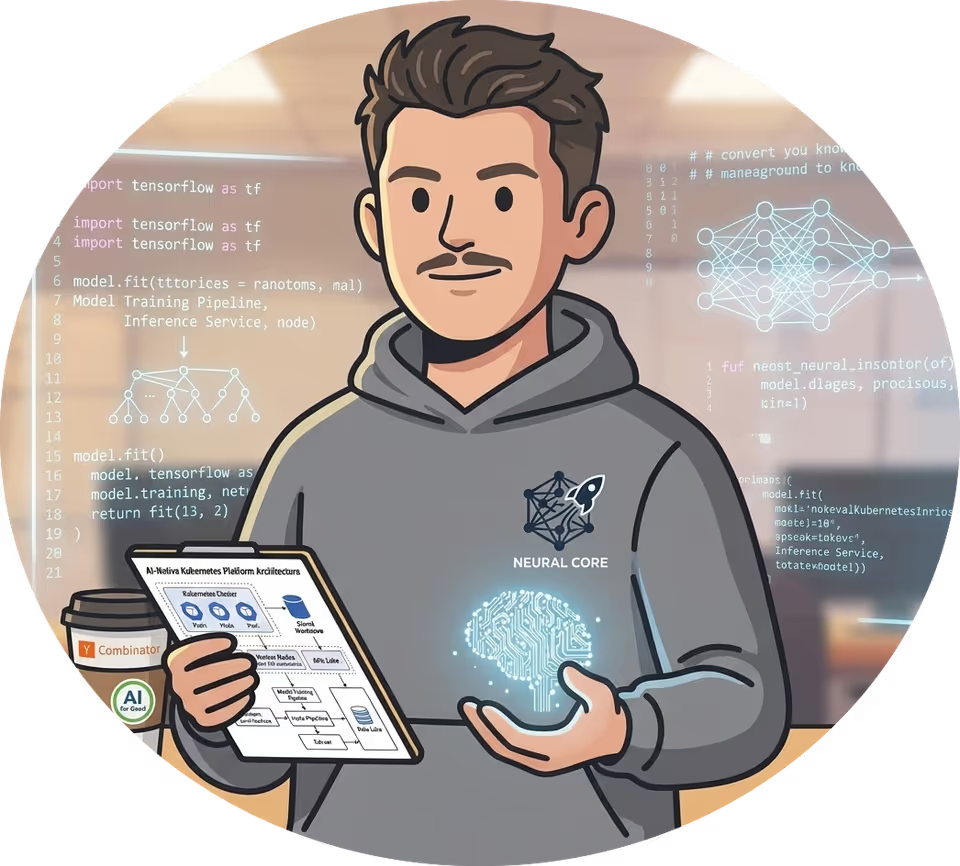
Silicon Valley Developer Waddy
I’m Waddy, a backend server developer with 13 years of experience. After working at various companies in Korea, I recently moved to Silicon Valley, where I’m now working on AI-related development.
I joined this course through my connection with a developer friend at Toss, and I’m very excited about being able to provide a wide range of information in an online environment. I’ll do my best to share the knowledge I have in the easiest and most accessible way possible.
"Most of the course is dedicated to giving you a clear order of judgment for what to check first when the search results seem strange. As you follow along, the code will naturally become familiar."
RAG · Vector SearchLLM ApplicationsProduction BackendSilicon Valley Practitioner
Follow the perspective of a Silicon Valley developer currently working in the field, starting now.
From the principles of vector search to completing a RAG service, everything flows together seamlessly.
Before and after taking the course, what will change?
Even when working with the same RAG, after taking this course, you’ll see it from a much deeper perspective.
Before taking the course
When asked, "How did you implement RAG?", you simply list the steps you followed from a tutorial.
You choose chunk size and top-k values by intuition and cannot explain the reasoning behind them.
I’ve never checked with numbers whether the search quality has improved or worsened.
I tried cloning and running the example, but I’ve never built one from scratch using my own data.
After completing the course
I can explain the principles of embeddings and vector search in my own words.
Measure search quality numerically and decide what to change.
Operate a fully backend-equipped RAG service yourself.
Improve quality with reranking, HNSW, and advanced RAG patterns.
By the end of this course, you will build this..
My own RAG search service that answers users’ questions based on the documents they upload.
Document-Based Question-Answering RAG Service
This is not just a simple demo—it’s a working backend equipped with an ingest API, semantic search, LLM responses, prompt design, and source attribution. On top of that, we add reranking and advanced RAG patterns to further improve search quality.
1 Upload documents → Chunking & embedding storage
↓
2 Question → Retrieve relevant documents through semantic search
↓
Select the most accurate evidence through 3 reranking
↓
4 The LLM generates an evidence-based answer
This technology is used like this in practice
The vector search and RAG systems you build are already running every day in places like these.
사내 지식 검색
Scattered documents, in one line
Even when hundreds of wikis, manuals, and regulations are scattered across different places, one line—"What was the refund policy again?"—gets you an answer with accurate sources. It’s an area where you can significantly reduce new-hire onboarding and repetitive inquiry costs.
고객 지원 자동화
A support bot that shows its sources
Automate first-line support based on product documentation and FAQs. Along with each answer, show which documents were referenced so users can trust and verify the information.
문서 Q&A · 리서치
Reduce the time spent reading lengthy materials
Upload reports, papers, or contracts, and it becomes an assistant that answers questions about the key points. You can ask questions like, "Summarize only the penalty clause in this contract."
코드 · 데이터 검색
"Where was that feature again?"
It searches code by meaning as well. Even if you can’t think of the right keywords, it can find the relevant code based solely on a description like "the part that processes payment cancellations." (The course covers this directly through code chunking.)
How is it different from self-study through YouTube and official documentation? What makes it different?
Reduce the time spent searching for scattered information and get all the way to hands-on practice in one go.
Comparison
Self-study on your own (YouTube, blogs, and official documentation)
This course
Form of information
Scattered here and there, requiring you to piece it together yourself
Beginner → Operations → Advanced, organized in one continuous flow
Depth
Easy to stop at a “working demo”
Through deployment, quality measurement, and improvement—all the way to the end
When you get stuck
Search on your own through trial and error
Provide a troubleshooting perspective and diagnostic sequence
Deliverables
Fragmented example code snippets
A RAG service you operate yourself
Standards
Different for each source
Practical standards from a current Silicon Valley professional
If you’ve reviewed the entire curriculum,
It progresses seamlessly from the basics to advanced optimization. You can get started right away without paying for external APIs.
Recommended for people like these
I’ve written this honestly so that it can be a definite help to those for whom it’s a good fit.
If this sounds like you, you should definitely...
Developers who want to build AI·LLM applications
Those who want to properly get a handle on RAG and vector search once and for all
Those who have completed the tutorials but haven’t been able to move on to “real-world services”
Those who need practical insight into measuring and improving search quality
Those who want a glimpse into the design perspective of Silicon Valley practitioners
This may be challenging for:
Those who are just starting out with programming (basic syntax is assumed)
Those who only want to delve deeply into theory and mathematical proofs (this course focuses on “building”)
People who have no time at all to run the code themselves
Get comfortable with these tools through hands-on practice.
The entire course is written in TypeScript and Node.js. At the heart of semantic search is ChromaDB, an open-source vector database. Rather than stopping at an in-memory setup for learning, we’ll run it as a Chroma server and cover data backup and restoration as well. Embeddings are handled by bge-m3 running in Ollama, while llama3.2 running alongside it generates the answers. Since both run on your laptop, there are no API keys or charges. Finally, we’ll build a search and RAG API with Express, completing a backend that answers questions with supporting evidence when you upload documents.
The two platforms this course uses
Both are open source, and both run on your laptop. You can get started without an account or a credit card.
Local Model Runtime
Ollama
Build with open models, on your computer and in the cloud
Ollama is a tool that lets you run and test the AI models you want on your local machine without many dependencies.
You can download a model and call it immediately with a single command.
In this course, we have configured it to use this platform by default to avoid requiring additional environment setup and costs.
ChromaDB is a platform that can be set up quickly on a local machine without much difficulty or dependencies.
The official documentation introduces it as follows: “Chroma is the open-source data infrastructure for AI.
It comes with everything you need to get started built-in.”
This course teaches you patterns for handling RAG data with this platform and injecting and managing data in LLMs based on it.
We do not use the cloud. Chroma also operates Chroma Cloud, a hosted service that provides serverless vector, hybrid, and full-text search. However, this course is conducted locally from start to finish, so you can complete it without signing up or making any payments. Just keep in mind that you will have one more option when you later move to production.
Prerequisites & What You Need
No elaborate preparation is needed. You can get started with just one laptop.
Prerequisites
TypeScript · Node.js Basics
Variables, functions, async/await, and import are all you need. Express will also be covered step by step during the course.
Practice environment
macOS
The course is conducted using macOS (zsh · Homebrew) as the standard environment. Embeddings and LLMs all run locally (Ollama) for free.
Cost
Zero external payment fees
You don't need a paid API key like OpenAI's. Complete the entire process from start to finish using only open-source and local models.
Frequently Asked Questions thường gặp
We’ve compiled the questions most frequently asked before enrolling.
Q.RAG(Retrieval-Augmented Generation)는 무엇인가요?⌄
RAG is a method where, when a question comes in, it first searches our data for relevant sources and then has the LLM answer using those sources. It addresses the limitation that LLMs don’t know information from after their training cutoff or our company documents by supplementing them with search.
Q.Python을 몰라도 들을 수 있나요?⌄
Yes. This course is taught in TypeScript. When people think of AI hands-on exercises, they often think of Python, but this course is designed so that JavaScript/TypeScript developers can follow along as they are.
Q.OpenAI API 키나 결제가 필요한가요?⌄
No. Both the embeddings and the LLM run locally (with Ollama) for free. You can complete the hands-on exercises from start to finish without obtaining an API key or worrying about charges.
Q.완전 초보도 따라갈 수 있나요?⌄
Familiarity with the basic syntax of TypeScript and Node.js (variables, functions, and async/await) is sufficient. Even if you’re new to vector databases and RAG, you’ll gradually build your understanding from the concepts up through a variety of visual materials and code, so there’s no need to worry.
Q.앞에만 듣거나, 실습만 들어도 되나요?⌄
We recommend taking each course in sequence. However, if you already have knowledge of the individual topics, you may decide for yourself whether to take them. That said, taking them in the order of beginner → practical → advanced is the most effective.
Q.실습 환경이 Windows인데 괜찮나요?⌄
The course is conducted using macOS as the reference platform. The code itself is independent of the operating system, but please note that some instructions, such as installation commands, are based on macOS (Homebrew·zsh).
Q.ChromaDB나 벡터 검색을 이미 좀 써봤는데, 그래도 들을 이유가 있나요?⌄
Importing and using a library is one thing; being able to determine for yourself where to start looking when the search results seem off is another skill entirely. Even if you have used basic CRUD and query(), measuring search quality numerically and improving it through reranking, HNSW tuning, and advanced RAG patterns will likely be new material for most of you.
AI agent course students rated it this way
5.0Actual Inflearn course review
rudnfaiActual Inflearn course review
“I was able to understand the core principles behind how agents work by implementing them myself.”
핵심 원리 이해
ReidActual Inflearn course review
“After implementing the agent loop and then rebuilding it with the SDK, I was able to see what was inside for the first time.”
구조를 이해하는 실습
lsls ksActual Inflearn course review
“You made the core concepts easy to understand, which made the course even more beneficial.”
쉬운 설명
Sik-KActual Inflearn course review
“I thought it would be difficult at first, but I was able to take the course comfortably because you explained it in an easy-to-understand way.”
진입 장벽 완화
rudnfaiActual Inflearn course review
“I was able to understand the core principles of how agents work by implementing them myself.”
핵심 원리 이해
ReidActual Inflearn course review
“Because we implemented the agent loop and then rebuilt it with the SDK, I was able to see what was inside for the first time.”
구조를 이해하는 실습
lsls ksActual Inflearn course review
“Breaking down and explaining the core concepts in an easy-to-understand way made the course even more valuable.”
쉬운 설명
Sik-KActual Inflearn course review
“I initially thought it would be difficult, but you explained it in an easy-to-understand way, so I was able to take the course comfortably.”
I’ve finished the entire course. Thank you for the great course.The message you left in the open chat room after completing the courseThanks to your help, I was able to land a job at the companyThe news of your successful job offer that you shared in the open chat room
A RAG service that answers questions when you upload documents, build it yourself now
From the principles of vector search to completing a RAG service, including reranking and HNSW tuning. Practice everything locally without paying for external APIs.
함께 성장하기
So it doesn’t end when you’re learning alone khi chỉ học một mình
Learning continues beyond the course. We run a KakaoTalk open chat where developers gather to freely share career concerns, workplace experiences, and technical discussions. If you get stuck while taking the course, feel free to ask questions.
A KakaoTalk open chat where developers gather
Career, workplace situations, and technical concerns. A space where you can ask casually and find answers together.
Career discussionsSharing real-world experiencesTechnical discussionsFree for everyone
I started studying development after becoming interested in it while idling at home, and I am currently responsible for platform server development in Pangyo. I am continuing my activities as a knowledge sharer because I want to provide you with the methods I used to study, as well as the various problems and solutions you may encounter in practice.
These lectures are not created solely through my own knowledge. There are others who collaborate on every lecture.
I’m about 30% through the course, and I’m very satisfied with how clearly and accessibly the theory has been explained from the beginning.
In particular, it was great to learn how vector DB coordinate transformation, the concept of embeddings, the differences from traditional databases, and the principles behind semantic search all work.
I’m also glad to have had the opportunity to work with ChromaDB and Ollama firsthand. After completing the course, I’m planning to take on GraphRAG, which you mentioned separately. I’m looking forward to finding many ways to apply what I’ve learned in various fields!
I’ll write an additional review after completing the entire course!
I liked that it was structured to help learners understand Retrieval itself first, rather than immediately integrating an LLM. It covered not only vector search but also Hybrid Search and Reranking, which helped me understand the big picture of RAG and which techniques are needed in different situations.
I would recommend it to anyone new to RAG or looking to move from tutorial-level implementations to a real-world service architecture. In particular, I appreciated that it went beyond simply following individual technologies and made it possible to understand RAG from a holistic perspective.
If there is one thing I would personally hope for, it would be a more diverse practice dataset. Being able to compare the differences between each technique depending on the data would have helped me gain a deeper, more practical understanding of what I learned.
This is a very hot topic lately, so I took the course with great interest. Even though I started with zero knowledge, it was very informative and helpful.
The market is quite difficult these days, but I think I'll be able to build a portfolio based on this content.. haha
Thank you!!
I think the part where you personally demonstrated what doesn't work and verified it together was very impressive.
I spent my day off watching all the recently released lectures in one go—including the AI Agent lecture!!
I believe these are great topics for establishing a big-picture understanding of what aspects need to be considered and which functions and services should be integrated when developing AI platforms or services.
I think it will be a huge help in setting a direction for those preparing for employment or considering a career change into this field.
I believe a truly valuable lecture should show you what doesn’t work.
Most of the example code you use will generally work fine if you simply copy and use it.
However, I think it’s important to know how to investigate when something doesn’t work.
I’m glad this perspective seems to have come across well. Haha, have a great day!!
It was a very informative topic for me, as I was only familiar with general databases.
It was even more beneficial because it wasn't a common topic like MySQL or MongoDB, and I was able to learn that these kinds of technologies and perspectives exist.
I feel like my horizons have been broadened. Thank you for the great content.
I think RAG is actually a difficult topic to get into.
However, if you’re adopting AX and building AI services, it’s an essential topic, so learning about it will be a great help.
Thank you for leaving such a kind review!








![[Chuseok Special] An LLM Evaluation Harness Engineering Guide from a Silicon Valley DeveloperCourse Thumbnail](https://cdn.inflearn.com/public/files/courses/343194/cover/01m34cgavc7y9g7nwxe347vnqt?w=420)

![[Chuseok Special] A Silicon Valley Developer Explains Embeddings and Mini GPTCourse Thumbnail](https://cdn.inflearn.com/public/files/courses/342278/cover/01m34cgvzk2n6r8c7qryb4w24b?w=420)
![[Chuseok Special] A Naver Developer’s Valkey Handling 1,000,000++ RPS per SecondCourse Thumbnail](https://cdn.inflearn.com/public/files/courses/343676/cover/01m2m6v60mxfwd9rj2wyvgwef4?w=420)

![The Easiest and Most In-Depth MongoDB Complete Guide [ By. Non-CS Major & Kakao Developer ]Course Thumbnail](https://cdn.inflearn.com/public/files/courses/337578/cover/01jwt82r7jn3c9mzybfn00mdnh?w=420)
![Core Banking Server Features Implementation with Multi-Module Architecture [ Kotlin & Spring ]Course Thumbnail](https://cdn.inflearn.com/public/files/courses/337692/cover/01jx6h8k9xwd55qz59ta1vskrc?w=420)
![[VOD] How to Redesign Your Expertise in the AI EraCourse Thumbnail](https://cdn.inflearn.com/public/files/courses/342633/cover/01kv7bvnz7t0wjh5fyp3xkscyp?w=420)
![[Meetup VOD] The Future of Work Seen Through the Working Style of an AI Native CompanyCourse Thumbnail](https://cdn.inflearn.com/public/files/courses/340242/cover/01kfdb25rybs92qftj95q38p2d?w=420)



![[AICE] Python for AICE Certification ExamCourse Thumbnail](https://cdn.inflearn.com/public/files/courses/340646/cover/01kg1pzqfsmh3pnt4dnwtkjcq6?w=420)

![[10 Minutes a Day] From work automation to financial management with Notion AI! + Creating your own AI assistant teamCourse Thumbnail](https://cdn.inflearn.com/public/files/courses/341768/cover/01kp29491pth451yaxs6syr5s9?w=420)