
inflearn logo

Linux Command Map - Bash, Who Are You?

Guides you so you don’t get lost at the Linux command prompt. Not all commands are the same. You can distinguish between aliases, Bash keywords, functions, builtins, and external commands. Learn the basics of Bash shell scripting. You’ll no longer be afraid even without a mouse.

2 learners are taking this course

Level Basic

Course period 6 months

Linux
Linux
bash
bash
bash-alias
bash-alias
bash-script
bash-script
shellscript
shellscript
Linux
Linux
bash
bash
bash-alias
bash-alias
bash-script
bash-script
shellscript
shellscript

What you will gain after the course

  • Learn skills that will help you survive the rapid changes of the AI era.

  • It becomes a lighthouse so you don’t panic when you lose your bearings in the vast sea.

■ Linux Command Map - Bash, Who Are You?

  • The pitch-black window is no longer intimidating.

  • You're ready to explore the depths of Linux.

  • You will realize that not all commands are the same.

  • Communicate with Linux through the command prompt.


▶I’ll guide you on an exciting exploration of Linux.

◆ Please watch this before enrolling

  • The X Window (GUI) environment is not covered.

  • AI tools such as Claude Code and Cursor are not used.

  • Topics related to administration, networking, and Docker are covered in separate courses.

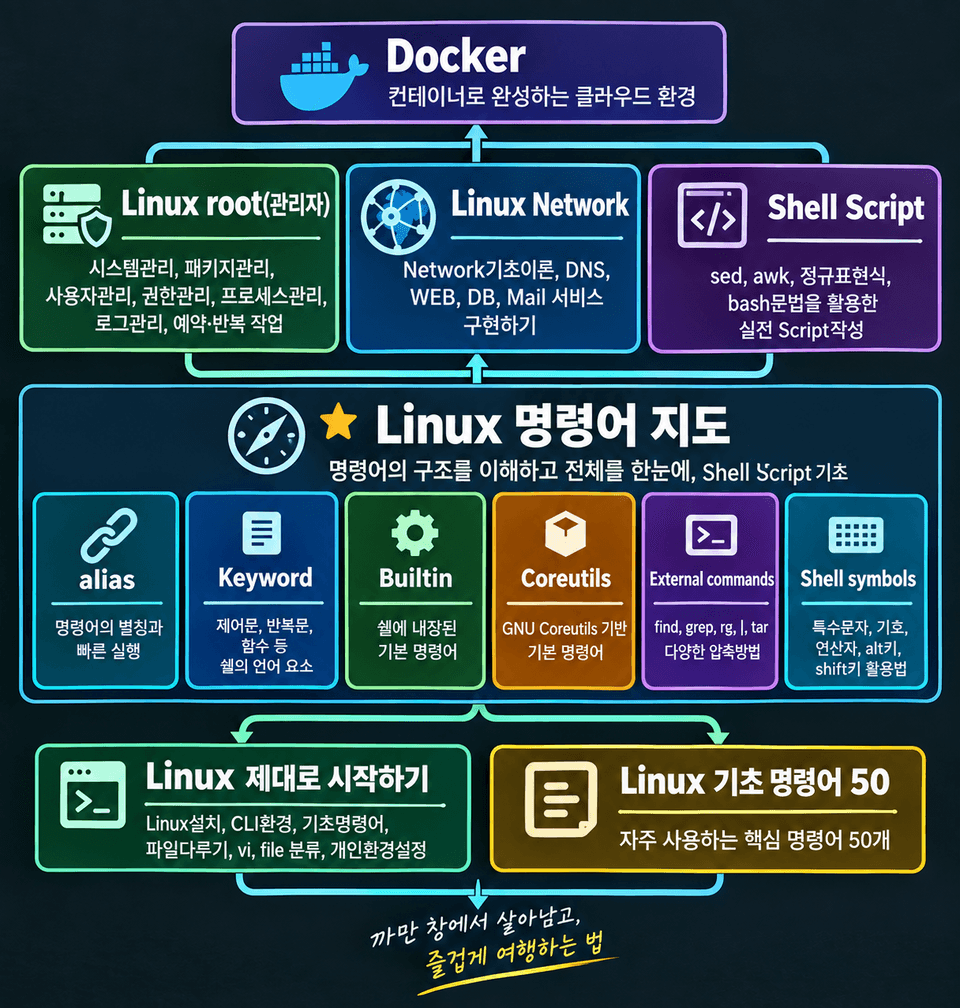
▲Ahalinux—Overall Roadmap

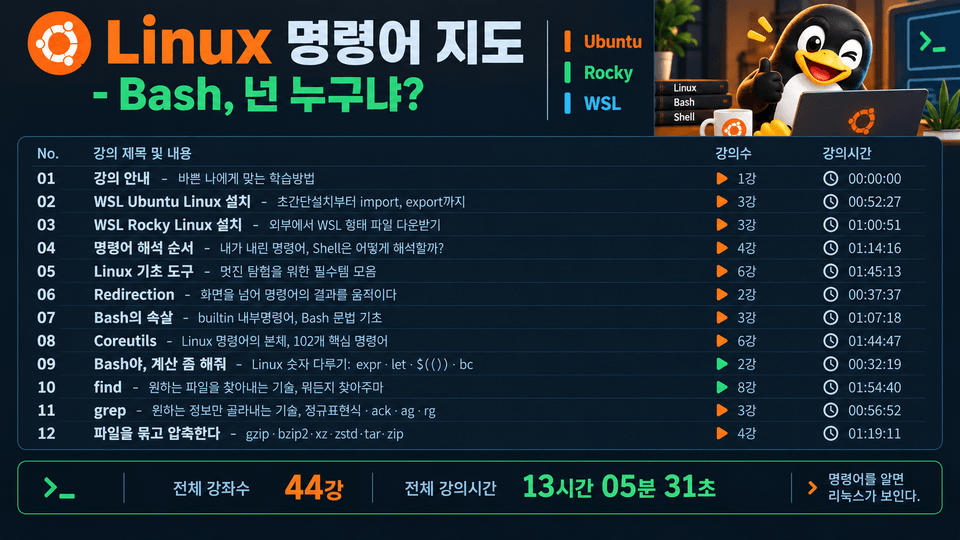
■ Overview of the Entire Course


01. Course Introduction - A Learning Method That Fits My Busy Schedule
02. Installing WSL Ubuntu Linux - From ultra-simple installation to import and export 3 lectures 00:52:22
03. WSL Rocky Linux Installation - Downloading WSL-format Files Externally 3 lectures 00:59:02
04. Command Interpretation Order - How Does the Shell Interpret the Commands I Give It? 4 lessons 01:13:49
05. Linux Basics Tools - A Collection of Essentials for Great Exploration, 6 lessons, 01:42:29
06. Redirection - Moving Command Results Beyond the Screen 2 lectures 00:37:08
07. The Inner Workings of Bash - Built-in Commands, Bash Syntax Basics 3 lessons 01:04:04
08. Coreutils - The Core of Linux Commands, 102 Essential Commands 6 lessons 01:43:51
09. Bash, Do Some Calculations for Me - Handling Numbers in Linux: expr·let·$(())·bc 2 lessons 00:32:10
10. find - The technique for finding the files you want—I’ll find anything 8 lessons 01:54:27
11. grep - The technique for selecting only the information you want, regular expressions · ack · ag · rg 3 lessons 00:56:49
12. Bundle and compress files — gzip·bzip2·xz·zstd·tar·zip 4 lessons 01:17:26

Total lessons: 44
Total course duration: 12 hours, 53 minutes, 37 seconds

▲ Complete Curriculum Map of Linux Commands

▶ Recommended for:

  • Computer science students

  • Beginners who are just taking their first steps with Linux

  • Those who want to explore Linux in depth


  • Those who want to learn more about Linux as a developer

▶ After completing the course,

  • You will experience how the keyboard is more powerful than the mouse.

  • You will understand why servers prefer CLI environments without graphics.

  • The pitch-black window is no longer intimidating.

  • You are ready to journey into the depths of Linux.

  • You will realize that not all commands are the same.

  • You can communicate with Linux through the command prompt.

■ Notes Before Taking the Course

■ Practice Environment

  • Operating system and version (OS): Windows 10/11, either is fine

  • On macOS, simply run bash in the built-in Terminal.

  • An account for accessing an external Linux system

  • WSL-based Linux installation, VirtualBox-based Linux installation

  • X Window is not covered.

■ Learning Materials

  • PDF materials that can be viewed by printing the output, along with the code used, are provided as text files.

  • The content used in the lecture is provided as-is.

■ Prerequisites and Notes

  • It is not necessary.

  • The more familiar you are with the basics of Linux, the better.

  • Since the commands were created in C, knowing C will be helpful.

Q. Why is the course access period six months?


"A course with a high completion rate" is the goal.


It is enough material to complete even the exercises in about a month by spending one hour a day.

The course materials are provided as PDFs and text files, so if you download them while taking the course,

You can use it indefinitely.

You will receive lifetime support through the two channels below, so you don't have to worry.

The course access period is six months, but support will continue for as long as I am alive.

YouTube channel: Operating since 2016 (14,600 subscribers as of October 2026)

Naver Cafe: Operating since 2010 (16,600 members as of October 2026)


▶ If you have chosen and decided carefully, please be sure to see it through to the end.

Q. Why have you divided the subjects into several courses?

  • To increase the course completion rate.

  • To reduce unnecessary time wasted.

  • You can choose and take only the courses you need, without wasting money or time.

Q. Do the Linux distribution and version matter?

  • This course is not dependent on any specific distribution or version.

  • These are Ubuntu 24·04 and Rocky 9 versions based on WSL2.

  • VirtualBox / Ubuntu 24·04 and Rocky 9 environments are also fine.

  • Mac users can use the terminal as is.


  • You can use the same version used by schools, training centers, and companies.

■ Course Creator

  • Yang Joo-jong (ahalinux@naver.com): Computer Science, teaching since 2000

  • I have been using Linux and teaching it for a long time.

  • Through a wide range of experience, I understand beginners’ perspectives and the areas where they need help.

  • Once you become my student, I’ll be your instructor, providing lifelong support.

▶ Keywords: bash, bash-alias, bash-script, shellscript, WSL, Ubuntu, Rocky

Recommended for
these people

Who is this course right for?

  • Those who want to explore Linux in depth

  • Students majoring in a computer-related field

  • Those who want to learn more about Linux as developers

Need to know before starting?

  • None

Hello
This is ahalinux

Career Verified

517

Learners

7

Reviews

4.6

Rating

4

Courses

Learn and share IT knowledge.

Yang Joo-jong (ahalinux@naver.com)

Computer Science major. Teaching foundational IT subjects since 2000.

Subjects: Linux · Python · C · C++ · Java · Database · Data Structures

Watching the changes in artificial intelligence (AI) and striving to adapt.

I have communicated with approximately 15,000 learners through public enterprises, large corporations, educational centers, and special university lectures.

I focus on courses for beginners and those new to the subject.

▶ You can continue to meet me on the IT기초탄탄 channel.

YouTube channel IT Gichotan-tan: Operating since 2016 (Subscribers: 14,500 as of October 2026)

Naver Cafe IT Basics Solid: Operating since 2010 (16,600 members as of October 2026)

Naver Blog IT Basics: Operated since 2003 in its early days (total visitors: 3,380,000 as of October 2026)

Even after your course access period ends, we promise lifelong after-sales support through the channels above.

More

Curriculum

All

44 lectures ∙ (12hr 53min)

    Published: 
    Last updated: 

    Reviews

    Not enough reviews.
    Please write a valuable review that helps everyone!

    ahalinux's other courses

    Check out other courses by the instructor!

    Similar courses

    Explore other courses in the same field!

    Limited time deal ends in 5 days

    $34,650.00

    30%

    $38.50