강의

멘토링

커뮤니티

NEW
Applied AI

/

AI for Work

Click! Web Crawling & Data Analysis Like a Pro with AI (w. GEMINI CLI)

Building Your Own Data Analysis Portfolio with GEMINI CLI Vibe Coding - No Payment Required Data Collection, Analysis, Reports, Dashboard Creation, and Work Automation Even if you're new to data collection, by learning the principles, prompt writing methods, and VSCode usage, you can perform data collection, analysis, visualization, reports, and dashboard creation just like a data analyst. Learning Python from Data Collection to Analysis Report Writing with GEMINI CLI and VSCode Prompt Writing and Error Resolution Methods for Foolproof Data Collection and Analysis

103 learners are taking this course

  • todaycode
실습 중심
AI 활용법
AI 코딩
Python
VSCode
gemini

What you will gain after the course

  • Understanding CLI-based Web Scraping and Analysis Workflow Using GEMINI CLI

  • Web Crawling Vibe Coding: Collecting Data Without Failure

  • Managing AI-Generated Code Versions Systematically by Integrating Git with VSCode

  • Visualize collected data and automatically convert markdown to PPT to reduce reporting time

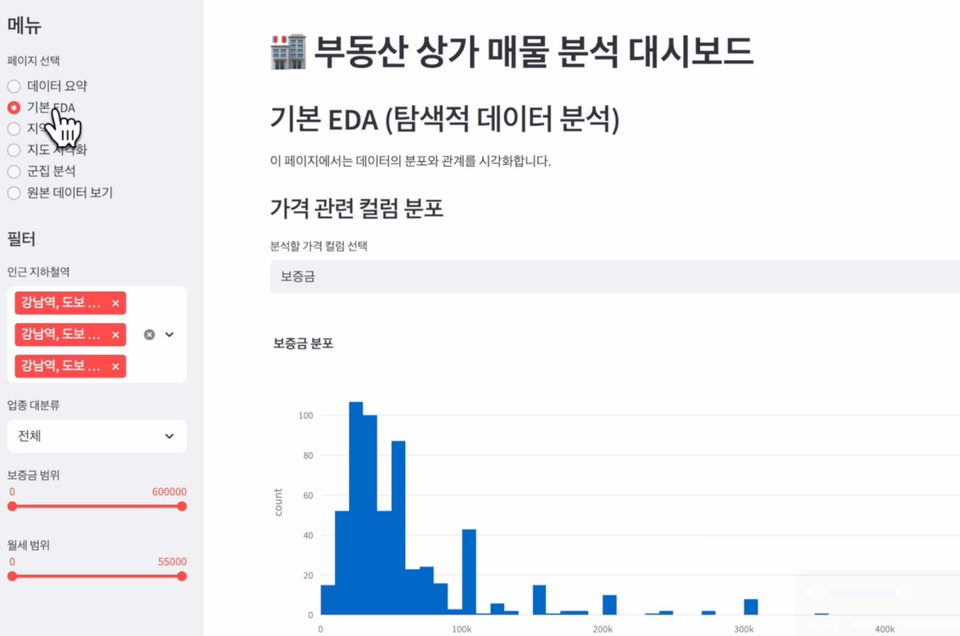
  • Creating Your Own Data Analysis Web Application Using Streamlit

Using GEMINI CLI and AI Assistant for Vibe Coding
From Web Scraping Data Collection to Report Writing? 🤔


Want to start Vibe Coding for free without any charges?
If the initial cost of $20-200 per month felt burdensome, in this course we'll learn together how to maximize productivity using free AI tools.


Is web scraping possible with vibe coding?
This course does not use Selenium.
Selenium was originally created as a tool for testing browsers.
Isn't Selenium essential for dynamic sites?
If you understand the principles, you can automate web crawling with a lighter and faster method than Selenium.
And that's just with prompts.


Additionally, you can practice immediately without a separate server or paid API, and learn through the "vibe coding" method where
AI assists you through the entire process from data collection to analysis and report writing.

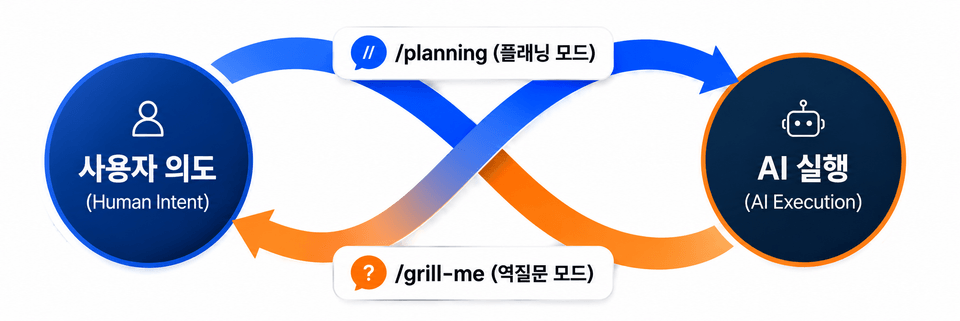
This course doesn't simply teach code. In the VSCode environment, you'll learn how to make Gemini CLI your 'thinking coding partner'. We 'command', AI 'executes', and we 'understand and improve' the results—mastering a new dimension of development workflow.

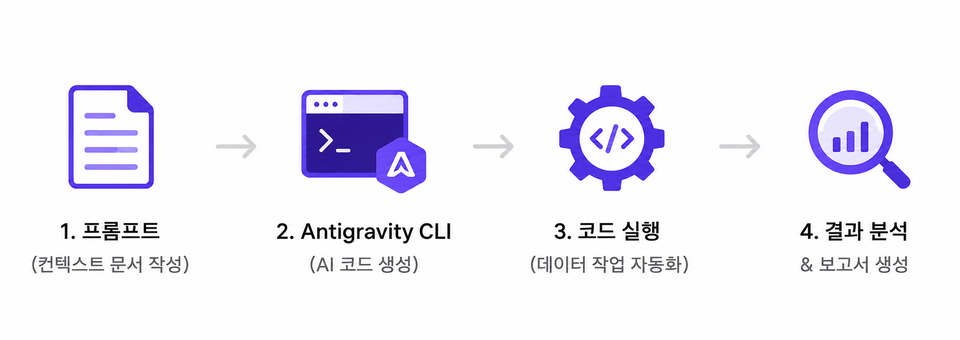
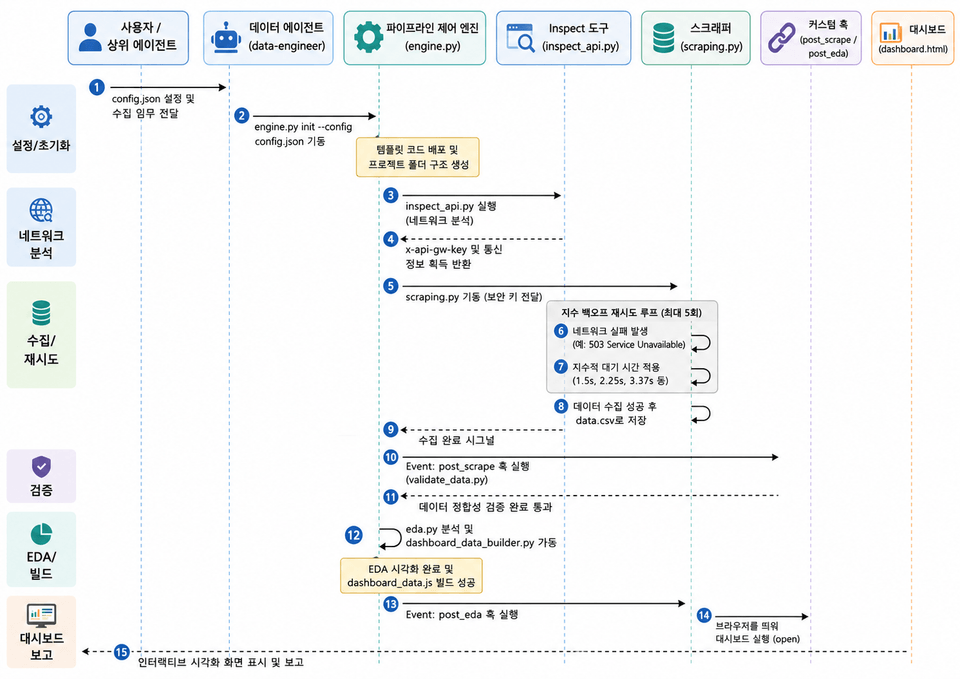
GEMINI CLI-based Data Collection and Analysis Workflow

Difficulties with Traditional Learning Methods

  • Expensive AI Tool Costs

  • Copilot($10/month), Cursor($20/month), ChatGPT Team($30/month)... The fixed cost of 50,000-100,000 won per month from the start is burdensome.

  • Boring grammar-focused lectures

  • I'm collecting and analyzing data, but I've been stuck on Python syntax for 20 hours... I'm getting exhausted before even seeing any actual results.

  • Limitations of Code Copy/Paste

  • When code written by ChatGPT produces errors, it fails to resolve them, ultimately leading to giving up.

Soaring with Vibe Coding

  • Zero-Cost Strategy

  • VSCode (free) + Gemini CLI (free) combination creates an environment comparable to paid tools. It's not too late to switch to paid tools after you become sufficiently familiar with this setup.

  • Project-centered, outcome-oriented

  • Leave grammar studies to AI. We focus on planning and directing "What data should we collect and how should we present it?"

  • Self-Correcting AI Workflow

  • When an error occurs, learn the 'Self-Healing' prompt technique that gives logs to AI and makes it fix itself.

💸 Are the subscription costs for Claude Code, Cursor, etc. becoming a burden?

Get 100x More Value from AI Tools You Can Start Using for Free
Once you become familiar with GEMINI CLI usage, you can apply the same CLI approach to other coding assistants like GitHub Copilot CLI, Claude Code, Codex CLI.
Once you become comfortable with VSCode, you'll find that Google Antigravity, Cursor, WindSurf and others are also VSCode-based IDEs with identical extension usage.


🚀 This course does not cover programming syntax or library usage in detail.

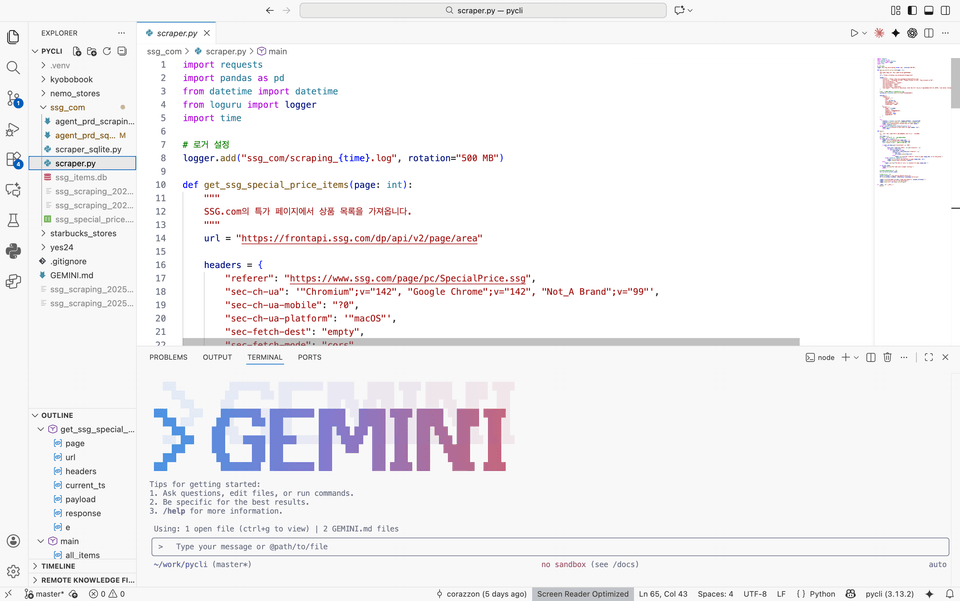
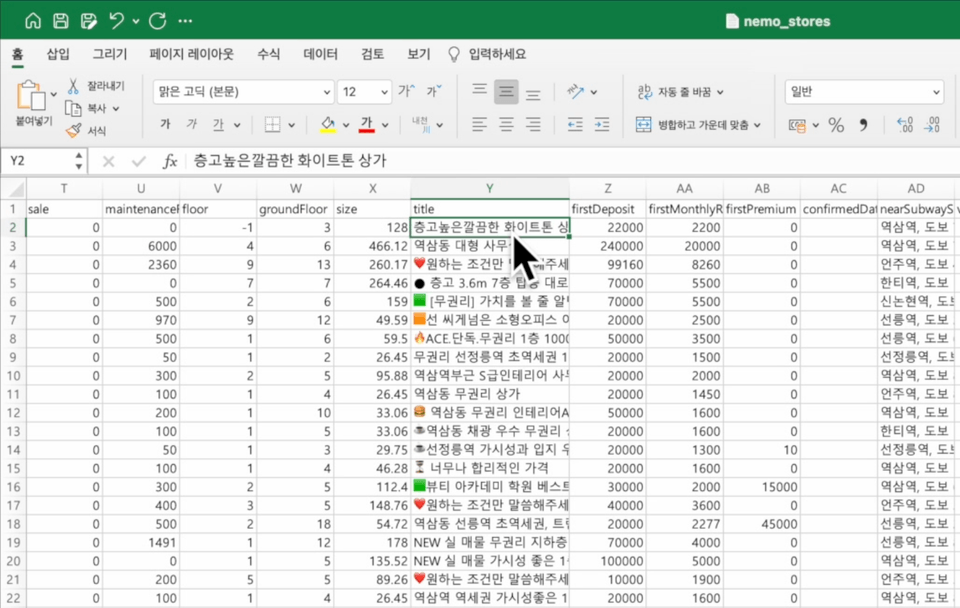
Learn how to automatically collect, store, analyze websites you want, and even create reports and dashboards based on how you write work instructions using only vibe coding, through real examples including YES24, Kyobo Book Centre book lists, Starbucks nationwide store information, commercial real estate listings, and shopping mall product catalogs.


🔁 Want to go back to a previous version of the code AI wrote for you?

Learn about version control methods through Git usage.

You'll learn the following content.

GEMINI CLI

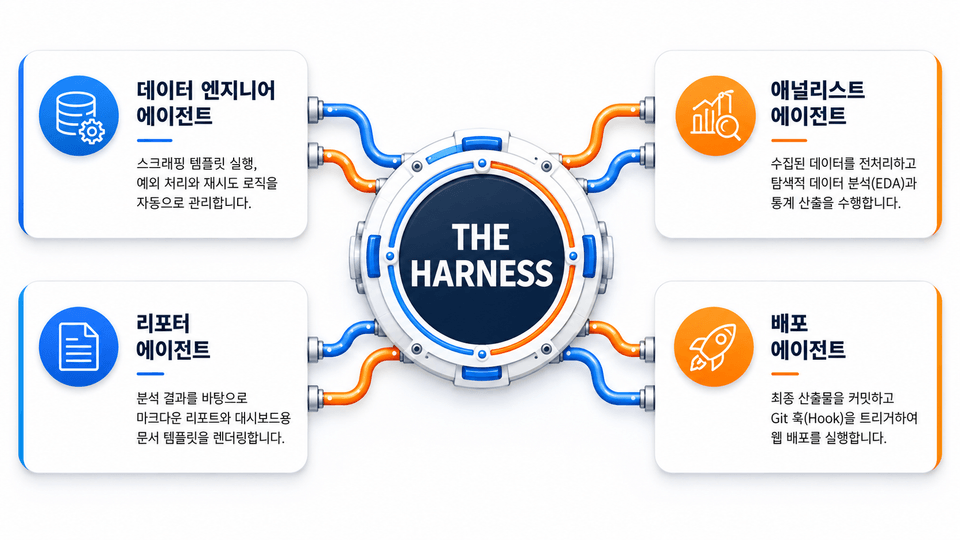
You can use it for free without any charges, and you just need to design the entire workflow from data collection to analysis at once and click!

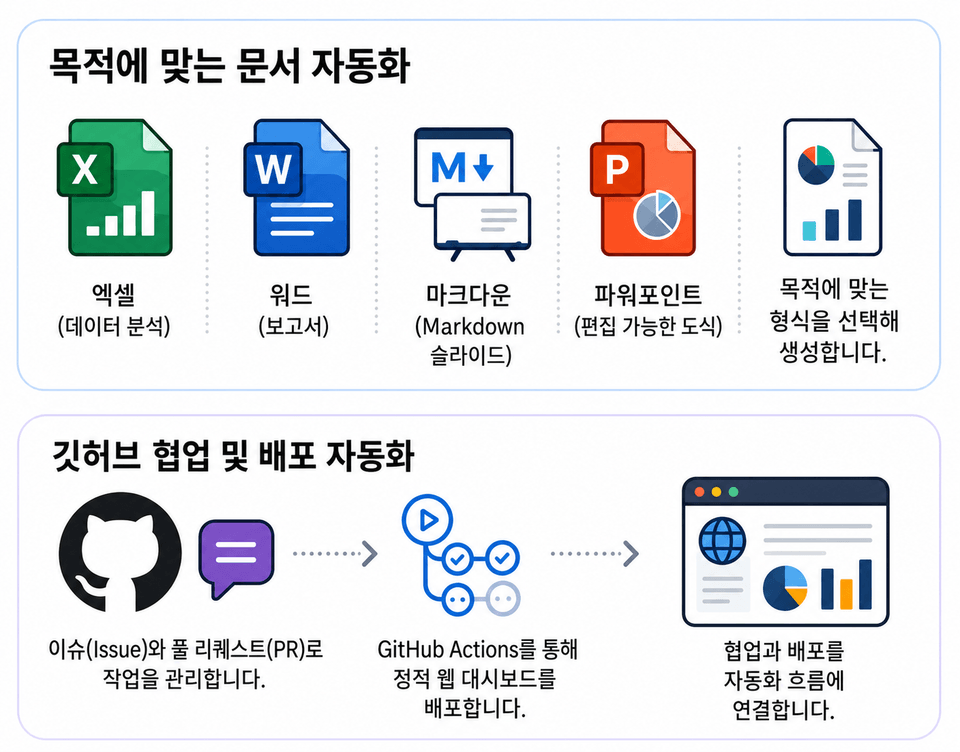
Reports and Dashboard Automation

Not only crawling, but also automated reports and dashboards are completed with a click!

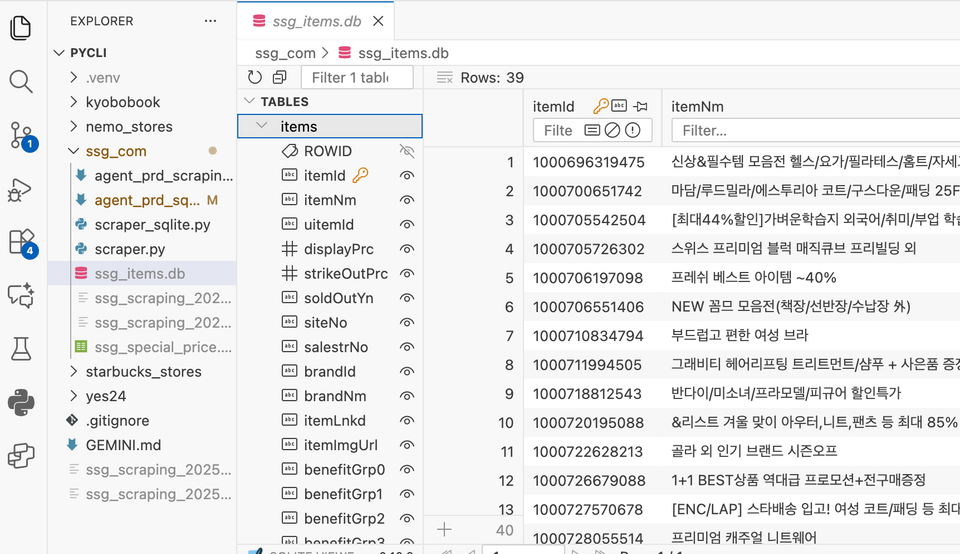
Data Collection and Storage

You can save and manage files in various formats. Simply specify the file format you want.

Database management with just a click

Non-developer finding the CLI environment too difficult?
Just learn workflow design methods and click! It's done and errors are fixed.

Features of This Course 💡

1️⃣ Understanding HTTP Request and Response Structure

  • Differences Between GET and POST Requests and Their Practical Applications

  • Understanding HTML and JSON Response Formats and Data Parsing

  • Extracting and Analyzing Actual Request URLs and Header Information

2️⃣ Web Data Scraping with Just a Prompt - Click!

  • Hands-on Examples Using Web Scraping

  • Exploring Data Sources Available Without API Keys

  • Automating Data Requests Using GEMINI CLI

3️⃣ Utilizing VSCode and Setting Up an AI Coding Environment

  • VSCode Installation and Basic Setup

  • Utilizing Extensions (AI Assistants, etc.)

  • Running GEMINI CLI through Terminal and Receiving Real-time Feedback

  • Hands-on "Vibe Coding" with AI Code Assistant Features

    💬 A method of writing and modifying code with AI while solving problems in real-time


4️⃣ Data Analysis and Visualization

  • Automatically summarize and structure collected JSON/CSV data with AI

  • Data cleaning using built-in analysis features of Pandas, Python, or GEMINI CLI

  • AI assistant suggests code improvements and visualization examples within VSCode

  • AI-Powered Report Generation: Automatic Creation of Summaries, Tables, Graphs, and Trend Analysis

5️⃣ Automated Report Generation and Practical Applications

  • Based on collected and analyzed data, AI automatically generates reports

  • Automatic Document Summarization, Table & Graph Insertion, and PDF Conversion Practice

  • Writing Data Storytelling with AI Assistants

  • Implementing a Process for Generating Data Reports Based on Analysis Content Using Only Prompts, Accessible Even to Non-Developers

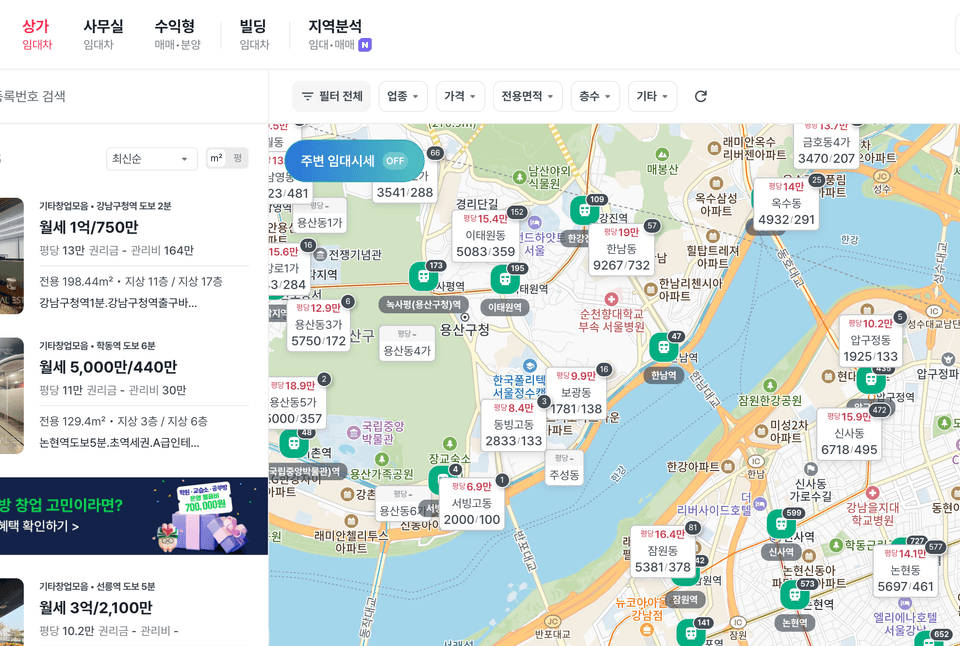
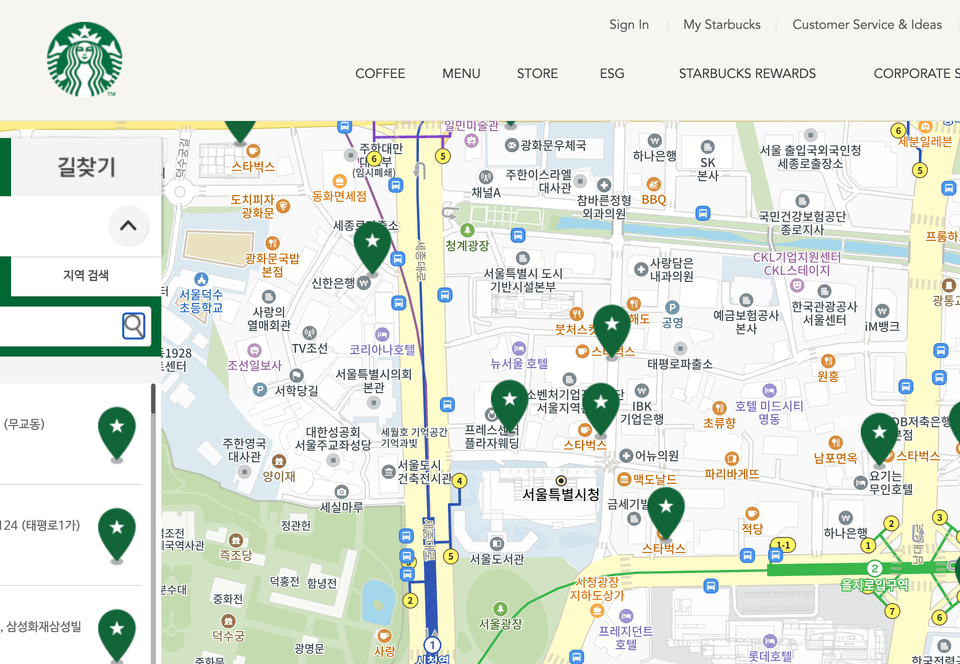
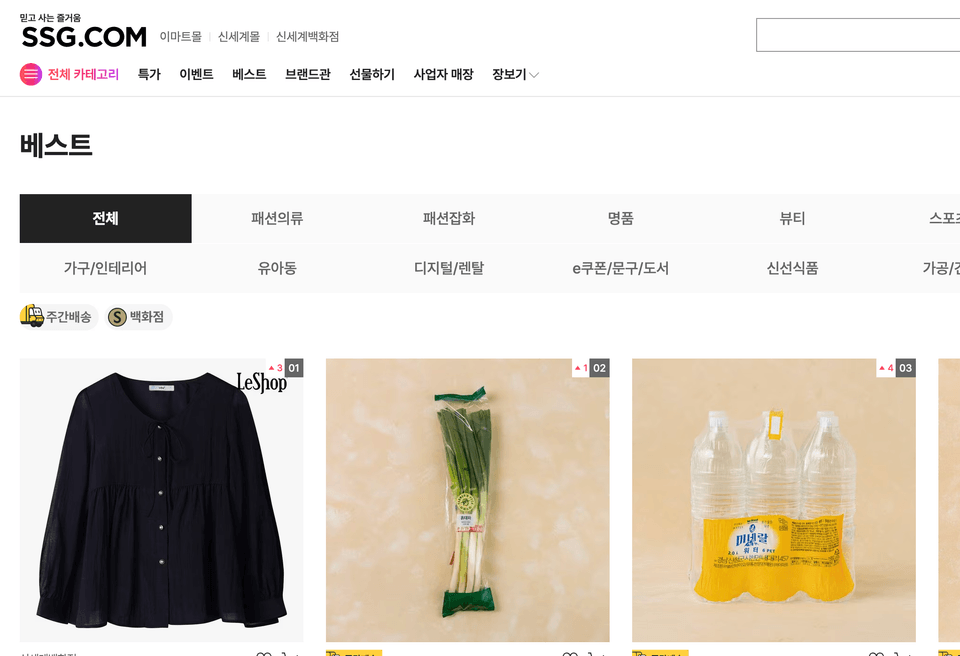
I'm crawling data like this.

Commercial Real Estate Listings
Coffee Shop Location
Infinitely Loading Shopping Mall Data

Since this is vibe coding, the results may differ from the demonstration video. This course focuses on learning how to write, execute, and refine work instructions, and how to combine and utilize tools effectively.

I recommend practicing by further refining the prompt content that appears in the lecture.

🧰 Preparation

  • Google Account (possible without billing)

  • VSCode (IDE that allows Copilot usage within free credit limits)

  • Internet Connection Environment

  • Basic programming concepts (optional)

💰 Cost

  • AI usage cost free (Both GEMINI CLI and VSCode available for free)

  • Without any charges, once you've tried it out and become familiar with how to use it, it helps you transition to tools in the $20-200 per month range.

🎯 Recommended for

The existing prompts didn't allow for the data collection and analysis I wanted.

Anyone who wants to understand the principles and learn how to utilize appropriate prompts and tools

I want to experience an AI coding environment for free without any charges.
For those who want to learn and experience AI coding with free tools like GEMINI CLI and VSCode without worrying about costs

I want to try automating reports or summarizing data.
Office workers and freelancers who want to streamline repetitive report writing or data organization using AI

🎯 Web Crawling Completed with a Click!

  • 💻 Non-majors interested in AI coding
    → You can learn through hands-on practice without complex programming.

  • 📊 Office workers interested in data collection, analysis, or automated reporting
    → Learn how to automate manual reports using AI.

  • 🧠 Developers and planners who want to utilize AI-based productivity tools
    → You can build an efficient workflow by integrating GEMINI CLI with VSCode.

  • 🚀 Those who want to start AI practice without cost burden
    → You can experience everything from data collection to report writing with practical examples in a free environment.

  • 🧩 IT Educators, Instructors, Freelance Developers
    → Perfect for those who want to integrate AI automation into their teaching materials or client reports.

🚀 What You'll Gain from This Course

  • 🧰 Build your own AI coding environment using GEMINI CLI and VSCode.

  • 🌐 Accurately understand and utilize HTTP request and response structures such as GET, POST, etc.

  • 📈 You will gain the ability to collect and analyze real-time data through web APIs.

  • 🧾 Automatically generate reports and documentation using AI.

  • 🤝 Experience "vibe coding" focused on problem-solving with AI assistants.

  • 💡 You can complete practical data projects using only free tools.

The person who created this course

  • Park Joeun

  • Today Code YouTube Channel Management

  • Microsoft MVP (Python)


  • Everyone's Korean Text Analysis with Python Author

  • NLP and LLM Practical Guide Translator

  • Translator of "Practical LLM Application Design"

  • Lectures at numerous universities, educational institutions, and companies

  • Worked as a backend developer at gaming and advertising companies

Points to Note Before Enrollment

Practice Environment - With just the tools below, you can achieve professional results with a simple click!

  • VSCode:
    An integrated development environment (IDE) that enables real-time code writing and editing with AI assistants
    A hands-on environment with terminal, extensions, and Git integration

  • Python 3.13+:
    Automated environment for data collection, analysis, and visualization based on libraries such as Pandas, Matplotlib, and Requests

  • uv: Virtual Environment

  • GEMINI CLI :
    A command-line tool for interacting with Google AI models that requires a Google account
    An AI command interface that supports code generation, data analysis, and automated report generation

  • Node.js:
    Runtime environment for installing and running GEMINI CLI and Claude Code
    npm-based AI package management and imperative automation script execution environment

  • GitHub Copilot:
    AI code autocompletion and refactoring suggestion tool within VSCode
    Productivity enhancement tool based on real-time pair programming

Learning Materials

  • Download within the course

Prerequisites and Important Notes

  • Even if you're new to programming or have never used development tools before, as long as you have data you want to collect and an analysis goal, you can bring live data and analyze it through vibe coding.

Recommended for
these people

Who is this course right for?

  • Office workers who want work automation

  • Anyone who wants to maximize productivity by utilizing the latest modern stack such as VSCode, Gemini CLI, uv, etc.

  • Data analysis and report/thesis writing required

  • Anyone who wants to create their own portfolio using real, live data

  • Those who need a portfolio for job hunting, career change, or career transition

Need to know before starting?

  • # Purpose of Analysis <analysis> The user has provided a Korean phrase "분석하고자 하는 목적" which translates to "Purpose of Analysis" or "The purpose of analyzing" in English. This appears to be a heading or title rather than

  • Basic Data Analysis Methods

  • VSCode Installation and Extension Installation Experience

  • Understanding File/Folder Structure

  • Program Installation/Setup

  • # Terminal/Command Prompt Basic Operations

Hello
This is

19,094

Learners

805

Reviews

1,336

Answers

4.8

Rating

7

Courses

Curriculum

All

29 lectures ∙ (6hr 37min)

Course Materials:

Lecture resources
Published: 
Last updated: 

Reviews

Not enough reviews.
Please write a valuable review that helps everyone!

Limited time deal

$23.10

40%

$38.50

todaycode's other courses

Check out other courses by the instructor!

Similar courses

Explore other courses in the same field!