강의

멘토링

커뮤니티

Programming

/

Devops & Infra

Master the basics of AWS EKS and GitLab CI/CD with 99% J-type engineers

This is a lecture that will help you develop the ability to see the essence by directly constructing the overall framework of the actual CI/CD work rather than just learning theoretical content.

(4.8) 4 reviews

69 learners

  • Meiko
강의자료
실습 중심
eks
AWS
Kubernetes
gitlab
CI/CD

Reviews from Early Learners

What you will learn!

  • How to customize and apply the components required for configuring Gitlab CI/CD pipelines to your project instead of using the provided components as is.

  • How to improve security in a safe and smart way through IRSA instead of .env for important environment variable values that need to be taken care of by project unit in Kubernetes environment

  • How to monitor project logging in a Kubernetes environment and send Slack notifications when specific logs occur

  • How to monitor the resources of nodes in a Kubernetes environment and send Slack notifications when a threshold value is exceeded

  • How to apply CI/CD to your Nest.js project

  • Pipeline Monitoring


Self-introduction

hello.

My name is Meiko and I am the creator of the first lecture on DevOps, infrastructure, and cloud.

Currently, we are working on building, managing, and operating an environment for deploying actual services in a cloud-native environment integrated with EKS clusters and Gitlab, as well as establishing a work request integration plan in preparation for expanding the DevOps organization and automating the platform engineering aspect. I am doing it.


Lecture Notes (The fastest way to understand a technology is to implement it yourself)

I will minimize the explanations except for the core theories I think, and focus on practical exercises.

Rather than simply providing recipes, we've prepared this lecture to help you understand the essence of infrastructure structure and operational flow as easily as possible, based on personally created architecture diagrams and sequence diagrams.

EKS provisioning focuses on configuration based on the EKS Best Practices document .

If you don't have knowledge or practical experience with AWS, K8S, Git, and Docker, it can be a bit daunting.

Additionally, since the training is conducted through AWS services, charges will inevitably be incurred.

Please be sure to watch the lecture introduction video before deciding whether to take the course.


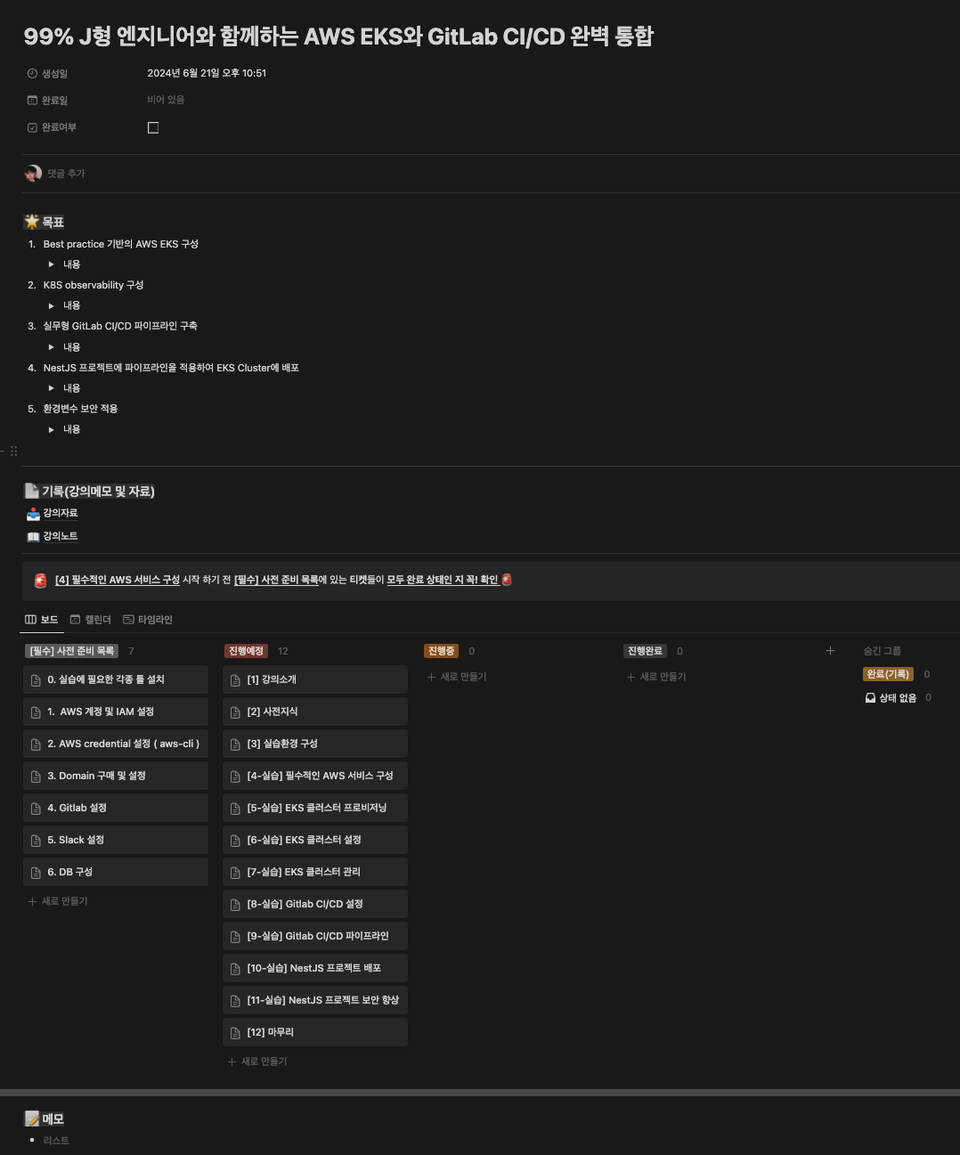
We provide a custom Notion template to help you take the course.

There are many things to install and prepare before the practice, such as installing various CLI tools, purchasing Gitlab, Slack, DB, and domain, and there will be a lot to cover.
So! As someone with a Power J personality, I've prepared a Notion template to help you navigate the course!

Please copy each template and use it privately.

(Refer to lecture materials)

Take the lecture with the template above and organize it once to plan your infrastructure work!

And I recommend that you organize it on your own personal blog later and create your own knowledge.

We have prepared the AWS infrastructure so that you can build it by completing the corresponding tickets that specify the level of preparation required before proceeding with the practical training while watching the lecture.


Practice sequence

  1. We will proceed with installing and setting up the essential tools required for the practice.

  2. Quickly provision AWS Elastic Kubernetes Service (EKS) clusters and required AWS services by executing yaml files provided with the eksctl command. We are conducting a practical training.

    1. Creating in the AWS console has been minimized.

  3. Learn core commands such as kubectl, helm, and aws-cli and proceed with essential settings for the cluster.

  4. Gitlab Pipeline Custom

    1. Gitlab Runner (using shared runner)

    2. Gitlab AutoDevOps

    3. Gitlab AutoDeploy Image

    4. Gitlab Kubernetes Agent

  5. Deploy the NestJS project to EKS directly provisioned through the Gitlab Pipeline configured in step 4.

  6. Hands-on training on handling environment variables with enhanced security through IRSA and AWS Secrets Manager in a NestJS project.


First, let's deploy basic settings and essential open source projects ( Loki, Grafana, Prometheus, Istio, etc. ) directly to the cluster. Then, if you proceed with the concept and practice of IAC such as Ansible or Terraform , you will understand why it is convenient and why it is used. (If this lecture is successful(?), I plan to continue creating in-depth follow-up lectures.)


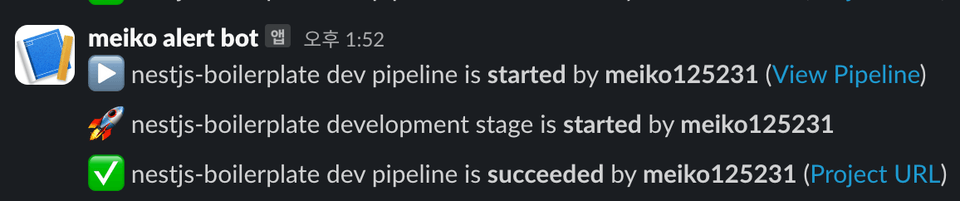
Send Pipeline monitoring notifications to Slack


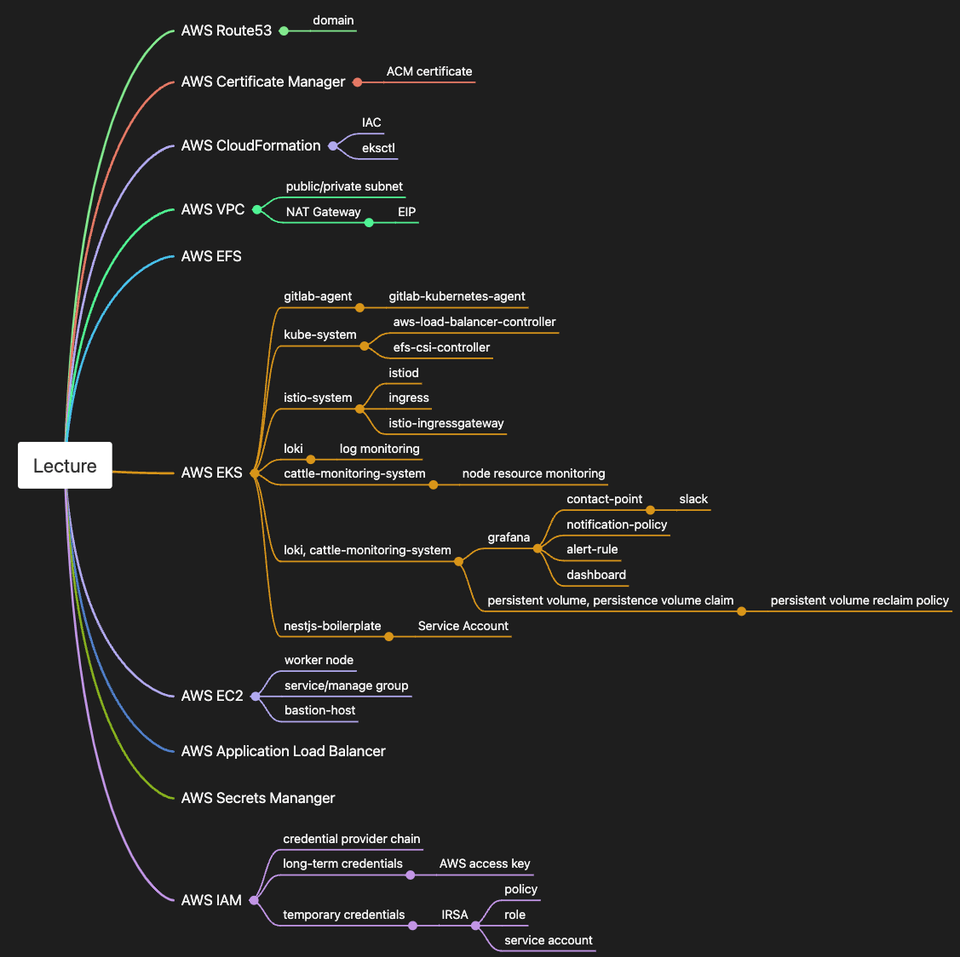
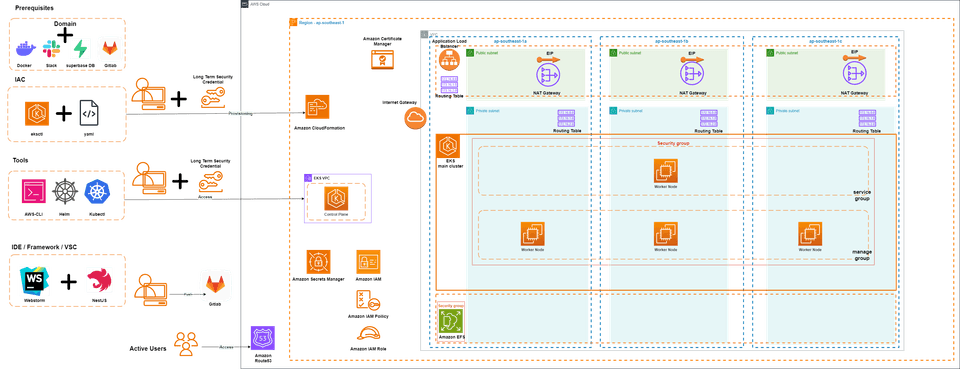
AWS services you can use


Architecture diagram


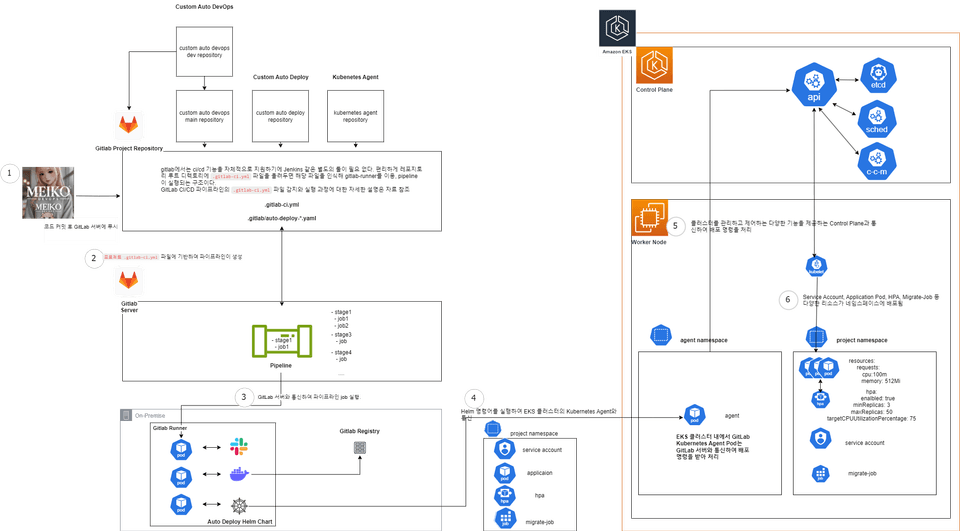
Pipeline flow


In addition to building an EKS cluster and pipeline as above, we will also configure important monitoring in a Kubernetes environment, how to inject IAM in Kubernetes, and look at traffic flow.

After attending the lecture, you will have a deep understanding of the DevOps workflow.


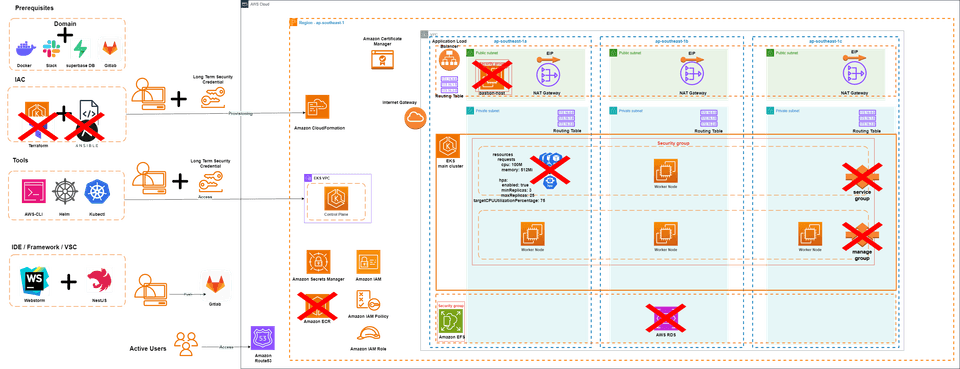
What is not covered in this lecture


In order to achieve the goal of this lecture, which is to configure a cluster with a good structure and set up the essential settings before the operation stage, we will not cover the AutoScaling settings, backup strategies, HPA configuration and operation principles, and application load testing required in actual operation, and will cover them in the next in-depth lecture.


It also doesn't use Terraform or Ansible, which are IACs required for infrastructure provisioning and configuration settings.


Finally, due to cost considerations and the complexity of the training, we do not use the following AWS services. While some are inexpensive, we have considered only the most essential services.

  1. It would be correct to place the Bastion-Host (EC2) in a public subnet and access the cluster through SSH to the instance, but since we are focusing on infrastructure configuration, we decided that it is unnecessary and did not configure it, so we proceed by sending a request to the API Server in the cluster Control Plane through IAM locally.

  1. DB does not use RDS, but uses a free DB (Postgres) provided by Superbase.

    1. We will practice creating a single Secret in AWS Secrets Manager, not in env, for this DB endpoint information, and then receiving and using the value when the application pod starts.

  2. The registry also uses Gitlab Registry instead of ECR.

Learn about these things

About customizing Gitlab CI/CD pipelines

You can learn and practice how to configure a pipeline to suit your needs by customizing the components provided by default in Gitlab (Gitlab auto devops, auto deploy) rather than using them as is.

About building a Kubernetes monitoring and alerting system

We will set up a representative PLG stack (Prometheus, Loki, Grafana) for Obsability in a Kubernetes environment.

You can practice preventing data loss by setting up Amazon EFS (EFS) as a Persistent Volume (PV) using the EFS CSI driver and then binding it to the PV created through a Persistent Volume Claim (PVC) .

Monitor errors or important logs in the project and set up Slack notifications so that immediate response is required, and monitor the computing resources of the nodes . You can practice setting up Slack notifications when a set threshold value is exceeded.

How to manage environment variables safely and securely by using the env file instead of the env file.

First, we will learn about long-term credentials and temporary credentials , which are important topics in AWS .

Create a secret in AWS SecretsManager and utilize Service Account , one of the Kubernetes resources, to apply the principle of least privilege and safely separate roles for each pod. You can practice.


Things to note before taking the course

Practice environment

  • Operating System and Version (OS): MacOS M2 Pro 14


  • IDE: Webstorm

  • Infrastructure environment: AWS, AWS EKS, GItlab

Learning Materials

  • Format of learning materials provided: Lecture materials provided in Notion templates

  • Volume and Capacity: Materials provided for each section

Player Knowledge and Precautions

  • AWS, NestJS, k8s, docker

    Basic understanding


  • Since we use AWS, please be careful about charges by deleting resources after practice.


  • Unauthorized distribution and duplication of the code is prohibited. The learning materials are also copyrighted, and any use other than for personal learning purposes is prohibited.

Recommended for
these people

Who is this course right for?

  • Anyone who wants to apply Gitlab CI/CD pipeline to their project

  • Developers who spend a lot of time documenting infrastructure and want to use their time more efficiently

  • Anyone curious about how to build a CI/CD pipeline that is frequently used in the field

  • Anyone with experience in manual deployment who has a need for automated deployment

  • People who want to contribute to the company by improving the existing CI/CD environment

Need to know before starting?

  • Kubernetes

  • NestJS

  • AWS

  • Linux basic command

  • Docker

  • Git

Hello
This is

69

Learners

4

Reviews

3

Answers

4.8

Rating

1

Course

자기소개


백엔드 엔지니어로 근무할 때부터 자동화를 통해 업무 프로세스를 효율화하고 개선 하는 것 에 관심이 많았습니다. 업무 생산성을 향상시키고 보다 효율적인 업무 환경에 기여하다보니 데브옵스 엔지니어로 일할 수 있는 기회를 얻었습니다. 저는 좋은 사수분들 밑에서 성장하고 있습니다. 그 과정에서 얻은 경험과 지식을 함께 나누고자 강의를 찍게 되었습니다.

경력

[前] Blockchain Backend / Contract Developer

[] Blockchain Mainnet DevOps Engineer


Curriculum

All

70 lectures ∙ (4hr 20min)

Published: 
Last updated: 

Reviews

All

4 reviews

4.8

4 reviews

  • jukas5985 [DEL] 250815201525님의 프로필 이미지
    jukas5985 [DEL] 250815201525

    Reviews 14

    Average Rating 4.9

    5

    64% enrolled

    就労生として理論はある程度勉強していましたが、実際の実装経験が不足して悩みでしたが、この講義を通じて多くのことを学びました。特にEKSクラスタ構築からGitlabパイプライン構成、モニタリングシステム構築まで、全体的な流れを体験できてよかったです。

    • meik0
      Instructor

      こんにちは、受講坪ありがとうございます! もし講義を聞きながら、さらに気になった点やもっと詳しく扱って欲しい部分があれば、いつでもフィードバックしてください。

  • 1302님의 프로필 이미지
    1302

    Reviews 7

    Average Rating 5.0

    5

    60% enrolled

    実務でよく使われる技術を核心的に取り扱いながら、実際に実習を通じて学ぶことができてよかったです。 IRSAを通じたセキュリティ強化、PLGスタックを利用したモニタリングの構築など、実務で必要なスキルを学ぶことができ、就職準備に大いに役立ちました。ご提供いただいたノッションテンプレートも学習整理に非常に有用であり、今後もよく参考になると思います。デブオプスに興味のある方に強力おすすめです!

    • meik0
      Instructor

      就職準備に大変お役に立てたと幸いです! ノッションテンプレートも役に立つなんて気持ちいいですよ~~今後講義はずっとこのように提供していきたいと思います。より充実したフォローアップ講義を作ることができるように努力いたします!

  • kimuyjoong2two님의 프로필 이미지
    kimuyjoong2two

    Reviews 9

    Average Rating 4.6

    4

    100% enrolled

    講義資料をノッションとして提供してくれたことが良かったです。 ただ、講義時間に比べて価格が多少ある方なので、その点は残念でした。

    • meik0
      Instructor

      Notion を提供して喜んでいただけてよかったです。ありがとうございます。講義料金については、gitlab cicd と k8s を実務的に一緒に扱う講義がないため、競争力があると判断しました。次に計画している istio 講義は、もう少し安く設定してみます。

  • ericserra4918님의 프로필 이미지
    ericserra4918

    Reviews 99

    Average Rating 4.9

    5

    30% enrolled

    AWS EKS 구성에 대해 차근차근 준비해가는 과정을 보여주셔서 좋았습니다。後続の講義として、AWS Network Firewall を含む新しい講義で AWS セキュリティについても講義してくださるとありがたいです。講師の皆さん、頑張ってください!!!

    • meik0
      Instructor

      こんにちは! 誠心誠意のレビューを本当にありがとうございます! 今後、istio の後続講座も準備中です! 今後も役に立てば幸いです。おっしゃった AWS セキュリティについても、私が実務で経験して共有できるようになったらお伝えします。ありがとうございます。

$77.00

Similar courses

Explore other courses in the same field!