inflearn logo
Challenge
In progress

Analysis automation using Google Analytics (GA4) + Microsoft Clarity

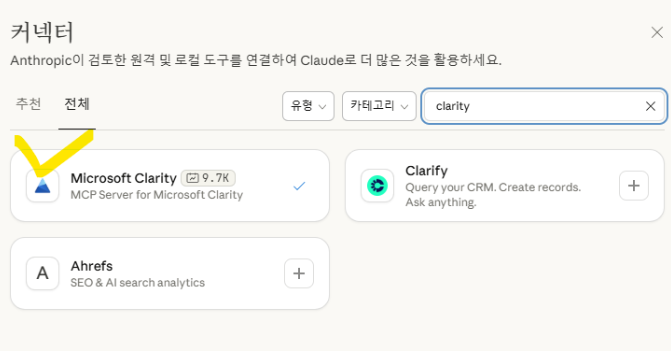
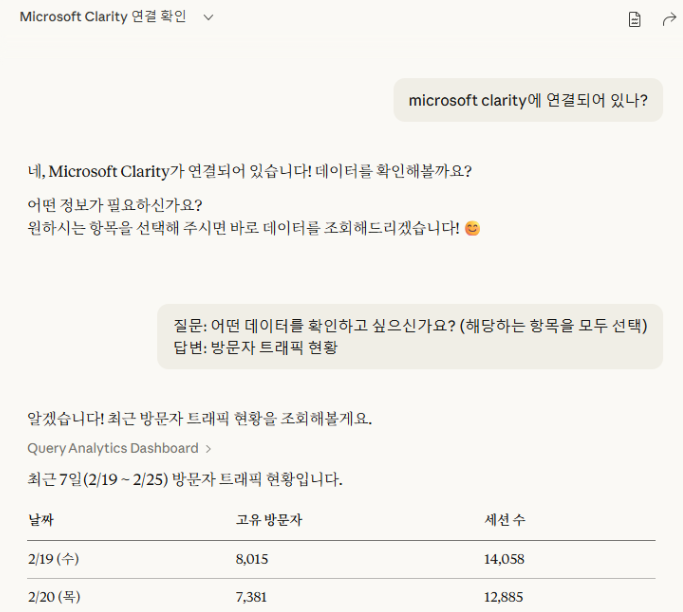
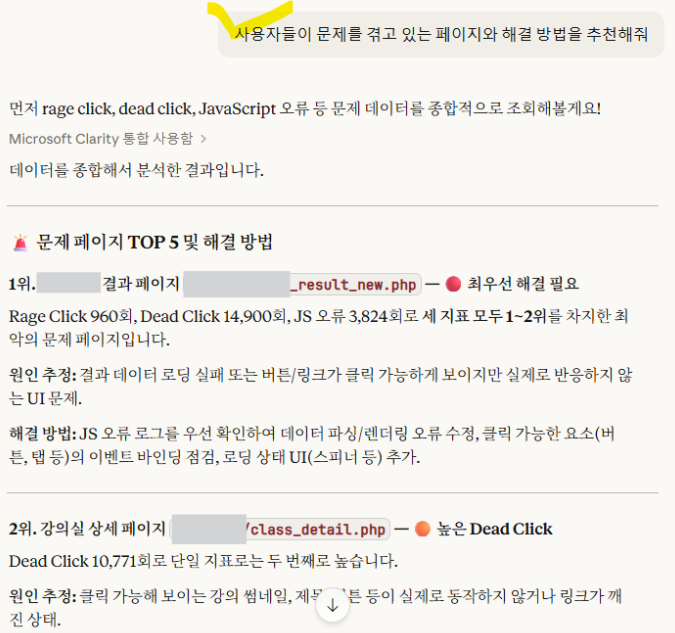
We will create an automated system that uses AI to automatically analyze traffic influx data from Google Analytics (GA4) and customer behavior data from Microsoft Clarity. By appropriately utilizing GA4's numerical data and Microsoft Clarity's Copilot auto-analysis feature, even beginners can easily receive AI-powered insights into customer behavior on their websites. No coding is required, and no development knowledge is necessary.

Google Analytics
GA4
Free Live

라이브 1 회

성취의 증표, 수료증을 발급해요.

질문하고 즉시 답을 얻어요.

GA4 Guide님과 함께해요!

2,594

Learners

122

Reviews

310

Answers

4.9

Rating

13

Courses

I am a 16-year veteran marketer in charge of online marketing and a Google Analytics instructor.

I started teaching because I remember what it was like learning Google Analytics on my own, starting from scratch and hitting wall after wall.

Now, I am teaching classes at an academy every week.

There is something I tell my students every time.

I tell them that if you only learn Google Analytics briefly, you will end up wasting even more time later on trying to find answers when you encounter things in practice that you haven't learned.

If you invest some time in learning it at the beginning, you can save a lot of time later that would otherwise be spent asking around for help.

It is a difficult task, but it is better to invest some time in learning when you first start.

It will save you a lot of time later on that would otherwise be spent asking around. It's a difficult task, but it's better to invest some time to learn it when you first start.

It will save you a lot of time later on that would otherwise be spent asking around. It's a difficult task, but it's better to invest some time to learn it when you first start.
More

[Free Challenge Webinar] Automating Customer Behavior Analysis with GA4 x Microsoft Clarity

"If data is piling up but you still don't know the real reason why your customers are leaving?"

  • Data-driven decision-making is now essential in digital marketing and service planning.
    However, it is difficult to read the true intentions of customers through GA4's complex numbers and graphs alone.

  • In this webinar, we will show you how to build an analytical environment by combining **Google Analytics (GA4), the ultimate tool for quantitative analysis**, with **Microsoft Clarity, which visually demonstrates actual user behavior**.


What you will learn

(1) Seeing Real Customer Behavior Beyond Numbers: The Synergy of GA4 and Clarity

While GA4 tells you 'how many people entered and where they left (What),' Clarity shows you 'why they left from there (Why).'
We will cover the core concepts of clearly understanding the differences between the two tools and how to use them complementarily to maximize performance.

(1) Done in just 10 minutes! Perfect integration setup without complex coding

Marketers and planners can do it themselves without the help of developers. We will show you the step-by-step process of integrating GA4 and Clarity. You can apply it to your website immediately while attending the webinar.

Notes before taking the course

Practice Environment

  • Operating System and Version (OS): Windows recommended

  • Tools used: We recommend using dual monitors so you can follow along with the practice while watching the screen.

  • PC Specifications: Chrome browser recommended

Learning Materials

  • Replays and teaching materials will not be provided.

  • Due to the nature of the webinar, it may be difficult to answer all questions.

Prerequisite Knowledge and Important Notes

  • It is recommended to have basic experience using GA.

This webinar is based on the existing GA4 / Clarity courses, but taking the courses is not mandatory.

Google Analytics (GA4+GTM) for Practitioners: https://inf.run/Jxd6i

GA4 Practical Reports for Immediate Use: https://inf.run/JR68B

GA4 BigQuery Introduction for Marketers and Planners: https://inf.run/f6p3F

Looker Studio Practice for Data Analysis https://inf.run/fwaZW

GA4 Google Analytics Ecommerce Setup Practice for Marketers: https://inf.run/HZpQ5

Microsoft Clarity Analysis, Easier than GA4 https://inf.run/PQbew

Google Analytics (GA4) Certification (GAIQ) Practice Exam Questions & Explanations for Practical Use 2026 https://inf.run/pnXfc

3월

27일

챌린지 시작일

2026년 3월 27일 PM 03:00

챌린지 종료일

2026년 3월 28일 PM 02:30

챌린지 커리큘럼

All

1 lectures

Course Materials:

Live

챌린지에서 배워요

  • How to import GA4 data into AI tools like Claude

  • How to import Microsoft Clarity data into AI tools like Claude

  • How to interpret GA analysis results and Microsoft Clarity analysis results using AI

  • How to derive insights and improvements based on analyzed data and build a dashboard

Recommended for
these people

Who is this course right for?

  • Performance marketers who are curious about post-ad behavior analysis within the website

  • Junior UX/UI designer who needs to analyze customer behavior within a website

  • Seniors who need web data analysis automation

  • People who want to reduce the time spent on simple data extraction, analysis, and reporting tasks in data tools like GA4.

Need to know before starting?

  • You just need to understand what GA4 is.

  • It is recommended to have GA4 and Microsoft Clarity accounts for the hands-on practice.

Reviews

Not enough reviews.
Please write a valuable review that helps everyone!

취소 및 환불 규정
챌린지는 지식공유자가 설정한 수업 최소 정원이 충족되지 않을 경우, 폐강 안내가 고지되며 결제 내역이 자동취소됩니다.

GA4 Guide's other courses

Check out other courses by the instructor!

Free