강의

멘토링

커뮤니티

Data Science

/

Data Analysis

Data Analysis Using Microsoft Clarity, Easier Than GA4 (2026)

I'll show you how to use Microsoft Clarity to identify problems based on actual user behavior, and connect filters, segments, funnels, Smart Events, and Custom Tags to organize them into actionable insights. I've included the exact methods I've used in practice to quickly pinpoint causes of drop-offs and conversion declines by combining Clarity with GA4, and to prioritize improvements. It's structured in a "Setup → Analysis → Insight Generation Process → Advanced Settings" flow, so even first-time users can follow along. (For those who need it, I've also included sections on demo shopping malls and basic GA/GTM setup)

(5.0) 4 reviews

24 learners

Level Beginner

Course period Unlimited

  • GA4 Guide
microsoftclarity
microsoftclarity
GA4
GA4
UI/UX
UI/UX
UX 리서치
UX 리서치
데이터분석
데이터분석
Google Analytics
Google Analytics
UX Research
UX Research
data-analysis
data-analysis
Data literacy
Data literacy
microsoftclarity
microsoftclarity
GA4
GA4
UI/UX
UI/UX
UX 리서치
UX 리서치
데이터분석
데이터분석
Google Analytics
Google Analytics
UX Research
UX Research
data-analysis
data-analysis
Data literacy
Data literacy

Reviews from Early Learners

Reviews from Early Learners

5.0

5.0

kitlshee

100% enrolled

I watched the free webinar and even took the course, and there are many parts I can actually apply, so I think it will be very helpful.

5.0

makretit

100% enrolled

It was good that you explained it easily and well.

5.0

sunsun1234

31% enrolled

It's well organized for practical use in real work, so it seems very useful. It's also nice that there's a demo account so I can see it directly. I'm planning to install and try it out for my upcoming project. Thank you for the great lecture.

What you will gain after the course

  • Learn Clarity's core features at a "ready-to-use in practice" level

  • The ability to isolate and analyze "problematic users" using filters/segments

  • Securing 'supporting evidence (videos/heatmaps)' that can persuade teams/customers

  • How to find the "WHY" with Clarity that you couldn't see with GA4 numbers alone

  • How to easily capture 'desired actions' as events with Smart Event

  • The design skill to record "the criteria I want to see" as data using Custom Tags

  • 3-Step Process to Turn Insights into Action Items

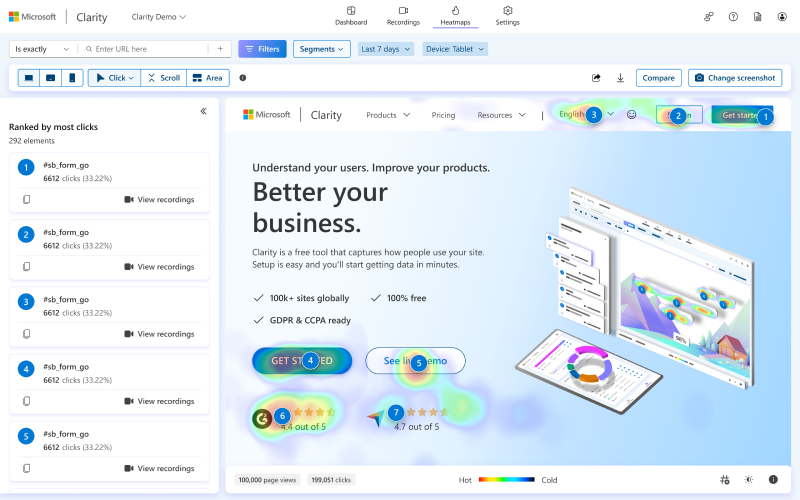
Microsoft Clarity enables click heatmaps and behavior recording analysis of users

Understand user behavior through session recordings

Understanding user behavior such as clicks/scrolls


Easy data analysis with
Microsoft Clarity, free software forever!

Get actionable insights based on real user behavior.

See real user behavior directly through videos and heatmaps with Clarity.

Identify the root causes of bounce rates and conversion drops, secure compelling evidence to persuade your team and customers, and
develop data-driven problem-solving capabilities.


There are many things you can immediately discover once data is collected after a simple installation.
User clicks/scrolling/behavior recording/AI analysis - now easily solve it with Microsoft Clarity!


Microsoft Clarity, easier than GA4
Learn data analysis methods based on actual user behavior.

Intuitive data analysis through click/scroll/customer behavior recording

From Microsoft Clarity installation to filters, segments, funnels, Smart Events, and Custom Tags
Learn in-depth analysis skills to dig into the 'WHY' beyond GA4 numbers.

We explain the analysis process using Microsoft Clarity, from easy analysis/setup to utilizing filters/segments for
detailed insight analysis, so you can understand and follow along.


Beyond simple installation and basic analysis, identify the root causes of bounce rates and conversion drops
and establish a practical process for deriving actionable improvement priorities.

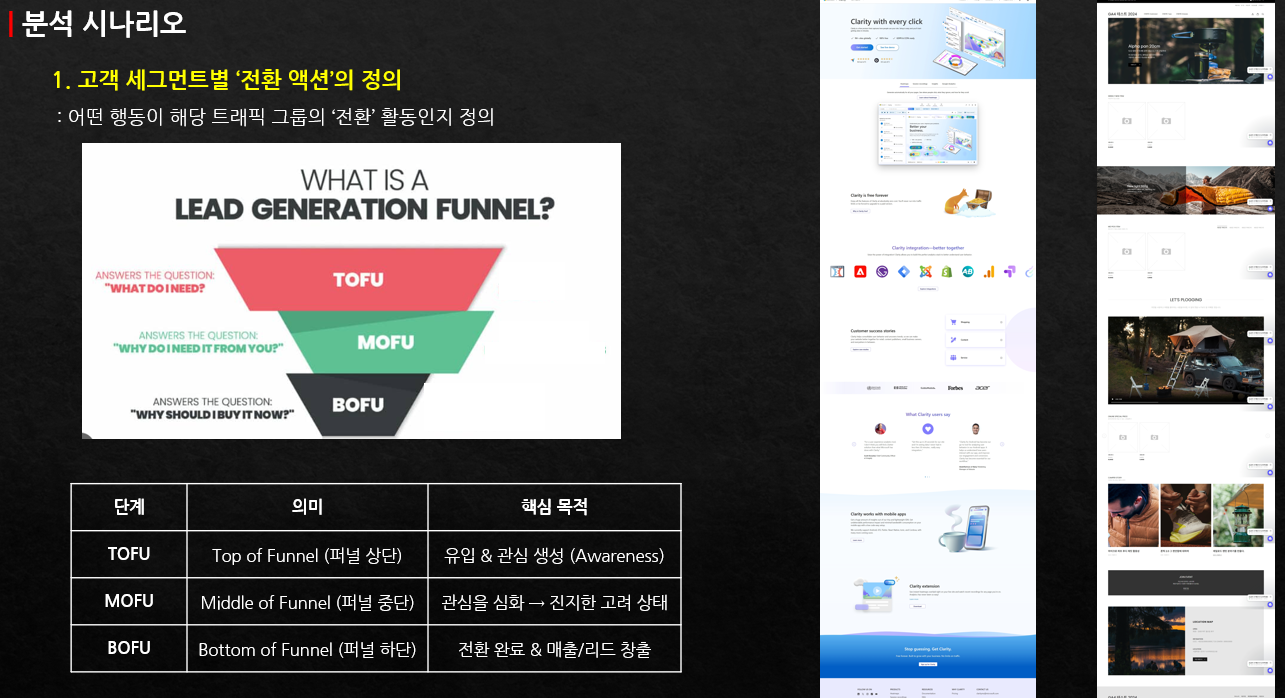
We'll explain in detail how to use funnels in Microsoft and how to classify traffic to understand customer intent,
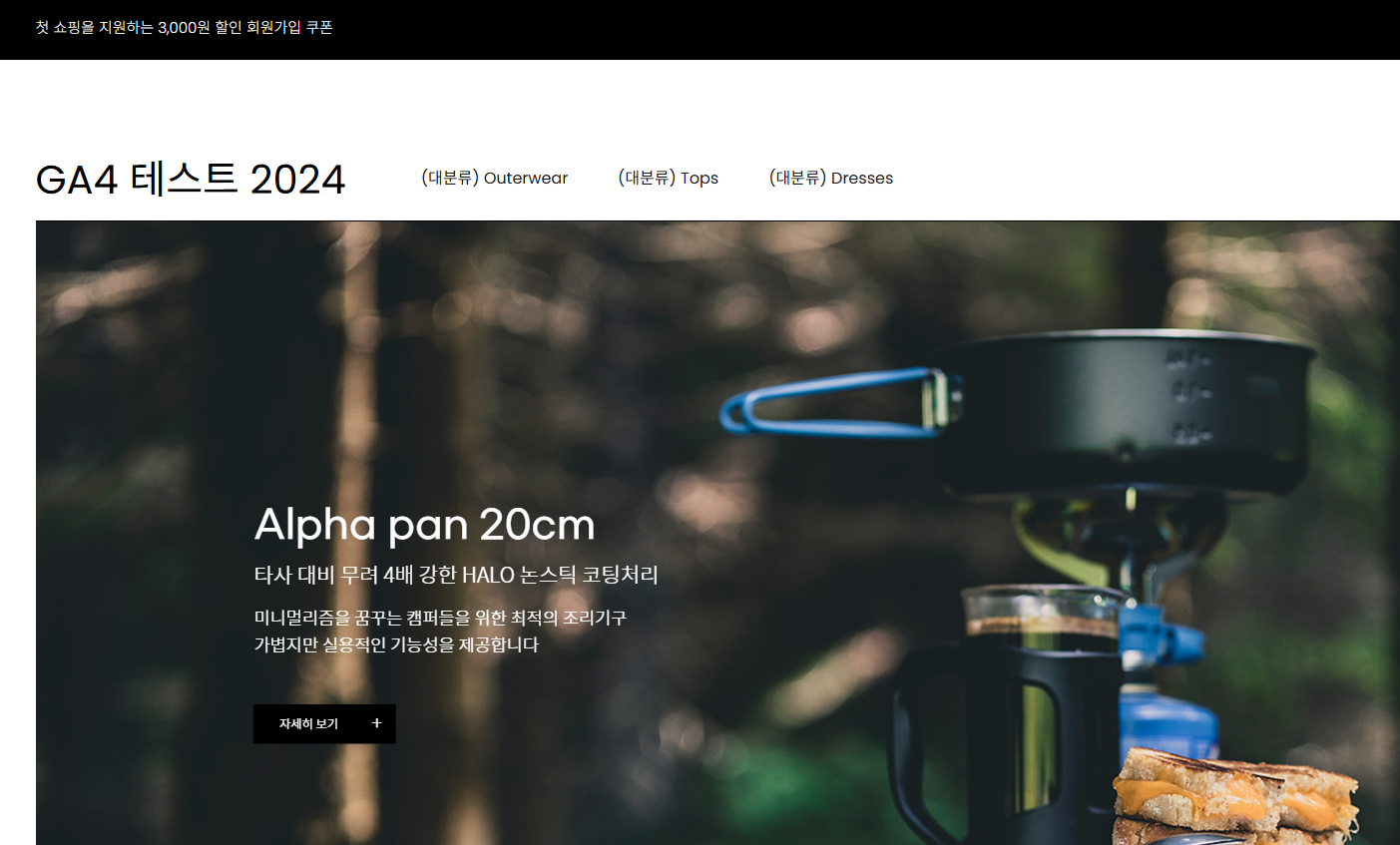
and guide you through setting it up using an actual test shopping mall.


From basic GA/GTM setup to deriving insights using Clarity and advanced analysis with Copilot,
systematically learn the entire process and strengthen your practical capabilities.

We'll guide you through easy setup using templates for the challenging GTM (Google Tag Manager) configuration, and show you how to organize customer insights all at once using Copilot.

Discover actionable insights
with Clarity

Section 1 - Demo Shopping Mall Setup and GA/GTM Basic Configuration for Practice (Only for those who need it)

In this section, we guide you through creating a demo shopping mall account needed for practice and effectively setting up Google Analytics 4 (GA4) and Google Tag Manager (GTM). You'll learn how to configure the basic environment for installing GA4 tags.

Section 2 - Microsoft Clarity Installation and Basic Analysis Usage

This section covers the detailed installation process of Microsoft Clarity and teaches basic usage methods that can be immediately applied to actual website analysis. You'll learn how to configure initial analysis scenarios through filtering and comparison features.

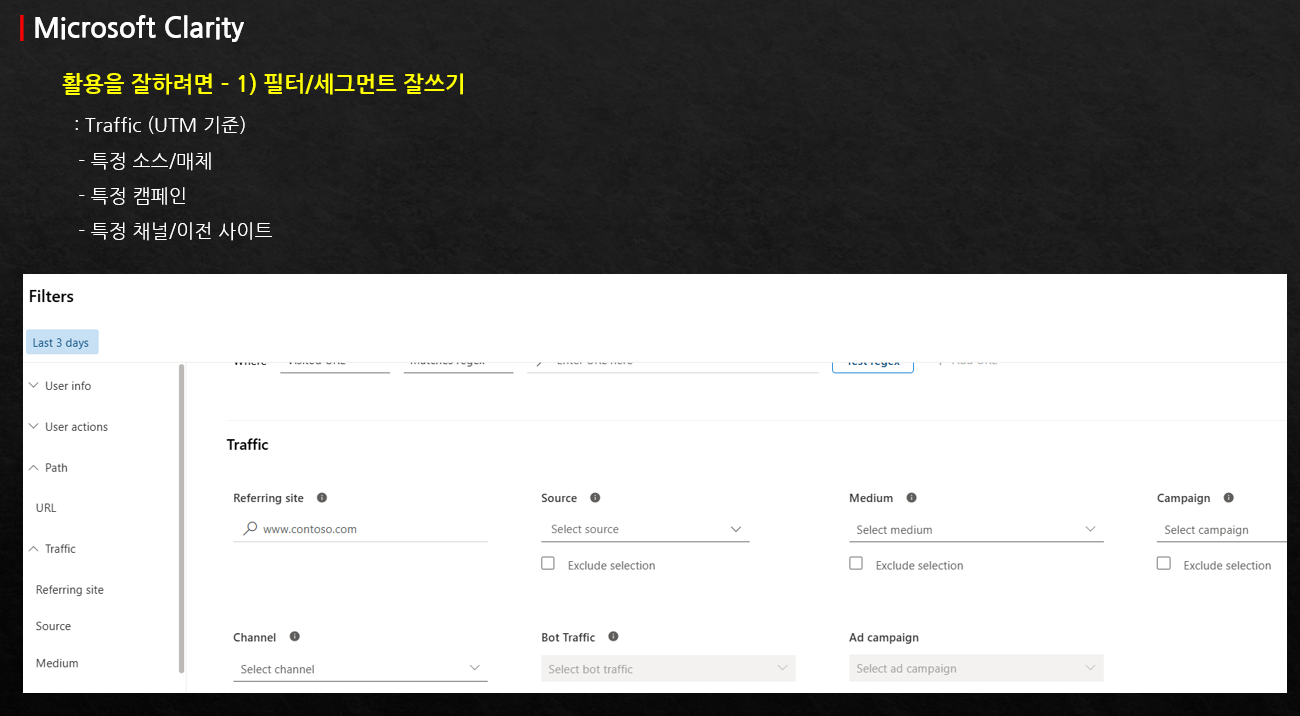
Section 3 - Advanced Analysis Techniques Using Filters and Segments

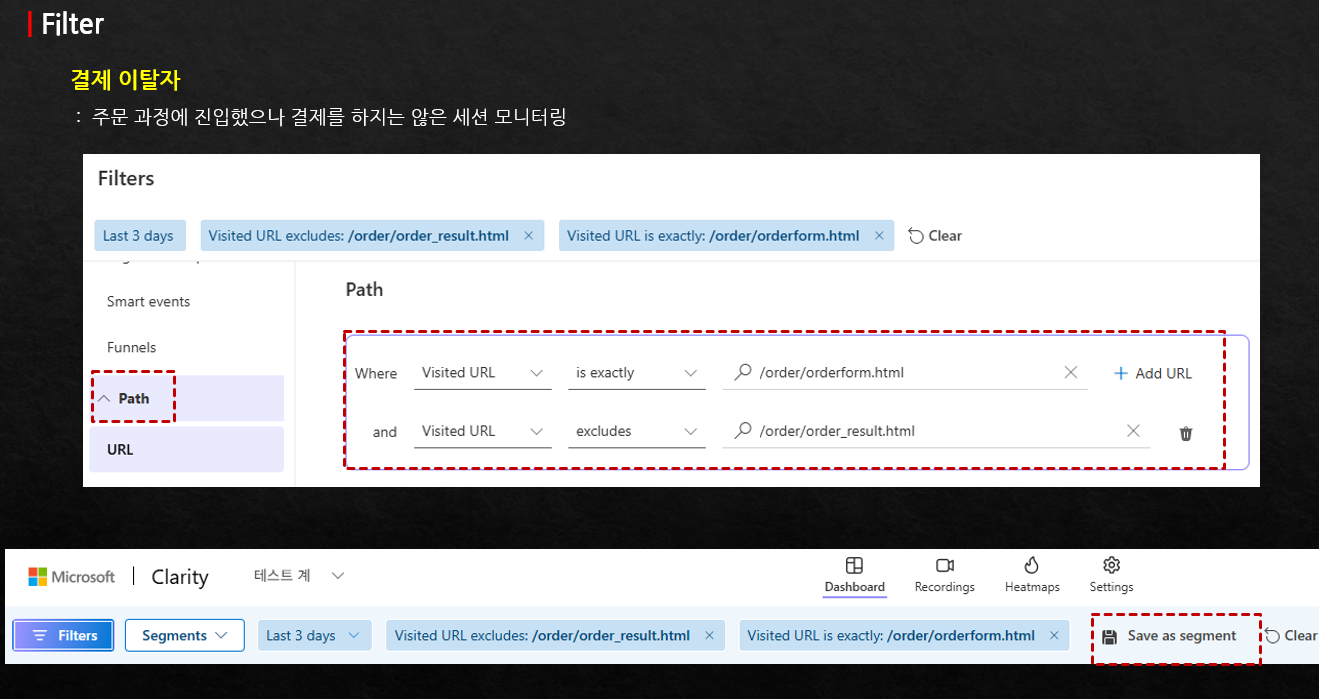
Learn in-depth methods for setting up and analyzing filters and segments based on various elements such as user information, behavior, labels, and URL paths. This includes hands-on practice with specific configurations for analyzing payment drop-off users.

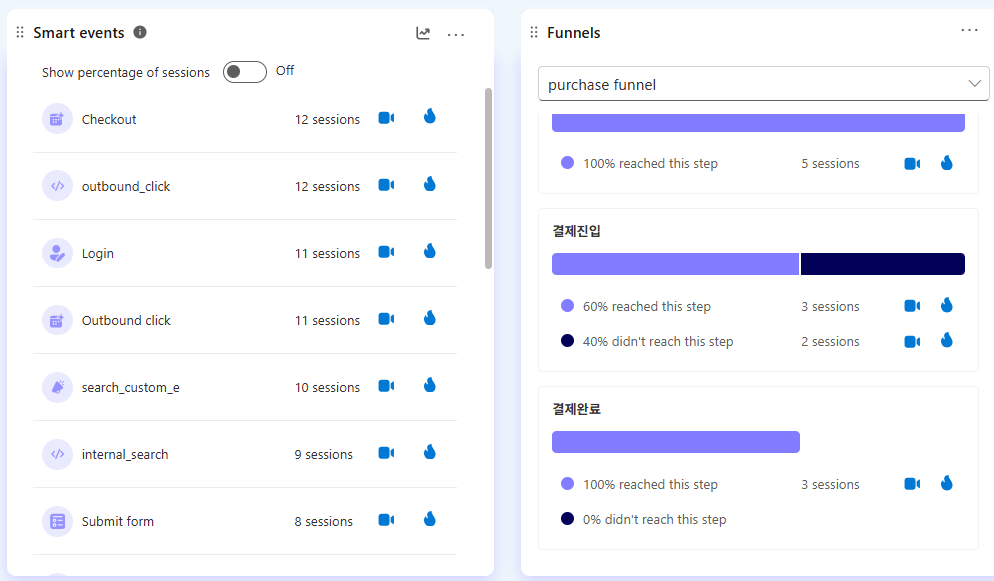
Section 4 - Analysis Design Using Funnels and Smart Events

Learn funnel setup and scenarios for user flow analysis, and understand the Smart Event feature that effectively manages automatic and custom events. Practice detailed event setup using Custom Tag configuration and Smart Events.

Section 5 - Clarity-Based Conversion Analysis and Insight Derivation Process

The importance of conversion settings as a key element for effective analysis is emphasized, and you will learn a 3-step process that connects analytical insights to concrete action items. The course also covers how to set up session insight analysis using Copilot.

Section 6 - Additional Settings for Advanced Analysis and GA4 Integration

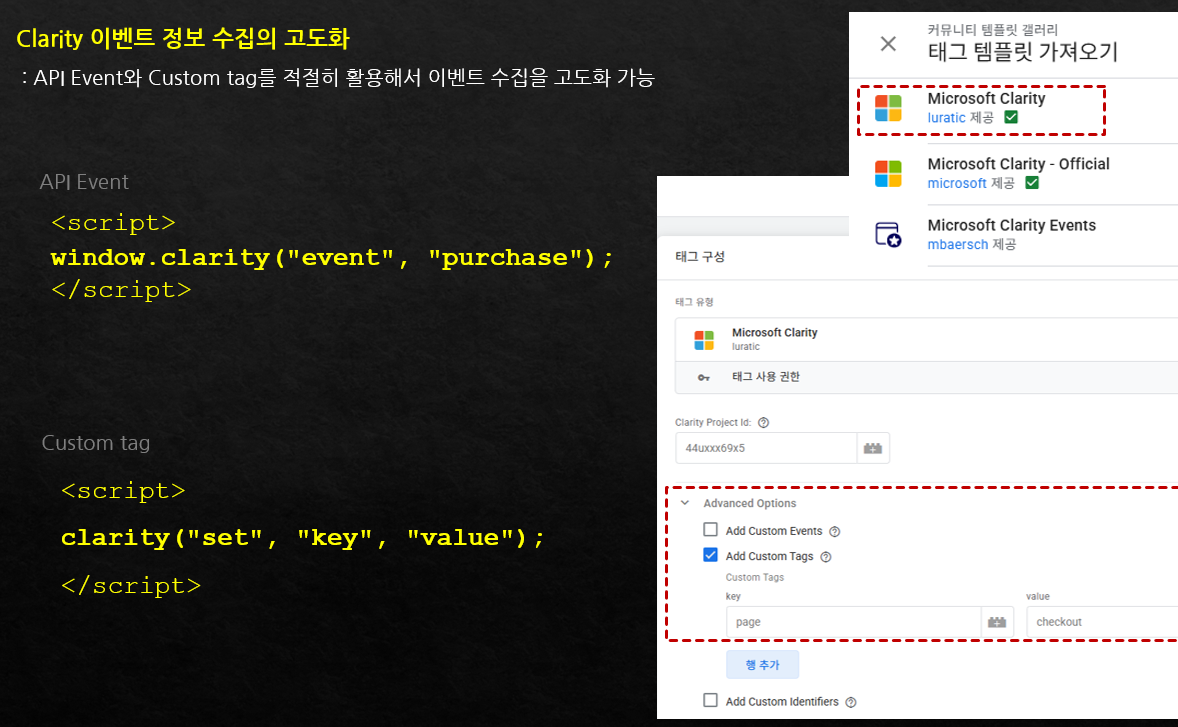
You will learn about understanding and practicing API events, and how to set up API events and Custom Tags using tag templates. Additionally, you will learn how to utilize e-commerce event setup templates and how to check session recording URL data in GA4.

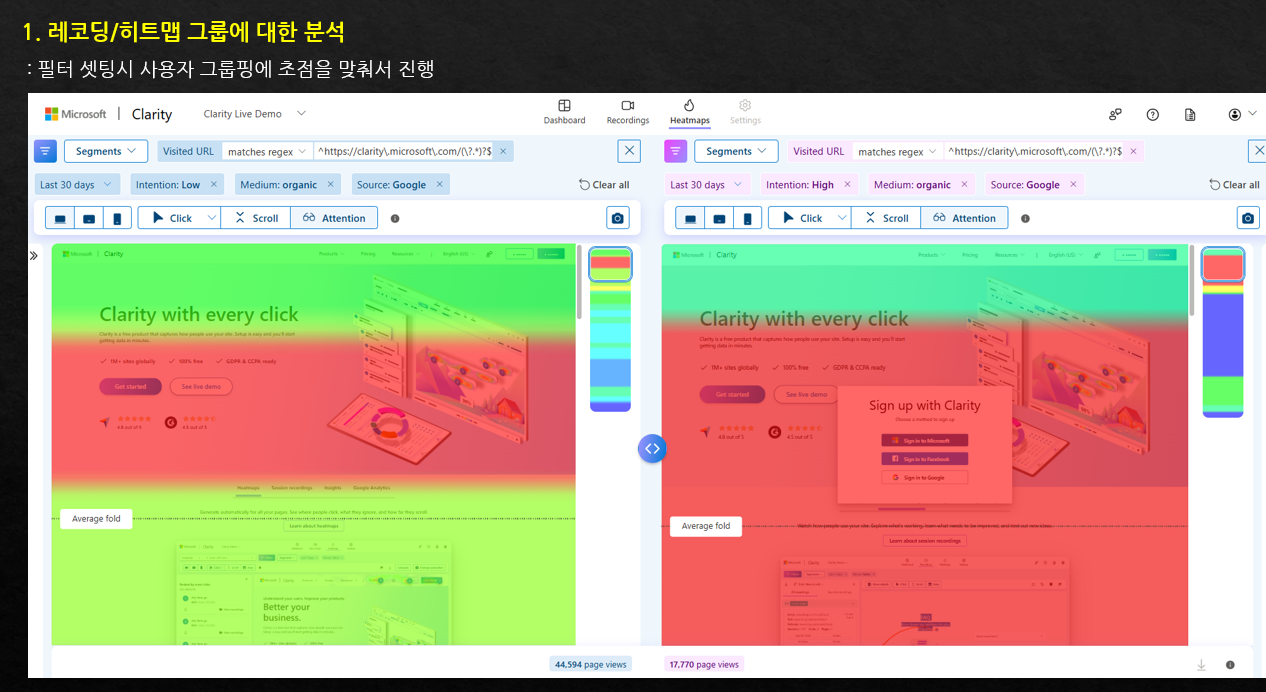
Where are users clicking the most?

You can check through click heatmap and even watch recorded videos of users' clicking behavior.
You can also quickly view insights from these videos using AI.


How far down do users scroll on this page?
What areas are they interested in?

With Scroll heatmap, you can see what percentage of users view up to a specific location, and using the Attention feature, you can intuitively identify areas users are interested in through color visualization.


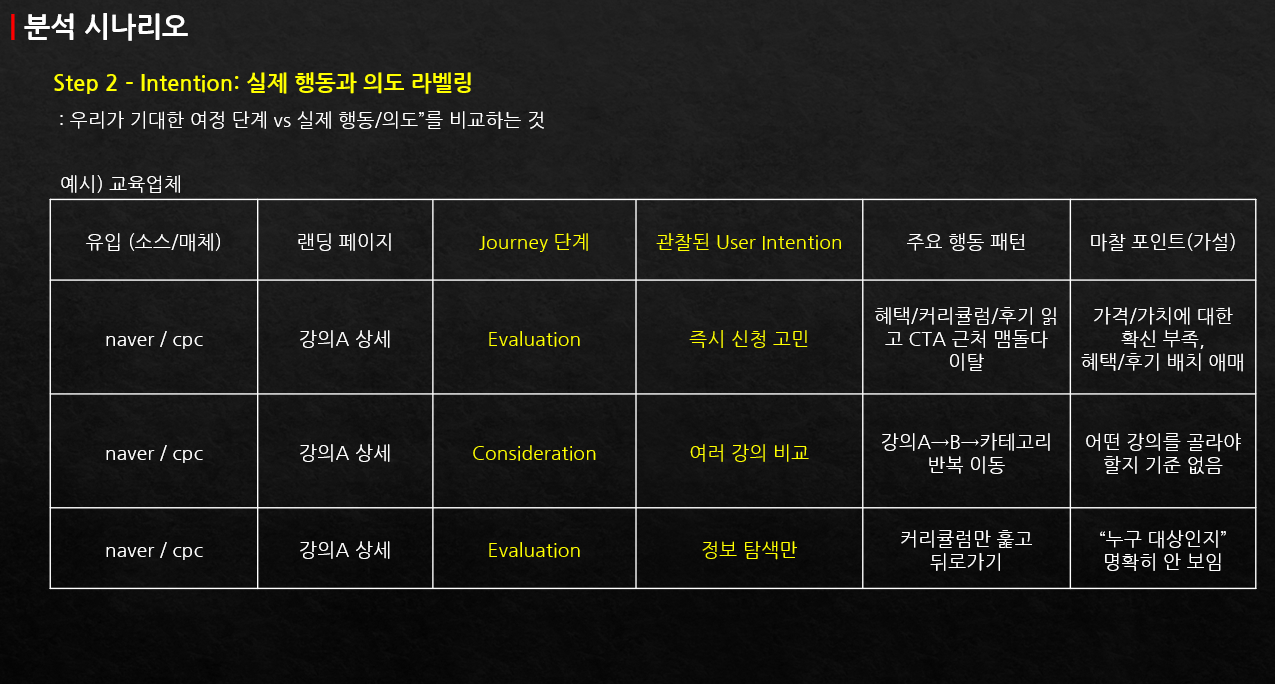
What actions are users taking here?

You can understand user intent by watching recordings of actual user behavior.
Through the built-in Copilot, you can instantly identify behavior patterns and insights from many users.

Feeling overwhelmed about where to start with website analysis?
This course was created just for people like you.


✔️ Marketers/Planners/Analysts curious about the 'Why' behind user behavior that GA4 couldn't reveal

  • Those who found it difficult to identify the root cause of drop-offs/conversion declines by relying solely on GA4 data

  • Those who want to find problems by directly observing user behavior

  • Those who want to derive convincing improvement proposals based on data

✔️ Practitioners who have adopted Clarity but are struggling because they don't know how to analyze

  • Those who felt lost about how to utilize core features like filters, segments, and funnels after installing Clarity

  • Those who want to analyze actual user experience through heatmaps and session recordings

  • Those who want to gain deeper analytical insights by integrating GA4 and Clarity

✔️ Those who want to quickly gain actionable insights to improve website performance

  • Those who want to quickly diagnose the causes of drop-offs in key sections such as landing pages, detail pages, and checkout funnels

  • Those who want to accurately track desired user behaviors through Smart Event and Custom Tag design

  • Those who want to turn analysis results into actionable items through a 3-step process


Stop wasting time on vague guesses.
Listen to your users' real voices with Microsoft Clarity and become an expert at dramatically improving your website performance.

Notes Before Taking the Course


Practice Environment

  • We recommend using a dual monitor setup to follow along with the hands-on practice while watching the lecture.

  • Some advanced features are easier to understand if you have experience installing GA4 and GTM.

  • You can practice on your personal PC, and no separate software installation is required.

Prerequisites and Important Notes

  • Since this is a recorded webinar, there may be parts where the audio is not smooth or the editing seems awkward.

  • There is some explanation about GA4 and GTM, but you only need to understand the content covered in the lecture.

  • Before taking the course, it will be helpful for practice if you create GA4 and GTM accounts and complete the basic setup in advance.
    (Section 1 includes explanations that you can follow along with by clicking.)

  • Course materials are not provided, but the lectures are available without an expiration date and can be viewed at any time.

Learning Materials

  • The demo shopping mall information for practice and basic GA/GTM setup guide are included.

  • You can refer to the Microsoft Clarity demo video materials.


Recommended for
these people

Who is this course right for?

  • For those who want to quickly identify the causes of drop-offs in landing pages, detail pages, and payment/application funnels

  • People who have implemented Clarity but feel overwhelmed about where and how to start analyzing

  • Marketers/planners/analysts who look at GA4 but want to find the "why" from a UX/CRO perspective

  • Planners/Performance Marketers who need website analysis

Need to know before starting?

  • Required: None (beginners to Clarity can also take this course)

  • Much easier if you have: Experience using GA4 or GTM "at least once"

Hello
This is

2,170

Learners

108

Reviews

307

Answers

4.9

Rating

10

Courses

I am a 16-year veteran marketer in charge of online marketing and a Google Analytics instructor.

I started teaching because I remember what it was like learning Google Analytics on my own, starting from scratch and hitting wall after wall.

Now, I am teaching classes at an academy every week.

There is something I tell my students every time.

I tell them that if you only learn Google Analytics briefly, you will end up wasting even more time later on trying to find answers when you encounter things in practice that you haven't learned.

If you invest some time in learning it at the beginning, you can save a lot of time later that would otherwise be spent asking around for help.

It is a difficult task, but it is better to invest some time in learning when you first start.

It will save you a lot of time later on that would otherwise be spent asking around. It's a difficult task, but it's better to invest some time to learn it when you first start.

It will save you a lot of time later on that would otherwise be spent asking around. It's a difficult task, but it's better to invest some time to learn it when you first start.

Curriculum

All

32 lectures ∙ (6hr 57min)

Published: 
Last updated: 

Reviews

All

4 reviews

5.0

4 reviews

  • koonbus80936273님의 프로필 이미지
    koonbus80936273

    Reviews 4

    Average Rating 5.0

    5

    100% enrolled

    I watched the free webinar and even took the course, and there are many parts I can actually apply, so I think it will be very helpful.

    • qstrike6272님의 프로필 이미지
      qstrike6272

      Reviews 6

      Average Rating 5.0

      5

      100% enrolled

      It was good that you explained it easily and well.

      • asdfasdfasdfasdfasdf님의 프로필 이미지
        asdfasdfasdfasdfasdf

        Reviews 4

        Average Rating 5.0

        5

        31% enrolled

        It's well organized for practical use in real work, so it seems very useful. It's also nice that there's a demo account so I can see it directly. I'm planning to install and try it out for my upcoming project. Thank you for the great lecture.

        • empriel5450님의 프로필 이미지
          empriel5450

          Reviews 5

          Average Rating 5.0

          5

          84% enrolled

          There are some parts where the editing is a bit awkward, but overall the content is really good.

          $132.00

          GA4 Guide's other courses

          Check out other courses by the instructor!

          Similar courses

          Explore other courses in the same field!