


12.11 invalid Date 오류
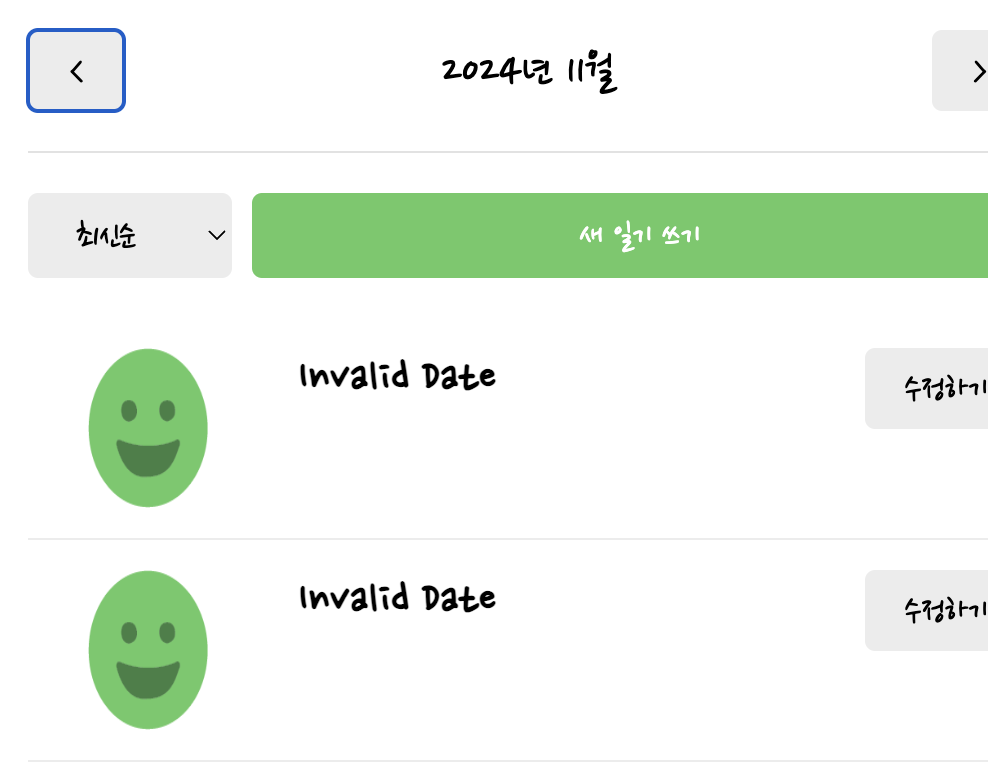
따라서 하고 있었는데 다음 그림과 같이 invalid Date 라는 값이 떠서 관련 질문 드립니다. 강의 몇번 돌려보면서 오타가 있나 봤는데 도저히 모르겠어서 질문 드립니다...
// App.jsx

import "./App.css";
import { Routes, Route, Link, useNavigate } from "react-router-dom";
import Home from "./pages/Home";
import Diary from "./pages/Diary";
import New from "./pages/New";
import Edit from "./pages/Edit";
import Notfound from "./pages/Notfound";

import { useReducer, useRef, createContext } from "react";

const mockData = [
  {
    id: 1,
    createdDate: new Date("2024-11-13").getTime(),
    emotionId: 1,
    content: "1번 일기 내용",
  },

  {
    id: 2,
    createdDate: new Date("2024-11-10").getTime(),
    emotionId: 2,
    content: "2번 일기 내용",
  },
  {
    id: 3,
    createdDate: new Date("2024-10-11").getTime(),
    emotionId: 3,
    content: "3번 일기 내용",
  },
];

function reducer(state, action) {
  switch (action.type) {
    case "CREATE":
      return [action.data, ...state];
    case "UPDATE":
      return state.map((item) =>
        String(item.id) === String(action.data.id) ? action.date : item
      );
    case "DELETE":
      return state.filter((item) => String(item.id) !== String(action.id));
    default:
      return state;
  }
}

export const DiaryStateContext = createContext();
export const DiaryDispatchContext = createContext();

function App() {
  const [data, dispatch] = useReducer(reducer, mockData);
  const idRef = useRef(3);

  const onCreate = (createdDate, emotionId, content) => {
    dispatch({
      type: "CREATE",
      data: {
        id: idRef.current++,
        createdDate,
        emotionId,
        content,
      },
    });
  };

  const onUpdate = (id, createdDate, emotionId, content) => {
    dispatch({
      type: "UPDATE",
      data: {
        id,
        createdDate,
        emotionId,
        content,
      },
    });
  };

  const onDelete = (id) => {
    dispatch({
      type: "DELETE",
      id,
    });
  };

  return (
    <>
      <DiaryStateContext.Provider value={data}>
        <DiaryDispatchContext.Provider value={{ onCreate, onDelete, onUpdate }}>
          <Routes>
            <Route path="/" element={<Home />} />
            <Route path="/new" element={<New />} />
            <Route path="/diary/:id" element={<Diary />} />
            <Route path="/edit/:id" element={<Edit />} />
            <Route path="*" element={<Notfound />} />
          </Routes>
        </DiaryDispatchContext.Provider>
      </DiaryStateContext.Provider>
    </>
  );
}

export default App;


//Home.jsx

import { useState, useContext } from "react";
import { DiaryStateContext } from "../App";

import DiaryList from "../components/DiaryList";
import Header from "../components/Header";
import Button from "../components/button";

const getMonthlyData = (pivotDate, data) => {
  const beginTime = new Date(
    pivotDate.getFullYear(),
    pivotDate.getMonth(),
    1,
    0,
    0,
    0
  ).getTime();

  const endTime = new Date(
    pivotDate.getFullYear(),
    pivotDate.getMonth() + 1,
    0,
    23,
    59,
    59
  ).getTime();
  return data.filter(
    (item) => beginTime <= item.createdDate && item.createdDate <= endTime
  );
};

const Home = () => {
  const data = useContext(DiaryStateContext);

  const [pivotDate, setPivotDate] = useState(new Date());

  const monthlyData = getMonthlyData(pivotDate, data);
  console.log(monthlyData);

  const onIncreaseMonth = () => {
    setPivotDate(new Date(pivotDate.getFullYear(), pivotDate.getMonth() + 1));
  };
  const onDecreaseMonth = () => {
    setPivotDate(new Date(pivotDate.getFullYear(), pivotDate.getMonth() - 1));
  };

  return (
    <div>
      <Header
        title={`${pivotDate.getFullYear()}년 ${pivotDate.getMonth() + 1}월`}
        leftChild={<Button onClick={onDecreaseMonth} text={"<"} />}
        rightChild={<Button onClick={onIncreaseMonth} text={">"} />}
      />
      <DiaryList data={monthlyData} />
    </div>
  );
};

export default Home;


//diaryList.jsx

import Button from "./button";
import "./DiaryList.css";
import DiaryItem from "./DiaryItem";

const DiaryList = ({ data }) => {
  return (
    <div className="DiaryList">
      <div className="menu_bar">
        <select>
          <option value={"latest"}>최신순</option>
          <option value={"oldest"}>오래된 순</option>
        </select>
        <Button text={"새 일기 쓰기"} type={"POSITIVE"} />
      </div>

      <div className="list_wrapper">
        {data.map((item) => (
          <DiaryItem key={item.id} {...item} />
        ))}
      </div>
    </div>
  );
};

export default DiaryList;

//DiaryItem.jsx

import { getEmotionImage } from "../util/get-emotion-image";
import Button from "./button";
import "./DiaryItem.css";

const DiaryItem = (id, emotionId, createdDate, content) => {
  return (
    <div className="DiaryItem">
      <div className={`img_section img_section_${emotionId}`}>
        <img src={getEmotionImage(1)} />
      </div>
      <div className="info_seciton">
        <div className="created_date">
          {new Date(createdDate).toLocaleDateString()}
        </div>
        <div className="content">{content}</div>
      </div>

      <div className="button_section">
        <Button text={"수정하기"} />
      </div>
    </div>
  );
};

export default DiaryItem;
답변 2
useEffect와 lifecycle문의
0
26
2
프론트엔드 학습 수준 문의
0
34
2
리액트 챕터별 코드에서 eslint 설정파일이 없어요
0
46
2
데이터 로딩중 화면만 계속 나와요!!
0
53
2
퍼블리셔일경우 어느정도 수준까지 강의를 들어야할까요
0
78
2
이후의 커리큘럼 문의
0
101
2
실슬환경 설정에서 save후 console.log 부분이 새로고침이 안되는현상입니다.
0
50
2
최적화 관련 질문있습니다 (useMemo 등)
0
83
3
프로바이더 컴포넌트의 위치는 어떤 기준인가요?
1
80
3
Date 객체에 관련하여 질문드립니다.
0
83
2
리액트 개정판 교재 질문
0
59
2
예제코드가 안나와요!
0
77
2
select a variant 선택에서 javascript와 javascript+react compiler 중 무엇을 선택해야하나요? com
0
106
2
onMouseEnter 관련 문의 드립니다
0
90
3
배열의 렌더링 관련 질문 드립니다.
0
71
2
2:40초 refObj를 콘솔로 출력시 오류가 발생합니다.
0
111
2
TS, 리액트 강의중에 뭘 먼저 수강하는게 좋을까요?
0
133
2
useCallback 적용한 onCreate, onUpdate, onDelete 함수..
0
68
1
vs code 자동완성관련 문의
0
109
2
91강 useEffect내에서 상태변화함수 호출시 발생하는 에러
1
176
2
87강 필터 함수 질문
0
66
2
useRef, useState count 비교
0
66
2
안된다고했던 이유가 무엇이었는지 모르겠습니다
0
89
2
85강에서 객체를 왜 클래스로 만들어서 new 하지 않는건지 궁금합니다.
0
74
2