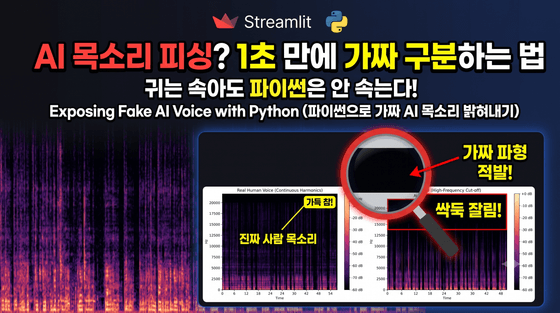
[기술 아티클] Streamlit과 Librosa로 구축하는 AI 음성 주파수 적발 시스템
안녕하세요, 인프런 수강생 및 개발자 여러분.딥페이크 음성 및 AI 목소리 생성 기술이 보편화됨에 따라, 이를 판별하기 위한 기술적 접근법에 대한 관심이 높아지고 있습니다. AI가 만든 오디오 데이터는 음성 인코딩 및 학습 모델 특성상 특정 고주파 대역이 잘려 나가는 상한 제한(High-Frequency Cut-off) 패턴을 보입니다.본 글에서는 파이썬 오디오 처리 모듈인 Librosa와 Streamlit 대시보드를 연동하여 이를 시각적으로 판별하는 애플리케이션 구축 사례를 공유하고, 음성 데이터 처리 시 발생하기 쉬운 웹 서버 블로킹, 메모리 누수 대처 방안을 정리합니다.1. 실전 시스템 백엔드 핵심 코드가독성을 위해 핵심 흐름만 요약했으며, 전체 예외 처리 및 상세 코드는 깃허브를 참고해 주세요.Pythonimport os import tempfile import threading import numpy as np import matplotlib.pyplot as plt import librosa import librosa.display import streamlit as st # 외부 연동 및 트래킹 백그라운드 처리 함수 def track_usage_async(app_name, action, details=None): try: # 데이터베이스 통신 수행 pass except Exception: pass # 메인 스레드 영향 차단 예외 우회 def analyze_voice_spectrum(human_audio_file, ai_audio_file): # 재실행 안정성: 파일 커서 위치 초기화 human_audio_file.seek(0) ai_audio_file.seek(0) # 물리 임시 파일 생성을 통한 디코딩 데드락 예방 human_ext = os.path.splitext(human_audio_file.name)[1] or ".mp3" ai_ext = os.path.splitext(ai_audio_file.name)[1] or ".mp3" with tempfile.NamedTemporaryFile(delete=False, suffix=human_ext) as tmp_human: tmp_human.write(human_audio_file.getvalue()) human_temp_path = tmp_human.name with tempfile.NamedTemporaryFile(delete=False, suffix=ai_ext) as tmp_ai: tmp_ai.write(ai_audio_file.getvalue()) ai_temp_path = tmp_ai.name fig, axes = plt.subplots(1, 2, figsize=(14, 5)) try: y_human, sr_human = librosa.load(human_temp_path, sr=None) y_ai, sr_ai = librosa.load(ai_temp_path, sr=None) # 푸리에 변환 및 dB 변환 db_human = librosa.amplitude_to_db(np.abs(librosa.stft(y_human)), ref=np.max) db_ai = librosa.amplitude_to_db(np.abs(librosa.stft(y_ai)), ref=np.max) # 서브플롯 렌더링 librosa.display.specshow(db_human, sr=sr_human, x_axis='time', y_axis='hz', ax=axes[0]) axes[0].set_title('Real Human Voice') librosa.display.specshow(db_ai, sr=sr_ai, x_axis='time', y_axis='hz', ax=axes[1]) axes[1].set_title('AI Voice (High-Frequency Cut-off)') st.pyplot(fig) finally: # 메모리 누수 방지: 자원 해제 및 임시 파일 삭제 plt.close(fig) if os.path.exists(human_temp_path): os.remove(human_temp_path) if os.path.exists(ai_temp_path): os.remove(ai_temp_path) 2. 음성 데이터 처리 시 실무 고려 메커니즘메인 UI 스레드 블로킹 방지 외부 데이터베이스 통신이나 통계 적재 로직을 분석 버튼 핸들러 내부에서 동기 방식으로 처리할 경우, 렌더링 스레드가 멈추는 지연 현상이 발생합니다. 이를 방지하기 위해 threading.Thread(..., daemon=True) 구조로 백그라운드 스레드로 격리하여 네트워크 통신 실패 시에도 분석 화면이 멈추지 않도록 구성해야 합니다.서버 자원 해제 (Resource Cleanup) Matplotlib 시각화 그래프 객체 및 디스크 물리 파일은 누적될 경우 서버 RAM을 지속적으로 오염시킵니다. 전체 처리 로직을 try-finally로 감싸 연산 성공 여부와 관계없이 plt.close(fig) 및 os.remove()가 강제 구동되도록 제어해야 합니다.3. 소스코드 및 구현 시연 안내해당 알고리즘 및 웹 대시보드가 실제 구동되는 꿀잼 시연 영상은 유튜브 콘텐츠를 참고해 주세요.🎬 유튜브 시연 영상: https://youtu.be/cThE0wH4EAY/📦 GitHub 소스코드: https://github.com/gohard-lab/voice_frequency_analyzer🚀 웹 앱 직접 실행해보기: https://voicefrequencyanalyzer-67zfryfptjxwdjofkymjyw.streamlit.app/📺 워드프레스: https://gohard.pe.kr/📺 잡학다식 개발자 유튜브 채널: https://www.youtube.com/@PolymathDev_KR