![[DevOps] Creating a fast and secure application deployment pipeline (CI/CD)Course Thumbnail](https://cdn.inflearn.com/public/courses/332182/cover/f1183942-1754-4cc9-bd8f-8180146e5a1d/332182.png?w=420)
[DevOps] Creating a fast and secure application deployment pipeline (CI/CD)
rex
Fast is dangerous, and safe is slow? Not true. Let's create a fast and safe pipeline!

Intermediate
gitlab, CI/CD, AWS
Docker? It's not difficult at all. I'll explain the key points briefly and clearly. Learn, apply, and understand quickly!
218 learners
Level Basic
Course period Unlimited
Reviews from Early Learners
5.0
이희수
It's good for Docker beginners. It's great because it has all the practical exercises. It's been a while since I've had a lecture that I wanted to finish.
5.0
별다방
It's compact, but it seems to have everything you need. The lecture materials are sufficient, and the commands are organized in an easy-to-see manner. It's a very satisfying lecture.
5.0
ericserra
The detailed and Kind explanation using practical examples about Docker is very good. Instructor, if you happen to know about Azure's AKS or GCP's GKE, please consider opening a course about these on Inflearn as well. Thank you!!!!!
Docker and Container Concepts
Docker's Network and Volume
Image Build and Optimization
Setting up a development environment using Docker
Project based on practical requirements
Docker Compose and Production Deployment Pipeline
3-Tier Architecture for Scalability
CI/CD Deployment Pipeline with GitHub Actions
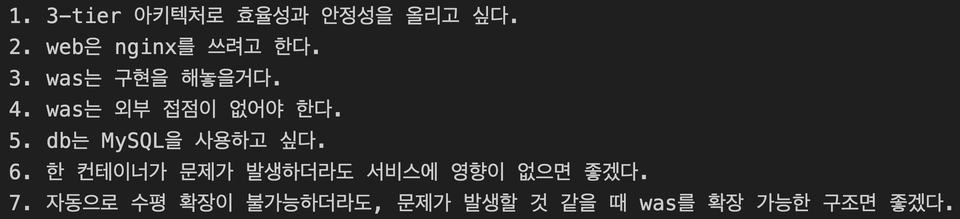
If you can think and solve problems based on actual service provision, don't take this course.
Docker? Kubernetes? They're great tools. But before you learn the tools, you need to understand the underlying technologies, right? But learning them from scratch would be too difficult, right? So, let's get familiar with them first!
Learn Docker's technologies, including containers, networking, and storage, quickly and easily.
I remember myself struggling to piece together the scattered pieces of knowledge, even though it wasn't difficult. Let's learn it faster than anyone else, while still focusing on the essentials !
![[Image] 3_tier_architecture](https://cdn.inflearn.com/public/files/courses/334231/builder/01j2h4f954s9xp7njrnevp7ef8?w=960)
Simple, you say? So, we're going to try to make it meet practical requirements.
![[Image] CICD Deployment Pipeline](https://cdn.inflearn.com/public/files/courses/334231/builder/01j44g5wjserh9s7xv6g6ws0mr?w=960)
CI/CD deployment pipeline with GitHub Actions!
You will start to think , 'Docker was easy...'
You can easily launch and quickly learn various open sources in various environments.
![[Image] Learning Content 1](https://cdn.inflearn.com/public/files/courses/334231/builder/01j2h67jrvx34rvjs7mesgaaj5?w=960)
Section (0) Lecture Introduction
It's the same as how we use programs.
Docker? Containers? Kubernetes?
Are containers tiny operating systems?
Section (1) Just try to float it
We lower the barrier to entry by haphazardly launching various types of containers and inspecting them in advance.
nginx
PostgreSQL
httpd
node
![[Image] Learning Content 2](https://cdn.inflearn.com/public/files/courses/334231/builder/01j2h67pf3xy64f5vmxwv371h2?w=960)
Once you try it out, you'll see how simple it is.
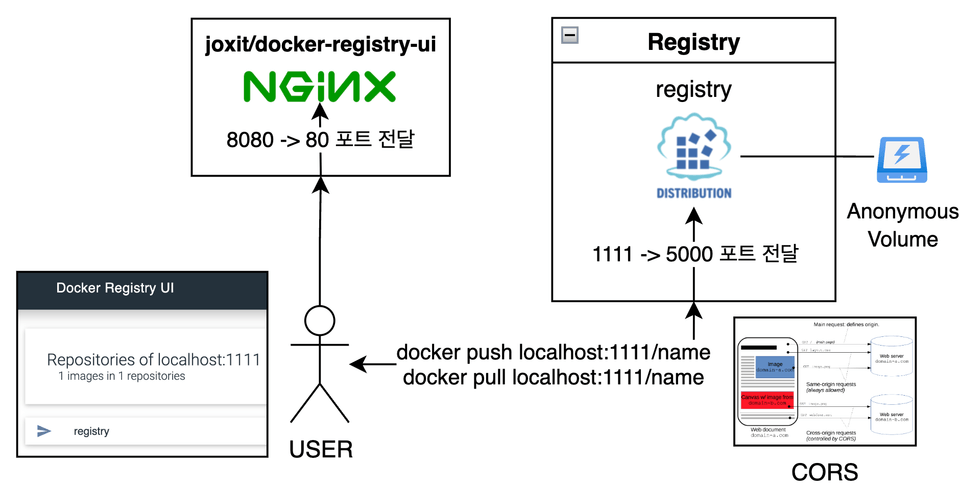
I didn't know that opening the registry and UI was this easy...?
Section (2) Registry and Repository
Using registry images
Creating a Private Registry
Section (3) Image
Images and Layers
Dockerfile
Build context and image building
Definition and Use of Build Cache
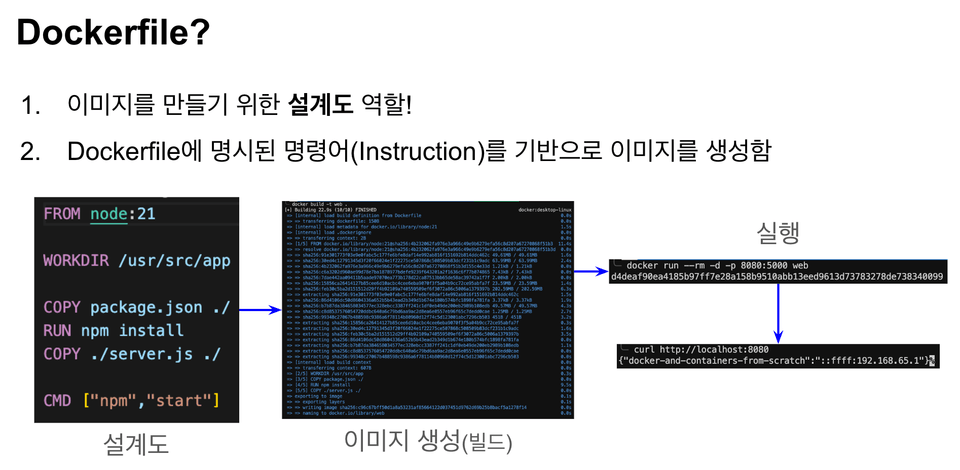
Building isn't difficult, it's just annoying.
![[Image] Learning Content 3](https://cdn.inflearn.com/public/files/courses/334231/builder/01j2h67syvgs7xp7frnb78sktr?w=960)
Section (4) Network
Is Docker's network actually the same as our home?
Docker default network and issues
[Practice] Docker Basic Network
Create and utilize custom networks
[Practice] Creating and Using a Custom Network
Section (6) Container
A container is just an isolated process...
We will actively utilize containers by leveraging the concepts discussed above.
Container lifecycle and restart policy
Must-Know Commands and Options
[Practice] Building a Service Development Environment Using Docker
![[Image] Learning Content 4](https://cdn.inflearn.com/public/files/courses/334231/builder/01j2h67zda12k5w0zv5wq4nmy7?w=960)
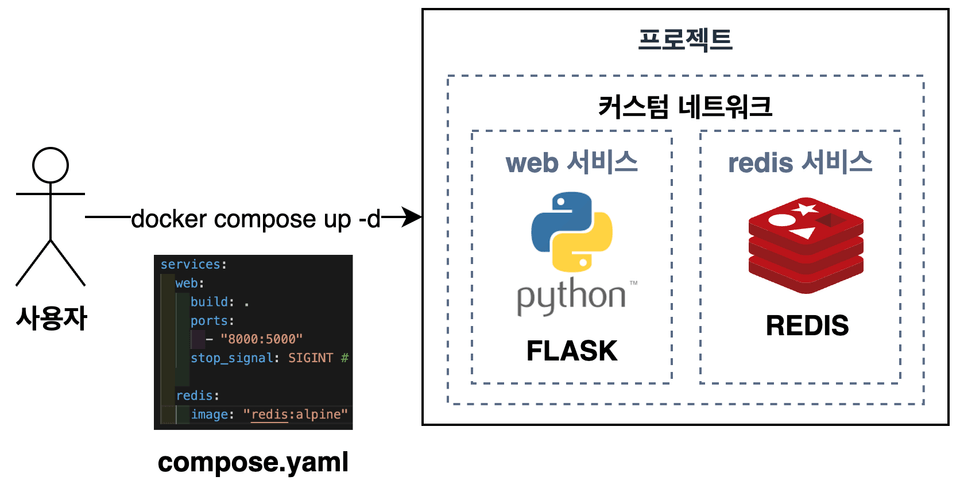
Section (8) Compose
Mindset before starting to compose
Reflects the latest Compose grammar
build/deploy/develop
Compose Migration for Practical Projects
Section (9) Creating a CI/CD Deployment Pipeline
CI/CD and GitHub Actions
Various pipeline exercises
Image building and external repository practice!
![[Image] CICD Deployment Pipeline](https://cdn.inflearn.com/public/files/courses/334231/builder/01j44g70vbtfpec80724xvz09m?w=960)
You will need a PC or laptop to attend lectures and practice.
Operating System and Version (OS): The operating system is irrelevant, and the explanation is based on Docker Desktop.
Tools used: Docker Desktop, VSCode, AWS, GitHub
PC specifications: Minimum CPU 2 cores, 4 GiB of memory (should be fine for anyone interested in this course)
Lecture presentation materials provided (PDF)
Practice source code provided through GitHub
Linux experience
Experience using one or more programming languages
Network basics such as TCP, UDP, and HTTP
Experience launching a process by running a program
Who is this course right for?
Those who want to learn Docker and containers
If you have used Docker but are confused about how it works
Those who want to learn important and frequently used things quickly
Need to know before starting?
Linux usage experience
Experience using one or more programming languages
Network basics such as TCP, UDP, and HTTP
Experience of running a program and starting a process

1,683
Learners
147
Reviews
46
Answers
4.9
Rating
4
Courses
I am currently working as a Cloud Engineer (SRE) at KakaoBank. My role involves designing and providing service architectures, as well as creating, providing, or building various tools required by the organization.
Contact: 7424069@gmail.com
All
59 lectures ∙ (6hr 19min)
Course Materials:
5. [Practice] nginx
05:57
7. [Practice] httpd
05:58
8. [Practice] node
08:52
All
18 reviews
4.8
18 reviews

Reviews 11
∙
Average Rating 4.5
5
It's good for Docker beginners. It's great because it has all the practical exercises. It's been a while since I've had a lecture that I wanted to finish.
Thank you for your review! We will continue to add practical and helpful content in the future, so please look forward to it!
Reviews 102
∙
Average Rating 4.9

Reviews 4
∙
Average Rating 5.0
5
[Reasons for Choosing This Course] - I chose this Docker course because it's short, compact, and the price is reasonable. [Course Strengths] - It was great that it didn't ramble and explained only the necessary parts in a structured way. - I usually have a hard time concentrating when taking online courses, but this one made it easy to focus. - It was convenient to study because the course materials were provided separately as PDF files and GitHub source code. [Study Method] 1. Because the course is short, I first listened to it all the way through to grasp the flow. 2. Immediately challenged myself with hands-on practice! 3. Re-watched the video when stuck. 4. Organized parts that were different from the lecture or that I was curious about separately. [Thoughts] - When I first encountered Docker, it felt so foreign that I thought, "What is this?" but it seems like the beginning was the most difficult. - At first, I just went along with it, learning terms like container, image, volume, and entrypoint, but as I continued to practice, I naturally memorized the Docker commands. - Concepts like multi-stage builds are still a bit difficult. - It feels like the more I learn, the more there is to study. I believe I will become more familiar with it as I work with it in practice! - I plan to improve the project deployment method based on what I've learned.
Thank you for your feedback! I'm so glad and grateful that you felt it as intended. If you have any questions while you're working on it, please feel free to ask me anytime!
Reviews 13
∙
Average Rating 4.5
5
It's compact, but it seems to have everything you need. The lecture materials are sufficient, and the commands are organized in an easy-to-see manner. It's a very satisfying lecture.
Thank you for your first class review! I thought back to myself when I was wandering around, and I put in only the things that are used in practice and the things that I absolutely need to know, so it became this compact. ㅎㅎ Thank you for your good class review, and I would appreciate it if you could look forward to the lecture contents that I will upload in the future!!
Check out other courses by the instructor!
Explore other courses in the same field!
Limited time deal ends in 1 days
$30,800.00
30%
$34.10







![Docker and Modern Server Technologies for Full-Stack Development (Linux, nginx, AWS, HTTPS, Deployment) [Full-Stack Part 3]Course Thumbnail](https://cdn.inflearn.com/public/courses/326771/cover/bc862b4d-abe6-4d80-a826-3a5324a9f998/326771-eng.png?w=420)