

강의

멘토링

커뮤니티

Programming

/

Desktop Application

[Beginner] Practical Qt/QML Programming for Stepping Up to Intermediate Level

Take the leap from a beginner to an intermediate developer by learning Qt/QML programming skills and the latest technologies through real-world projects.

(5.0) 2 reviews

23 learners

Level Basic

Course period 5 months

  • qtdev
Qt
Qt
QML
QML
C++
C++
GUI
GUI
Qt
Qt
QML
QML
C++
C++
GUI
GUI

What you will gain after the course

  • Learn Qt through real-world project examples to make the leap from beginner to intermediate.

  • Learn Qt6 focusing on examples in the fields of networking, multimedia, document handling, and IPC.

A course focused on practical projects to help you leap to an intermediate level in Qt/QML!

You can learn the intermediate Qt course focusing on practical projects primarily in fields such as Network, Multimedia, and IPC .

  • The content is project-oriented, designed to help you leap from a Qt/QML beginner to an intermediate level.

  • This course focuses on advanced, real-world examples to help you learn Qt.

Recommended for those who want to learn Qt and reach an intermediate level or higher.

Those who want to learn Qt focusing on projects in various fields

You can upgrade your skills by learning various fields such as Network, Multimedia, Documents, and IPC through this course, which focuses on real-world projects.

Those who want to learn by implementing projects together with the instructor, just like in an offline class

You can learn by coding along with the instructor. You will also be able to see the project take shape step-by-step through real-time coding.

After completing the course

  • Through this course, you can develop the capabilities to grow into a Qt/QML developer with intermediate-level skills or higher.

  • You can develop your problem-solving skills through more in-depth projects.


Course Curriculum 📖

Section 1. Introduction to the Course
In this section, we will take an overall look at what you will learn in this course. We will also introduce reference sites and documents.

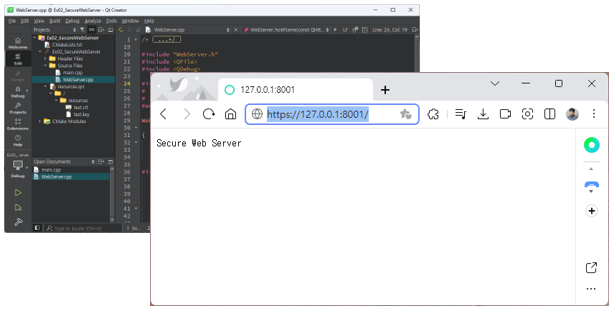
Section 2. Implementing Web server & Secure Web server
There are many types of web servers, such as Apache and IIS, used to provide web services. And to provide the desired information to users who access the web server using a web browser, server-side scripts such as PHP, ASP.NET, and JSP must be used. This involves quite a bit of tedious work. However, in Qt, all these functions can be easily implemented using the Web Server module provided by Qt.
In other words, when a specific request is received from a user, the slot connected to the corresponding signal is executed. In this way, you can easily implement the web services that a web server aims to provide using Qt.
In this section, you will learn how to implement a web server and how to provide services by distinguishing requests received from users. You will also learn how to implement HTTPS for a secure web server along with HTTP.

Section 3. Implementing a Client using RESTful API
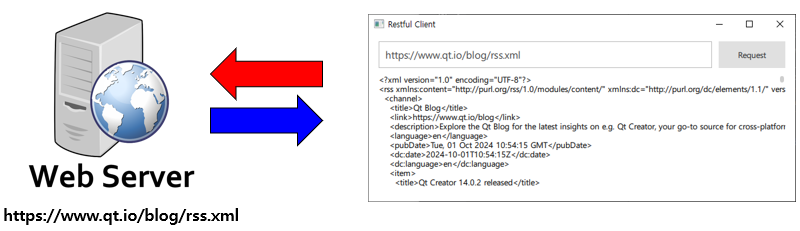
It is called REST or RESTful API. It refers to an API that complies with the architecture called REST (Representational State Transfer) and means implementing it according to REST design principles. In this section, you will learn how to implement a RESTful Client using Qt according to REST API design principles.

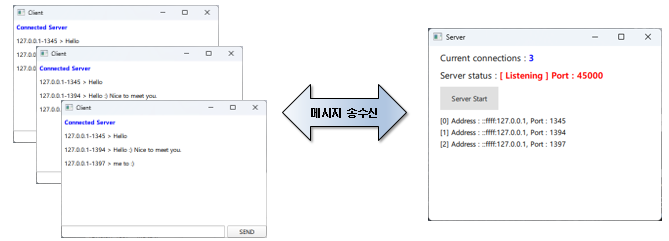
Section 4. Implementing a Simple Chatting Server and Client
You will learn how to implement a TCP protocol-based Chatting Server that allows multiple users to connect and chat using the Network module provided by Qt. Additionally, you will learn how to implement a Chatting Client to chat with users connected to the Chatting Server.

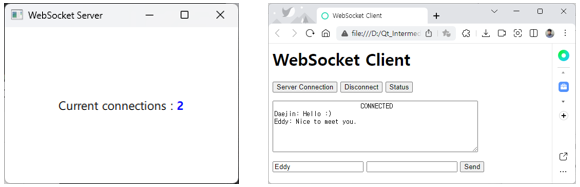
Section 5. Implementing a WebSocket-based Server and a Client using HTML5
The HTTP protocol closes the connection once the web server receives a request and finishes providing the service to the user (web browser). To solve the issues of wasted network resources and connection latency caused by repeated connecting and closing for every request, WebSocket was developed to maintain a persistent connection through the HTTP protocol.

In this section, you will learn how to implement a WebSocket-based chat server using Qt. Additionally, you will learn how to implement a chat client using HTML5 and JavaScript so that it can run in a web browser.

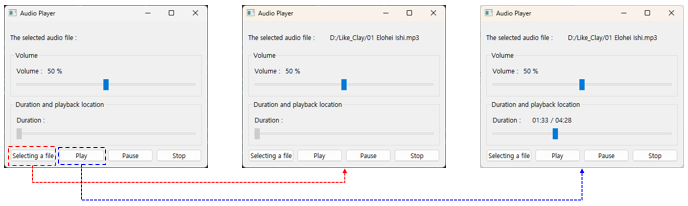
Section 6. Audio Player
In Qt, you can easily implement various multimedia applications. In this section, you will learn the concepts of audio Sample Rate and Bit Rate before implementing a real-world project. You will also learn how to calculate bytes during the process of decoding encoded (compressed) data such as MP3.
And you will learn how to implement an application that plays audio files encoded with the MP3 codec using the Multimedia module provided by Qt.

Section 7. Building a Mini Broadcasting Station to Transmit Microphone Audio via a Network
In this section, we will implement two applications using Qt. In the first application, you will learn how to implement an application that extracts audio data from a microphone and transmits it via the network UDP protocol. In the second, you will learn how to implement an application that outputs audio data received via the UDP protocol to a speaker.

Therefore, in this session, we will learn how to implement a mini network radio station by implementing an application that transmits and receives voice data.

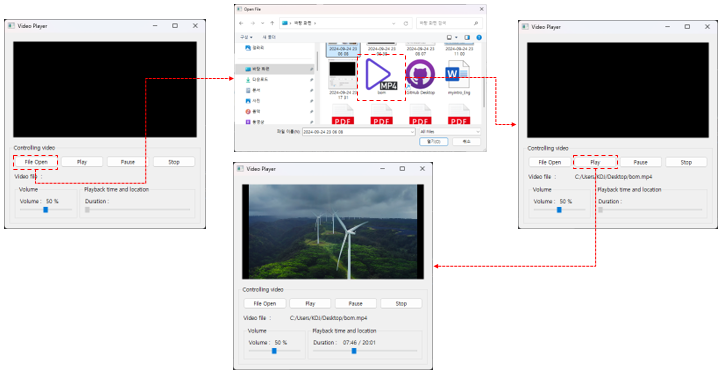
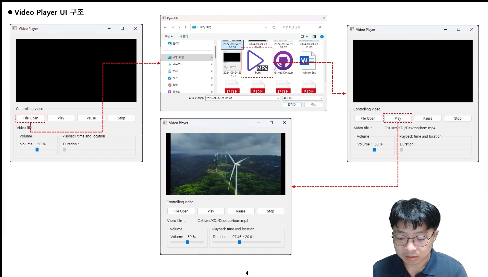
Section 8. Implementing a Video Player
In this section, you will learn how to implement an application that plays video files using the Multimedia module provided by Qt.

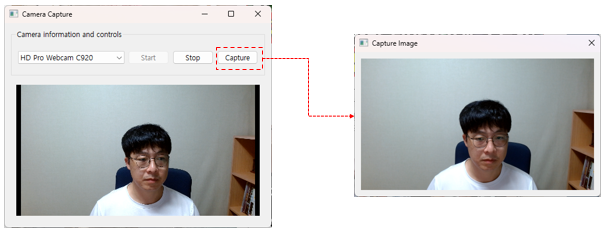
Section 9. Implementing a Video Output Application Using a Camera
In this section, you will learn how to handle camera devices connected to a computer using the Qt Network module. And you will learn how to implement an application that handles camera devices connected to a computer.

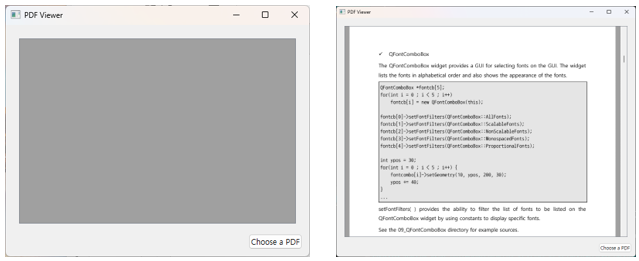
Section 10. PDF Viewer
Qt provides various PDF-related classes to handle PDFs easily. In this section, you will learn how to implement an application that displays PDF files on the screen.

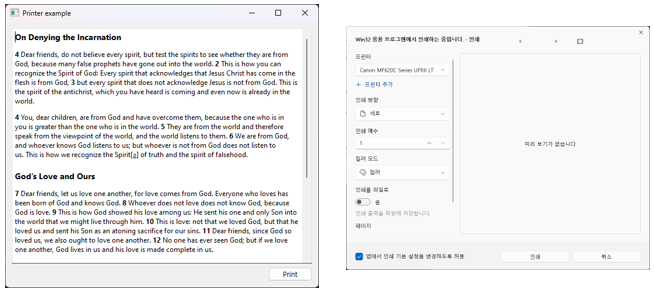
Section 11. Printer Support
You will learn how to print text or images to a printer connected to a computer. Therefore, in this section, you will learn how to implement an application that prints text to a printer.

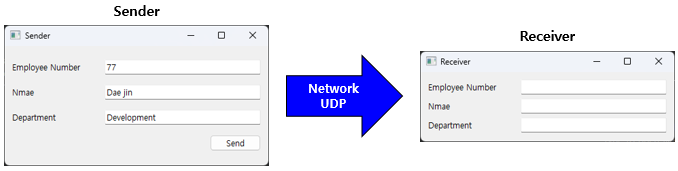
Section 12. Data Communication Between Applications Using Google's Protocol Buffers
Protocol Buffers, developed by Google, serialize data and convert it into binary data format for storage. Conversely, they also convert serialized binary data back into structured data and store it in a structure format. Protocol Buffers can be utilized for IPC in various applications. In addition to C++, Protocol Buffers can be used in various programming languages. Qt makes it easier to use Google's Protocol Buffers.
In this section, you will learn how to exchange data between applications using Protocol Buffers.
Furthermore, you will learn how to implement applications that exchange data over a network and how to use Protocol Buffers during data exchange.

Check out the unique features
of this course
📖

Theory and practice all at once

The course is structured to enhance your practical skills. Every section features lessons where you can learn by implementing a real-world project yourself, helping you boost your professional capabilities.

Beyond the online barrier

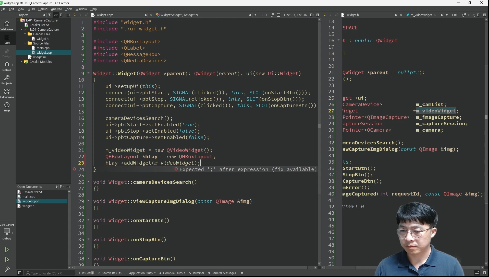
The instructor is featured on the lecture screen. Learn anytime, anywhere with vivid live coding sessions that make you feel like you're attending an in-person class.

Do you have any questions?

Q. Is there anything I need to prepare before taking the course?

The Qt version to be used in the course is explained in Section 1. Therefore, please refer to Section 1 and install Qt.

Q. Can I download the examples used in the course?

Yes, it is possible. You can download the project source code used in the class from each session.

Q. Are there any reference materials or textbooks for the course content?

I serve as an administrator for the Qt Developer Community (qt-dev.com). You can find additional resources related to Qt and QML on this site.

Q. Is it possible to participate in the class after installing Qt on Ubuntu or macOS platforms?

Yes, it is possible. You can participate in the class on Linux as well as macOS. Therefore, you can set up your development environment and join the class on whichever platform you prefer among MS-Windows, Linux, and macOS.

Notes before taking the course

Practice Environment

  • Operating System and Version (OS): MS Windows, Ubuntu Linux, macOS

  • Qt Version: We recommend using version 6.8 or 6.5, which are LTS (Long Term Service) versions.

  • IDE Tool: It is recommended to use the QtCreator IDE tool. Please refer to Section 1 for more details.


Learning Materials

  • The project source code covered in the class can be downloaded from each section.


Prerequisites and Precautions

  • C++ Basics

  • Qt/QML


Copyright of this course (LICENSE)

All materials provided in this course on Inflearn, including videos and examples, are protected by Korean copyright law. Reproduction of any part or all of the content (including reprinting on websites or print media, or copying as electronic files) requires the permission of the copyright holder and knowledge sharer, Daejin Kim, in accordance with Article 42 of the Korean Copyright Act, regardless of whether it is for commercial purposes, except for private use as stipulated in Article 27 of the Korean Copyright Act.

Recommended for
these people

Who is this course right for?

  • Those looking to make the leap from junior to senior Qt developer

  • Those who want to build extensive know-how through projects

Need to know before starting?

  • C++

  • Qt/QML

Hello
This is

1,079

Learners

109

Reviews

107

Answers

4.7

Rating

9

Courses

Instructor Introduction ✒️


Work Experience
Current: SW Team Leader in the Embedded field
LG Electronics, VS Division IVI Advanced Platform/Module Development
SW Maestro, SW Mentor

Teaching Experience
Samsung Electronics, Qt & QML Lectures
LG Electronics, In-house Instructor for Qt & QML
Hancom Academy, Qt Guest Lecturer
Guest Lecturer for Qt at numerous IT companies


Books
Qt Programming
Qt Quick Programming
Qt5 Programming Guide
MeeGo Programming Complete Guide
Qt Practical Programming

SW Community Management
Qt Developer Community Administrator ( www.qt-dev.com )

Curriculum

All

72 lectures ∙ (10hr 44min)

Course Materials:

Lecture resources
Published: 
Last updated: 

Reviews

All

2 reviews

5.0

2 reviews

  • siroimono님의 프로필 이미지
    siroimono

    Reviews 26

    Average Rating 5.0

    5

    31% enrolled

    Qwidget // QtQuick This is a lecture where you write examples using what you learned It's a good lecture intended to help you remember for a long time by utilizing what you've learned yourself ++ The latest version content is also included in the lecture.

    • qtdev
      Instructor

      White, thank you so much for giving such a good review. :)

  • ljh2641님의 프로필 이미지
    ljh2641

    Reviews 2

    Average Rating 5.0

    5

    61% enrolled

    • qtdev
      Instructor

      Hello, Mr. Lee Jun-hee, thank you for the good review. ^^;

$68.20

qtdev's other courses

Check out other courses by the instructor!

Similar courses

Explore other courses in the same field!