[Web Development Full Stack Course] HTML&CSS Basics
This lecture is about HTML & CSS, part of the [Web Development Full Stack Course] series designed to train full-stack web developers.
Through this course, you will gain an understanding of HTML, the backbone of web development, and CSS, which makes the web beautiful.
The ultimate html, css... wow, this is all you need
5.0
강부열
100% enrolled
Thank you so much for the wonderful free lecture.
5.0
T parkkk
33% enrolled
I was impressed by the way the instructor tried to explain in detail even the most practical tips!
What you will gain after the course
Basic HTML Tags
Global Attributes and Local Attributes
Semantic tags
Styling fonts, lists, colors, and tables
Layout Design
Responsive Web
The foundation for creating readable and fast websites! Learn HTML & CSS the right way ✨
✅ This course is part of the [Full-Stack Web Developer Roadmap] series.
This course is a foundational course covering HTML&CSS as part of the [Web Development Full-Stack Course] lecture series designed to train full-stack web developers.
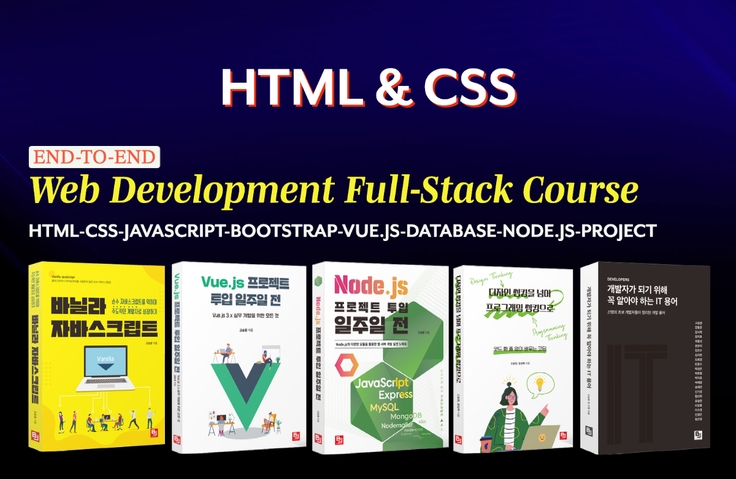
The Web Development Full Stack Course covers the entire process for full-stack web development, from HTML&CSS → Vanilla JavaScript → Bootstrap → Vue.js → Database → Node.js → to Portfolio.
Upon completing the full-stack web development course, you will acquire not only the foundations of web development but also the skills that can be applied directly to real-world practice.
What is HTML/CSS?
HTML and CSS, the foundational technologies of the web, are languages created to connect everything.
HTML stands for Hyper Text Markup Language. It is composed of four words: Hyper, Text, Markup, and Language. Among these words, the most important one is Hyper. This is because the most crucial hint for understanding HTML can be found in Hyperlink.
Unlike text in the paper era, in web browsers or document creation tools like Word, you can connect specific locations of videos, music, photos, files, and text through a feature called hyperlinks. A hyperlink is a reference link that can connect and point to all types of data within a document. It is truly remarkable that the early web had tags that functioned as hyperlinks, such as the <a> tag. Ultimately, HTML, the foundational technology of the web, can be seen as having been born to connect everything.
Hyper has the meaning of 'transcendence' and Text means 'characters'. In other words, Hyper Text is a type of text that transcends ordinary text, where characters and characters, sentences and sentences, and documents and documents are organically connected to communicate with each other.
HTML is a language that can mark up such Hyper Text. Here, markup refers to information used to express the formatting and structure of a document in addition to its content. HTML is a language capable of expressing this markup information and serves as the skeleton of the web.
Meanwhile, CSS (Cascading Style Sheets) is a language responsible for design, like putting beautiful clothes on the skeleton of HTML. Through CSS, you can apply designs for the layout, colors, fonts, sizes, and more of a website.
HTML&CSS, why should you learn them?
You cannot become a web developer without learning HTML/CSS.
Have you ever thought about what makes a website easy to read versus one that isn't? Every day, we live surrounded by countless texts from books, TV, magazines, and blogs. However, some writing flows well while others do not. The same applies to the code written by web developers. Although invisible to the human eye, it is read by software such as search engines and screen readers. Search engines and screen readers interpret the invisible code that makes up a web page to understand the site we have developed. How can we write code that software can easily read and understand? And why is that important?
The way to write well-readable text is to write "simply and clearly." The same applies to code written by developers. When writing markup, unnecessary tags should be removed, and the structure should be kept simple by using only the tags necessary to compose the page.
Today's web must not only be well-crafted but also fast. According to Google research, if a web page takes more than 5 seconds to load, the probability of a visitor bouncing increases by 90%. You must understand the browser rendering process and optimize the resources used within the page to provide a web that is not only readable but also fast. Therefore, to develop a good web, you must build a solid foundation in HTML and CSS, the fundamental languages that make up the web.
Features of this course!
Easy and detailed
Practical Application-Focused
Even example codes!
I will teach you so that you can understand the web development life cycle.
Understand what HTML is.
You will learn the correct usage of each tag that makes up HTML.
You will learn how to write tags that consider mobile users and the visually impaired.
You will master all the basic syntax of CSS.
You will learn CSS for creating layouts and become capable of implementing responsive websites.
We use Visual Studio Code as the development IDE tool. You will learn development methods using Visual Studio Code and discover useful extensions.
Install Node.js and learn what Node.js is.
You can understand the concept of the web and the entire process from planning to development and testing for web development.
You will learn all the basic HTML tags.
You will learn about global attributes and local attributes for HTML tags.
You will learn about semantic tags and become able to use the appropriate tags according to their meaning.
Through CSS, you will learn how to style colors, fonts, lists, tables, and more.
By learning CSS for creating layouts, you will be able to implement responsive webs.
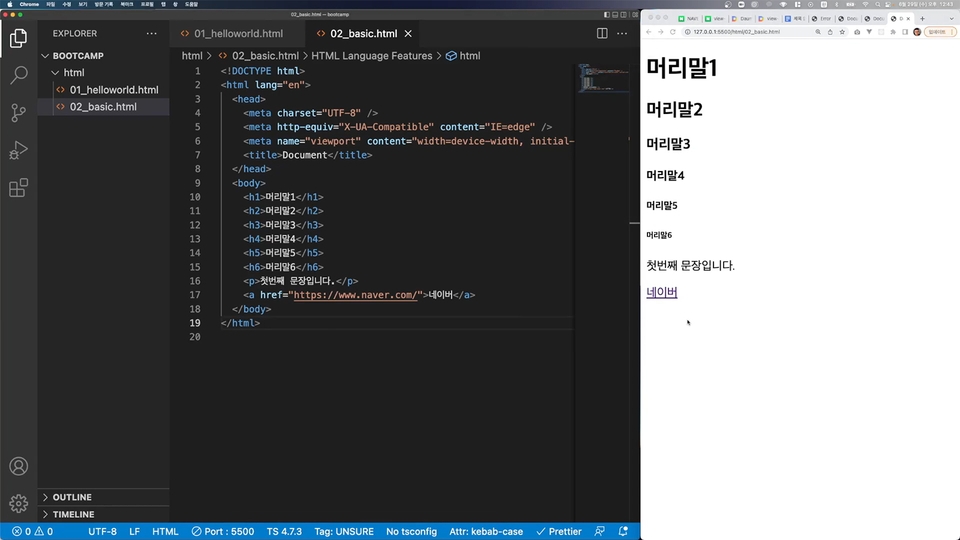
HTML Basic Structure and Basic Elements
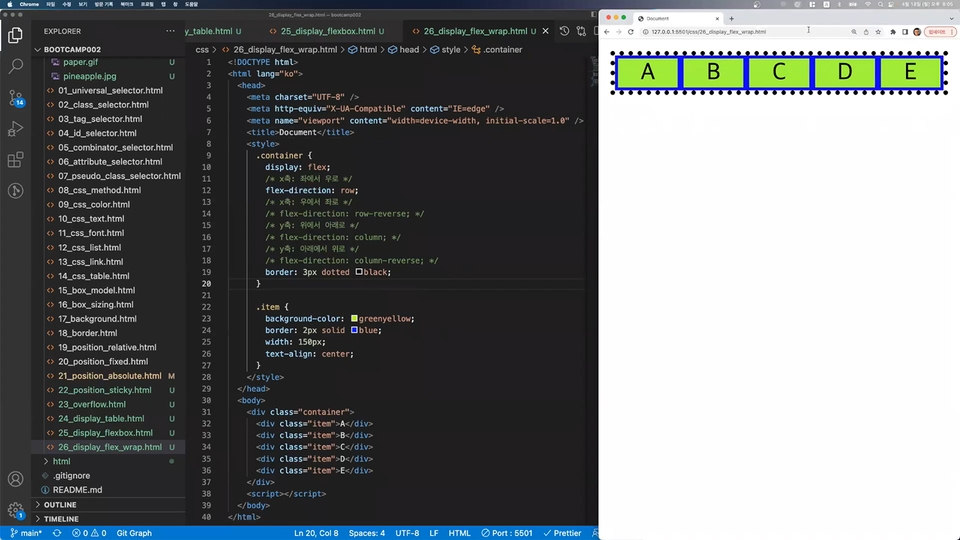
CSS for Creating Layouts
Who is the person who created this course?
The Quality of a Developer
A 24-year software developer who wants to have a positive influence on the world through software technology. I love sharing knowledge and always enjoy learning new technologies.
I have worked as a consultant and developer building ERP systems for over 60 global companies both domestically and abroad, and I also have experience selling software I developed myself to leading companies in Korea and overseas. I am also the CEO of an IT startup.
Working not only as a developer but also as a UX consultant and sometimes as a business consultant, I have accumulated extensive experience across the entire process of application and service development, from planning to implementation. Now, based on over 20 years of practical experience, I am dedicated to sharing knowledge with a sense of mission to pass on the truly essential skills and proper expertise to my juniors.
A 24-year software developer who wants to make a positive impact on the world through software technology. I love sharing knowledge and always enjoy learning new technologies.
I have worked as a consultant and developer building ERP systems for over 60 global companies both domestically and abroad, and I also have experience selling software I developed myself to leading companies worldwide. I am also the CEO of an IT startup.
Working not only as a developer but also as a UX consultant and business consultant, I have accumulated extensive experience across the entire process of application and service development, from planning to implementation. Now, based on over 20 years of practical experience, I am dedicated to sharing knowledge with a sense of mission to pass on the essential skills and authentic expertise that junior developers truly need.
I am providing over 200 useful lecture videos through the YouTube channel 'Quality of Developer'.
I am so grateful to be able to watch this kind of lecture for free~ Thanks to this, I think I'll be paying to watch other lectures as well. Thank you for the high-quality lecture!












![[Web Development Full Stack Course] Learn Database Basics through Netflix and Carrot Market AnalysisCourse Thumbnail](https://cdn.inflearn.com/public/courses/330079/cover/c142fdb2-b4fa-4b6a-9e8f-7bd48aed7635/fullstack-db-1.jpg?w=420)

![[Web Development Full Stack Course] Portfolio - Product Sales Mini Web App DevelopmentCourse Thumbnail](https://cdn.inflearn.com/public/courses/330081/cover/7afb92db-0588-4ac1-920f-38ab511054eb/fullstack-project-1.jpg?w=420)

![[Web Development Full Stack Course] A week before starting a Node.js project - From basics to practiceCourse Thumbnail](https://cdn.inflearn.com/public/courses/330080/cover/53450c0a-fe6a-448a-a968-54803487b395/nodejs-1.jpg?w=420)
![[Web Development Full Stack Course] A week before starting a Vue.js project - From basics to practiceCourse Thumbnail](https://cdn.inflearn.com/public/courses/330078/cover/d413a6e5-4692-4d3f-ae26-64c5e8d592e5/vuejs-1 (1).jpg?w=420)
![[Web Development Full Stack Course] Bootstrap BasicsCourse Thumbnail](https://cdn.inflearn.com/public/courses/330077/cover/828bc814-19c5-431e-a72c-f6592c9b7a74/fullstack-bootstrap-1.jpg?w=420)
![[Web Development Full Stack Course] From Pure JavaScript Basics to PracticeCourse Thumbnail](https://cdn.inflearn.com/public/courses/330076/cover/e46f4bde-0146-42d6-a2fa-64d9bd510d27/vanila-javascript-1 (1).jpg?w=420)
![Modern Web Interactive CSS3 [PART2/3]Course Thumbnail](https://cdn.inflearn.com/public/courses/335745/cover/db39333d-68a5-4ca7-9629-dac891711a94/335745.jpg?w=420)
![Modern Web Interactive CSS3 [PART1/3]Course Thumbnail](https://cdn.inflearn.com/public/courses/335744/cover/32ae213b-41d5-4c80-8408-b64b8d286b58/335744.jpg?w=420)
![[2024] HTML Basics by Lee BehayanCourse Thumbnail](https://cdn.inflearn.com/public/courses/334082/cover/faaaa70e-cae8-4488-afb0-5a2d4e7c0905/334082.png?w=420)
![Modern Web Interactive CSS3 [PART3/3]Course Thumbnail](https://cdn.inflearn.com/public/courses/335746/cover/77dcadeb-88d7-4410-939e-265755e39733/335746.jpg?w=420)
![Modern Web Interactive CSS3 Bootcamp [Full vers.]Course Thumbnail](https://cdn.inflearn.com/public/courses/334857/cover/4ccc6c75-74aa-4aba-b3d9-8aabe36e9452/334857.jpg?w=420)
![1. Web Development Basics [HTML, CSS]Course Thumbnail](https://cdn.inflearn.com/public/courses/324886/course_cover/998919c5-399f-416c-9f57-c611ae178c51/html-css-basic-eng.png?w=420)
![[Web Publishing Practice] Creating a Web Standard SiteCourse Thumbnail](https://cdn.inflearn.com/public/courses/328172/cover/2c352d60-87dd-4e15-9880-9dccde4539ee/328172-eng.png?w=420)
![[2026 Examination Standards] Perfect Guide for the Web Design & Development Technician Practical ExamCourse Thumbnail](https://cdn.inflearn.com/public/courses/324878/course_cover/12211037-e74b-46b3-8942-46d465b81bba/webdesign-cover-02.png?w=420)


![A Solid Front-End Bootcamp for Full-Stack Developers (HTML, CSS, Vanilla JavaScript + ES6) [Full-Stack Part 2]Course Thumbnail](https://cdn.inflearn.com/public/course-326306-cover/4ea213de-f786-4af1-a9d0-b8932263885a?w=420)