How non-majors can develop Chrome extensions in just 1 hour and use them in real life (Vibe Coding, Cursor AI)

It's okay even if you don't know the first thing about coding. We are in an era where AI writes the code for you as long as you have an idea! This course is not just about learning a programming language. It is a practical course where you will learn the 'most modern way of development'—giving commands (prompts) to the powerful AI code editor 'Cursor AI' to directly build the programs you've imagined.

(4.9) 17 reviews

115 learners

Level Beginner

Course period Unlimited

Chrome Extention
Chrome Extention
AI
AI
LLM
LLM
Cursor AI
Cursor AI
Chrome Extention
Chrome Extention
AI
AI
LLM
LLM
Cursor AI
Cursor AI

Reviews from Early Learners

4.9

5.0

sanggi1407.park

100% enrolled

I've only ever used Chrome extensions and never even imagined that I could develop one myself. To think that with Vibe Coding, I can bring a simple idea to life! I'm going to enjoy this without any pressure.

5.0

kyujong.roh

100% enrolled

I used to feel that the barrier to coding was so high, but in just one hour, I experienced the thrilling sense of achievement of directly deploying a browser tool that is useful in real life.

5.0

daniel.na

100% enrolled

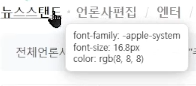
It was great to be able to create an extension so simply. I had always thought it would be nice to have a font identifier, and this was perfectly helpful. Thank you.

What you will gain after the course

  • Completion of a practical project: You will fully master the entire process by repeating the steps of conceptualizing an idea, instructing the AI, completing the code, and installing it in an actual Chrome browser for use.

  • AI Code Generation: Learn how to generate HTML, CSS, and JavaScript code by giving commands in Korean using Cursor AI.

  • Core Chrome Extension Structure: Fully understand the framework of an extension, including manifest.json, popup, content script, and background script.

"Have you ever had thoughts like these?"


  • "Is there a way to finish this repetitive daily task with just one button?"

  • "This site design is really pretty; I wonder what font they used?"

  • "I want to do other tasks comfortably while watching YouTube..."

  • "I want to turn my ideas into a simple program, but coding feels so overwhelming..."

If you resonated with even one of the questions above, this course is exactly for you.

'Conquering Chrome with AI' was created for non-majors and beginners with absolutely no coding knowledge. Instead of memorizing complex code, we focus on how to clearly communicate our 'ideas' to an AI assistant to achieve results.

Your ideas will become the 'blueprint,' and AI will become an excellent 'contractor.'


Why should you take this course?


  • The Forefront of AI Utilization (AX): Beyond simply using AI, we develop core competencies for the AX (AI Transformation) era, where productivity is maximized and new value is created through AI.

  • Chrome Extension Development: Create results that can be immediately applied to real life and work through the development of Chrome Extensions that can transform your web browser into your own smart tool.

  • Synergy between CursorAI and LLM: By utilizing CursorAI, a powerful AI code editor based on the latest LLM (Large Language Model), we provide a magical experience where you can implement programs with just your ideas, even without coding knowledge.


🎯 What you will gain from this course


This course helps everyone, from coding beginners to experienced developers, harness the power of AI to navigate the web freely and create their own innovative Chrome extensions.

You will learn how to maximize the potential of CursorAI and LLM to automate repetitive tasks, provide necessary information instantly, and further create your own tools that never existed before. Equip yourself with a powerful weapon for the AI era and turn your ideas into reality!

Start right now and experience a new development paradigm with AI! 🚀

What you will learn

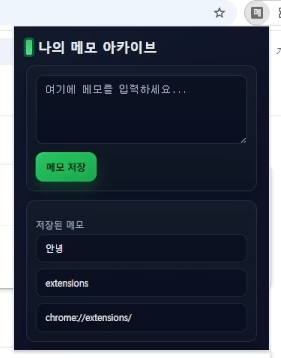
My Assistant, 'Memo Archive'

Ideas that flash through your mind while surfing the web, links to articles you meant to read later, or phrases that left an impression... We've all had the experience of them disappearing the moment we close the browser, haven't we?

In this course, we will create 'My Own Notepad' to solve all of these problems.

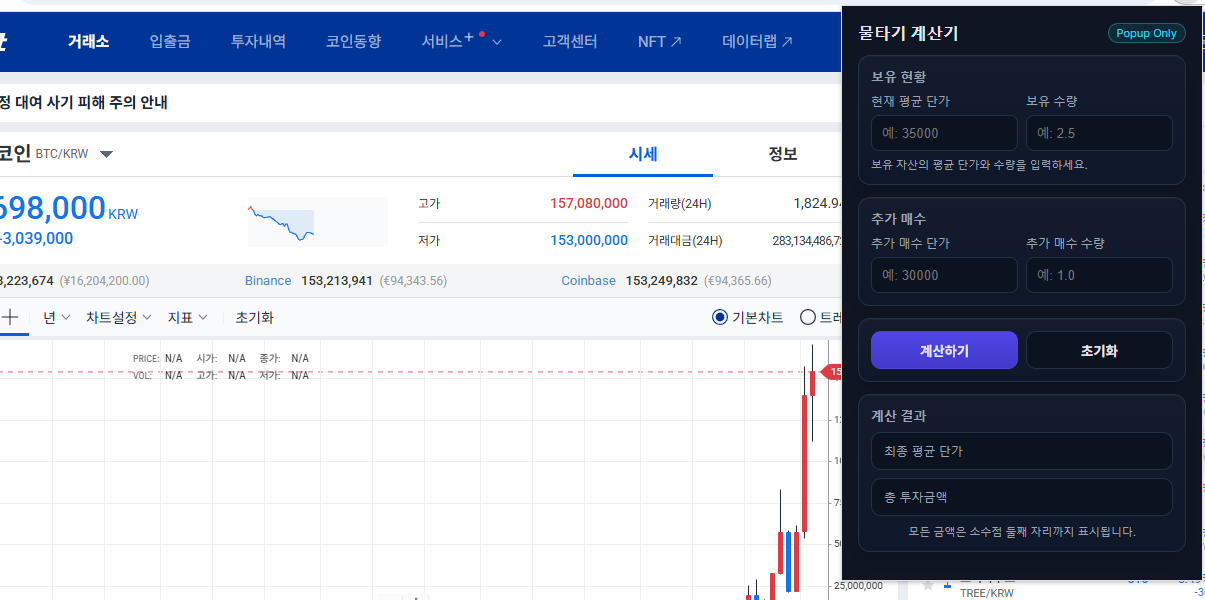
Smart Investment Assistant, 'Average Down Calculator'

Solve complex average price calculations for stock/crypto investing with a single click. Develop the ability to handle user input and calculation logic.

Notes before taking the course

Practice Environment

  • All you need is a computer (Windows, Mac) and the Google Chrome browser. You do not need to pre-install any other programs for coding.

Learning Materials

  • Please download the lecture materials attached to the lecture item.

Prerequisite Knowledge and Precautions

  • No coding knowledge is required at all. Anyone can follow along as long as they know the most basic computer skills, such as "creating a folder" or "copying/pasting." The course is explained step-by-step for non-majors and coding beginners.

  • Lecture Style: This course is not a rote learning experience where you blindly follow and type out the correct code. It focuses on "What is the problem, and how should I ask (instruct) the AI to solve it?" The goal is to cultivate problem-solving skills rather than just the ability to find the right answer.

  • You can get even more help if you have your own ideas.

Recommended for
these people

Who is this course right for?

  • Those who want to create their own unique tools that don't exist in the world and use them immediately in real life.

  • Those who have never learned coding before but want to create their own program

  • Anyone interested in AI-powered development and prompt engineering

  • Those who have started studying development but have lost interest and need a quick experience of success

Hello
This is codebridge

948

Learners

89

Reviews

21

Answers

4.8

Rating

13

Courses

기존 경력과 경험을 토대로 세상 트렌드를 따라가며 나누고 싶은 노하우와 꿀팁들을 공유합니다. 잘 부탁드립니다!

경력

🤖👾 미국 AI 석사 과정

🏗 IT 대기업 7년차 풀스택 개발자

📱 안드로이드 앱 14개와 iOS 앱 7개 및 잡다한 웹사이트 개발 및 운영 중


[Eng]

Based on my existing experience and experience, I'm sharing know-how and tips I want to share while following world trends. Thank you for your cooperation!

YouTube: https://youtube.com/channel/UChmHjzyYedu9yYb3YmnOOog?si=xM1HueA3TJ4BjnV3

Contact: codebridge747@gmail.com

Experience

Developer at a major IT corporation in South Korea

Bachelor's degree in Computer Engineering

More

Curriculum

All

12 lectures ∙ (1hr 1min)

Course Materials:

Lecture resources
Published: 
Last updated: 

Reviews

All

17 reviews

4.9

17 reviews

  • sanggi1407park9629님의 프로필 이미지
    sanggi1407park9629

    Reviews 1

    Average Rating 5.0

    Edited

    5

    100% enrolled

    I've only ever used Chrome extensions and never even imagined that I could develop one myself. To think that with Vibe Coding, I can bring a simple idea to life! I'm going to enjoy this without any pressure.

    • codebridge
      Instructor

      Thank you for taking the course! 😄

  • tata님의 프로필 이미지
    tata

    Reviews 8

    Average Rating 5.0

    Trial Review

    5

    36% enrolled

    To be honest, I was skeptical. But it really works... I just explained things to the AI in Korean, gently and step by step, just as the instructor taught us, and programs that solve the inconveniences I felt while web surfing were created in no time. This is a life-changing lecture!"

    • kyujongroh1518님의 프로필 이미지
      kyujongroh1518

      Reviews 10

      Average Rating 5.0

      5

      100% enrolled

      I used to feel that the barrier to coding was so high, but in just one hour, I experienced the thrilling sense of achievement of directly deploying a browser tool that is useful in real life.

      • codebridge
        Instructor

        Thank you for taking the course!!

    • sigmin님의 프로필 이미지
      sigmin

      Reviews 23

      Average Rating 5.0

      5

      100% enrolled

      This was such an interesting lecture. I was curious about Chrome extensions and it was very helpful. Now I'm going to try making my own extension. Thank you.

      • codebridge
        Instructor

        mkjo, I'm deeply touched that you left such a wonderful review. As an instructor, nothing makes me happier than hearing that the course was helpful and enjoyable! I have no doubt that you will successfully build your very own extension! Please let me know if there is any specific content you would like to see in future extension lectures or other SW development courses. 🌞

    • danielna5496님의 프로필 이미지
      danielna5496

      Reviews 3

      Average Rating 5.0

      5

      100% enrolled

      It was great to be able to create an extension so simply. I had always thought it would be nice to have a font identifier, and this was perfectly helpful. Thank you.

      • codebridge
        Instructor

        I'm so glad it was helpful.😆 Thank you for leaving a review!! 😊

    codebridge's other courses

    Check out other courses by the instructor!

    Similar courses

    Explore other courses in the same field!