Introduction to Linux - Solid Concepts!!
learnit

If you study the main concepts of Linux, you can handle Linux more easily and more powerfully. I hope you build a solid foundation from the beginning!! :D

Beginner
Linux
This course is a “Core Practical Linux” course designed not only for those encountering Linux for the first time, but also for those looking to enhance their Linux skills in practice. It covers the essential fundamentals of Linux, along with only the most frequently used and indispensable features from the perspective of a backend developer in the field.
69 learners
Level Beginner
Course period Unlimited
Reviews from Early Learners
5.0
쾌활한 호랑이
Note: The book shown in the final lecture wrap-up video can be viewed for free on WikiDocs. The English version is available for free download under CCL license.
5.0
karu98
This is a great lecture with no fluff
5.0
sbh03011
I highly recommend this for beginners.
Through command-focused hands-on practice, you can build skills that can be immediately applied in the workplace.
You can understand the basic concepts of Linux and the characteristics of operating systems.
You can learn the structure of files and directories and the principles of the Linux file system.
You can write efficient commands using pipelines and redirection.
You can learn about the concepts of users and groups and how to manage them.
You can learn how to efficiently edit files using the VIM editor.
You can learn what processes are and how to manage them in a Linux system.

Linux is an operating system used as a standard across various IT fields, including servers, cloud computing, and development environments. Many companies consider Linux proficiency a basic requirement when assessing practical skills, and even in fields that are highly sought after today, such as coding, data analysis, artificial intelligence, and web development, work is often carried out in Linux environments. In addition, because Linux is an essential technology for security and network management, learning Linux can open up broader opportunities and possibilities in the IT field.
Linux has a vast number of features and commands, but the most effective way to learn is to build a solid foundation by focusing on practical, work-oriented content that I, as an industry professional, personally selected based on my experience. Rather than trying to learn everything at once, it is best to practice and master the core commands and features that are frequently used in real-world work. Put aside the pressure to master all of Linux, and start by building a strong foundation through this course.

Those who are new to Linux and feel overwhelmed about where to start

Those who want to learn step by step from the basics through an online course with hands-on practice

Those who have been looking for a hands-on curriculum centered around commonly used commands.
✅ You will be able to use basic Linux commands freely.
🛠 You will develop the ability to use Linux commands even in real-world environments.
💡 You will be able to take on more challenging Linux exercises and development with confidence.
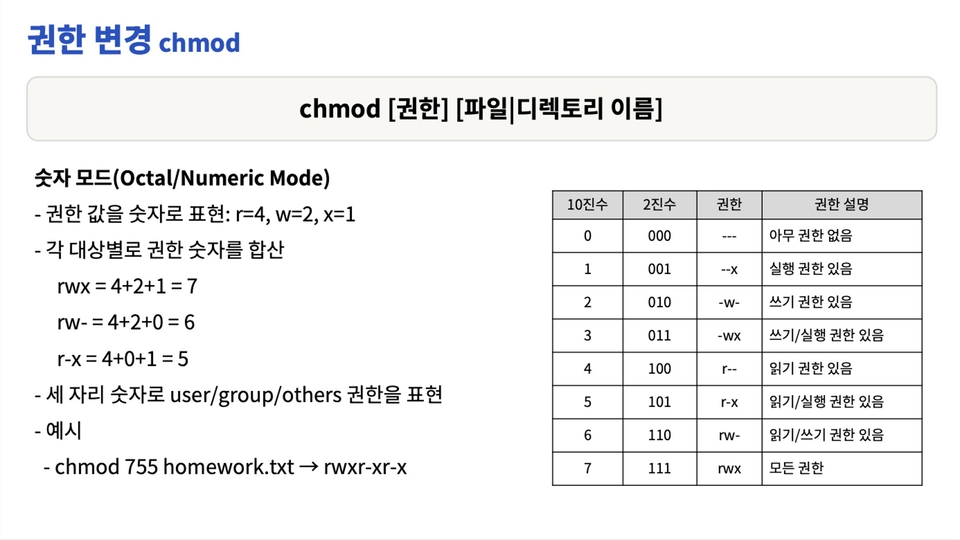
Carefully selected Linux commands based on real-world experience
We have carefully selected only the essential Linux commands frequently used in the field. We have incorporated practical know-how that can be applied immediately at work into the course.
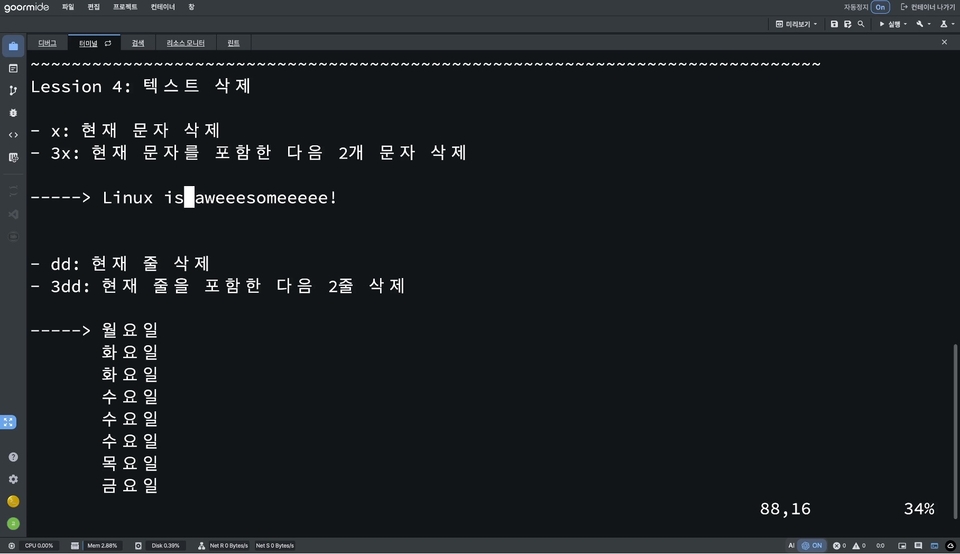
A hands-on course where you learn by following along
Rather than simply conveying theory, you will learn by directly practicing in class and seeing how the commands work. Try it yourself and understand it right away.
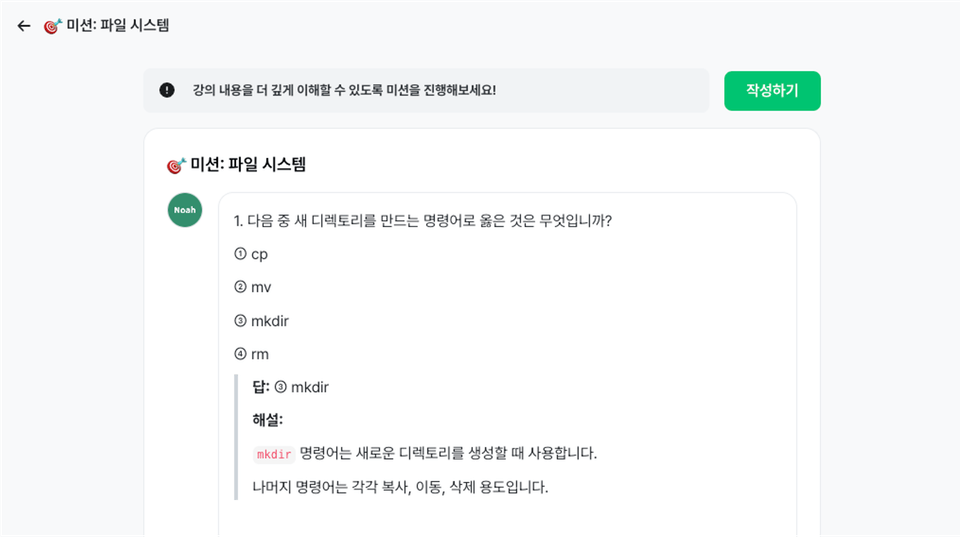
Review what you learned through missions
It doesn't end with lectures. Through missions where you actually work with commands, we help you review what you've learned by solving mission problems.
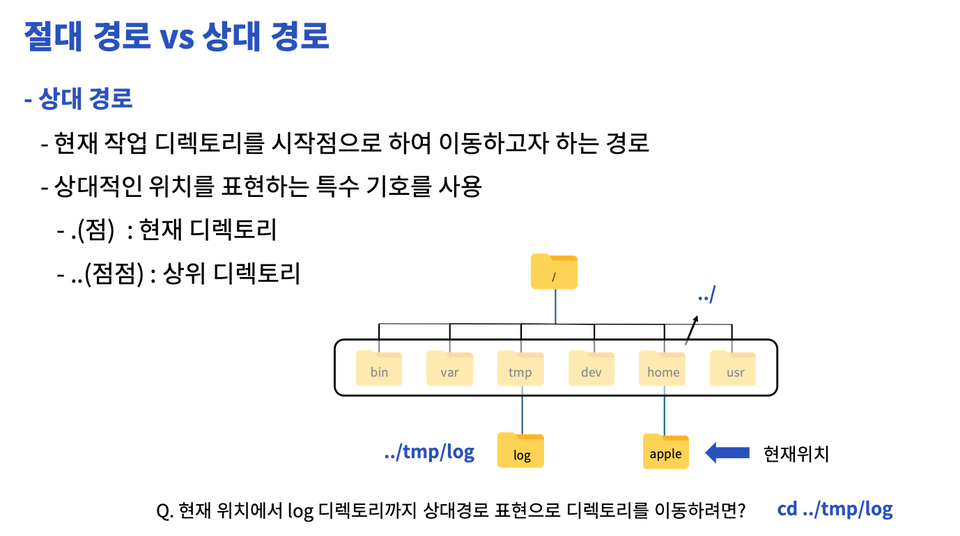
Lecture materials you can review anytime
No more worrying about taking notes! We provide refined lecture materials that let you see the key points of the lecture at a glance. You can vividly review the lecture whenever you need to.
This course is practice-oriented. Therefore, it is very important not to simply watch the lectures, but to follow along by entering the commands yourself. After fully understanding the lecture content, trying to solve the mission problems provided in each lecture on your own will greatly improve your skills.
If you have any questions while watching the lecture, we recommend pausing and trying the exercise once again. The mission problems are designed to help you check your understanding of what you have learned. You can gain a deep understanding of Linux through the process of thinking through and solving the problems yourself.
The best way to learn Linux effectively is to listen to the lectures carefully, practice enough to follow along, and then diligently solve the mission problems. Keep practicing and reviewing, and feel free to ask questions whenever you come across something you don't understand. We support your growth. 😊
Practice in the Arkain (https://arkain.io/) environment without installing Linux separately. (The lectures were recorded using goormIDE, but as the service will end on 25.10.30, please use Arkain for practice.)
Even if the learner’s Windows, macOS, or computer specifications are not good, they can practice without difficulty as long as they have internet access.
Lecture materials are available for download as a PDF.
No prior knowledge is required.
Even if you are not a computer science major, your passion for learning Linux is all you need.
This course includes answers from the knowledge sharer. If you have any questions while taking the course, please post them on the Q&A board, and we will answer them.
Questions outside the scope of the course may receive limited answers.
The mission is a set of questions at the end of each section to check your understanding of what you’ve learned.
Each section consists of 7–10 questions, including short-answer and multiple-choice questions. After submitting, you can view the explanations. (Explanations are not provided for VIM missions.)
The mission content may be added to or modified in the future based on questions from students.
Who is this course right for?
Those new to Linux
Those unfamiliar with and finding command-line environments difficult
Those who want to use the Linux command line with ease
Job seeker looking to enter the IT industry
An aspiring developer who dreams of becoming a software developer
Those preparing for server/system administrator roles
Need to know before starting?
No prior knowledge is required.

69
Learners
9
Reviews
5.0
Rating
1
Course
Hello.
I live in Pangyo,
I am Noah, currently working at an IT services company loved by millions of people.
Looking back at my college days decades ago, there weren't as many great learning materials or lectures as there are now. I would pull thick textbooks from the library shelves and search on Google...
Looking back at my college days decades ago, there weren't as many great learning materials or lectures as there are now.
I spent a lot of time picking up thick textbooks from the library and learning things one by one by searching on Google.
While majoring in computer science, there were many times I felt lost because I didn't know how the theories I learned in the classroom were actually applied in the real world. Since then, after teaching hundreds of students offline...
While majoring in computer science, there were many times I felt lost because I didn't know how the theories I learned in the classroom were actually applied in the industry.
Since then, I have taught development to hundreds of students in person and created helpful assessment content for learners by designing exam questions for K-MOOC courses.
Since then, I have taught development to hundreds of students in person
and created helpful assessment content for students by designing evaluation questions for K-MOOC courses.
My experience working as a backend developer for a service currently used by millions of people has been a great help in building practical, real-world knowledge. Now, I
My experience currently working as a backend developer for a service used by millions of people
has been a great help in building practical, real-world knowledge from a professional perspective.
Now, I would like to share this knowledge and know-how with all of you.
Through lectures that bridge theory and practice, I want to support your growth and share the joy of learning together.
From a small room in Pangyo, Knowledge Sharer Noah
From a small room in Pangyo,
Sincerely, Knowledge Sharer Noah
All
56 lectures ∙ (2hr 48min)
Course Materials:
All
9 reviews
5.0
9 reviews

Reviews 6
∙
Average Rating 5.0
Edited
Reviews 9
∙
Average Rating 4.7
Edited
Reviews 9
∙
Average Rating 5.0
Reviews 1
∙
Average Rating 5.0
Reviews 1
∙
Average Rating 5.0
Explore other courses in the same field!
Free




![Structure and Principles of the Linux Kernel: Interrupts [Author's Lecture Part 1-5]Course Thumbnail](https://cdn.inflearn.com/public/courses/333194/cover/79593ea5-0a6d-453a-8ead-a54103462943/333194.png?w=420)

![Structure and Principles of the Linux Kernel: Interrupt Bottom Halves [Author's Lecture Part 1-6]Course Thumbnail](https://cdn.inflearn.com/public/courses/333195/cover/3b8c8cd2-44b0-43b7-a441-b950ba367717/333195.png?w=420)