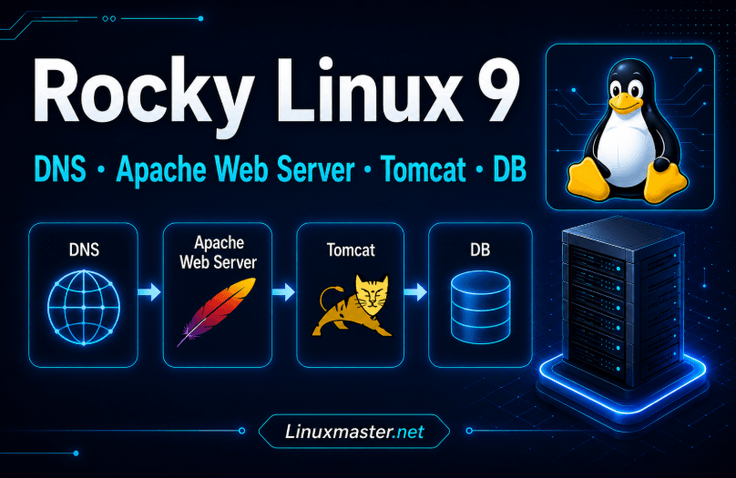

Hands-on Practice Building a DNS Server and Apache Web Server with Rocky Linux 9

Through step-by-step hands-on exercises, learn the entire web service deployment process in a Rocky Linux 9 environment, starting with setting up a DNS server, configuring an Apache web server, building an APM (Apache, PHP, and MariaDB) environment, and installing Gnuboard and WordPress. The course also covers the principles behind each configuration and troubleshooting methods to help develop practical skills.

1 learners are taking this course

Level Basic

Course period Unlimited

WordPress
WordPress
Linux
Linux
apm
apm
apache-tomcat
apache-tomcat
domains
domains
WordPress
WordPress
Linux
Linux
apm
apm
apache-tomcat
apache-tomcat
domains
domains

What you will gain after the course

  • Building and Integrating a Rocky Linux 9-Based DNS Server and Apache Web Server

  • APM Environment Setup and Virtual Host Configuration Using Apache, PHP, and MariaDB

  • Implementation of Gnuboard and WordPress CMS installation and database integration

Hands-on Practice Building a DNS Server and Apache Web Server with Rocky Linux 9

This is a hands-on Linux server course where you will build everything yourself, from DNS servers and Apache web servers to APM environments, Tomcat-based JSP applications, and Java Spring-based web services.

When studying Linux servers, you may learn each technology individually, but

  • How are DNS and web servers actually connected?

  • How do Apache, PHP, and MariaDB work together?

  • How do you deploy a JSP service on Tomcat?

  • How does a Java Spring application connect to a web server?

You may have questions like these.

In this course, you will build a server yourself in a Rocky Linux 9 environment and learn step by step the entire flow of web service infrastructure, from DNS → Apache → APM → Tomcat/JSP → Java Spring
.

Rather than simply following and entering commands, this hands-on course focuses on directly verifying the role of each service and how they connect with one another.

Recommended for those who fit the following descriptions

Those building a Linux server for the first time

Recommended for those who know the basic Linux commands but aren’t sure how to actually set up server services.

You can learn the basic workflow of server administration by installing and configuring a server yourself in a Rocky Linux 9 environment.

For those who want to properly understand DNS and web servers

From the basic concepts of DNS to building a DNS server, domain registration, forward and reverse lookups, and connecting to an Apache web server, you will practice everything hands-on.

Rather than simply learning that DNS converts domains into IP addresses, you will examine how an actual web service connects.

Those who want to experience PHP, JSP, and Java Spring web service environments

We do not cover just one web technology.

  • APM-based PHP service

  • Tomcat-based JSP service

  • Java Spring-based web services

By building each one, you will understand how the web server, WAS, application, and database are connected to one another.

Features of this course

1. Directly connect everything from DNS to the web application

Rather than learning each server technology separately, you will learn them by connecting them into a single web service infrastructure.

The overall service flow is as follows.

User → DNS → Apache → PHP / JSP / Java Spring → Database

Register multiple domains with DNS and connect them to the Apache web server, then progressively expand to PHP, JSP, and Java Spring applications.


2. A Hands-On, Practice-Oriented Course for Building It Yourself

Servers are difficult to learn through theory alone.

In this course, you will configure a Rocky Linux 9 virtual machine and build the server step by step by executing commands directly.

Installation → Configuration → Service Execution → Firewall Configuration → Connection Test → Troubleshooting

By repeating this process, you learn the workflow of actual server administration tasks.


3. Build the APM environment yourself

Build an APM environment integrating Apache, PHP, and MariaDB.

Run a PHP web application and connect it to MariaDB to see how a dynamic, database-based web service is structured rather than a simple static web page.


4. Building a Tomcat-Based JSP Service

Install Tomcat, a Java-based web application server, and deploy a JSP application.

Set up the Java runtime environment and practice the structure of web application services based on apache-tomcat, as well as WAR file deployment and database integration.


5. Building a Java Spring-Based Web Service

After running an application developed with Java Spring, you will practice a setup in which external requests are forwarded to the Spring application using the Apache web server's Reverse Proxy.

Through this, we confirm that Apache can serve not only as a web server that simply provides static web pages, but also as a reverse proxy that forwards requests to internal applications.


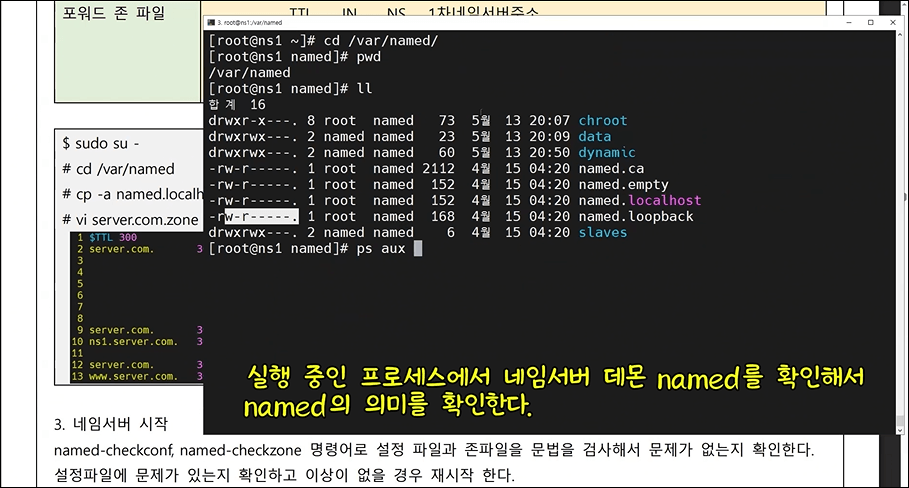
After configuring the DNS server, check the running status and processes of the named service.

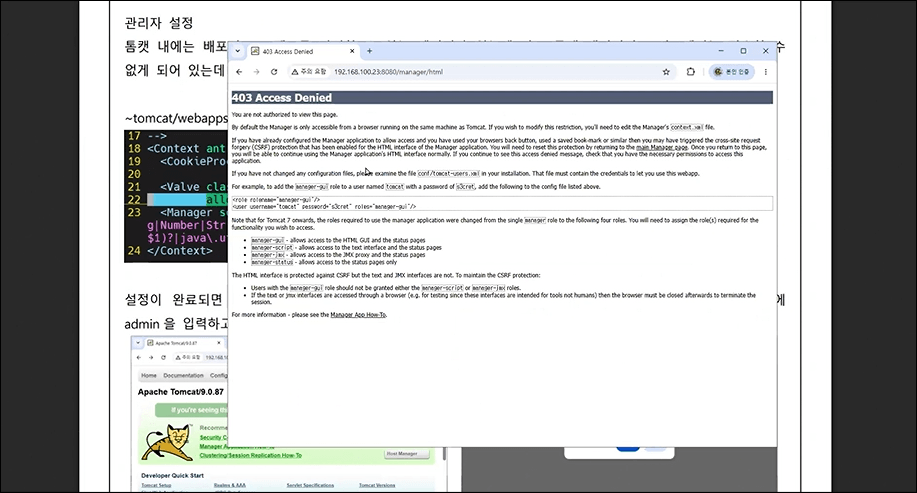
Practice configuring Tomcat Manager and deploying a JSP web application.

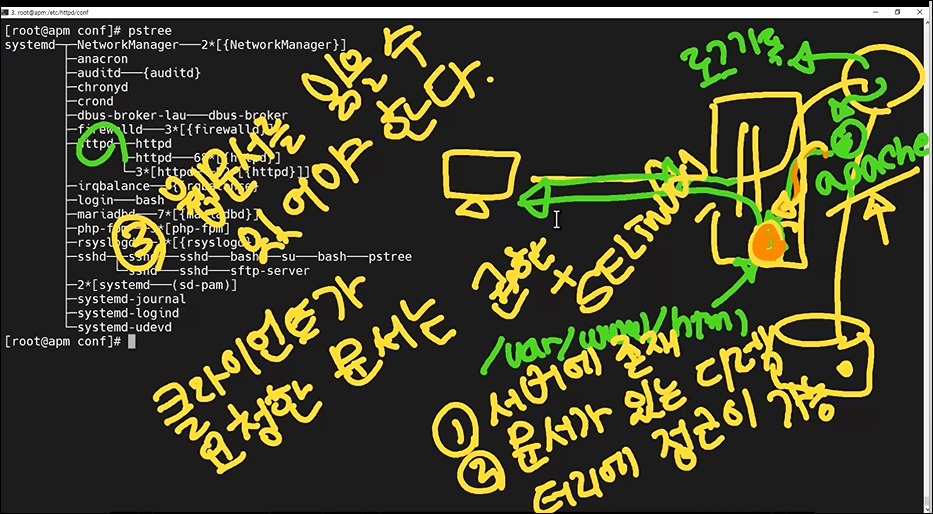
Architecture and Request Processing of the Apache Web Server

What you’ll learn in this section

1. Preparing the Server Practice Environment

Before building the server in earnest, we will prepare the entire practice environment.

  • Basic Concepts of IDC and Servers

  • Understanding the Virtualization Environment

  • Configuring a VMware-Based Practice Environment

  • Installing Rocky Linux 9

  • Network Configuration

  • Configuring Hostnames and IP Addresses

  • Server Updates and Basic Package Installation


2. Building a DNS Server

Build an actual DNS server using BIND.

  • Concepts and Role of DNS

  • DNS Resolution Process

  • Primary / Secondary DNS Servers

  • BIND Installation and Service Management

  • /etc/named.conf Configuration

  • DNS Firewall Configuration

  • Writing zone files

  • A, NS, MX, and PTR Records

  • Forward and reverse queries

  • nslookup

  • dig

  • Registering and Managing Multiple Domains

  • Connecting the DNS server to the Apache web server


3. Building an Apache Web Server

Install Apache HTTP Server on Rocky Linux 9 and configure an actual web service.

  • Structure and Role of the Apache Web Server

  • Install the httpd package

  • Apache Service Management

  • httpd.conf structure

  • ServerRoot

  • DocumentRoot

  • Listen

  • Directory

  • DirectoryIndex

  • Options

  • AllowOverride

  • Require

  • Files

  • Access Log / Error Log

  • Configuration file syntax check

  • Restart / Reload

  • VirtualHost

  • Web Service Using a Domain


4. Building an APM Web Service

Configure a dynamic web service by integrating Apache, PHP, and MariaDB.

  • Understanding the APM Environment

  • Integrating Apache with PHP

  • PHP Installation and Configuration

  • MariaDB Installation and Configuration

  • Create a database

  • Create a database user

  • PHP and MariaDB Integration

  • Running a Web Application

  • Understanding the Apache → PHP → MariaDB service flow


5. Building a Tomcat-Based JSP Service

Install Tomcat and deploy a JSP web application.

  • Difference Between a Web Server and a WAS

  • Role of Tomcat

  • Configuring the Java Runtime Environment

  • Install Tomcat and Run the Service

  • Deploying a JSP Application

  • Deploying a WAR File

  • Tomcat Manager

  • JSP and Oracle DBMS Integration

  • Understanding the Structure of a Tomcat-Based Web Service


6. Building a Java Spring-Based Web Service

Run a Java Spring application on a Rocky Linux server and integrate it with Apache.

  • Java Spring-based web service architecture

  • Running a Spring Boot Application

  • Spring Service Port Configuration

  • Configure an internal service based on 127.0.0.1

  • Restrict direct external access to the Spring service port

  • Apache Reverse Proxy Configuration

  • ProxyPass

  • ProxyPassReverse

  • Services based on the /board and /jumsu paths

  • Integrating a Java Spring Application with a Database

  • Understanding the Apache → Java Spring → Database service flow


Additional Practice – Using Various Web Services

After learning the fundamentals of this course, you will also have access to additional hands-on exercises for deploying various web applications directly on a server.

  • Installing GNU Board (Coming soon)

  • Installing WordPress (Coming soon)

  • Installing Oracle SQL Developer (Coming soon)

※ Some additional hands-on practice lectures are currently being edited and will be updated sequentially.


After completing the course,

After completing the entire course, you will be able to perform the following tasks yourself.

  • Server environment configuration based on Rocky Linux 9

  • Building DNS Primary / Secondary Servers

  • Writing DNS zone files

  • Registering and querying multiple domains

  • Build an Apache web server

  • VirtualHost configuration

  • APM web service setup

  • Build a Tomcat-based JSP service

  • JSP and Oracle DBMS Integration

  • Running a Java Spring application

  • Integrating Apache Reverse Proxy with Java Spring

  • Understanding the roles of web servers, WAS, applications, and databases

  • Basic troubleshooting using service status, firewalls, networks, and logs


Notes Before Taking the Course

  • Basic experience using Linux commands will be helpful for learning.

  • It is helpful to have a basic understanding of the web, including HTTP, domains, and IP addresses.

  • It is helpful to have experience using text editors such as vi and vim.

  • Although practice applications for PHP, JSP, and Java Spring are provided, the process of developing the application source code is not included in the course.

  • Depending on the practice environment or package versions, some content shown in the lectures and provided PDF documents may differ from the actual environment.

  • Some additional hands-on practice lectures are currently being edited and will be updated sequentially.


After completing the course

Technologies that initially appeared separate from one another become connected as a single service flow.

DNS server → Apache web server → APM environment → Tomcat-based JSP → Java Spring-based web service

And from the perspective of an actual service,

User → DNS → Apache → PHP / JSP / Java Spring → Database

You will be able to understand the overall structure.

Beyond simply installing a server, the core of this course is to build and understand firsthand the entire flow of a Linux-based web service infrastructure, connecting everything from DNS to the web server, WAS, application, and database.


Practice Environment

  • Practice is conducted on Rocky Linux 9.

  • We recommend a PC environment where you can use a VMware virtual machine.

  • An internet connection is required for the lab exercises.

Learning Materials

  • We provide the configuration files, commands, and hands-on examples used in the course.

  • The necessary content is explained step by step in the lecture videos.

Prerequisites and Notes

  • Knowing basic Linux commands will be helpful for learning.

  • The process proceeds step by step, starting with installation, so even beginners can follow along.

  • PHP, JSP, and Java Spring practice applications are provided, but the source code development process is not included in the course.

  • Some content in the course screen and the provided PDF documents may differ from the actual environment depending on the practice environment or package versions.

  • Some additional hands-on practice lectures are currently being edited and will be updated sequentially.

Recommended for
these people

Who is this course right for?

  • For beginner developers and system administrators who are setting up a web server in a Linux environment for the first time

  • Learners who want to understand the integration principles of DNS, Apache, PHP, and MariaDB through hands-on practice

  • Practitioners who want to operate websites based on GNUBoard or WordPress themselves

Need to know before starting?

  • Basic experience using Linux commands and an understanding of the terminal environment would be helpful.

  • Understanding basic web concepts such as HTTP, domains, and IP addresses will help with learning.

  • Experience editing configuration files using text editors such as vi or vim is preferred.

Hello
This is linuxmasternet

Career Verified

113

Learners

3

Reviews

5

Answers

5.0

Rating

3

Courses

[Career History]

  • (Current) CEO of Linux Master Net

  • Received the KISA (Korea Internet & Security Agency) President’s Award in 2014

  • Conducted penetration testing and vulnerability assessments of information systems for the Supreme Prosecutors' Office, Allianz Life Insurance, and Dongbu Securities

  • (Former) Korea Information and Communications Promotion Association Expert Committee Member (Linux Master)

  • (Former) Mentor for the University Student Information Security Association (SUA)

  • (Former) Head of the Education Team, Korea Hacking and Security Association


[Teaching History]

  • KISA (Korea Internet & Security Agency) Linux Security Lecture

  • Information security lectures at Seoul Hyundai Vocational School, KH Information Education Institute, and Korea IT Academy

  • Special lectures on information security at Korea Information and Communication Polytechnic College, Chonnam National University, Woosuk University, and Hoseo University

  • Ministry of Culture, Sports and Tourism, National Information Society Agency, and many others: Special lectures on personal information protection and information security

  • Numerous personal information and information security special lectures for POSCO A&C, Ilsan Paik Hospital, Hyundai Department Store, Hyundai HDS, and many others

  • Special lectures on information security for the Navy, the National Election Commission, and many others

  • Since first learning Linux in 1995, I have provided hands-on, practice-oriented lectures based on experience operating and securing Linux servers, as well as network experience.

More

Curriculum

All

38 lectures ∙ (8hr 51min)

Course Materials:

Lecture resources
Published: 
Last updated: 

Reviews

Not enough reviews.
Please write a valuable review that helps everyone!

Similar courses

Explore other courses in the same field!

Limited time deal

$16,500.00

50%

$26.40