
inflearn logo

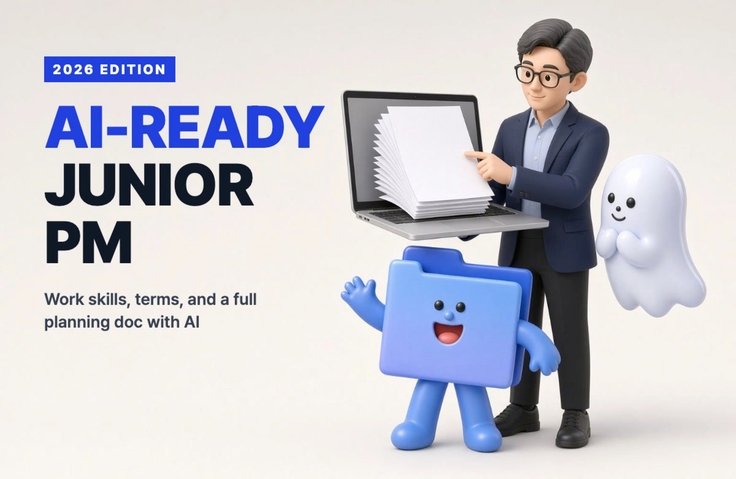
Practical Guide for Junior Planners in the AI Era: From Work Skills and Terminology to Proposals and Screen Designs (2026 Revised Edition)

AI handles the first draft; I handle the judgment and polish. Learn the practical skills and terminology that junior planners use from day one, and work with Claude to create a complete set of deliverables for a study café reservation service: a project proposal, menu structure, screen designs, and functional specifications.

1 learners are taking this course

Level Beginner

Course period Unlimited

Service Planning
Service Planning
Planning Document
Planning Document
UX Planning
UX Planning
claude
claude
quality assurance
quality assurance
Service Planning
Service Planning
Planning Document
Planning Document
UX Planning
UX Planning
claude
claude
quality assurance
quality assurance

What you will gain after the course

  • How to quickly write work requests, meeting minutes, and report emails with AI—and catch mistakes yourself

  • The ability to understand implementation, development, business, and AI terminology that comes up in meetings

  • A complete set of planning deliverables, from interview questions to personas, PRDs, menu structure (IA), user flows, screen designs, and feature definitions.

  • How to Hand a Project Plan to a Developer (or AI Coding Tool) and Organize a QA Checklist and Issues

The AI drafts it; I make the decisions and polish it.

Junior planners learn the work skills and terminology they use from their very first day at a company, then work with Claude (claude.ai) to create a complete set of the planning document, menu structure, screen design, and feature definitions for the study café reservation service "자리잡기".

This is the 2026 revised edition of “Essential work skills and terminology for junior planners, all in one!”—a course that many people have taken since 2021. We’ve reorganized work skills, email, and terminology based on current standards, and newly added lessons on how to work in the AI era and hands-on practice creating a planning document from start to finish.

Recommended for these readers

  • Entry-level planners and PMs with 1–3 years of experience—especially junior professionals handling planning on their own without a mentor

  • Those preparing for a job or career change in planning who need a complete set of planning documents to include in their portfolio

  • Those who use AI but are confused about “how much to trust it and what they should do themselves”

  • People who just nod along when terms like RFP, API, MVP, and MCP come up in meetings.

After listening to everything, you’ll be able to do the following.

  1. You can quickly write work requests, meeting minutes, and report emails with AI, and identify mistakes on your own.

  2. You’ll understand the implementation, development, business, and AI terms that come up in meetings.

  3. From interview questions → personas → PRD → information architecture (IA) → user flows → screen design → feature definitions, you will create a complete set of planning deliverables yourself.

  4. I hand that project document over to a developer (or an AI coding tool) and take care of everything through the QA checklist and issue tracking.

What This Course Covers

  • Essential tasks for highly effective juniors: how work comes in, organizing meeting minutes, status report emails, schedules and priorities, and the habit of not blindly trusting AI results

  • Terminology that keeps you going in meetings: implementation and operations (RFP·WBS·QA), development (frontend·backend·API·DB·deployment), business (MVP·KPI·retention), and newly emerging AI terminology (LLM·prompt·context·agent·MCP·vibe coding)

  • Create a complete set of planning deliverables with Claude: Using a single regular chat on claude.ai, follow the entire process from the “getting settled” interview through review.

  • A faster way: Create the same result in Plandy in just a few minutes and send it to Figma (optional)

  • From a project brief to a service: handing it off to developers, watching AI create screens from the brief, and QA

  • Check Quiz 2: Terminology quiz (end of Chapter 2) and final quiz (at the end), 10 questions each, including answers and explanations

We used AI to make the lecture easy to listen to.

  • Clear AI voice narration — You’ll hear the same voice at the same speed from beginning to end, without noise or inconsistent pronunciation. It reads the script written in simple language exactly as it is, so you won’t miss a single sentence.

  • The screen shows the actual work as it happened — real conversations with Claude, including the process of catching mistakes when the AI gives an incorrect answer.

  • Just as you work with AI in the course, the course itself was created together with AI — AI handled the drafts, while humans handled the verification and decisions. This course itself is an example of "AI drafts, I decide."

What students receive

  • Planning Template Bundle (24-page PDF) — PRD, IA, user flows, feature specifications, QA checklists, issue logs, meeting minutes, report email templates, and 12 step-by-step AI prompts. Available as course materials for Lesson 0-1.

  • Course example proposal (PDF) — A complete proposal for the study café reservation service “Jari Japgi.” You can receive it as 3-8 lesson material.

  • 8 Plandy planning credits — 4 practice-use coupons BUILD8(plandi.app/c/BUILD8)

Materials and Costs

  • Computer (both Mac and Windows work. We’ll provide shortcuts for both.)

  • Claude (claude.ai) account — you can start for free. If you plan to use it extensively, a paid plan is more convenient.

  • Plandi and Figma are only used in Step 4 (optional). We’ll provide a coupon for the Plandi planning pass.

  • You won’t write a single line of code.

Let me explain.

  • This is based on the screens as of October 2026. I’ll also explain what to look for so you can follow along even if the service screens change slightly.

Recommended for
these people

Who is this course right for?

  • Entry-level or 1–3-year junior planners and PMs handling planning on their own without a mentor.

  • Job seekers and career changers preparing for planning roles who need a set of planning documents to include in their portfolio

  • People who use AI but are unsure how much to trust it and what they should do themselves

  • People who just nod along when terms like RFP, API, MVP, and MCP come up in meetings.

Need to know before starting?

  • No planning experience or coding knowledge is required. Let’s follow along together from the beginning.

  • We use Claude (claude.ai) in class. You can start for free, and a paid plan is more convenient if you want to use it extensively.

Hello
This is codingai

754

Learners

90

Reviews

24

Answers

4.3

Rating

8

Courses

Hello! I'm Ake, a planner with 20 years of experience and an expert in AI coding and Figma.

I have been planning web and app services and working as a PM for 20 years. I am also an expert in AI-assisted coding and UI/UX planning using Figma.

Introducing AI tools like Claude and ChatGPT into the planning process has innovated the way I work. Target analysis and persona creation, which used to take days, have been shortened to just a few hours, and by combining Figma with AI, anyone can now create professional-level planning documents.

I have accumulated know-how in utilizing AI throughout the entire process from planning to development, and I have personally experienced how it enables faster and more efficient service development.

Now, I want to share with you the planning expertise and AI proficiency I have accumulated over the past 20 years. Let’s take the first steps toward a new way of service development—from planning to execution—together with AI.

Service planning and development used to be complex and difficult, but now anyone can do it with AI!

More

Curriculum

All

30 lectures ∙ (3hr 4min)

Course Materials:

Lecture resources
Published: 
Last updated: 

Reviews

Not enough reviews.
Please write a valuable review that helps everyone!

codingai's other courses

Check out other courses by the instructor!

Similar courses

Explore other courses in the same field!

Limited time deal ends in 15:37:21

$61,600.00

30%

$68.20