Practical Use of ChatGPT: From Basics to APIs and RAG
Learn how to ask ChatGPT for the results you want and verify the sources and outcomes of the materials. This is a 70-session course that begins with hands-on practice in documents, data, and writing, then progressively expands to the OpenAI API, RAG, agents, evaluation, and operations.
Writing practical prompts that include objectives, materials, constraints, and success criteria
Document analysis using PDF, CSV, and Excel, information extraction, and result verification
Long-term Work Management Using Projects and Research & Connection Tools
Basic usage of the Responses API, streaming, and image/audio APIs
Basic Implementation Structure of Function Calling, Structured Outputs, Conversation State, and RAG
Agents SDK, Evals, and operational design considering security, costs, and error handling
CHATGPT PRACTICAL COURSE
🤖 Practical ChatGPT Applications: From Basics to API & RAG
Going beyond asking questions to producing results you can use at work
Have you tried asking ChatGPT questions but felt unsure how to apply it to your work?
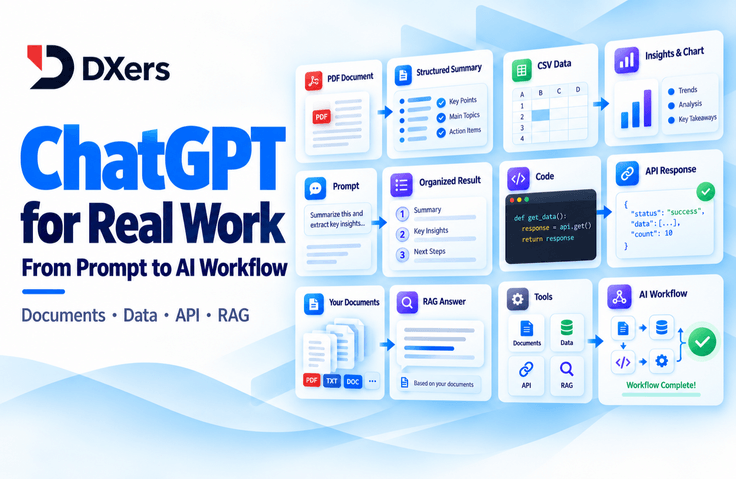
In this course, you will learn the basics of using ChatGPT and prompt engineering and apply them to documents, writing, and data analysis. Then, you will connect these skills to APIs for using AI in programs, document search, and the basic structure of agents.
📄 Read documents · 📊 organize numbers · 💻 connect the AI functions you need with code.
Request → Execute → Verify → Revise
🎬 본편 전체 70차시 구성 예정 ·
📘 교재 31개 챕터 ·
📂 차시별 실습자료
🎁 After completing the main course, the bonus videos for “Hands-on Practice Applying Each Chapter” will be added sequentially.
📢 This is a serialized course, with lessons 00–15B released first.
During the main course release period, at least two lessons per day, excluding holidays, are scheduled to be released.
The course fee is scheduled to increase at both the release of 20A and the completion of the full main course release.
📢 A serialized course that starts with the lessons released first
🟢 Initial release scope — from LESSON 00 through 15B
This course is not a completed course with all videos available at once, but rather a serialized course where you can watch subsequent videos while learning from the lessons released first.
At the initial release, we will provide content from 00 Orientation through 15B “Distinguishing Between Query and Execution Permissions for Connected Tools”.
You can learn the basic principles of ChatGPT and how to write prompts, as well as writing and organizing materials, and the criteria for using Projects, research, and connected tools.
📅 At least two lessons from the main course will be released each day, excluding holidays.
Starting with 16A, we will release API fundamentals, image and voice applications, document and data analysis, and advanced topics in sequence according to the curriculum.
Rather than live classes that require attendance at a set time, recorded videos will be added sequentially.
🎁 After completing the main course, we’ll continue with chapter-by-chapter applied practice.
After all 70 lessons in the main course have been released, we plan to sequentially add supplementary videos on “Practical Application Exercises by Chapter”, applying what you learned in each chapter to new work situations.
Learn the concepts and basic practices in the main lessons, then apply them in the supplementary materials to situations with different resources, requirements, and deliverable conditions.
The supplementary materials’ specific topics, number of sessions, and release schedule will be announced separately once finalized.
📌 The detailed introduction and textbook also include the full course you will study going forward. The main content and appendices that have not yet been released can be viewed once the relevant videos are available, so please check the currently released scope in the curriculum before purchasing.
💳 The course fee will increase twice according to the release stages of the main course.
STEP 1
🌱 Early-access price
From the initial launch until before 20A is released
After releasing up to 15B first, subsequent lessons will be added sequentially.
STEP 2
📈 First price increase when 20A is released
When 20A “Check the Rows, Columns, and Units Before Analyzing” Is Released
It is based on the release of 20A, not the entire Chapter 20.
STEP 3
🎓 Second price increase upon completion of the main course
When all 70 main-course sessions from 00 to 99 have been released
It is based on the completion of the full main course release, without waiting for the appendices to be fully released.
💡 Early-bird price → First price increase when 20A is released → Second price increase when the main course is fully released → Appendices added sequentially thereafter
Please check the currently applicable sale price on the course page, and the actual payment amount on the checkout screen.
🙋 Start with the ChatGPT usage you need right now
📝 People who frequently organize documents, reports, and materials
“I received a summary, but I’m not sure whether any important conditions were left out.”
“The tables and charts are ready, but can I use them as they are?”
Practice what to request and what to check when working with reports, business emails, surveys, and customer inquiries.
🌱 The general-use section starts without coding.
💻 For those who want to connect AI features to a program
“I’ve used ChatGPT, but where should I start with the API?”
“How are document search systems or agents structured?”
Learn the basic structure for handling requests and responses outside the chat window and connecting the necessary functions and documents.
🧑💻 Basic Python knowledge and experience running code are required for the API exercises.
🛠️ Hands-on ChatGPT Practice Using Documents and Data
💬 Prompt Engineering — Start by Defining the Criteria for the Desired Result
In this course, prompt engineering goes beyond memorizing example sentences.
You will define the goal, audience, input materials, constraints, evidence, and output format, while also specifying the conditions to check in the result.
💭 Vague request
Create a good presentation using this material.
🎯 A Request That Includes Conditions
Create a 10-minute presentation outline for explaining the findings to a non-technical department head, using only the attached survey CSV as evidence. Structure it into 7 slides and connect the basis for the key figures to recommended actions.
This is not about adding lots of words, but practicing determining first what results would make it usable.
📄 PDF Document Analysis — Finding Required Conditions and Supporting Evidence Together
🟢 This exercise is included in the initial preview scope.
Find the eligibility requirements in the employment policy PDF and compare the supporting sentences and pages with the original text.
Check that “or” conditions have not been changed to “and,” and that no information absent from the file has been added arbitrarily.
This is a guide to a document analysis exercise using fictional regulations for class. It is not an actual ChatGPT response screen.
📦 What remains after the exercise: A table organizing eligibility requirements, supporting statements, pages, and additional items to verify
📊 CSV·Excel Data Analysis — Create Summary Tables and Charts and Verify the Calculations
📅 Data analysis basics are available in the early-release lessons, while the extended exercises will be released sequentially in 20A–20C.
After checking the rows, columns, and units in the sales data, aggregate it by month and product. After creating the chart, compare it with the source data, totals, axis units, and aggregation criteria, then reopen the result file to verify it.
🧮 Check aggregation criteria → 📈 Review the chart → 💾 Save and verify the result file
This is the data analysis workflow using virtual sales data for the lecture and textbook. It is not a screen showing actual responses or performance measurement results.
📦 What remains after the exercise: A sales summary table, charts, exported files, and calculation verification records
🔄 Building practical usage habits through concepts, practice, verification, and review
💡 01. Understanding the Concepts
Understand not only the names of the features, but also what tasks they are needed for.
🖱️ 02. Run It Yourself
Use the provided file and request, then adapt them to your own conditions.
🔍 03. Verify the Results
Compare the original prompt’s conditions, numerical calculations, and output format against the actual result.
📝 04. Review & Record
Record the verified results, reasons for revisions, and anything that has not yet been done.
🎯 The goal is to be able to evaluate the results you receive, rather than receive the exact same wording as the instructor.
💻 To Be Released Sequentially: Expanding Your Development Learning with the OpenAI API, RAG, and AI Agents
🔜 This section is the follow-up curriculum that will be released sequentially after 16A.
Not all of the content below is included in the initial early-access release. Please check the curriculum for the videos currently available to watch.
🔌 OpenAI API — Understanding the Structure of Requests and Responses
In the development section, you will learn how a program uses the OpenAI API to send requests to an LLM (large language model) and receive results.
You will distinguish between inputs and instructions in the Responses API and learn to separately interpret the final text, tool calls, and usage.
📚 RAG — Connecting Documents as the Basis for Answers
In RAG, you will learn how to find materials relevant to a question and connect them to the model’s input.
You will compare managed File Search with a self-configured RAG approach and examine criteria for evaluating the relevance, version, permissions, and citations of retrieved documents.
🤖 AI Agent — Designing Tool Use and Stop Conditions
In the AI Agent lessons, we explore which tools to use, how to verify execution results, and when to stop. We read through a small execution flow in the Agents SDK and review human approval alongside execution logs.
This is a textbook diagram explaining the structure of tool calls. It is not an actual API execution success screen or a completed service interface.
🧪 The API section distinguishes between reading code, checking preparations without external requests (DRY RUN), reviewing simulated results, and making optional actual calls.
In the latter part, we also cover evaluation, deciding whether to apply fine-tuning, and standards for safety and operations.
🗺️ Learn step by step, from basic usage to development extensions.
🌱 Beginner — Basic ChatGPT Usage / 10 Chapters in the Textbook
Learn the basic principles and work environment of ChatGPT, as well as how to request the results you want. Apply it to writing, organizing materials, coding questions, and learning while building the fundamentals of reviewing responses.
🌿 Intermediate — Complex Workflows and Introduction to APIs / 10 Chapters in the Textbook
Design requests that include goals and supporting rationale, and manage multi-step conversations and materials. This leads into Projects and research, API fundamentals, the use of images and audio, and document and data analysis.
Covers tool calling, structured outputs, conversation state, RAG, and the Agents SDK. Learn how to determine when to apply fine-tuning, as well as evaluation data and security, cost, and error handling.
💼 If practical workplace applications come first
First, the publicly released Chapters 00–15B → lessons related to Chapters 19–20 according to the release schedule
Learn the basics of writing requests, writing, organizing materials, Projects, and research, then move on to document search and data analysis.
💻 If you want to continue through API development
Basic Usage & Verification Criteria → Chapters 16–18 Released Sequentially → Lessons Related to Chapters 21–31
Prepare the Python execution environment and move on to API and tool calls, document search, agents, evaluation, and operations.
🎁 To be added after completing the main course: Chapter-by-chapter practical application exercises
This appendix lets you apply what you’ve learned to new work situations.
After all 70 lessons of the main course have been released, we plan to sequentially add “Chapter-by-Chapter Practical Application Exercises” as supplementary content connected to each chapter of the textbook.
Based on the concepts and evaluation criteria learned in the main course, we examine how to change requests and the order of tasks when the materials, objectives, and constraints differ.
🧩 Connect the process from understanding the situation to checking the results
Rather than stopping at simply showing example prompts, we connect the process of making requests, carrying them out, and reviewing the results, starting from specific work situations.
Understand the situation and goals → Check the materials and constraints → Design the request → Execute → Review and revise the results → Apply to other situations
📘 In the main section,
Learn the concepts and basic practice, along with verification methods. Understand the necessary functions and request methods, and check the results of the provided examples.
🧩 In the appendix,
Apply the same principles to situations where the audience, materials, and output format differ. Distinguish between what can be used as-is and the conditions that need to be newly determined.
📅 The appendix consists of additional learning videos that are not included in the main course’s 70 sessions. The total number of additional videos and the individual release schedule will be announced once finalized; this does not mean that the main course’s release plan of “at least 2 lessons per day, excluding holidays” will also apply to the appendix.
📦 Course materials, practice resources, and prompts are provided together
📂 So you don’t have to worry about what to practice with
We use the course textbook PDF together with the practice guides for each session. You will practice using inputs with different purposes, such as regulations and policies, proposals, surveys, customer inquiries, sales data, images, and audio.
Each session explains which file to use first and which results to check.
This is a guide to the course materials for students and the practice materials for each lesson in the main course. Regulations, policies, customer data, and similar materials are fictional materials created for the course.
📘 Course materials and lesson-by-lesson practice files Use materials suited to the purpose, including PDF, CSV, Excel, JSON, images, and audio.
💻 Prompts and API helper code Learn to distinguish between reading code, making actual calls, and virtual examples.
📝 Learning Record Template Record the inputs used, results checked, changes made, and next steps.
🔐 Use mock data first Practice with provided materials first instead of entering personal information or company confidential data directly.
👨🏫 I connect experience in development and education to practical learning.
DXers (DXers)
Hello. Drawing on my experience in web development and IT vocational training, I am 디엑서스(DXers), connecting development and education.
We explain not only what to click, but also why you are making the request and what to check in the result.
💡 Define the necessary materials and conditions 🔍 Compare the explanation with the actual results 🛠️ Revise the necessary parts while keeping what worked.
📌 Check the preparations and course scope before taking the course
🎬 If I purchase it now, can I watch all the videos right away?
No. The initial release covers 00 Orientation through 15B, and videos from 16A onward will be added sequentially according to the main series release schedule.
📅 How often are new lectures released?
During the main course release period, at least two lessons will be released per day, excluding holidays. After the main course is complete, the supplementary materials will be released sequentially according to a separate schedule.
💳 When will the course fee increase?
The price will be raised first when the 20A video is released, and a second time when all 70 lessons of the main course have been released. It is unrelated to individual progress.
🎁 What courses will be added after completing the main course?
We plan to add “Chapter-by-Chapter Practical Application Exercises” as supplementary material, applying what you learned in each chapter to new work situations.
🌱 Can I take this course even if I don’t know anything about coding?
The general applications section can be started without coding. The API exercises require a basic understanding of Python syntax and experience installing packages and running code.
🧑💻 Do I need a paid ChatGPT account or incur additional costs?
The course fee does not include a paid ChatGPT subscription or API usage fees. Before making actual API calls, please check the available features, authentication, billing status, and costs on your own account.
🧪 Do I need to actually run all the code and learning tasks?
Some sessions use mock responses, logs, training data, and local checks to understand the structure. We distinguish between reading code, DRY RUNs, reviewing mock results, and making actual API calls.
🧭 Does it cover everything from Codex to web service development?
We distinguish between the roles of ChatGPT and Codex, but this is not a dedicated course that covers Codex CLI and repository development in depth. Its scope also differs from an A-to-Z course that takes you through completing a web service from planning to deployment.
✨ Learn the fundamentals and gain experience applying them to new situations too
Start with the publicly available lessons first and broaden your learning scope.
📄 Prepare the materials you need · 💬 Request the results you want · 🔍 Check the answers yourself.
Expand the principles learned in the already released 00–15B lessons to APIs, RAG, and AI Agents,
then apply them to new situations through “Chapter-by-Chapter Practical Application Exercises” after completing the main course.
🎬 Main course 00~15B available early
📅 Main course release period: At least 2 lessons will be released per day, excluding holidays
💳 Tuition will increase when 20A is released and when the entire main course becomes available
🎁 After completing the main course: A supplementary appendix with practical applications by chapter will be added sequentially
Recommended for these people
Who is this course right for?
Office workers, planners, and marketers who use ChatGPT but find it difficult to apply the results to their actual work
Freelancers and solo business owners who want to organize documents, reports, customer feedback, and sales data with AI
Learners who want to learn how to evaluate and improve results rather than memorize example prompts
Junior developers who know the basics of Python and want to expand into the OpenAI API, RAG, and agents
Need to know before starting?
The general usage section can be started without programming experience. Basic computer skills, such as using a web browser and downloading, extracting, and uploading files, are required.
To run the API sections yourself, it is recommended that you know the basic syntax of Python variables, conditional statements, loops, functions, lists, and dictionaries, as well as how to install packages and run code. A basic understanding of JSON and HTTP will also be helpful.
Hello, I am Jihoon Seo, an instructor at DXers who will be joining you here on Inflearn. I have 3 years of experience as a government-funded vocational training instructor and 2 years and 6 months of practical development experience. During that time, I have been responsible for building and operating large-scale systems for various major corporations, including H Motor Company.
Lecturing on overall web development, including Java, Spring Boot, and React.js, tailored to the learner's level.
Participated in national business projects related to energy data analysis and prediction, and a large-scale project for H Motors for 2 years and 6 months:
Machine learning-based data analysis and prediction using Python Scikit-learn, TensorFlow, etc.
Design and implementation of TypeScript-based backend (Node Express/NestJS) systems
React.js, Next.js, Electron.js, Tauri frontend development
AWS, Azure, Docker, Kubernetes environment setup and CI/CD pipeline configuration
💻 Technical Stack
Languages & Frameworks: Java, JavaScript, TypeScript, Spring Boot, React.js, Next.js, Node.js(Express, NestJS), ElectronJS, React Native, Rust, Tauri, Python(Scikit-lean, TensorFlow, Pandas)
During my time as an instructor for government-funded offline programs, I was unable to deliver the style of teaching I desired (practice-oriented, practical-focused lectures). There were various reasons, but because I had to follow a fixed curriculum (typically Java-centered) and was affiliated with a specific organization, I ended up teaching for the benefit of the organization rather than for the students. Since this did not align with my teaching philosophy, I transitioned to online lectures to create courses for the students by providing high-value content at an affordable price.
Above all, I aim to provide high-value lectures at an affordable price. I learned IT development through self-study (online courses). I want to prove that it is not absolutely necessary to spend a lot of money on in-person learning.