
inflearn logo

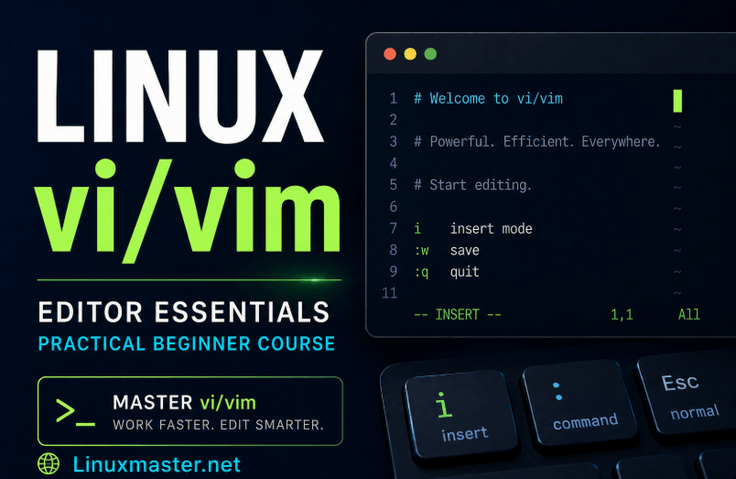
Introduction to vi/vim Editor for Linux Users

This is a practical course for Linux beginners who struggle with saving, exiting, switching input modes, navigating, deleting, and copying/pasting because they are unfamiliar with vi/vim. Based on over 30 years of experience using Linux, this course is designed to help you step-by-step master the vi/vim basics and practical editing commands required for server tasks in a Rocky Linux 9 environment.

5 learners are taking this course

Level Beginner

Course period Unlimited

Linux
Linux
Vim
Vim
Shell Script
Shell Script
terminal
terminal
Linux
Linux
Vim
Vim
Shell Script
Shell Script
terminal
terminal

What you will gain after the course

  • I can perform the basic tasks of opening, editing, saving, and exiting files in vi/vim on my own.

  • You can quickly edit file content by distinguishing between input mode and command mode and using commands for moving, deleting, copying, and pasting.

  • You can efficiently modify the contents of configuration files or source code using string search and replace commands.

  • You can understand screen splitting, registers, and swap file recovery functions and apply them to actual Linux server tasks.

  • You can use vi/vim to write and edit programming language files such as shell scripts, Python, and C.

Master the basics of Linux server tasks, starting with the vi/vim editor.

When using Linux, there is an editor you will inevitably encounter.
It is the vi/vim editor.

vi/vim is very frequently used on Linux servers when modifying configuration files, checking logs, writing shell scripts, or editing simple source code. Especially since GUI editors are often unavailable in server environments, the ability to use the vi/vim editor directly from the terminal is an essential basic skill for Linux users.

However, vi/vim can feel difficult for first-time users.

It is common to feel flustered when keys don't input text as expected, or when you don't know how to save and exit, and the confusion between command mode and insert mode is frequent. This is why beginners learning Linux often encounter their first major hurdle with vi/vim.

This course was created to solve these difficulties.


What kind of course is this?

This course is an introductory course where you learn how to use the vi/vim editor in a Rocky Linux 9 environment through hands-on practice.

The Linux installation process is not covered.
Instead, we focus on the vi/vim editing functions that are actually used frequently in a Linux environment.

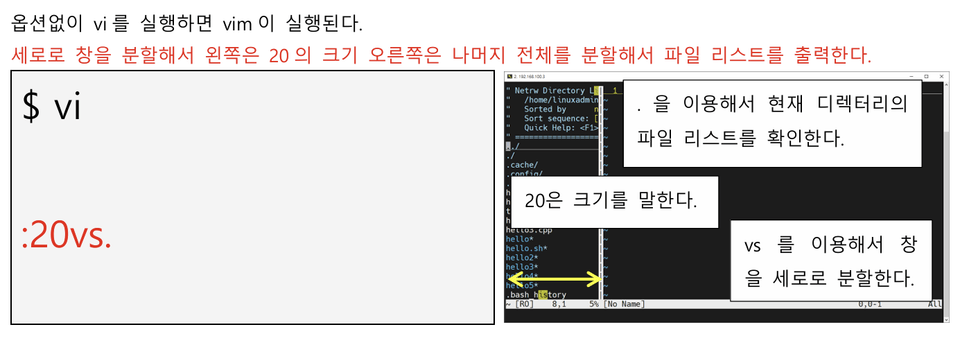
You will learn step-by-step, starting from basic functions such as opening, saving, and closing files, switching input modes, cursor movement, deletion, and copy-pasting, to advanced topics like screen splitting, registers, string substitution, swap file recovery, and practical editing for programming languages.

Rather than simply listing commands, the practice exercises are structured based on situations frequently encountered in actual Linux server tasks.


You will learn the following.

In this course, you will learn the following.

  • Types of Linux editors and how to use nano

  • The basic structure and operation of the vi/vim editor

  • Setting basic vi/vim options

  • Commands for opening, saving, and exiting files

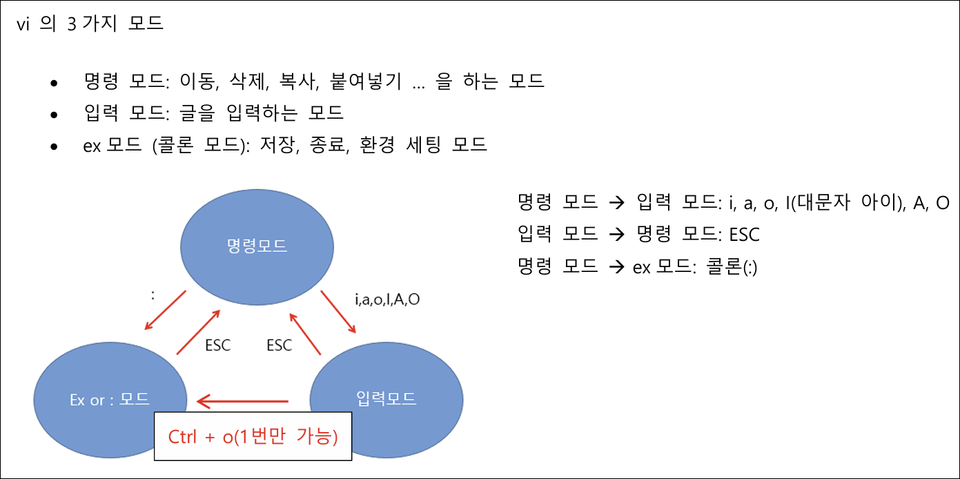
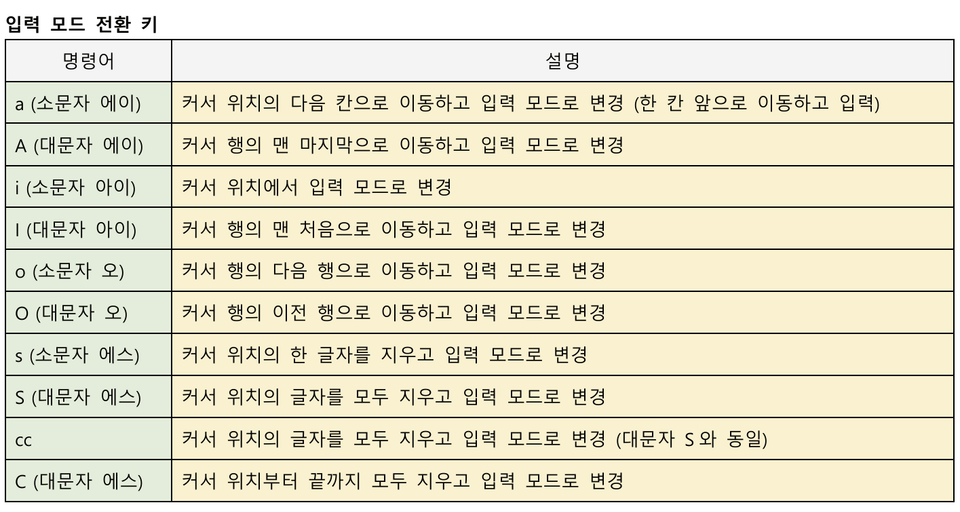
  • How to switch to input mode

  • Cursor movement commands

  • Delete commands

  • Copy and paste commands

  • Multi-window and screen splitting

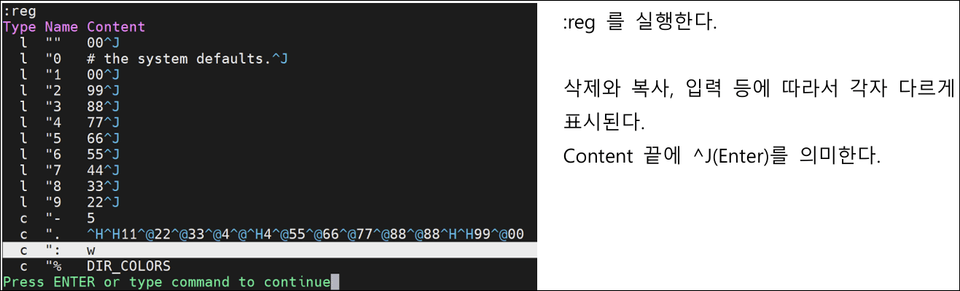
  • How to use vi/vim registers

  • Search, other commands, and string replacement

  • Understanding and Recovering Swap Files

  • Utilization of shell scripts, configuration files, and programming language editing


Problems you can solve by taking this course

When first using vi/vim, many people experience the following problems.

  • You feel panicked because you don't know how to save and exit in vi/vim.

  • Confusion arises between input mode and command mode.

  • They cannot move quickly to the desired location within a file.

  • They do not know how to delete by line, multiple lines, or by word.

  • I cannot properly utilize copy and paste.

  • I cannot open multiple files at once or work with a split screen.

  • They cannot utilize string search and replace commands in practical work.

  • You don't know how to handle swap files created after an abnormal termination.

This course is structured to help you use the vi/vim editor naturally while solving these problems one by one.


Recommended for the following people.

This course is suitable for the following people.

  • Those who are learning Linux for the first time

  • Linux server beginners

  • Developers or those new to development

  • Those studying cloud, security, and infrastructure fields

  • Those who need to modify configuration files on a server

  • Those who are not familiar with the vi/vim editor

  • Those who want to learn systematically, starting from saving, exiting, and switching to input mode

  • Those who are looking for a vi/vim practical course that is more organized than free lectures


Lecture Environment

This course is conducted in a Rocky Linux 9 environment.

This course does not include the Linux installation process and focuses on how to use the vi/vim editor in an already prepared Linux environment.

The basic usage of vi/vim can be applied almost identically not only to Rocky Linux but also to other Linux distributions such as CentOS, RHEL families, and Ubuntu.


Course Curriculum

SectionLesson ContentSection 1. Getting Started with vi/vim EditorLinux editors and nano usage, vi/vim overview, basic option settingsSection 2. Basic vi/vim Editing CommandsOpening, saving, and exiting files, switching input modes, navigation, deletion, copy and pasteSection 3. Advanced vi/vim FeaturesMulti-windows and split screens, registers, other commands, and string substitutionSection 4. vi/vim Troubleshooting and Practical ApplicationUnderstanding and recovering swap files, practical use for editing programming languages

It consists of a total of 13 lectures, with a total runtime of approximately 4 hours.


PDF educational materials provided

Students will be provided with approximately 40 pages of PDF educational materials.

The course is structured so that you can follow along with the hands-on exercises while listening to the lectures, and review vi/vim commands and key concepts even after completing the course.

This is not just a lecture where you simply watch a video and finish; it also provides learning materials so you can look up necessary information again.


What makes this course different

This course is not just a simple collection of vi/vim commands.

It is structured based on editing tasks that are actually used frequently in Linux server environments. It covers not only basic functions such as saving, exiting, inputting, moving, and deleting, but also features that are helpful to know in practice, such as screen splitting, registers, string substitution, and swap file recovery.

Furthermore, based on over 30 years of experience using Linux, I have structured this course by considering where beginners get stuck, what parts they find confusing, and which commands they should master first when using vi/vim.

This course is helpful for those who want to systematically organize the vi/vim fundamentals required for Linux server tasks, going beyond the brief coverage found in free lectures.


Conclusion

vi/vim may feel difficult at first.
However, once you learn the basic structure and frequently used commands, working in Linux becomes much easier.

If you are studying Linux servers, development, cloud, security, or infrastructure, vi/vim is an essential basic tool you must master.

Through this course, reduce your vague fears about the vi/vim editor and build the fundamental skills to perform necessary file editing tasks in a Linux environment on your own.


Key Highlight!

To understand Linux deeply, you must be able to go beyond simple command usage and access the source level.

To do that, it is important to become familiar with the vi editor.

Thank you.

Recommended for
these people

Who is this course right for?

  • Server beginners who need to modify configuration files on a Linux server but are stuck because they are unfamiliar with saving, exiting, and switching input modes in vi/vim.

  • Developers and beginners who experience slow Linux workflows because they cannot quickly move, delete, copy, and paste files in a terminal environment.

  • Those who are struggling with modifying configuration files or checking logs due to a lack of proficiency in vi/vim during cloud, security, or infrastructure practice.

  • Those who have learned a bit of vi/vim through free lectures but haven't been able to systematically organize the editing commands necessary for actual server work.

  • Programming beginners who need to write and modify shell scripts, Python, and C language files directly in the Linux terminal.

Need to know before starting?

  • Basic experience using the Linux terminal is recommended.

  • It will be easier to follow the lecture if you are familiar with basic commands such as cd, ls, pwd, and cat.

  • We explain basic concepts from the start so that even those using vi/vim for the first time can take the course.

  • The Linux installation process will not be covered, and vi/vim will be explained from the basics so that even first-time users can follow along.

Hello
This is linuxmasternet

Career Verified

[Experience]

  • (Current) CEO of LinuxMasterNet

  • 2014 KISA (Korea Internet & Security Agency) President's Award recipient

  • Performed penetration testing and vulnerability assessment for information systems at the Supreme Prosecutors' Office, Allianz Life, and Dongbu Securities

  • (Former) Expert Committee Member of the Korea Association for ICT Promotion (Linux Master)

  • (Former) Mentor for the Student University Information Security Alliance (SUA)

  • (Former) Education Team Leader at the Korea Hacking Security Association


[Lecture History]

  • KISA (Korea Internet & Security Agency) Linux Security Lecture

  • Information security lectures at Seoul Hyundai Occupational Training College, KH Information Education Center, and Korea IT Academy

  • Special lectures on information security at Korea ICT Polytechnic, Chonnam National University, Woosuk University, and Hoseo University

  • Numerous special lectures on personal information and information security for the Ministry of Culture, Sports and Tourism, the National Information Society Agency, etc.

  • Numerous personal information and information security lectures for POSCO A&C, Ilsan Paik Hospital, Hyundai Department Store, Hyundai HDS, etc.

  • Numerous information security lectures for the Navy, National Election Commission, etc.

  • Having started with Linux in 1995, I provide practical, hands-on lectures based on my experience in Linux server operation, security, and networking.

More

Curriculum

All

14 lectures ∙ (4hr 16min)

Course Materials:

Lecture resources
Published: 
Last updated: 

Reviews

Not enough reviews.
Please write a valuable review that helps everyone!

Similar courses

Explore other courses in the same field!

Limited time deal

$13,200.00

40%

$17.60