


Recently, as Google held the 2026 I/O,
announced Anti-Gravity 2.0 and the new version of Gemini Flash.
However, both domestic and international users
While this version 2.0 has its advantages, the disadvantages are too significant.
Most are using it by downgrading (using a previous version).
You can downgrade by using the method below, and
You can continue taking the current lecture as it is.
Go to the Google release page
Click on Version 1.23.2 at the bottom and install it.
By doing this, you can install the older version, and
Next, you can prevent automatic updates by following the method below.
*This post was shared by Ivanist from the group chat.
Thank you once again:)
This is the method I used.
1. Even if it updates to v2, in my case, when I went to uninstall, I found that there were two versions of antigravity.
So first, I uninstalled only v2.
2. Disconnect the internet for a moment (if left on, it will auto-update immediately)
3. Open antigravity v1.23. ( or https://antigravity.google/releases old version)
4. Press Ctrl + Shift + P and
type 'Preferences: Open User Settings (JSON)' to open the preference window.
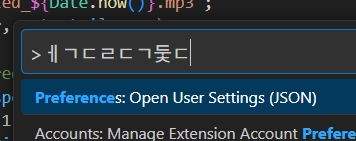
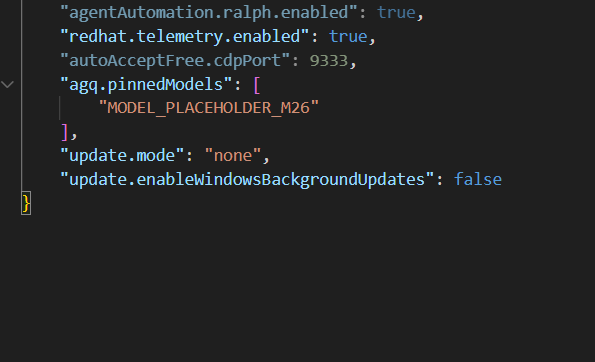
5. You will see several lines of code; add a , (comma) to the very last line, and on the next line, add:
"update.mode": "none", "update.enableWindowsBackgroundUpdates": false
Add the following.
The entire code will look something like this.
{
"workbench.colorTheme": "Default Dark Modern",
...(other miscellaneous code. It may or may not be there depending on the situation)
"update.mode": "none",
"update.enableWindowsBackgroundUpdates": false
}
6. Save (ctrl+s)
7. Since there is a risk that updates pre-downloaded in the background might run, press Windows (Win + R) and type %LOCALAPPDATA% to open the folder. From there, please delete the 'Antigravity-Updater' folder.
8. If you reconnect to the internet, the automatic update will not run.
Thank you!
I'll see you in class and in the group chat.