
Hello, this is Linux Master Net.
We’ve uploaded a new lecture video that expands the server setup exercises previously conducted in on-premises environments to the AWS cloud.
This course is designed around hands-on exercises so that even beginners can follow along easily, from creating an account to launching an EC2 instance, setting up a Linux server, and running a web server.
In particular, we created the videos based on the latest sign-up process, reflecting the new AWS sign-up method introduced in August 2026.
Key Course Content
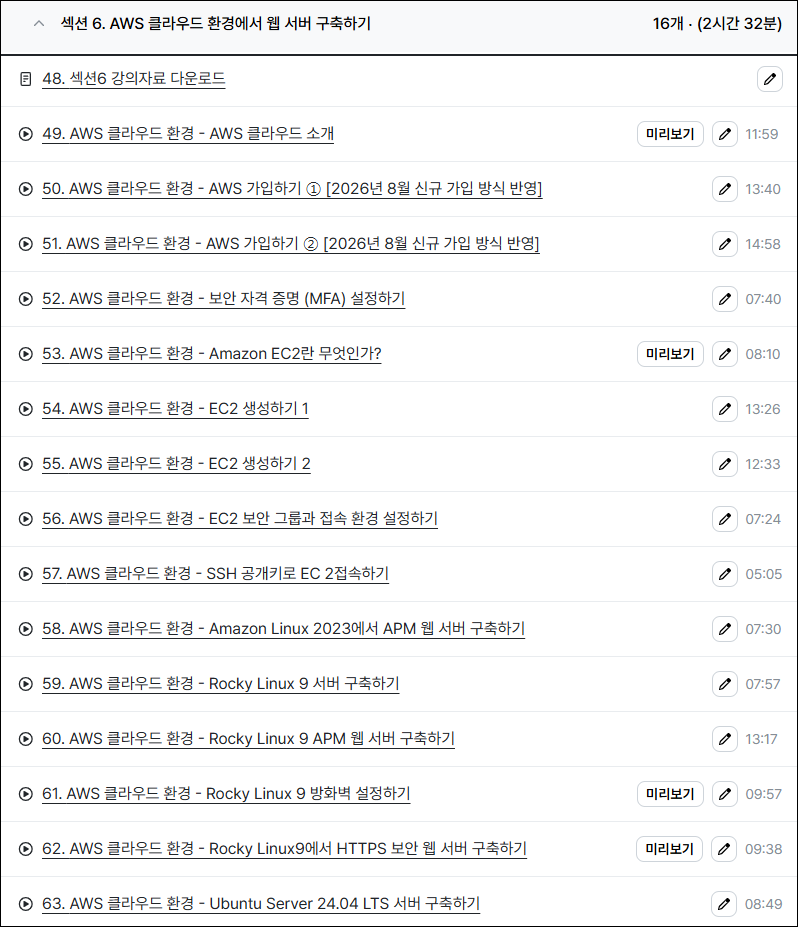
AWS Cloud Fundamentals: Cloud concepts and an introduction to AWS services
AWS Account Setup and Security Configuration: New account registration process and MFA setup
Amazon EC2: EC2 concepts, instance creation, and SSH access
Amazon Linux 2023: Building an APM Web Server
Rocky Linux 9: Build a server, install APM, configure the firewall, and set up a secure HTTPS web server.
Ubuntu Server 24.04 LTS: Setting Up an EC2 Server
Currently, 16 lessons, totaling 2 hours and 32 minutes, have been uploaded.
More videos to be uploaded later
We also plan to add the following hands-on videos in the future.
Building an APM Web Server on Ubuntu Server 24.04 LTS
Installing Gnuboard and WordPress
Setting a budget and managing cloud costs using AWS Budgets
The additional videos are about 1 hour and 30 minutes long in total and will be uploaded sequentially as a continuation of the existing course.
This AWS course goes beyond simply creating EC2 instances. It is designed to let you experience the process of building a real Linux server and running a web service.
We will also cover management practices to prevent unnecessary charges, as costs in a cloud environment may vary depending on the resources used.
Those who have previously learned to build servers in VMware environments may find it even more helpful to study by comparing them with the AWS cloud environment.
We will continue to add content that is useful in the workplace.
We hope you’ll take a keen interest and continue learning.
Thank you.
Hello.
We are adding a section that expands the web server setup exercises from the existing VMware + Rocky Linux 9 environment to the AWS cloud environment.
The newly added section is “Building a Linux Web Server in an AWS Cloud Environment” .
We are currently uploading the lessons sequentially, starting with the next one.
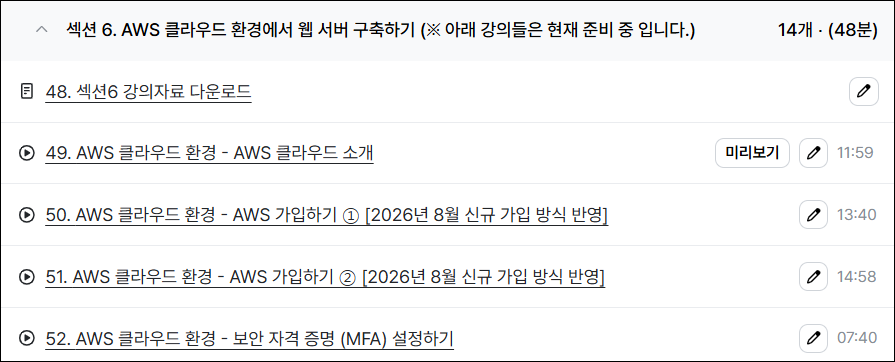
Introduction to AWS Cloud (Video uploaded)
Sign up for AWS (video uploaded)
Set up security credentials (MFA) (Video uploaded)
Create an EC2 instance (Coming soon)
Configure EC2 security groups and connection settings (to be added)
Connecting to EC2 Using an SSH Public Key (To be added)
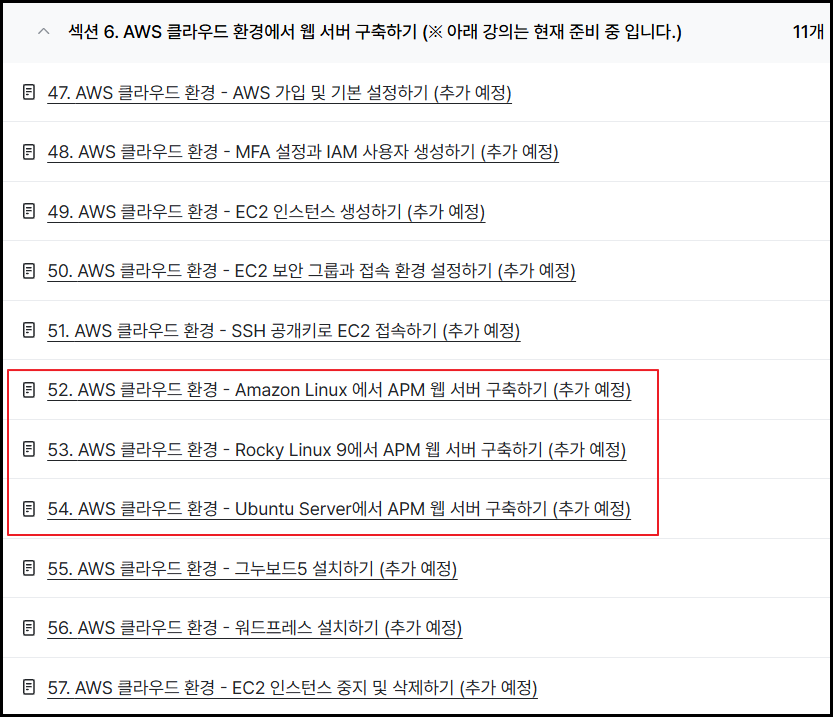
Build an APM Web Server on Amazon Linux (coming soon)
Building an APM Web Server on Rocky Linux 9 (Coming soon)
Building an APM Web Server on Ubuntu Server (Coming soon)
Installing Gnuboard 5 (Coming soon)
Install WordPress (coming soon)
※ The Signing Up for AWS lesson was created to reflect the updated sign-up process introduced in August 2026.
We have also uploaded the course materials (PDF) for Section 6: Hands-on Practice in the AWS Cloud Environment.
Refer to them alongside the videos to help organize and review the hands-on exercises.※ Some videos are currently being edited and will be added gradually.
In the AWS environment, rather than setting up a separate DNS server, the hands-on exercises focus on building a Linux web server using an EC2 instance and installing a web application.
Also, rather than covering AWS in professional depth, this course is designed as a hands-on opportunity to apply the Linux web server setup skills you’ve already learned directly in a cloud environment.
Some videos are currently being edited and uploaded, and will be added gradually.
Thank you.
Hello.
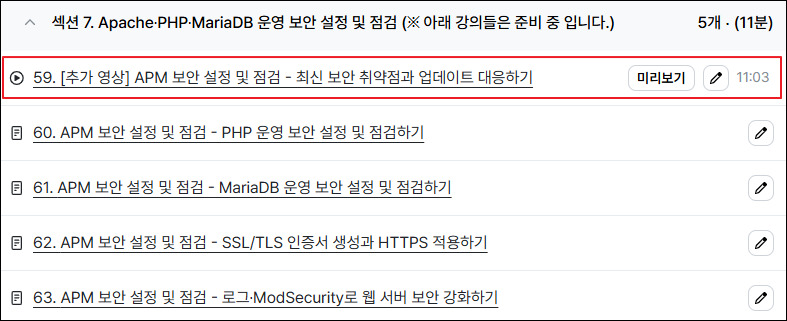
Security vulnerabilities have continued to be announced in Linux, PHP, WordPress, and other platforms, so we’ve posted an additional video explaining the importance of security updates when operating a server.
In this video, we explain the meaning of CVE and CVSS, how to check security advisories, how to determine whether vulnerabilities affect your servers, and what to keep in mind when applying updates, among other topics.
This video focuses on explaining the security concepts and response methods you should know when operating a server, rather than providing separate technical hands-on exercises, so we’ve made it available for all students to watch.
Additional video
APM Security Configuration and Auditing – Responding to the Latest Security Vulnerabilities and Updates
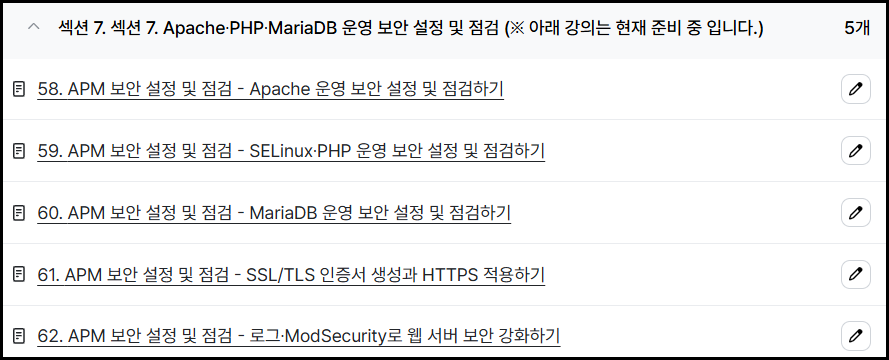
We are also preparing the lectures on Apache, SELinux/PHP, MariaDB, SSL/TLS, and ModSecurity for Section 7, and will release them in sequence.
Thank you.
Hello.
When I first created the course, I organized the content and set the price to match the video length and structure at the time.
However, after launching the course, I continued reviewing the content as a whole and noticed areas where it would be beneficial to improve it so that students could gain experience with a wider variety of actual server environments.
Therefore, we are continuously adding to and improving the existing course content, and this time we plan to add a new Section 6, “Building a Web Server in an AWS Cloud Environment”.
In addition to the existing VMware + Rocky Linux 9 environment, we will also add hands-on exercises for building web servers on AWS EC2 using Amazon Linux, Rocky Linux 9, and Ubuntu Server.
Rather than covering AWS in depth, this course will be structured simply around hands-on practice so that even first-time users can follow along easily, focusing on creating an EC2 instance → connecting via SSH → setting up APM → installing GNUBoard5 and WordPress.
Those who want to learn the AWS cloud environment in a more professional and in-depth manner should refer to a separate AWS specialty course.New AWS users can begin practicing within the scope of the Free Tier or the free credits provided, and during the practice, they will also be instructed to check their account’s current free usage limits and whether any charges apply.
Additionally, in response to learners’ requests, we plan to add security-related content as well.In the newly added Section 7, “Apache·PHP·MariaDB Operational Security Configuration and Checks”, we will cover the basic operational security settings for Apache, PHP, and MariaDB, as well as SSL/TLS certificates, HTTPS, log checks, and ModSecurity through hands-on practice.
The content planned for addition is as follows.
Existing students can also take the newly added lessons at no additional cost.
We will continue to improve any areas that are lacking and update the course so that it remains focused on hands-on practice, allowing you to build an actual server yourself.
Thank you. ^^*