강의

멘토링

커뮤니티

Programming

/

Mobile Application Development

[2025] React Native App Development Masterclass for Non-majors

For those who had ideas but didn't know how to develop an app, Let's master app development by creating 4 practical projects!

(2.9) 8 reviews

122 learners

  • IT Share
실습 중심
JavaScript
React
Node.js
React Native
TypeScript

What you will gain after the course

  • 100% Practical React Native Syntax

  • Practical React Syntax

  • Setting up a development environment optimized for efficient development

  • Get external data via API

  • Over 100 practical skills frequently used in real apps

  • Implement login functionality

[2025] [UPDATE] React Native App Development Masterclass for Non-Majors

[NEW!] New lectures for February, all renewed

A I'm back with a new lecture.

Filmed in December / Edited in January
Check out the 100% new and reborn lectures right now.

The lectures were organized by adopting only technologies used in the field.

With a running time of a whopping 13 hours, we'll turn you into an app developer.

Are you still taking theory-oriented lectures?

An app developer with 5 years of experience developing apps will share his practical know-how .

Who should take this course? 🤔

· 💡 People who have ideas but have difficulty making them into apps

· 📱 For those who want to jump into the app development field

· 📱 For those who want to create their own app

· 🧑‍💼 Those who want to get a job as an app developer

· 💻 For those who want to learn app development quickly and create a side project

· 💭 Anyone interested in app development

· 💸 Those who want to develop their own app service and monetize it

Why use React Native?

Here are some of the biggest reasons to use React Native.

POINT 1 Adoption by over 1,000 large companies

🏢 React Native used by over 1,000 major companies around the world, including ToX, BaeX, Minjok, and Instagram

POINT 2 Innovation in Cross-Platform Development

| What is cross-platform? Technology that allows development of both Android and iOS with one code

🔯 Cross-platform React Native => Fastest and easiest way to develop for both OSes

POINT 3 Strong community and ecosystem

🕸 Over 10,000 active developers on Github and Stack Overflow

🔭 Support from a large community => Various updated plugins and features

POINT 4 Rapid development and hot reloading

🔥 Exclusive hot reloading feature: See changes instantly whenever you modify code during development

🛠 Useful for MVP (Minimum Viable Product)

POINT 5 Native Performance and User Experience

🔧 Use native components => Excellent performance

🔗 Code written in JS interacts directly with native APIs => No performance degradation

Excellent performance in animation and gesture processing => Smooth user experience

After attending the lecture... 💭

· 👨‍💻 You can handle React Native skillfully according to the situation .

· 📱 You can develop your own ideas into an app.

· 👀 I can develop the features of the app I want.

· 👥 You can quickly learn other languages by associating what you learned with React Native .

· 💨 Enterprise-level app and app feature ideas can be implemented immediately.

What are the features of this course?

Practice-oriented lectures 🏃 ‍ ➡

Rather than a class that focuses on abstract theories that only catch clouds, students learn while developing actual projects .
The lectures are structured as practice-oriented classes .

A lecture faithful to the actual situation 🤺

If the lecture only tells you, "If you do this, this will happen," then even if it is a practice-oriented class, it is useless.
Where should it be used in practice? Which functions are most commonly used in real apps?
We will inform you so that you can use it 100% in practice.

Beginner-focused lectures 🧑‍🎓

This course teaches you countless practical skills in React Native, but
The course difficulty level is beginner level . In this way, the students will learn about the field of app development.
We will explain the concepts clearly so that even if you have no idea , you can understand all the concepts.

Why should I take this course?

I compared this course with other courses on Inflearn.

Inflearn other courses

Over 30,000₩

Theory lectures that only study abstract concepts

🔻 The more I listen to this lecture, the less I understand it

🚫 A lecture that doesn't tell you why and in what situations to use it

Courses that do not provide full code

Lectures with unsystematic experimental structure

📃 Lectures with insufficient explanations

💸 Basic tuition fee exceeds 30,000 won

V S

[2024] From Beginner to Master of App Development with React Native

22,000₩, 1600₩ per hour

Practical lectures where you learn while creating actual projects

🔺 A lecture that continuously reminds you of even the basic parts so that they are stored directly in your brain

💡 A lecture that clearly explains WHY and WHEN

📔 Courses that provide full code

🪜 Systematic method to master the basics lecture

📚 A lecture that explains from the basic understanding

👌 1,600 won per hour, a lifetime of lectures for the price of a chicken

How is this course structured?

I briefly introduced the lectures by section.

Section 1. INTRO

About 5 minutes

- Preview section
- Description of lecture structure

✯✩✩✩✩
Section 2. REACT NATIVE

About 31 minutes

- Preview section
- Explanation of basic coding knowledge such as variables and functions
- Take a look at React Native

✯✯✩✩✩
Section 3. Getting Started

About 1 hour and 40 minutes

- Configuring the development environment
- How to build an app
- Take a look at React Native's basic components

✯✯✯✩✩
Section 4. Calculator App

About 1 hour and 6 minutes

🧑‍💻 Development


🍌 JavaScript Basics

🏃‍➡️ Getting started with Node.js create-expo-app

🗂 Understanding file structure

🧐 Basic components such as Text, View, etc.

🔘 TouchableOpacity button

💡 onPress & function linking

🔐 Advanced use of useState

🤼‍♂ Perfect use of useState default value

🤔 useState & if statement linkage

🫗 Understanding null

🎛 Utilizing parameters

🔄️ Implementing value initialization

📚 Array creation & map linking

🎨 Styling


React Native Basic Styling

💅 Styled components

📕 15+ basic styles

Core sorting syntax

🔨 UI enhancement using styles

✯✯✩✩✩
Section 5. Translation App

About 50 minutes

🧑‍💻 Development


🟦 TypeScript Basics

🏃‍➡️ Getting started with community cli

🪛 Introducing external libraries

👇 React Native Picker

input component

Save user input

📚 Create a list variable

Variables of boolean type

🪬 Using logical operator (&&)

Using the map function

🟰 Prevent same-language translations (ternary operator)

🎨 Styling


🔲 Modern card styling

💅 Styled components

Core sorting syntax

🔨 UI enhancement using styles

🫸 Margin Basic Styling

✯✯✯✯✩
Section 6. Weather App

About 2 hours and 4 minutes

development


🟦 TypeScript Advanced

🪛 Introduction of external API + API concept

🔧 Fetch VS Axios

🛑 Node.js Concepts

🚩 Request user location permission

🗺 User Location Weather

📷 Image component

🪧 API & RN swiper integration

🛡 Data Validation (Ternary Operator)

🔗 Add Linking button

🌟 useEffect API request

Styling


🔲 Modern card styling

💅 Styled components

Core sorting syntax

🔨 UI enhancement using styles

🫸 Margin Basic Styling

🪂 padding basic styling

🔘 Card Button Styling

✯✯✯✯✯

Section 7 • 9 • 10. Coin App

About 5 hours and 25 minutes

development


🟦 TypeScript Master

📇 Create your own component and use it

📚 map function & API integration

Preview (before loading) component

🔗 Linking & React Native Vector Icons

🔖 Show conditional data validity icon/badge

🏃‍➡️ Move to the registration screen of Bottom Tabs through useNavigation

🪧 Create a card badge

📜 Connecting vertical ScrollView & horizontal FlatList

🔍 Implementing search functionality via search API

Styling


🔲 Advanced card styling

💅 Styled components

Core sorting syntax

🔨 UI enhancement using styles

🔍 Search box styling

🧱 Styling dividers with borderBottom

Set appropriate fontWeight

👤 Trendy profile tab styling

🔗 Practice styling with sensible tab shortcuts

State Management


📖 Complete understanding of Redux's structure

📜 Efficient basic framework composition

🔧 Efficient use of Slice components

🫙 Practice saving state with redux-persist

🔌 redux-persist & MMKV integration practice

State management using only MMKV & Redux

log in


🔗 Self-developed login button

Implementation of responses to various errors

🫙 Save user information when logging in

🔌 Passing saved user information

👤 Display transferred user information in the profile tab

🌉 Screen display depending on whether logged in or not

[Special Appendix] Distribution


🤖 Android deployment process

🍎 iOS deployment process

🐈‍⬛ Github deployment process

✯✯✯✩✩

Section 8. Special. Redux Counter App Development

About 1 hour and 11 minutes

Learning Skills

Redux from basics to advanced

React-Redux

Redux-persist

React Native MMKV

Section 11. Concluding the Lecture

About 26 minutes

Finally, this is a section where we look back on what we have learned together as we conclude this lecture.

[Appendix] For those of you who are wondering which path to take after taking this course, we have prepared a Tech Tree series.

After taking this course, you will be able to create results like this 🖼

Calculator app screen

P1. Calculator App

| Learning Skills

  • Create Array

  • map function

  • useState

  • switch

  • Self-developed function

  • Basic Components

ㅣ Detail

  • Initialization logic

  • Implementing the four basic operations

  • Feel of basic styling

  • Supplementary work to prevent component displacement, etc.

ㅣ Meaning

  • Learn the basics of development & styling most efficiently


  • After presenting various problems that occurred during the development process, we improved them.

  • Implementing logic using basic JS skills

Translation app screen

P2. Translation app

| Learning Skills

  • Picker

  • Card Component

  • Array & Map

  • TextInput

  • How to use external libraries

  • Ternary operator

ㅣ Detail

  • Understanding the structure of the library you want to use

  • Tracking user input

  • Complete prevention of same language selection

  • Styling using margin and padding appropriately

ㅣ Meaning

  • User Interaction

  • Practical App Topics

  • Development that can 100% reflect the developer's intention

  • The most frequently used Card design in UI

Weather app screen

P3. Weather App

| Learning Skills

  • GeoLocation

  • API Request

  • Card styling

  • Linking

  • Swiper

  • Map

  • useEffect

  • Asynchronous processing

  • Image

ㅣ Detail

  • Show weather at your location


  • Obtaining required data from users when making API requests

  • Select and display only the data you need from the API request results

  • Use the useEffect hook to request the API as quickly as possible

  • Encourage user interaction with Learn More buttons

ㅣ Meaning

  • Practical App Topics

  • Apps that work with the user at the center

  • Learn how to use Swiper, a useful library


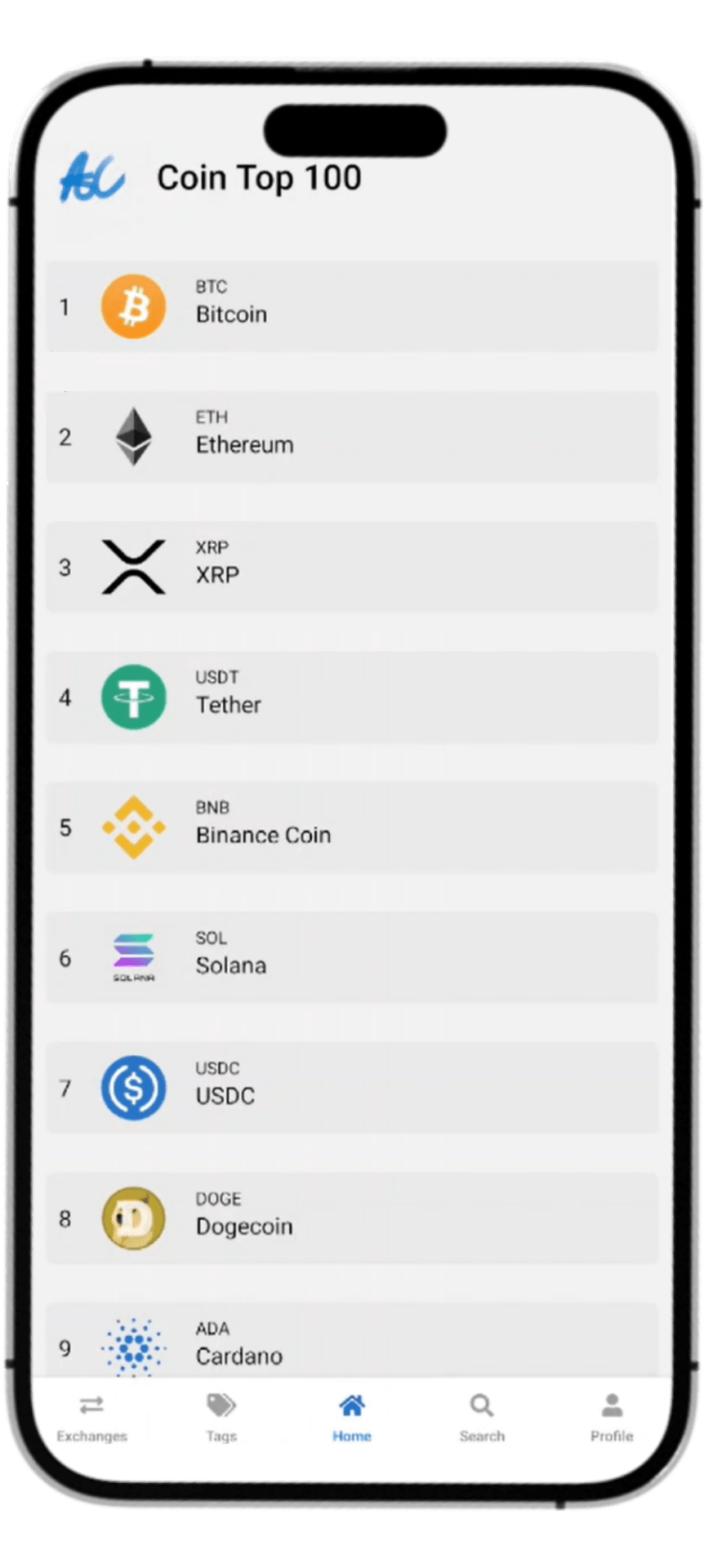
Coin app screen

P4. Coin App

| Learning Skills

ㅣ Details

  • Full use of API

  • External site links in various components

  • Perfect card component styling

  • Search function

ㅣ Meaning

  • A solid improvement in skills through development at difficult levels of difficulty

  • A project that will solidify your practical skills

FAQ

#1. Can someone who knows nothing about coding take the course?

Yes, you can. This course is not focused on React Native in depth, but rather teaches basic programming knowledge in an easy-to-understand manner, so even beginners can take the course without much difficulty, and those who have studied coding at least a little will be able to take the course easily.

#2. Should I study React.js in advance and take the course?

No. React Native is a framework based on React, so the lecture includes an explanation of the basic grammar of React. Even if you don't know React at all, you can learn React and React Native through this lecture.

#3. Will this course be updated?

Yes, it will be updated.
The lectures will continue to be updated due to library closures, lecture issues, etc!

Last updated: 2025-02-27

Notes before taking the class 🧳

The course will be conducted in a Windows 11 Home environment.
Even if you are using macOS, you can take the lecture without any problems.

Practice Environment 🪓

  • Operating System and Version (OS): Windows 7 or later / macOS 10 or later / Linux

  • Tools used: Android Emulator, Android Studio, VSCode, Node.js, JDK

  • Storage space required: At least 50GB

Learning Materials 📜

  • There are important materials at the bottom of each lecture! If there are development terms that are omitted from the lecture or if you need code, etc., please refer to the bottom of the lecture.


Player Knowledge and Precautions

  • This course is about learning the basic grammar of React and React Native. If you know React, you can easily take the course, but even if you don't know React, you can take the course without any problems.

  • This course was planned and recorded in December 2024 - January 2025.

  • This course will be updated regularly based on your reviews and React Native version updates.


  • I would appreciate it if you could listen to the lecture while doing the practical training.

  • This course supports Q&A, so you can ask the community any questions you have.


  • This course can only be taken by students who have paid for the course.

    Sharing and derivative works are prohibited.

  • This course uses the Windows (Android) environment.

  • You can also practice sufficiently in a macOS (iOS) environment.

Invest 13 hours and become a full-fledged app developer .

Recommended for
these people

Who is this course right for?

  • People who want to turn their ideas into apps themselves

  • People who want to get into app development

  • People who want to try making their own app

  • People who want to get a job as app developers

  • Those who want to quickly learn app development and create a side project

  • Those who were interested in the app development field

Need to know before starting?

  • React.js (optional)

  • Javascript (optional)

Hello
This is

32,802

Learners

61

Reviews

4.7

Rating

1

Course

IT Share 는 IT 직무의 모든것을 알려주는 전문가 집단 입니다.

Curriculum

All

119 lectures ∙ (13hr 26min)

Course Materials:

Lecture resources
Published: 
Last updated: 

Reviews

All

8 reviews

2.9

8 reviews

  • 권동현님의 프로필 이미지
    권동현

    Reviews 1

    Average Rating 5.0

    5

    52% enrolled

    영상 전체적으로 검수좀 다시해주세요.. 편집 이상한 부분 너무 많고 중간에 설명 없이 갑자기 코드가 추가되는 부분도 너무 많아요.

    • 정현우
      Instructor

      안녕하세요, 지식공유자 정현우입니다. 댓글 작성 전 일단 영상 검토에 있어 미숙했던 점 진심으로 사과드립니다. 강의를 전체적으로 검토해보았을 때, 영상 편집 부분에 있어서 수강생분들의 빠른 수강에 중점을 두어 이른바 영상 컷편집의 실수가 잦은 부분이 있었던 것 같습니다. 이에 대해 정말 진심으로 사과드리는 바이고, 9월 이내 영상 전체 재검토 후 안정성 있는 영상을 위한 재편집 및 영상 내에 변화에 대한 모든 설명을 추가하여 강의를 수정할 계획입니다. 수강생님에게 있어서 부족한 강의를 내보낸 점에 대해 사과드립니다, 또한 부족한 강의임에도 불구하고 높은 평점을 주신 점에 매우 감사함을 표하고 싶습니다. 9월 이내로 빠른 시일 내에 강의를 수정하도록 하겠습니다. 감사합니다.

  • 문대주님의 프로필 이미지
    문대주

    Reviews 6

    Average Rating 4.8

    5

    100% enrolled

    감사합니다.

    • 정현우
      Instructor

      완강 축하드리고 소중한 수강평 너무 감사드립니다ㅎㅎ🙇‍♂️

  • David님의 프로필 이미지
    David

    Reviews 1

    Average Rating 4.0

    4

    32% enrolled

    • 정현우
      Instructor

      안녕하세요, David 수강생님! 리뉴얼 이후 강의에 대해 좋은 평점을 남겨주셔서 너무 감사드립니다. 강의 꼭 끝까지 수강해 주시면 감사하겠습니다 :)

  • chanmi0505님의 프로필 이미지
    chanmi0505

    Reviews 6

    Average Rating 5.0

    5

    31% enrolled

    • nanyahoo님의 프로필 이미지
      nanyahoo

      Reviews 9

      Average Rating 4.3

      1

      83% enrolled

      먼저 강의자 보다는 훨씬 미치지 못 하는 실력이기 때문에 강의를 우선 정독보다는 전체 강의를 퀵하게 이동도 하며 훑어보았습니다. 강의자에게는 싫은 부분이 되겠지만 모르는 사람 입장에서 말씀드려 보겠습니다. 1. 강의 소리에 문제가 있습니다. 2.화질은 그렇게 문제가 되지 않지만 react를 완전히 모르진 않치만 레퍼런스 프로젝트가 없고 또한 react native를 이번에 처음보는 사람으로서 따라 가기가 쉽지 않네요. 강의가 중간중간 뛰어 넘는 부분이 있습니다. 물론 저가 이해를 하지 못해서 그런 부분일수도 있지만 앞강의와 뒷강의 사이에 녹화되지 않는 부분이 분명있습니다. 그리고 강의도중에 obs 툴 체인지가 너무 많이 나오네요. 3.혼자서 하는 강의로 느껴 졌습니다. 시간이 촉박하셔서 그런것인지는 모르겠지만 보는이를 이해시키기 보다는 앞으로 진도 빼는 듯한 느낌을 받아서 조금 아쉽습니다. 결론적으로~ 얻은 부분은 react native가 이렇게 생겼구나 하는 것을 알게 되었습니다. 그리고 모바일앱들이 이런 것들을 사용하는 구나 하는 부분도 알게되었습니다. 후에 아~ 그때 그 강의에서 이런것을 보았는데 할 때 참고가 될 것 같습니다. 감사합니다.

      • 정현우
        Instructor

        안녕하세요 nannyahoo님, 지식공유자 정현우입니다. 먼저 라이브러리 폐지로 인해 강의 리뉴얼 중 귀한 시간 내주셔서 아직 리뉴얼되지 않은 몇몇 강의까지 들어주시고 소중한 비판의 말씀 주셔서 진심으로 감사드리고 사죄드립니다. 디테일을 완벽하게 신경을 못 써드렸던 강의가 있었던 점에 진심으로 사과드리고, 틀린 말씀 해주신 것도 아니신게, 너무 성급하게 진도를 다뤘던 리뉴얼 이전 강의들이 잇고, 또 성급한 편집이 있었뎐 리뉴얼 이전 강의들도 있었습니다. 하지만 이번 리뉴얼 강의에서는 말씀해주신 문제 부분도 완벽히 개선된 강의입니다. 강의 리뉴얼은 이번주 일요일인 "9/22"에 완료될 예정이니, 참고 부탁드리면 감사하겠습니다. 만족스런 강의 제공 못해드려 송구스럽고 더 나은 리뉴얼 강의로 찾아뵙겠습니다.

    IT Share's other courses

    Check out other courses by the instructor!

    Similar courses

    Explore other courses in the same field!