Practical-focused! React for FE Beginners
IT Share
$77.00
Basic / React, Node.js, Redux, Sass, swr
4.8
(77)
32,800+
After completing all lectures, you will be able to develop a web service yourself.

Basic
React, Node.js, Redux

For those who had ideas but didn't know how to develop an app, Let's master app development by creating 4 practical projects!
122 learners
Level Beginner
Course period Unlimited
100% Practical React Native Syntax
Practical React Syntax
Setting up a development environment optimized for efficient development
Get external data via API
Over 100 practical skills frequently used in real apps
Implement login functionality
.png?w=960 "thumb-001 (5).png")
A I'm back with a new lecture.
Filmed in December / Edited in January
Check out the 100% new and reborn lectures right now.
Here are some of the biggest reasons to use React Native.
🏢 React Native used by over 1,000 major companies around the world, including ToX, BaeX, Minjok, and Instagram
| What is cross-platform? Technology that allows development of both Android and iOS with one code
🔯 Cross-platform React Native => Fastest and easiest way to develop for both OSes
🕸 Over 10,000 active developers on Github and Stack Overflow
🔭 Support from a large community => Various updated plugins and features
🔥 Exclusive hot reloading feature: See changes instantly whenever you modify code during development
🛠 Useful for MVP (Minimum Viable Product)
🔧 Use native components => Excellent performance
🔗 Code written in JS interacts directly with native APIs => No performance degradation
⚽ Excellent performance in animation and gesture processing => Smooth user experience
Rather than a class that focuses on abstract theories that only catch clouds, students learn while developing actual projects .
The lectures are structured as practice-oriented classes .
If the lecture only tells you, "If you do this, this will happen," then even if it is a practice-oriented class, it is useless.
Where should it be used in practice? Which functions are most commonly used in real apps?
We will inform you so that you can use it 100% in practice.
This course teaches you countless practical skills in React Native, but
The course difficulty level is beginner level . In this way, the students will learn about the field of app development.
We will explain the concepts clearly so that even if you have no idea , you can understand all the concepts.
I compared this course with other courses on Inflearn.
⛔ Theory lectures that only study abstract concepts
🔻 The more I listen to this lecture, the less I understand it
🚫 A lecture that doesn't tell you why and in what situations to use it
❌ Courses that do not provide full code
⚠ Lectures with unsystematic experimental structure
📃 Lectures with insufficient explanations
💸 Basic tuition fee exceeds 30,000 won
✅ Practical lectures where you learn while creating actual projects
🔺 A lecture that continuously reminds you of even the basic parts so that they are stored directly in your brain
💡 A lecture that clearly explains WHY and WHEN
📔 Courses that provide full code
🪜 Systematic method to master the basics lecture
📚 A lecture that explains from the basic understanding
👌 1,600 won per hour, a lifetime of lectures for the price of a chicken
I briefly introduced the lectures by section.
- Preview section
- Description of lecture structure
- Preview section
- Explanation of basic coding knowledge such as variables and functions
- Take a look at React Native
- Configuring the development environment
- How to build an app
- Take a look at React Native's basic components
🍌 JavaScript Basics
🏃➡️ Getting started with Node.js create-expo-app
🗂 Understanding file structure
🧐 Basic components such as Text, View, etc.
🔘 TouchableOpacity button
💡 onPress & function linking
🔐 Advanced use of useState
🤼♂ Perfect use of useState default value
🤔 useState & if statement linkage
🫗 Understanding null
🎛 Utilizing parameters
🔄️ Implementing value initialization
📚 Array creation & map linking
⚪ React Native Basic Styling
💅 Styled components
📕 15+ basic styles
✴ Core sorting syntax
🔨 UI enhancement using styles
🟦 TypeScript Basics
🏃➡️ Getting started with community cli
🪛 Introducing external libraries
👇 React Native Picker
⌨ input component
❇ Save user input
📚 Create a list variable
❓ Variables of boolean type
🪬 Using logical operator (&&)
⚒ Using the map function
🟰 Prevent same-language translations (ternary operator)
🔲 Modern card styling
💅 Styled components
✴ Core sorting syntax
🔨 UI enhancement using styles
🫸 Margin Basic Styling
🟦 TypeScript Advanced
🪛 Introduction of external API + API concept
🔧 Fetch VS Axios
🛑 Node.js Concepts
🚩 Request user location permission
🗺 User Location Weather
📷 Image component
🪧 API & RN swiper integration
🛡 Data Validation (Ternary Operator)
🔗 Add Linking button
🌟 useEffect API request
🔲 Modern card styling
💅 Styled components
✴ Core sorting syntax
🔨 UI enhancement using styles
🫸 Margin Basic Styling
🪂 padding basic styling
🔘 Card Button Styling
🟦 TypeScript Master
📇 Create your own component and use it
📚 map function & API integration
⬜ Preview (before loading) component
🔗 Linking & React Native Vector Icons
🔖 Show conditional data validity icon/badge
🏃➡️ Move to the registration screen of Bottom Tabs through useNavigation
🪧 Create a card badge
📜 Connecting vertical ScrollView & horizontal FlatList
🔍 Implementing search functionality via search API
🔲 Advanced card styling
💅 Styled components
✴ Core sorting syntax
🔨 UI enhancement using styles
🔍 Search box styling
🧱 Styling dividers with borderBottom
⚪ Set appropriate fontWeight
👤 Trendy profile tab styling
🔗 Practice styling with sensible tab shortcuts
📖 Complete understanding of Redux's structure
📜 Efficient basic framework composition
🔧 Efficient use of Slice components
🫙 Practice saving state with redux-persist
🔌 redux-persist & MMKV integration practice
⚡ State management using only MMKV & Redux
🔗 Self-developed login button
⚠ Implementation of responses to various errors
🫙 Save user information when logging in
🔌 Passing saved user information
👤 Display transferred user information in the profile tab
🌉 Screen display depending on whether logged in or not
🤖 Android deployment process
🍎 iOS deployment process
🐈⬛ Github deployment process
♋ Redux from basics to advanced
⚛ React-Redux
➿ Redux-persist
⚡ React Native MMKV
Finally, this is a section where we look back on what we have learned together as we conclude this lecture.
[Appendix] For those of you who are wondering which path to take after taking this course, we have prepared a Tech Tree series.

Calculator app screen
Create Array
map function
useState
switch
Self-developed function
Basic Components
Initialization logic
Implementing the four basic operations
Feel of basic styling
Supplementary work to prevent component displacement, etc.
Learn the basics of development & styling most efficiently
After presenting various problems that occurred during the development process, we improved them.
Implementing logic using basic JS skills

Translation app screen
Picker
Card Component
Array & Map
TextInput
How to use external libraries
Ternary operator
Understanding the structure of the library you want to use
Tracking user input
Complete prevention of same language selection
Styling using margin and padding appropriately
User Interaction
Practical App Topics
Development that can 100% reflect the developer's intention
The most frequently used Card design in UI

Weather app screen
GeoLocation
API Request
Card styling
Linking
Swiper
Map
useEffect
Asynchronous processing
Image
Show weather at your location
Obtaining required data from users when making API requests
Select and display only the data you need from the API request results
Use the useEffect hook to request the API as quickly as possible
Encourage user interaction with Learn More buttons
Practical App Topics
Apps that work with the user at the center
Learn how to use Swiper, a useful library
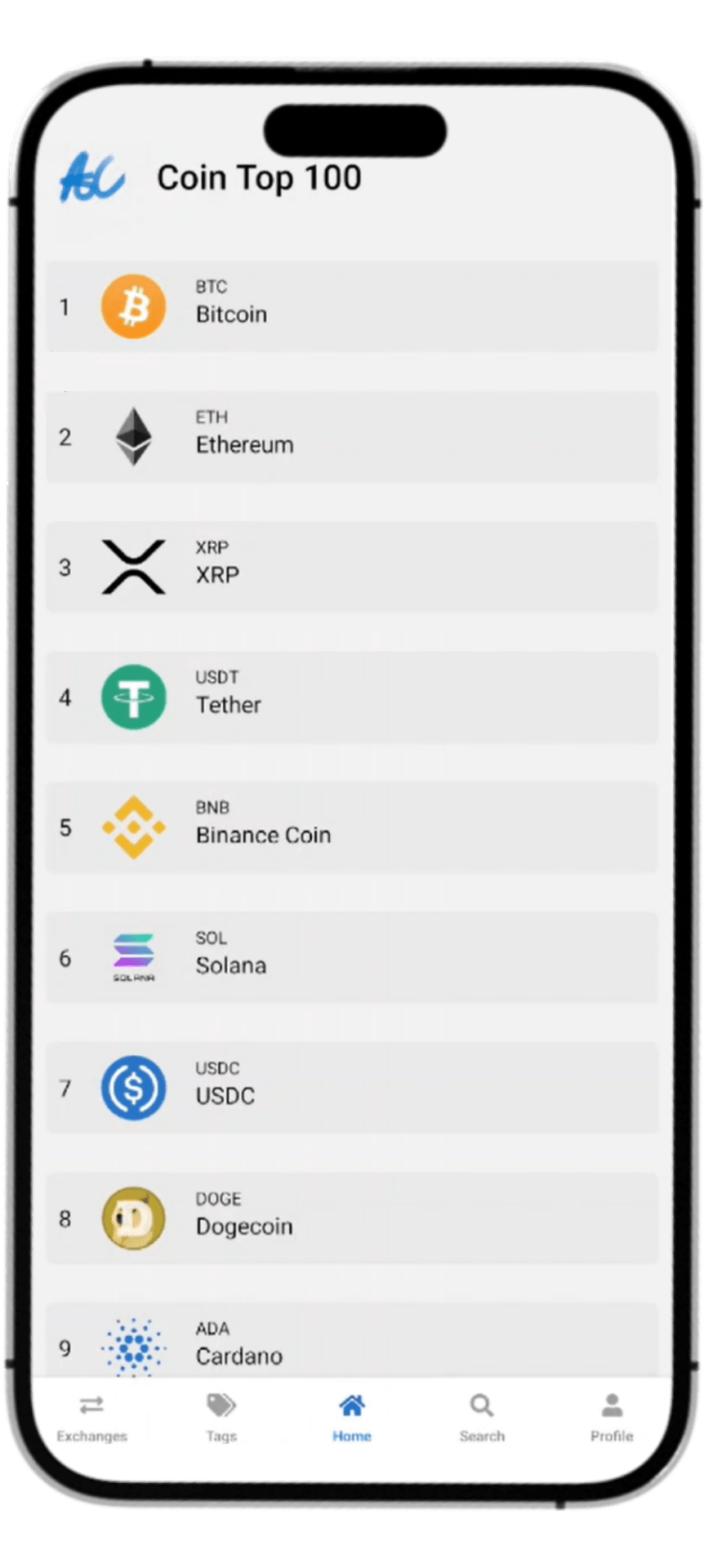
Coin app screen
Bottom Tabs Navigation
Native Stack Navigation
State Management
Image Deepening
Google login
Display profile picture, name, and email information
Check if you are logged in
Card Badge
Full use of API
External site links in various components
Perfect card component styling
Search function
A solid improvement in skills through development at difficult levels of difficulty
A project that will solidify your practical skills
Yes, you can. This course is not focused on React Native in depth, but rather teaches basic programming knowledge in an easy-to-understand manner, so even beginners can take the course without much difficulty, and those who have studied coding at least a little will be able to take the course easily.
No. React Native is a framework based on React, so the lecture includes an explanation of the basic grammar of React. Even if you don't know React at all, you can learn React and React Native through this lecture.
Yes, it will be updated.
The lectures will continue to be updated due to library closures, lecture issues, etc!
Last updated: 2025-02-27
The course will be conducted in a Windows 11 Home environment.
Even if you are using macOS, you can take the lecture without any problems.
Operating System and Version (OS): Windows 7 or later / macOS 10 or later / Linux
Tools used: Android Emulator, Android Studio, VSCode, Node.js, JDK
Storage space required: At least 50GB
There are important materials at the bottom of each lecture! If there are development terms that are omitted from the lecture or if you need code, etc., please refer to the bottom of the lecture.
This course is about learning the basic grammar of React and React Native. If you know React, you can easily take the course, but even if you don't know React, you can take the course without any problems.
This course was planned and recorded in December 2024 - January 2025.
This course will be updated regularly based on your reviews and React Native version updates.
I would appreciate it if you could listen to the lecture while doing the practical training.
This course supports Q&A, so you can ask the community any questions you have.
This course can only be taken by students who have paid for the course.
Sharing and derivative works are prohibited.
This course uses the Windows (Android) environment.
You can also practice sufficiently in a macOS (iOS) environment.
Who is this course right for?
People who want to turn their ideas into apps themselves
People who want to get into app development
People who want to try making their own app
People who want to get a job as app developers
Those who want to quickly learn app development and create a side project
Those who were interested in the app development field
Need to know before starting?
React.js (optional)
Javascript (optional)

32,813
Learners
77
Reviews
4.8
Rating
1
Course
IT Share is a group of experts that provides everything you need to know about IT roles.
All
119 lectures ∙ (13hr 26min)
Course Materials:
All
7 reviews
3.1
7 reviews

Reviews 1
∙
Average Rating 5.0
5
Please review the entire video again. There are too many strange parts in the editing, and there are too many parts where code is suddenly added without explanation.
Hello, I am Jeong Hyeon-woo, a knowledge sharer. Before writing a comment, I would like to sincerely apologize for my lack of experience in reviewing the video. When reviewing the entire lecture, I think there were many mistakes in the so-called video cut editing because I focused on students taking the class quickly. I sincerely apologize for this, and I plan to revise the lecture by re-editing the entire video within September to make it more stable and adding explanations for all changes in the video. I apologize to the students for sending out an insufficient lecture, and I would also like to express my gratitude for giving them a high rating despite the lecture being insufficient. I will revise the lecture as soon as possible within September. Thank you.
Reviews 6
∙
Average Rating 4.8
5
Thank you.
Congratulations on finishing the course, and thank you so much for your valuable review!😊😊🙇♂️
Reviews 4
∙
Average Rating 4.0
1
Did you upload the lecture less? The calculator app suddenly started during the second hour, and I don't even know that Android Auto was running in the middle and that it was linked. What is this?
Hello, this is knowledge sharer Jeong Hyeon-woo. I'm sorry 😢.. Currently, I have to completely renew the lecture due to the library closure, but my personal schedule overlaps perfectly with the renewal period ㅜㅜ So I'm uploading the lectures sequentially now, so I would appreciate it if you could take note of this. For now, I'm trying to keep the renewal period as tight as possible, so I would appreciate it if you could wait a little bit. I'm sorry 🙇♂️ And the part you asked about is confirmed to be the second time in the calculator app section. Please understand this.
Reviews 9
∙
Average Rating 4.3
1
First of all, since my skills are far inferior to the instructor, I quickly skimmed through the entire lecture rather than reading it thoroughly. This may be unpleasant for the instructor, but I will explain it from the perspective of someone who doesn't know. 1. There is a problem with the lecture sound. 2. The video quality is not that bad, but I am not completely unfamiliar with React, but I do not have a reference project, and as someone who is seeing React Native for the first time, it is not easy to follow. The lecture skips over parts here and there. Of course, it may be because I do not understand it, but there are definitely parts that are not recorded between the first and second lectures. And there are too many OBS tool changes during the lecture. 3. It felt like a lecture that was given alone. I do not know if it is because of the time constraints, but it feels like it is skipping ahead rather than helping the audience understand, so it is a bit disappointing. In conclusion~ I learned that React Native looks like this. And I also learned that mobile apps use these things. Later, ah~ I saw something like this in that lecture, and I think it will be helpful when I do it. Thank you.
Hello nannyahoo, I am knowledge sharer Jeong Hyeon-woo. First of all, I sincerely thank you and apologize for taking the time to listen to some lectures that have not been renewed yet due to the library closure and for your valuable criticism. I sincerely apologize for the lectures where I was not able to pay perfect attention to details, and it is not that you were wrong, but there were lectures before the renewal where the progress was handled too hastily, and there were also lectures before the renewal where there was hasty editing. However, in this renewed lecture, the issues you mentioned have been completely improved. The lecture renewal is scheduled to be completed this Sunday, "9/22", so please take note. I apologize for not being able to provide satisfactory lectures, and I will come back with better renewed lectures.
Check out other courses by the instructor!
Explore other courses in the same field!



![Learn React and Firebase by following along - Creating a Chat Application [Renewed in December 2023]Course Thumbnail](https://cdn.inflearn.com/public/course-326181-cover/d012cab3-58e1-45cd-899e-03f86c7b1df1?w=420)
![From Events to SPAs, the Essential Engine of the Interactive Web - [Mastering the DOM Part 2]Course Thumbnail](https://cdn.inflearn.com/public/files/courses/338102/cover/01k1bjkdeb2ap7p4b0vb2fck06?w=420)