


Introduction to UI design using Figma, from A to Z
This is a class called "UI Design with Figma A to Z" prepared for non-majors who have never studied design, students who have just started studying UX design, and UX and UI design job seekers. Even those who do not know any other tools such as Photoshop can become UI design experts by using only Figma, from basic to advanced functions.


"Figma's Solo" Summary of 2021 UX/UI Design Tool Statistics Announcement
Following last year, UX tools recently released statistics on the use of UX/UI design tools in 2021. This time, I participated in the survey, so I was curious about how the announcement would turn out and watched it more closely. I summarized the statistical survey results. (Statistics source: uxtools.co)
For those of you who are pressed for time, check out this summary:
_
Summary and Thoughts:
"Figma outperforms other tools in almost every area of the UX/UI design process"
Figma, which provides comprehensive functions for UX and UI design with a single tool, seems to be gradually surpassing other tools in most areas. The design tool market is changing so rapidly and there have been some ups and downs in the past 5-6 years, so I don't know what will happen next year. However, since it is common for a tool to be easy to use once it is easy to move to another tool, I think Figma will maintain its market dominance for the time being.
_
Summary of statistical results
We conducted a survey of 3,100 people working in UX, UI design, and other related industries in 111 countries around the world. There were some interesting parts related to demographic information. One of them was that when looking at the number of participants by country, our country had 111 participants, ranking 6th. It seems that this is because our designers participated more than last year, and it seems that this kind of presence is a good thing in many ways.
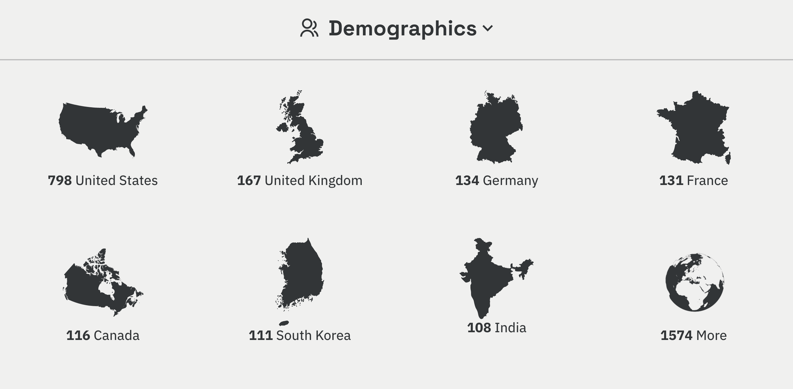
: Ranking of participants by country
Here is the ranking of participants by job type. Product designers who do both UX and UI design were the most common, followed by UX design and UI design. It seems that product designers are now firmly establishing themselves as one of the most popular job types. I think this is because product designers are preferred in Agile/Lean organizations.
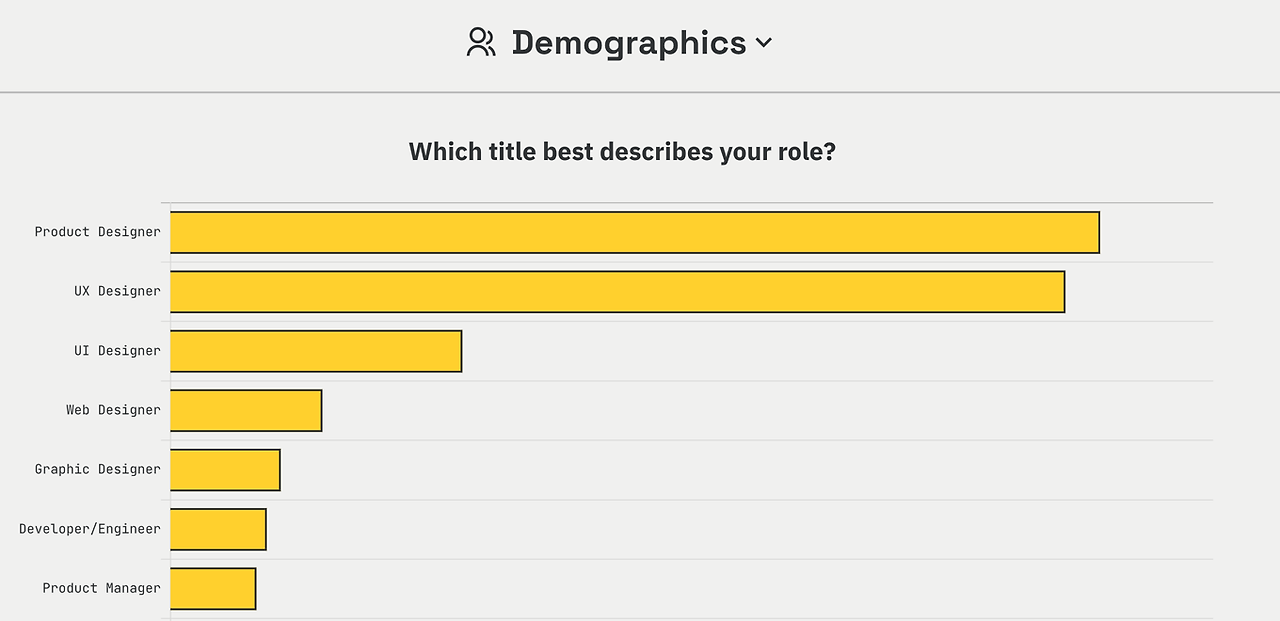
: Ranking of participants by occupation group
This statistical survey is about which tools are used the most in each area, such as UI design, prototyping, and whiteboard, in relation to UX/UI design. The conclusion is , 'Figma is unrivaled.' Last year, Figma began to overtake Sketch in key indicators, and this year, it seems to be solidifying its lead.
So let’s take a look at the results by area. (Source: UXtools.co)
_
1. UI Design: “Unique Figma”
In the UX, UI design tool market, I think the UI design field is the most all-out war. In the design process, brainstorming, whiteboards, and wireframes, which are at the front end (planning, ideation), can use tools with relatively low entry barriers, so you don't necessarily have to use specialized UI design tools, and there are alternative tools. Brainstorming can be done with paper and pen, and wireframes can be done with tools such as PowerPoint or Balsamic. However, UI design requires specialized tools, so I think it is very meaningful to capture this market.
The statistical results show that Figma achieved the top spot for the second year in a row, but by an even greater margin. Below is the ranking for 2020, and it was also the year that Figma surpassed Sketch for the first time to take the top spot. Sketch still had a presence.
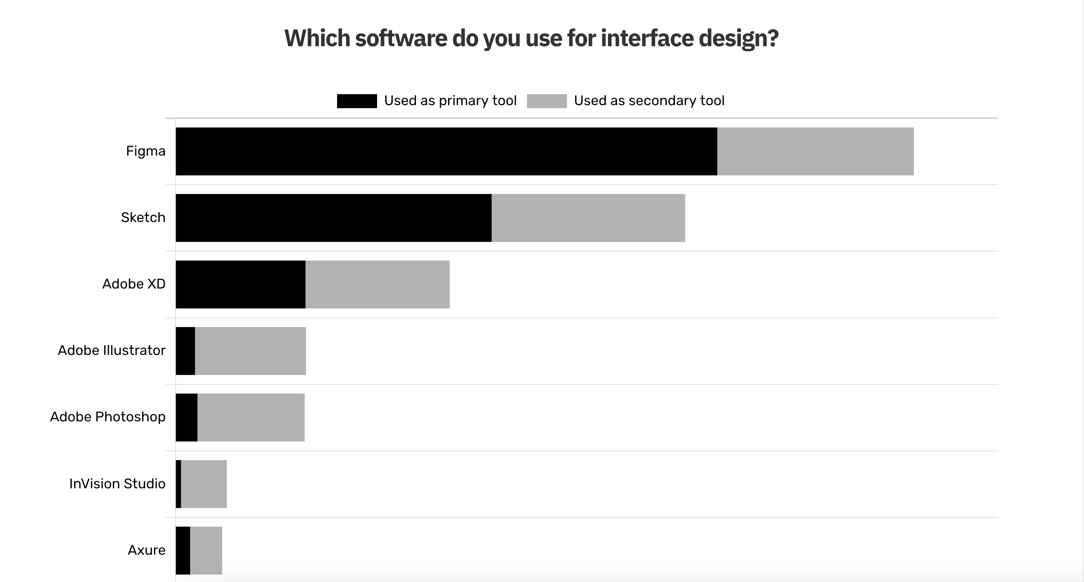
: 2020 UI Design Tool Rankings
The 2021 statistics show Figma running so far ahead of other tools that it could be said to have crushed them.
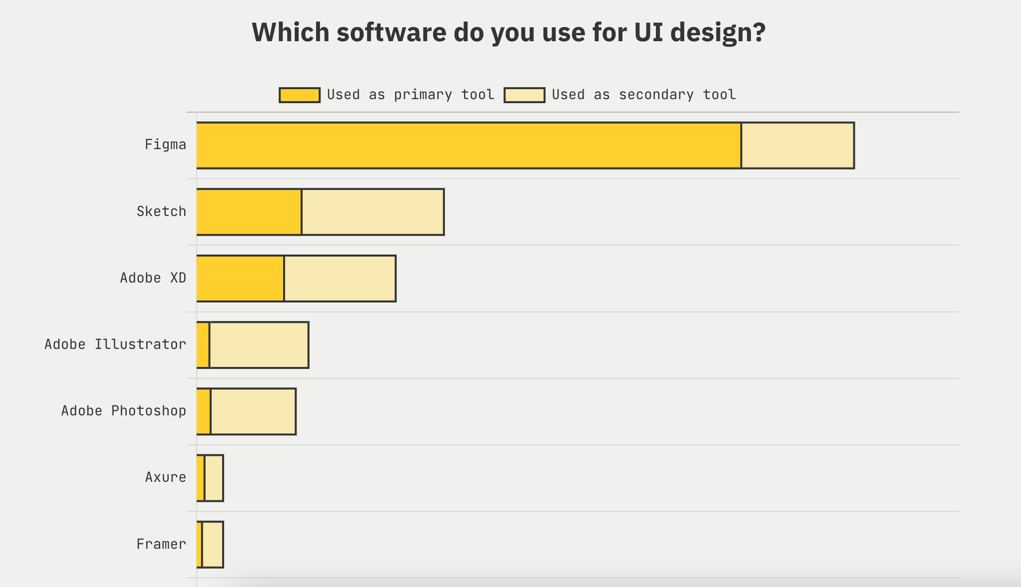
: 2021 UI Design Tool Rankings
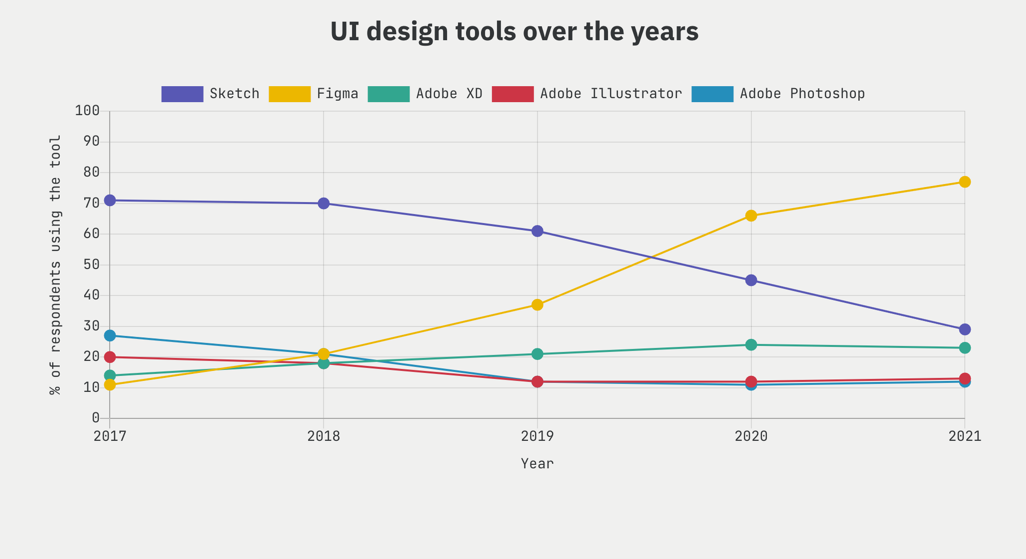
: Changes in UI design market share by year
_
There are probably many reasons why Figma is doing well, but I think the biggest reasons are as follows. (By the way, this is also the reason why I use Figma. Haha)
• Figma can be used on Windows as well as macOS, unlike Sketch.
• Figma's community features. Various plugins and templates available.
• Easy to collaborate with other team members as well as designers. Even non-paid members can leave comments in View mode.
• There is no need to install and use other apps separately as it also supports prototyping, handoff, etc. (all-in-one effect)
_
2. UI Prototyping: “Figma is the best”
Here are the results of prototyping for user testing, etc., to make the screen actually workable. Here again, Figma is overwhelming. In my personal opinion, Figma is lacking in detailed parts such as creating animations compared to tools such as Principle. Nevertheless, I think the reason it is doing so well is because you can prototype UI designs in Figma right away without the help of other apps.
Invision, which was once popular for its ease of use, now seems to have almost disappeared. In addition, there were some interesting points. One is that Adobe XD is quietly but steadily revealing its presence. Another is that ProtoPie, made in Korea, has risen to 4th place in the prototyping market. I hope ProtoPie continues to grow and do better in the future.
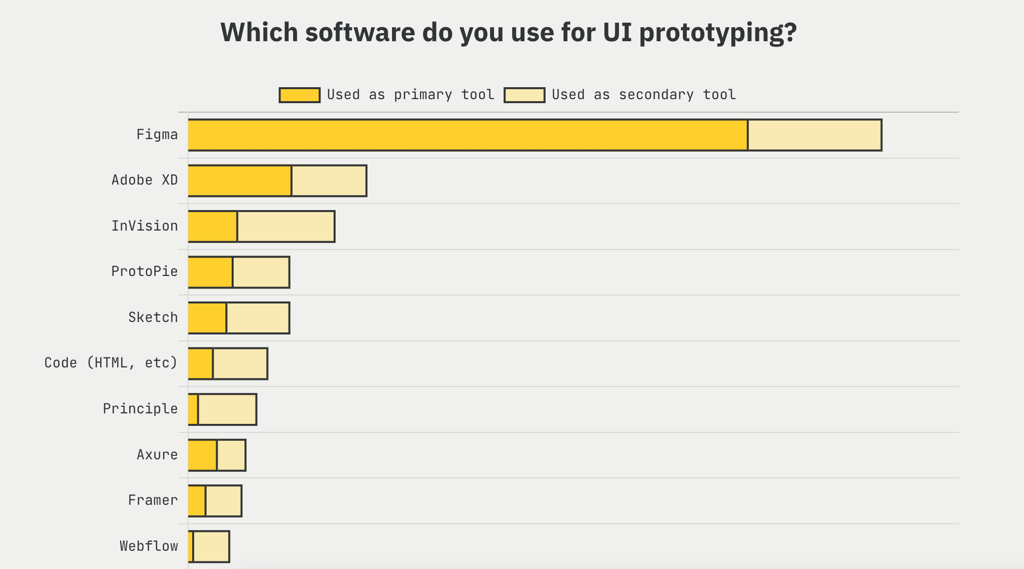
: UI Prototyping Tool Rankings
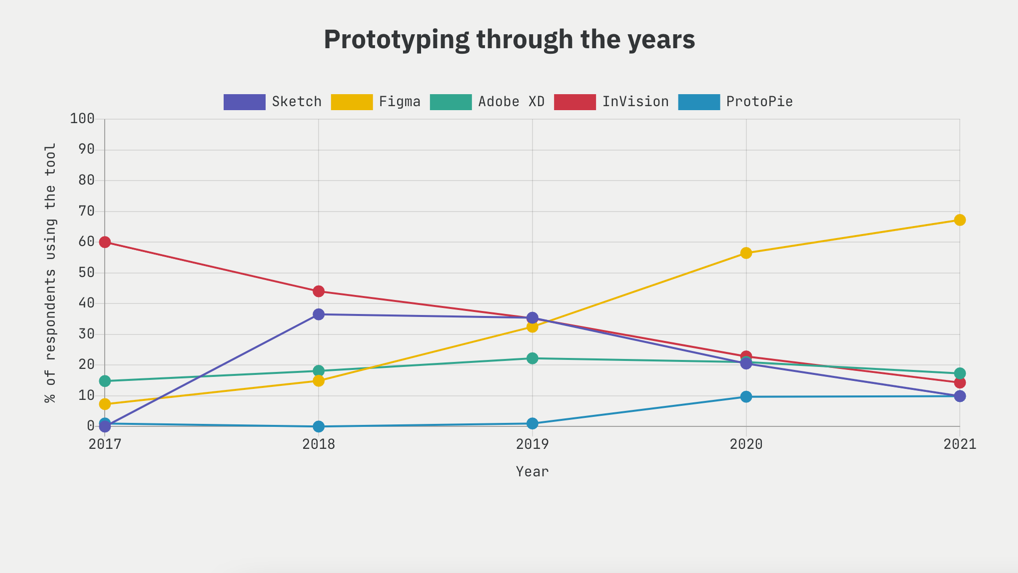
: UI Prototyping Tool Market Share by Year
_
3. Design System, Handoff
For the design system that is utilized for the unity/consistency of design elements such as colors and fonts, and also for UI design, Figma is ranked first, with a large gap from the second and third tools. I think it has an advantage in the market because Figma's component and style functions are easy to use, and when used in a team, team members can share it through the library, so there is no need to use other tools.
Handoff is where Figma solidifies its lead over Zeplin.
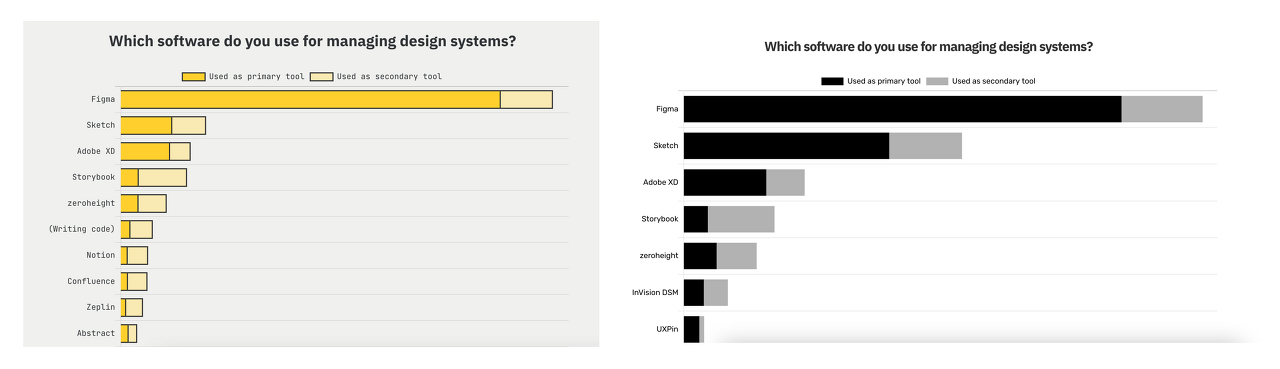
: Changes in the ranking of design system tools
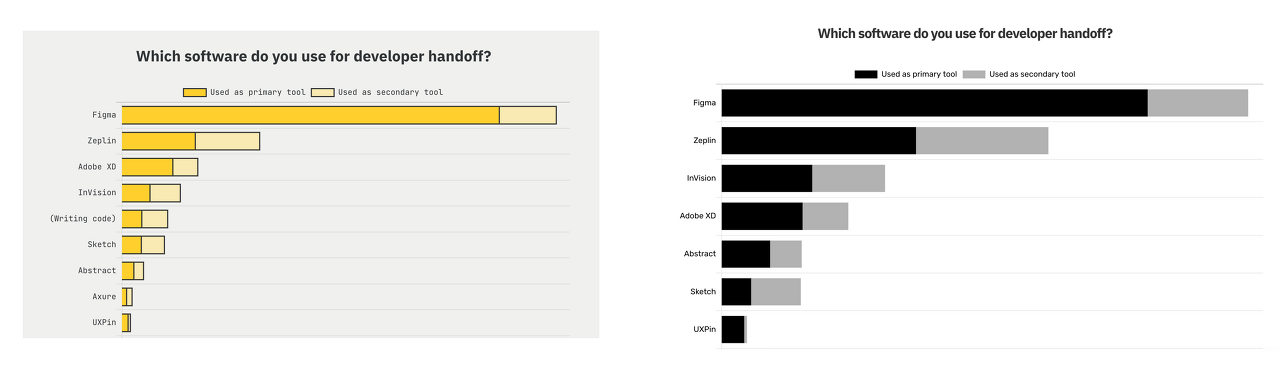
: Changes in handoff tool rankings
_
4. Digital Whiteboard, Brainstorming:
"Figjam, with Figma on his back, catches up with #1 Miro"
As non-face-to-face collaboration becomes more important due to the pandemic, competition among digital whiteboard tools needed for meetings or sharing and viewing documents together seems to be intensifying. Figma also released the Pigjam app, which specializes in whiteboards, this year.
The results showed that Miro came in first. It is impressive that Figjam is chasing Miro in second place even though it has only been around for a short time. This is probably because it is a function provided by Figma, which has many design users. From the user's perspective, it seems convenient to be able to do UI design and whiteboarding in one place. As a side note, according to UXtools, the reason why Miro, a paid tool, came in first (even though Figjam was available for free this year) is because of its high satisfaction with its functions, at 4.3 out of 5.
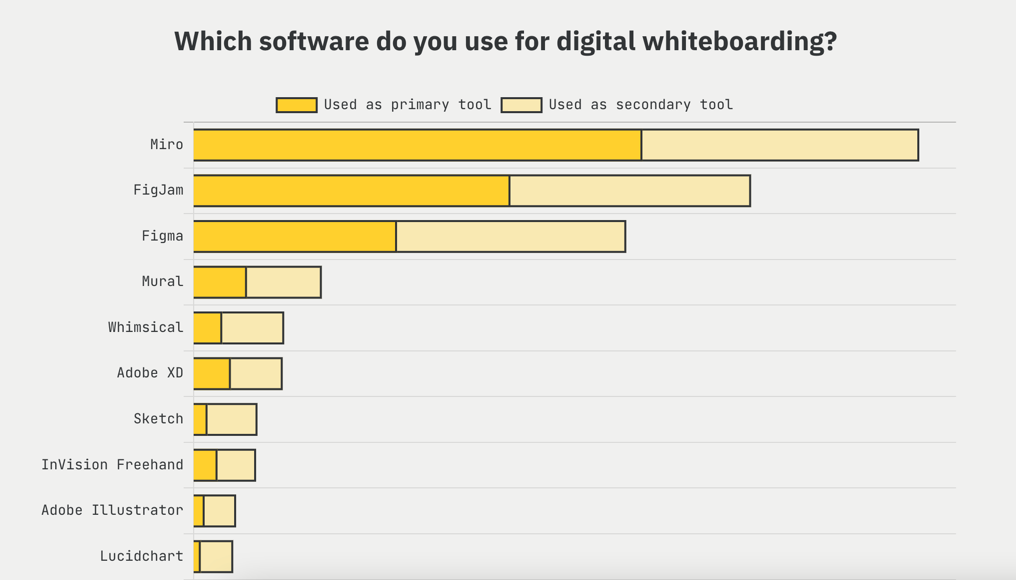
: Digital Whiteboard Rankings
_
To summarize,
From the perspective of design thinking, Figma, which provides the overall functions required for the UX/UI design process, seems to be surpassing all other tools and becoming the world's most unique UX/UI design tool. From a designer's perspective, it feels good to have such a convenient tool and to have more designers using it.
_
Source:
UX tools 2021 statistics results
UX tools 2020 statistics results
etc:
2020 UX Design Tool Statistics Announcement "Overwhelming Figma"