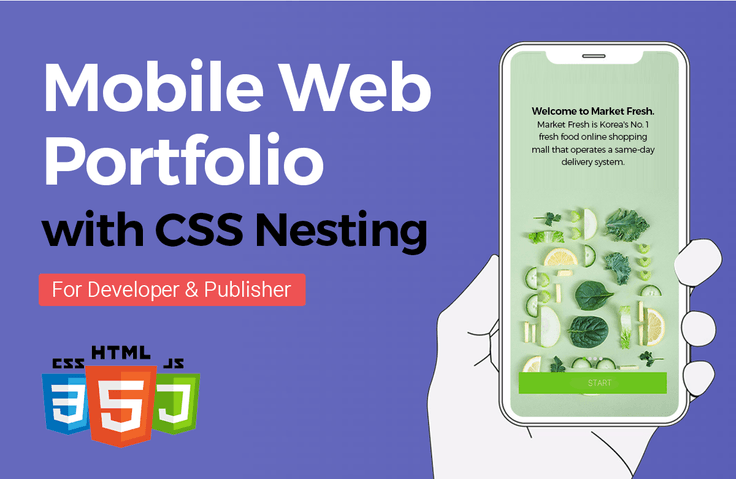







Mobile Web Publishing Portfolio with CSS Nesting

By creating 22 different mobile layouts across 19 pages, you can enhance your mobile web development skills, which is the most competitive asset for getting hired and working as a professional publisher. You will be able to solidify almost all production methods and know-how required for mobile web publishing. A key strength of this mobile web publishing course is the detailed instruction on how to create HTML wireframes for every single page. Through these lectures, your ability to build HTML wireframes will improve significantly. In particular, you will thoroughly learn CSS Nesting techniques. Centered around Flex layouts, you will gain sufficient intermediate-to-advanced practical CSS skills.

(5.0) 4 reviews

36 learners

Level Basic

Course period Unlimited

Mobile App Design
Mobile App Design
HTML/CSS
HTML/CSS
wireframe
wireframe
slick-slider
slick-slider
iframes
iframes
Mobile App Design
Mobile App Design
HTML/CSS
HTML/CSS
wireframe
wireframe
slick-slider
slick-slider
iframes
iframes

What you will gain after the course

  • Ability to publish using native CSS nesting.

  • Intermediate to Advanced CSS Practical Coding focusing on Flex & Grid Layouts

  • 19 pages, creating a total of 22 different mobile layouts

  • Essential Theory, Know-how, and Practical Production for Mobile Web Publishing

  • Creating a Mobile-Optimized Layout Using CSS Variables (Var)

  • The Standard of Clean Coding: Publishing Like a Professional

  • How to use Slick Slider and CSS customization tips

  • Using iframe after creating an HTML+CSS mobile mockup

"CSS Nesting Method Mobile Web Publishing Production
Essential Theory, Know-how, and Systematic Practical Production"

Step 01. Detailed production of 19 pages and 22 different mobile layout HTML wireframes
Step 02. Publishing various layouts using the CSS Nesting method
Step 03. Final publishing touches to make the finished result more perfect

This contains the mobile web publishing production know-how that Coding Works has taught to countless offline academy students until now. I am confident that after completing the course, your publishing skills will be significantly improved. In particular, you will gain great confidence in CSS Nesting style coding.

Coding with CSS Nesting, which was previously only available in SCSS (SASS),
is now done in standard CSS!


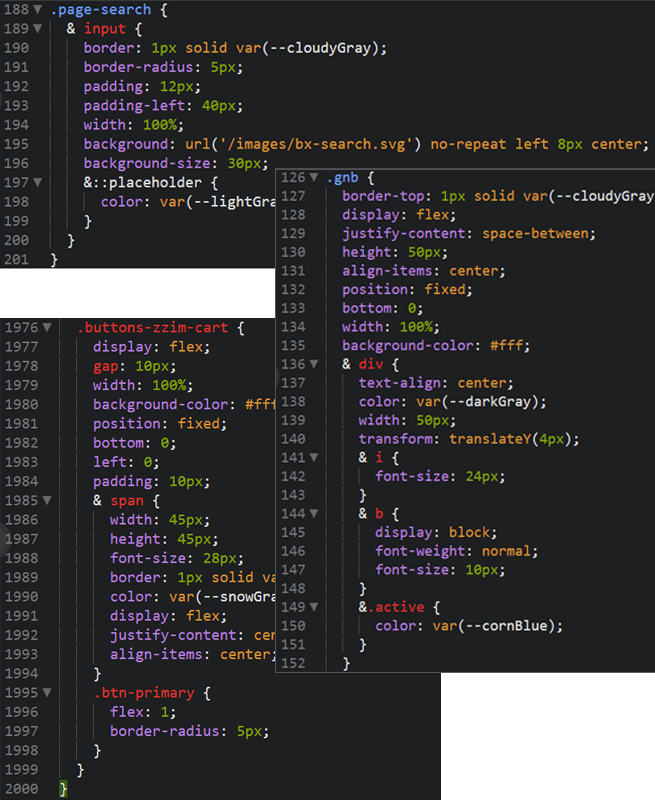
This course, [Mobile Web Publishing Portfolio with CSS Nesting], was created using the latest CSS Nesting coding method rather than the standard CSS coding method. Until a year ago, CSS Nesting was only available in SCSS (SASS), but now it can be used without SCSS (SASS). I believe you will grow significantly while publishing mobile web projects using CSS Nesting.

Preparation is required to use the existing SCSS (SASS). Along with preparation, it must go through a process called "compile" to become CSS that the browser can recognize. The primary reason most people use SCSS (SASS) is Selector Nesting. While SCSS (SASS) certainly has more diverse features, nesting is its most important function, and now you can code using CSS Nesting without using SCSS (SASS).

Lecture Topic 📖

Through Coding Works' <Mobile Web Publishing Portfolio with CSS Nesting>, you can enhance your mobile web production skills, which are highly competitive for both landing a job and working as a professional publisher. Furthermore, you can solidify almost all production methods and know-how required for creating mobile webs as a publisher.

  1. Publishing skills using pure CSS nesting methods

  2. Intermediate-to-advanced CSS practical coding centered on Flex & Grid layouts

  3. Essential theories, know-how, and practical production for mobile web publishing

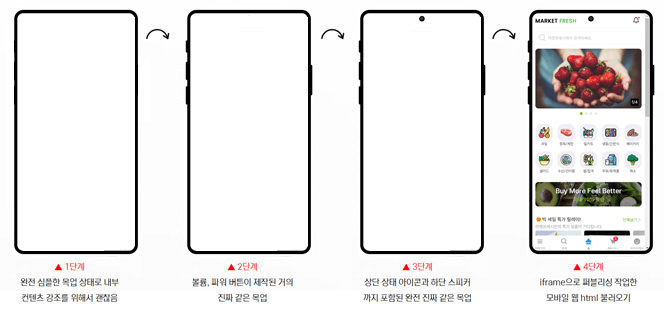
  4. Using iframe after creating HTML+CSS mobile mockups

  5. Creating mobile-optimized layouts using CSS variables (Var)

  6. How to use Slick Slider and know-how for changing CSS


  7. The Standard of Clean Coding for Publishing Like a Professional

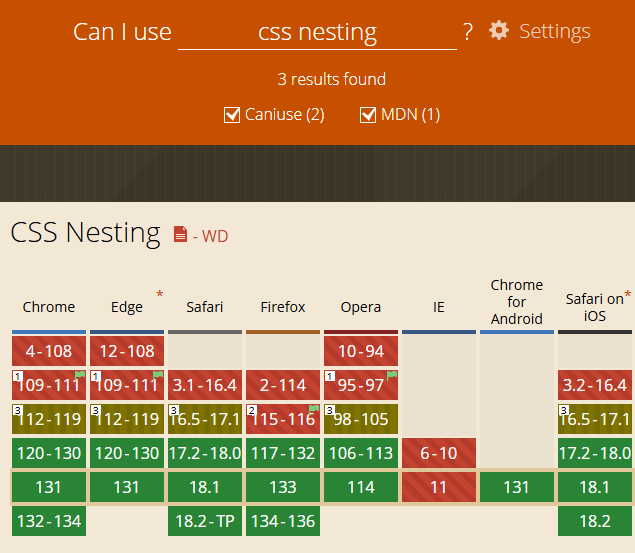
CSS Nesting style coding fully supported by all browsers

Green indicates that it is fully supported by the browser.

View details on the Can I Use website: https://caniuse.com/?search=css%20nesting

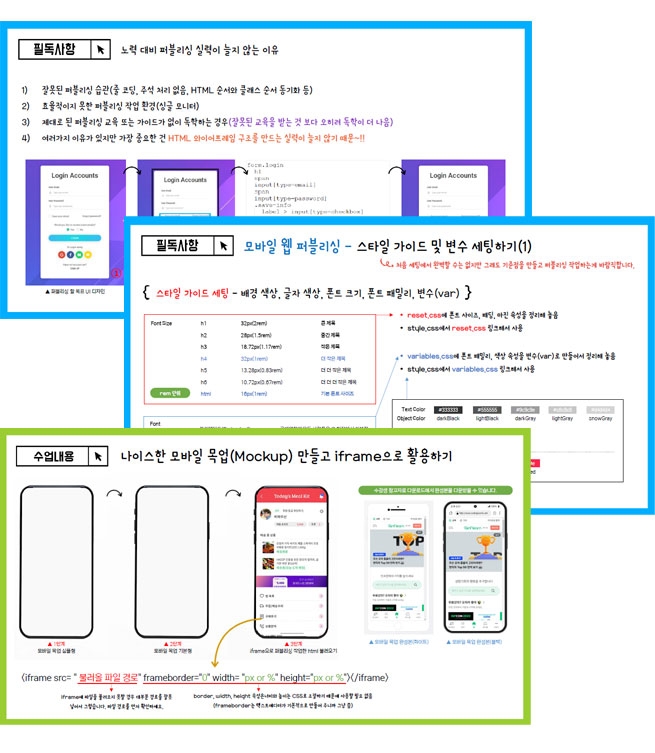
▲ Creating mobile mockups for personal portfolio use and utilizing iframes

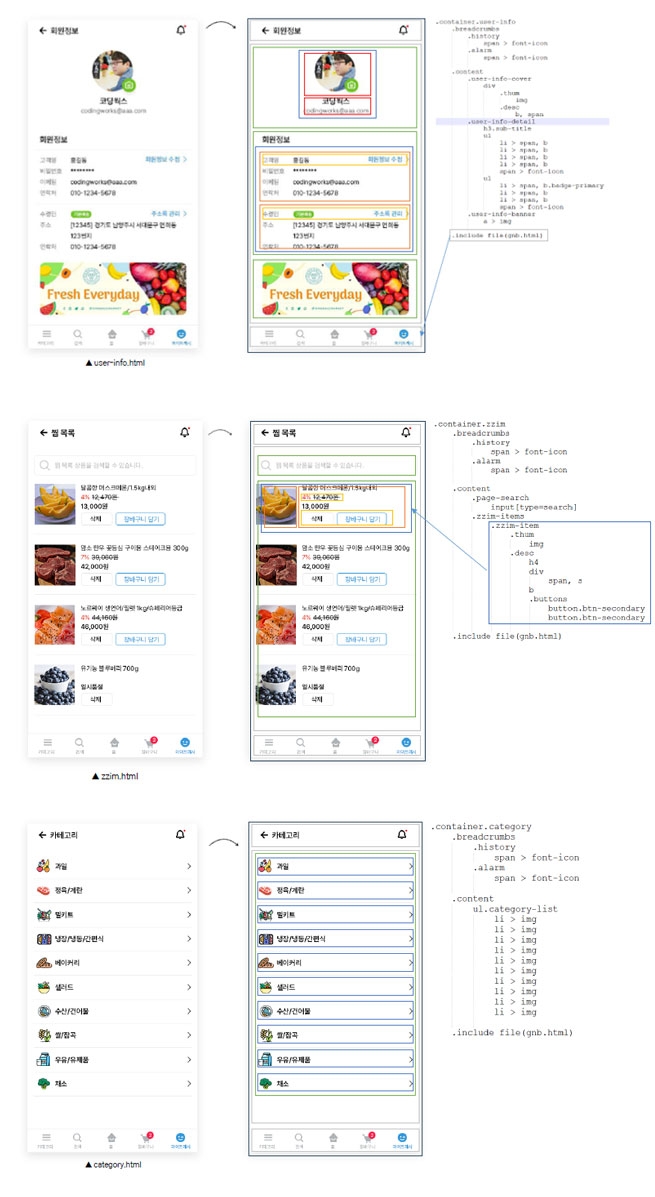
Detailed production of 22 different mobile layout HTML wireframes across a total of 19 pages

Various files provided 🗂

📝 Design files, source files, completed publishing files, and lecture notes

  1. [CSS Nesting] Design work image sources

  2. [CSS Nesting] Mobile Web HTML Wireframe (TXT)

  3. [CSS Nesting] Mobile Web Design Work (PSD)

  4. [Download] 3 types of HTML+CSS Mobile Mockups (iPhone, Galaxy)

  5. Individual Design Screens (PNG) [CSS Nesting] Mobile Web Individual Design Screens (PNG)

  6. Source Text and Reference Websites [CSS Nesting]

  7. CSS Nesting Mobile Web - Lecture Notes

▲ CSS Nesting Mobile Web Production Video - Video PPT lecture materials used in the lecture are provided

The Standard of Clean Coding🧽

<Mobile Web Publishing Portfolio with CSS Nesting> I believe that by taking this course, your skills will grow in various ways, such as the ability to create HTML wireframes and the ability to use Flex for publishing. While these aspects are very important, the most crucial part is that you will learn the 'Standard of Clean Coding for Publishing Like a Professional'. All publishing in this course has been written under these principles.

<The Standard of Clean Coding for Publishing Like a Professional> involves things like adding necessary comments where needed, coding CSS selectors in the same order as the HTML appearance, and organizing common CSS selectors in a "Common CSS" section for future maintenance. Learning these coding principles and habits will be incredibly helpful in practice. Especially when applying for a job, hiring managers or equivalent personnel will look at the source code after reviewing the applicant's publishing results. In such cases, even a brief look at the source code allows them to judge the applicant's fundamental publishing skills.

💡 What makes this course uniquely attractive?

  1. You can acquire the ability to code using the new CSS Nesting technique.

  2. You will learn detailed HTML wireframing techniques that significantly improve your publishing skills.

  3. You will learn the standard of Clean Coding for publishing like a professional at Coding Works.

  4. It provides detailed explanations of various exercises and examples, easy-to-understand descriptions, and in-depth concepts.

  5. It explains everything a student needs to know for mobile web publishing.

Mobile Web Full UI Design

CSS Nesting Publishing 📚


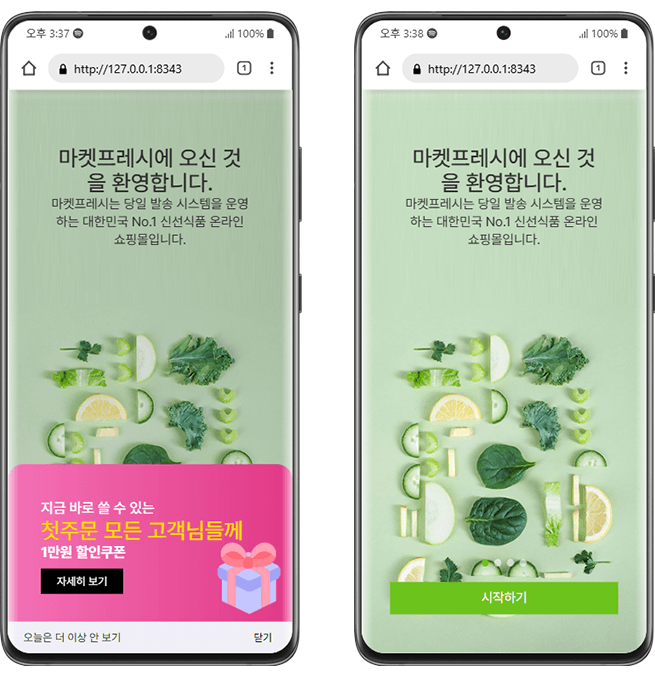
▲ Intro Page with Overlay / Intro Page

🚩Intro Page with Overlay

  1. Creating an HTML wireframe structure using the CSS Nesting method

  2. Full Screen Layout

  3. Show/Hide Toast Overlay

🚩 Intro Page

  1. Creating an HTML wireframe structure using the CSS Nesting method

  2. Intro Slick Slider

  3. Get Started


▲ Welcome Page / Login Page


🚩 Welcome Page

  1. Creating an HTML wireframe structure using CSS Nesting

  2. Login button design

🚩Login Page

  1. Creating an HTML wireframe structure using the CSS Nesting method

  2. Flex layout positioning

  3. Handling form elements


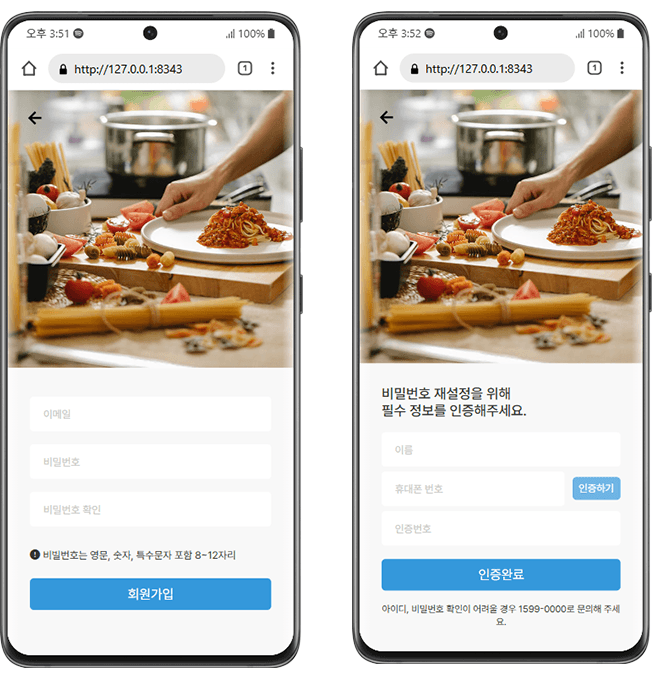
▲ Sign-up Page / Find Password Page

🚩 Sign-up Page

  1. Creating HTML wireframe structures using CSS Nesting

  2. Flex Layout Arrangement

  3. Handling form elements

🚩 Find Password Page

  1. Creating an HTML wireframe structure using the CSS Nesting method

  2. Flex layout arrangement

  3. Handling form elements


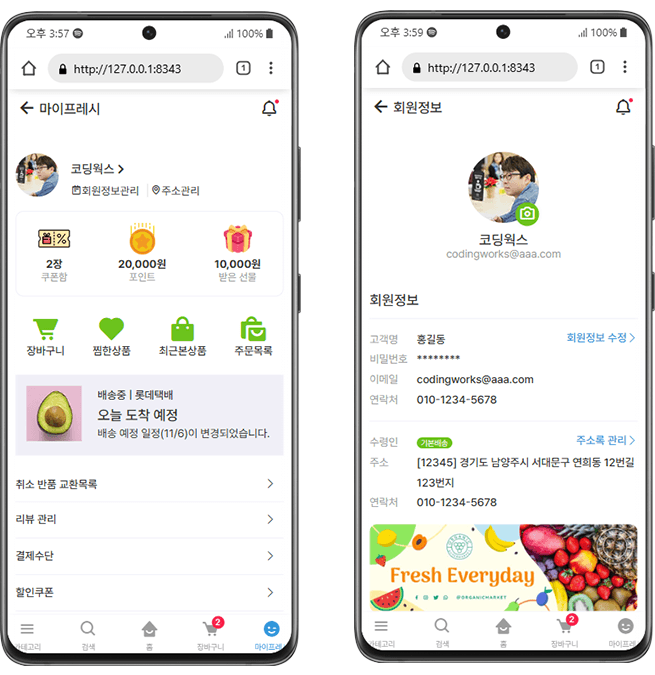
▲ MyFresh Main Page / Member Information Page

🚩My Fresh Main Page

  1. Creating an HTML wireframe structure using CSS Nesting

  2. Flex layout positioning

  3. Utilizing font icons, utilizing ::before and ::after

🚩 View Member Information Page

  1. Creating HTML wireframe structures using CSS Nesting

  2. Flex layout arrangement

  3. Utilizing font icons, utilizing ::before and ::after


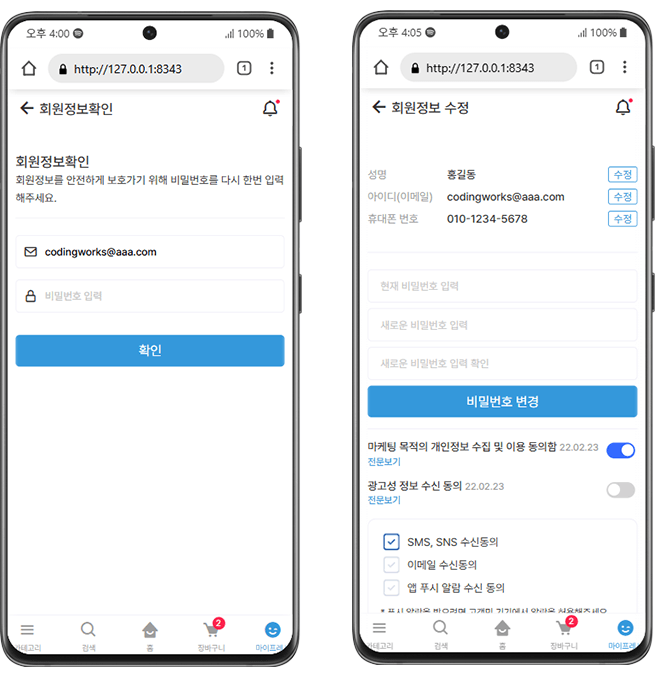
▲ Member Information Confirmation Page / Member Information Edit Page

🚩 Member Information Confirmation Page

  1. Creating HTML wireframe structures using CSS Nesting

  2. Flex layout arrangement

  3. Using font icons, using adjacent selectors

🚩 Edit Profile Page

  1. Creating an HTML wireframe structure using the CSS Nesting method

  2. Flex layout positioning

  3. Utilizing font icons, utilizing adjacent selectors

  4. CSS custom switch button

  5. CSS Custom Checkbox


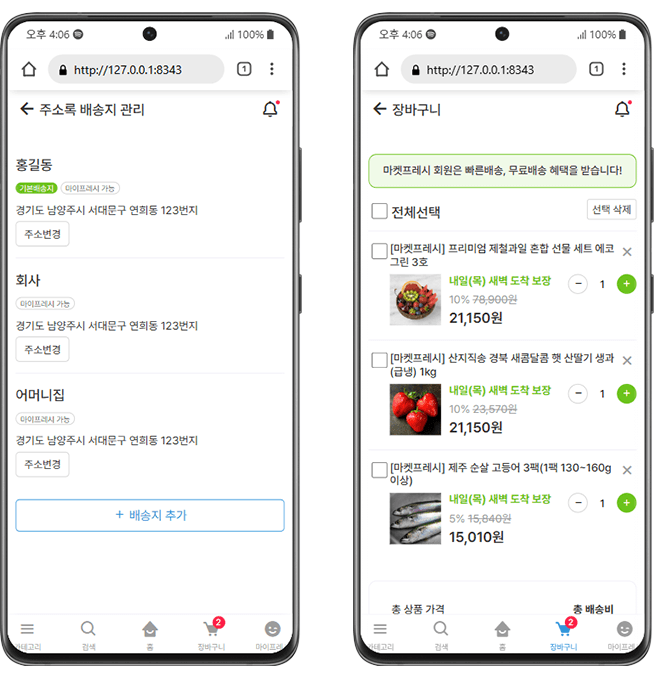
▲ Address Book Management Page / Shopping Cart Page

🚩 Address Book Management Page

  1. Creating an HTML wireframe structure using the CSS Nesting method

  2. Flex layout arrangement


🚩 Shopping Cart Page

  1. Creating an HTML wireframe structure using the CSS Nesting method

  2. Flex layout arrangement

  3. Utilizing font icons

  4. Handling form elements


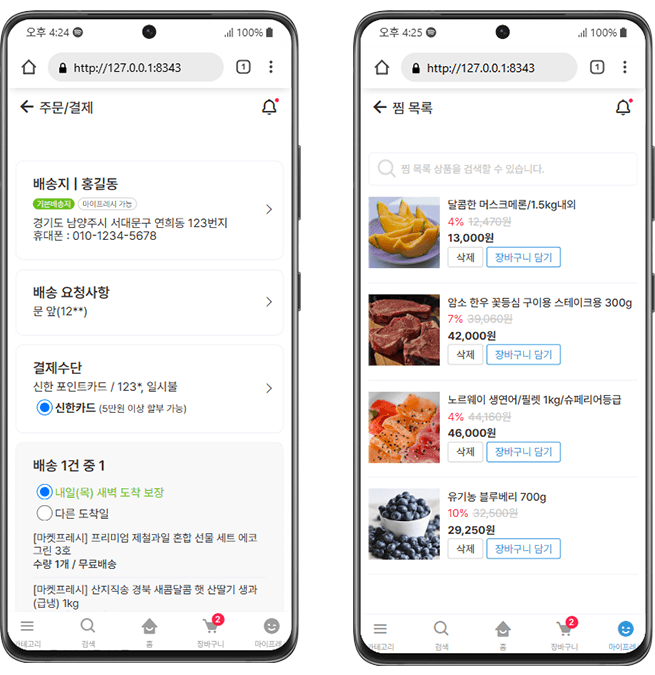
▲ Order & Payment Page / Wishlist Page

🚩 Order/Payment Page

  1. Creating an HTML wireframe structure using the CSS Nesting method

  2. Flex layout arrangement

  3. Utilizing font icons

  4. Utilizing font icon Unicode with pseudo-classes :before and :after


🚩 Wishlist Page

  1. Creating an HTML wireframe structure using the CSS Nesting method

  2. Flex layout arrangement


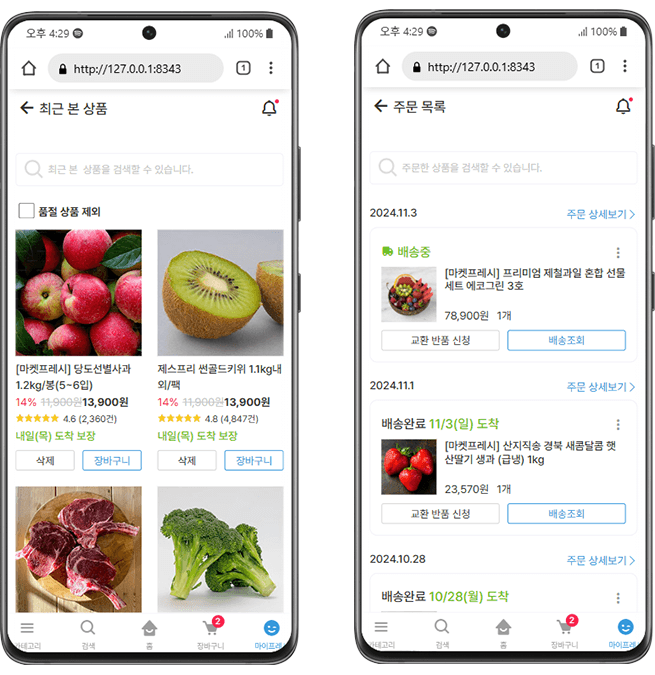
▲ Recently Viewed Products Page / Order List Page

🚩 Recently Viewed Products Page

  1. Creating an HTML wireframe structure using the CSS Nesting method

  2. Flex layout positioning

  3. Utilizing font icons, utilizing ::before and ::after


🚩 Order List Page

  1. Creating an HTML wireframe structure using the CSS Nesting method

  2. Flex layout arrangement

  3. Utilizing font icons, utilizing ::before and ::after


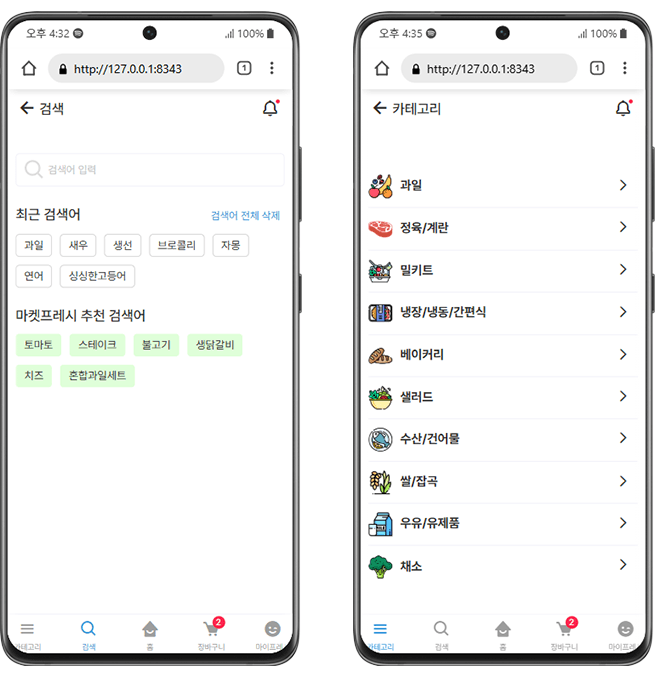
▲ Search Page / Category Page

🚩 Search Page

  1. Creating HTML wireframe structures using the CSS Nesting method

  2. Flex layout arrangement

  3. Utilizing font icons, utilizing ::before and ::after


🚩 Category Page

  1. Creating an HTML wireframe structure using CSS Nesting

  2. Flex layout arrangement

  3. Utilizing font icons

  4. Utilizing font icon Unicode with pseudo-classes :before and :after


▲ Home Main Page / Product Detail (Product Description) Page

🚩 Home Main Page

  1. Creating an HTML wireframe structure using the CSS Nesting method

  2. Home Main Slick Slider

  3. Product List Slider

  4. Flex layout arrangement

  5. Utilizing font icons, utilizing ::before and ::after

  6. Badge Design


🚩 Product Description Page

  1. Creating an HTML wireframe structure using the CSS Nesting method

  2. Flex layout arrangement

  3. Utilizing tab menu content functionality

  4. JavaScript Smooth Scroll to Top Function

  5. Utilizing font icons, utilizing ::before and ::after


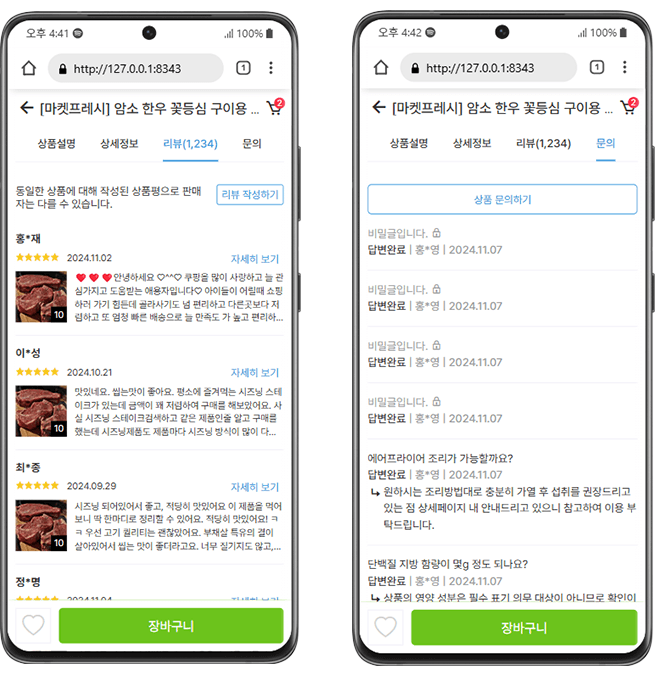
▲ Product Details (Review) Page / Product Details (Inquiry) Page

🚩 Product Details (Review) Page

  1. Creating an HTML wireframe structure using the CSS Nesting method

  2. Flex layout arrangement

  3. Utilizing font icons, utilizing ::before ::after

  4. Badge Design


🚩 Product Details (Inquiry) Page

  1. Creating an HTML wireframe structure using the CSS Nesting method

  2. Flex layout arrangement

  3. Utilizing font icons

  4. Using Font Icon Unicode with Pseudo-classes :before and :after

💡 Publishing Work Text Editor <Visual Studio Code>

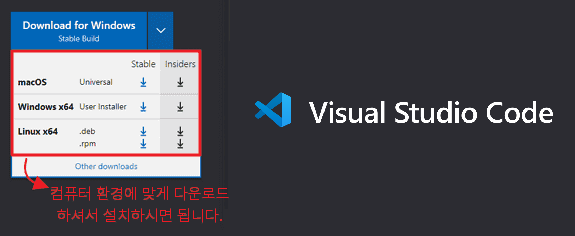
This course, <Mobile Web Publishing Portfolio with CSS Nesting>, is produced using Visual Studio Code. Visual Studio Code is a free program with no usage restrictions. All lecture videos are explained based on Visual Studio Code.
Please learn the basic usage through the Coding Works YouTube video below before starting your publishing studies.

Download Visual Studio Code

  1. How to Use and Configure Visual Studio Code (Watch Video)

  2. How to use Emmet in Visual Studio Code (Watch Video)

  3. Visual Studio Code Essential Extensions Installation and Usage (Watch Video)

  4. Preventing Full Reload that jumps to the top when editing CSS in Visual Studio Code (Watch Video)


Visual Studio Code Theme used during course production: One Dark Pro

Q&A 👨‍🏫

If you post your questions on the community Q&A board for this lecture, I will do my best to answer them.


Q. Are there any prerequisites or preparations required?

There are no special prerequisites or preparations required. Basic experience with HTML+CSS is enough to follow along, and you will be able to achieve the skill improvement and results you expect. However, since intermediate CSS theories are frequently used, you should have some understanding of the learning content listed below.

😀 Coding Works YouTube Playlist - Intermediate CSS Theory for Better Mobile Web Publishing


Q. What is the core content that sets it apart?

The [Mobile Web Publishing Portfolio with CSS Nesting] course is created using the latest CSS Nesting technique rather than the standard CSS coding method. Until a year ago, CSS Nesting was only available in SCSS (SASS), but it can now be used without it. I believe you will grow significantly as you publish mobile web projects using CSS Nesting.

As an instructor who has taught publishing in both online and offline settings for a long time, I teach using the most reliable and systematic methods to improve publishing skills. I believe the core of this course lies in its design, which allows students to step-by-step produce high-quality results from the unfamiliar and challenging task of mobile web publishing.


Q. Why should I learn the mobile web publishing production process, and what are the specific expected effects?

Mobile web is of the highest importance as a personal portfolio piece. Therefore, having mobile web work enhances your competitiveness in the job market. Not only does it serve as a job portfolio, but most companies are currently working on or planning to undertake mobile web projects. From a company's perspective, having a well-made mobile web portfolio will serve as an excellent reference for employment or career transitions.

Mobile web is of the highest importance as a personal portfolio piece. Therefore, having mobile web work gives you a strong competitive edge in employment. Beyond its role as a job-seeking portfolio, most companies are currently working on or planning to initiate mobile web projects. From the perspective of such companies, a well-crafted mobile web portfolio will serve as an excellent reference for hiring or career transitions.

The specific expected effects actually vary from person to person. However, what Coding Works can say for certain is that your ability to create HTML wireframe structures will improve significantly. By creating various HTML wireframe structures, you will receive sufficient training on how to systematically organize complex HTML hierarchies. Additionally, the lessons will cover in detail how to name and share consistent class names while building them together.

Detailed production of various mobile layout HTML wireframes, from creating various HTML wireframe structures to applying them to practical mobile web publishing, you will gain the confidence to create almost any web UI layout in the future.


Q. To what level does the course cover?

Due to the nature of mobile web development, there are many files and folders. Therefore, the course progresses at a fast pace covering a lot of content. While the "level" can vary depending on individual standards, the course content is designed to produce work sufficient for a publisher's personal portfolio. Furthermore, the content is comprehensive enough to be considered at the level of professional mobile web development in the field.


Q. What is the difference from the previous course [Mobile Web Publishing Portfolio with Figma]?

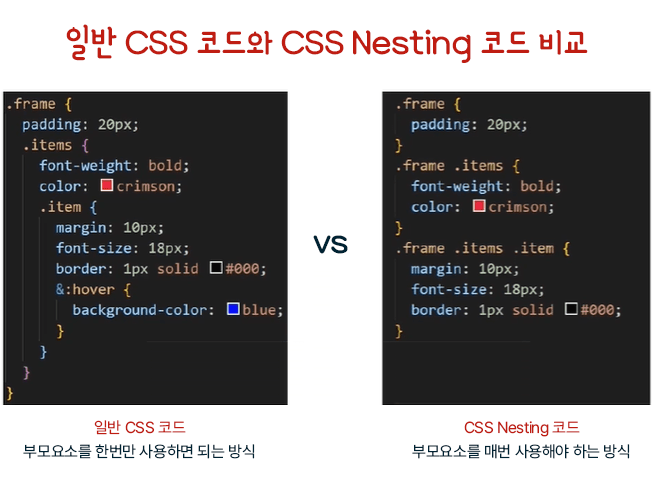
Both the existing mobile web course and this mobile web course are the same in that they create mobile webs using CSS. The biggest difference is that the existing course uses a CSS method where parent elements are listed every time, while this course uses a CSS nesting method where parent elements are used only once. As the difficulty level is about 1.5 times higher than the existing course and you will be creating more pages and a wider variety of layouts, you can further improve your mobile web publishing skills.

Differences of this Mobile Web Development Course

  • Figma design work is not performed in class.

  • Directly creating HTML wireframes and publishing while looking at the prepared final design.

  • CSS Nesting coding method

  • More than double the production and learning volume (the basic course covers 9 pages, while this course covers 19 pages)

  • Creating 22 different layouts, all unique.

  • Various slider creation methods (Slick Slider)


Q. What is the total duration of the course?

The total video lecture time is approximately 16 hours, providing sufficient content for in-depth learning.

  • Pre-course mandatory video and how to create mobile web HTML wireframe structures - 2 hours

  • [Practical Production] Mobile Web HTML Wireframe Structure with PPT - 3 hours

  • [Practical Production] Mobile Web Detailed Publishing with CSS Nesting - 10 hours

  • [Reference] Using the completed mobile web as a portfolio - 1 hour


Q. Are there any reference notes regarding the course (required environment, other precautions, etc.)?

There is a lot of content, and the class moves at a fast pace. However, I do not skip over things without sufficient explanation; I provide detailed instructions. I believe you will be able to follow along well. However, I strongly recommend setting up a dual monitor environment rather than studying with a single monitor. Please refer to the video Section 2 [Must-Read] Why your publishing skills aren't improving despite your efforts for more details.

Section 1. Course Introduction

  • [Course Introduction] Mobile Web Publishing Portfolio with CSS Nesting

  • [Preview of Completed Version] Mobile Web Publishing Portfolio with CSS Nesting

  • [Must-Read] Pure CSS Selector Nesting 01 - Basic Usage of CSS Nesting

  • [Must-Read] Pure CSS Selector Nesting 02 - CSS Nesting Practical Example (Login Form)


Section 2. [Must-Read] How to create a mobile web HTML wireframe structure

  • [MUST-READ] Reasons why your publishing skills aren't improving despite your efforts

  • [MUST-READ] How to create HTML wireframe structures and know-how

  • [Practice] HTML Wireframe Creation Practice (Custom Checkbox Login Form)

  • [MUST-READ] HTML Wireframe Structure (Border Box and Class Naming Tips)

  • [Reference] Understanding the concepts of Mobile Web & Mobile App


Section 3. [Practical Production] Mobile Web HTML Wireframe Structure with PPT

  • HTML Wireframe Structure (Join - Get Started, Login, Sign Up, Find Password)

  • HTML Wireframe Structure (Myfresh 01 - Myfresh Main)

  • HTML Wireframe Structure (Myfresh 02 - View, Confirm, and Edit Member Information)

  • HTML Wireframe Structure (Myfresh 03 - Shipping Address Management, Order & Payment)

  • HTML Wireframe Structure (Myfresh 04 - Shopping Cart)

  • HTML Wireframe Structure (Myfresh 05 - Wishlist, Recently Viewed Products, Order List)

  • HTML Wireframe Structure (Search, Category)

  • HTML Wireframe Structure (FAQ - Frequently Asked Questions)

  • HTML Wireframe Structure (Customer Center)

  • HTML Wireframe Structure (Home - Main Page)

  • HTML Wireframe Structure (Detail - Product Description, Detailed Info, Reviews, Inquiries)


Section 4. [Practical Production] Mobile Web Detail Publishing with CSS Nesting

  • [Must-Read] Setting width and height in mobile web publishing

  • [Must-Read] Creating Folder Structure, Reset, Variables

  • [Practical Publishing Production] Intro 01 (Intro Screen, Slider, Slider Custom CSS)

  • [Practical Publishing Production] Intro 02 (Toast Overlay, Absolute Path vs. Relative Path)

  • [Practical Publishing Production] Join 01(Welcome

  • [Practical Publishing Production] Join 02(Login)

  • [Practical Publishing Production] Join 03 (Sign up, Find password)

  • [Practical Publishing Production] My Fresh Main 01 (Page Header, Content Layout)

  • [Practical Publishing Production] My Fresh Main 02 (Detailed Content, GNB)

  • [Practical Publishing Production] My Fresh Main 03 (GNB Include)

  • [Practical Publishing Production] Organizing Container Heights (auto, 100vh)

  • [Practical Publishing Production] Member Information 01 (View Member Information)

  • [Practical Publishing Production] Member Information 02 (Confirm Member Password)

  • [Practical Publishing Production] Member Information 03 (Edit Member Information)

  • [Practical Publishing Production] Shipping Address Management

  • [Practical Publishing Production] Intermediate Code Modification (Common CSS)

  • [Practical Publishing Production] Shopping Cart

  • [Practical Publishing Production] Order Payment (:not :has pseudo-classes)

  • [Practical Publishing Production] Wishlist

  • [Practical Publishing Projects] Recently Viewed Products

  • [Practical Publishing Production] Order List

  • [Practical Publishing Production] Search, Category

  • [Practical Publishing Production] Home 01 - Main Slider, Category, Banner, Footer

  • [Practical Publishing Production] Home 02 - SNS, Bbaggomi Product Slider

  • [Practical Publishing Production] Product Description 01 - Tab Button Check, Tab Menu Function, Wishlist & Cart Buttons

  • [Practical Publishing Production] Product Description 02 - Product Details, Product Information

  • [Practical Publishing Production] Product Description 03 - Product Reviews, Product Inquiries

  • [Practical Publishing Production] Adjusting and Modifying Width and Height by Page (Checking Mobile Devices)

  • [Publishing Revision & Supplement] Smooth scroll to top on the product description page

  • [Publishing Revision & Supplement] - Linking Files & Checking GNB Navigation

  • [Publishing Revision & Supplement] Home main slider count, product slider tablet size


Section 5. [Reference] Utilizing the completed mobile web as a portfolio

  • Creating a Nice Mobile Mockup

  • Using iframe for the created mobile mockup (Multi-view, Single-view)

  • Mobile Browser Detection JavaScript (Arrow Functions, User Agent)

  • Applying the mobile web created after completing the course to your portfolio (View CodingWorks student portfolios)


Section 6. [Download] Student Reference Materials

  • [Download] Student Reference Materials Download (Mobile Web with CSS Nesting)

  • [PDF Textbook] Mobile Web - HTML Wireframe (PDF)

  • [PDF Textbook] Mobile Web - Lecture Notes

🙋🏻‍♂️ Please make sure to read this before asking a question!!

Please ask any questions you have while learning. When asking a question, you must include the details of what is not working, the code, and a screenshot of the browser result. For the code, you must provide the HTML, CSS, and JS code together so that I can provide an accurate answer.

If you only describe the problem in text without including the code in your question, it is difficult to provide an accurate answer unless it is a very simple issue. In that case, I will have no choice but to reply with, "Please upload the HTML, CSS, JS code and a browser screenshot," which ultimately makes it more cumbersome and takes longer to get a solution.

 For effective learning, please be sure to refer to Coding Works Publishing YouTube.

Please use the Coding Works Publishing YouTube channel in conjunction with the theoretical video lectures. Of course, not all theoretical videos are on the YouTube channel, but almost all important theoretical videos are available. Since there are many videos, it is recommended to search for them as shown in the example below to find the specific video you need.

CodingWorks Publishing YouTube Channel: https://www.youtube.com/codingworks

About the Instructor

Coding Works has taught publishing theory, application, and personal portfolio website creation to over 300 students in government-funded publishing courses to date. In particular, as an instructor who has specialized in publishing lectures for many years, I perfectly guide all preparation processes for employment as a publisher from A to Z, ensuring that most students can find employment immediately after completing the course. Additionally, while conducting publishing-related lectures on Inflearn, I have received feedback that my courses have been very helpful to Inflearn students as well.

Recommended for
these people

Who is this course right for?

  • For those who need a mobile web UI design and publishing portfolio

  • Those who need practical experience for mobile web publishing in the field

Need to know before starting?

  • Basic experience using HTML+CSS

Hello
This is codingworks

13,111

Learners

788

Reviews

2,122

Answers

4.9

Rating

23

Courses

■ [Current] Government-funded Publishing & Frontend Instructor
■ [Current] Freelance Frontend Publisher
■ [Current] Operator of HTML+CSS+JQUERY Publishing YouTube Channel 'Coding Works'
■ Green Computer Academy Web Publishing Instructor
■ The Joeun Computer Academy Web Publishing Instructor
■ Ezen Computer Academy Web Publishing Instructor
■ Frontend Publisher, Professional Frontend Publishing Instructor
■ UI/UX Web Design Portfolio Lectures
■ Web Design Technician Practical Certification Class Lectures
■ Easy & Edu Frontend UI/UX Design and Publishing

🌏CodingWorks Inflearn Lecture List - https://www.inflearn.com/users/@codingworks
🌏Inflearn CodingWorks Lecture Learning Order (Learning Roadmap) - https://www.inflearn.com/blogs/2351
🌏CodingWorks Inflearn Publishing Blog - https://www.inflearn.com/users/@codingworks/blogs
🌏CodingWorks Publishing YouTube Channel - https://www.youtube.com/codingworks
🟣View Inflearn In-Focus CodingWorks Interview: https://www.inflearn.com/pages/infocus-8-20230704

More

Curriculum

All

56 lectures ∙ (16hr 19min)

Course Materials:

Lecture resources
Published: 
Last updated: 

Reviews

All

4 reviews

5.0

4 reviews

  • parkjb215682님의 프로필 이미지
    parkjb215682

    Reviews 11

    Average Rating 5.0

    5

    30% enrolled

    I'm a developer who has been working with a publisher, but while studying React, I felt that developers should also know CSS, so I decided to take this class. Learning about the concept of wireframes seems like it will be a great help in my future work.

    • codingworks
      Instructor

      Thank you for the course review.^^

  • n5i4님의 프로필 이미지
    n5i4

    Reviews 3

    Average Rating 5.0

    5

    32% enrolled

    • codingworks
      Instructor

      Thank you for the course review.

  • kimkm67923205님의 프로필 이미지
    kimkm67923205

    Reviews 1

    Average Rating 5.0

    5

    30% enrolled

    • codingworks
      Instructor

      Thank you for the course review.

codingworks's other courses

Check out other courses by the instructor!

Similar courses

Explore other courses in the same field!