inflearn logo
Challenge
Ended

ChatGPT × Excel: Functions & Macros Master Challenge 4th Cohort

Let ChatGPT Handle Your Excel Functions and Macros Now Learn SUM, SUMIF, SUMIFS, IF, and VLOOKUP functions using ChatGPT to master essential practical calculation methods such as calculating totals, conditional sums, and data lookups. Next, we will use ChatGPT to generate VBA code for repetitive tasks in your workflow. By learning how to speed up calculations with functions and automate repetitive tasks with macros, you will acquire practical skills that significantly reduce work time and increase efficiency. Anyone with basic Excel skills can take on this challenge, and by the end of the course, you will be able to work smarter by freely utilizing functions and macros.

Excel
functions
vba-macros
ChatGPT

6개 수업 학습

3회 미션 수행

성취의 증표, 수료증을 발급해요.

무제한 복습, 내 것으로 만들어요.

지식공유자와 멘토링 혜택!

추가 자료를 통해 학습을 이어나가요.

질문하고 즉시 답을 얻어요.

dmsgml1030님과 함께해요!

Career Verified

480

Learners

55

Reviews

1

Answers

4.9

Rating

20

Courses


I am teaching office certification courses to help students preparing for employment with their self-development.

And I teach practical Excel classes for office workers to help them improve their job competencies

CEO of Eunhee-ssam Class

■ Professional Qualifications

Vocational Training Teacher Level 2 (General Administration & Office Work) Ministry of Employment and Labor

Vocational Training Instructor (Information Technology Operation & Management) Level 3 Ministry of Employment and Labor

Vocational Training Teacher Level 3 (General Administrative Affairs) Ministry of Employment and Labor

Computer Literacy Level 1 Korea Chamber of Commerce and Industry

ITQ Professional Training Instructor (PTI) Korea Productivity Center

ITQ Hangul A, Excel A, PowerPoint A, Internet A Korea Productivity Center

Computer Utilization Ability Level 2 Korea Chamber of Commerce and Industry

Industrial Engineer Information Processing Human Resources Development Service of Korea

■ Publications

85 Excel Functions to Pick and Use Like a Dictionary & Everything About Analysis Tasks (Bookk 2020)

■ Teaching Experience

Taught OA and ITQ certification courses at the Daechi 4-dong Information Education Center in Gangnam-gu as a member of GIT Academy, commissioned by Gangnam-gu Office 2009.03

Lectured on OA and ITQ certifications for people with disabilities and seniors at Gunpo Welfare Center for the Disabled, March 2011

Conducted OA lectures at the Geumcheon-gu Office Computer Training Center as part of Hanbit Computing, entrusted by Geumcheon-gu Office, 2012.03

Taught OA and ITQ certification courses for people with disabilities and seniors at Seodaemun Welfare Center for the Disabled 2013.03

Taught Computer Literacy Level 2 and ITQ OA Master courses for office workers and the general public at the Hwaseong U&I Center (Women's Vision Center) 2015.01

Taught Computer Literacy Level 2 and ITQ OA Master courses as part of the vocational training program for the unemployed at the Gyeonggi Vocational Education Center, 2015.03

Lectured Computer Literacy Level 1 and 2, and ITQ OA Master courses as vocational training programs for the unemployed at Green Computer Academy 2016.04

Obtained "A" grade in Office Administration Trainee Evaluation, Dec 2018

Awarded Star Instructor at Green Computer Academy 2020.10

Selling practical Excel and certification courses on Inflearn 2022.03

[Teacher Eunhee's Class] Launch of an online lecture site specializing in employment certifications, September 2022

[Mapo Youth Naru] Youth Employment Competency ITQ Excel Special Lecture



More


“Do I have to do this by hand every time?”

“Is there a way to process this automatically?”


When working with Excel, you've probably had this thought at least once.

However, while you might know a bit about functions, macros are difficult, and it’s not easy to find answers that perfectly fit your specific tasks even when you search for them.


▣ Why apply ChatGPT to Excel tasks?

Excel is an essential tool for professionals in organizations and corporations. Most people likely only know the
Excel functions required for their specific tasks. However, as work becomes increasingly complex and demanding, you will begin to feel the limitations of your current Excel knowledge.


How do you solve it in times like this?

Most of you will probably search the internet, look on YouTube, or even look through Excel books.


However, this method doesn't solve my problem immediately

It takes time to search, and even if you find something, it's not easy to find an answer that perfectly fits your specific task.


What are some ways to get immediate help when needed?

Couldn't I apply ChatGPT to Excel?

So, I explained the tasks I needed to do to ChatGPT and asked about the Excel features I required,

ChatGPT provides more accurate answers than expected and even kindly explains how to use them.

Among various Excel features, I received a lot of help especially with using functions and macro tasks (VBA code).

What was created this way is [VOD] Excel Functions and Macros (VBA Code) Using ChatGPT .


This challenge is an automation challenge that applies Excel functions and macros directly to practical work using ChatGPT
automation challenge.


The focus is not on 'how to use Excel better,' but on how to do less Excel work
instead.


'ChatGPT × Excel: Function & Macro Master Challenge' The course consists of the following steps

The course is not just for passive viewing; it is structured as Mission → Practice → Completing the Output → Feedback.

Starting with how to prompt ChatGPT, we will solve frequently used practical function problems and
even create macro codes together with ChatGPT.

It's okay if you don't know how to code.
What's important is how you explain your work and derive solutions.
Through this challenge, the barrier that "macros are only for experts" will disappear.


How to complete the mission

A mission is prepared below the Basic Functions and Macros lecture.
Read the mission description, download the attachment, complete it according to the instructions, and submit it.


Get professional feedback from Teacher Eun-hee

Receiving feedback allows you to identify shortcomings or habits that you might not notice on your own, and you can find solutions faster through someone else's perspective than by struggling alone.
Furthermore, positive feedback builds confidence, while advice on areas needing improvement provides motivation for growth.
In other words, you can feel a sense of accomplishment by further strengthening your strengths and supplementing your weaknesses.
You can fill in your gaps through Teacher Eunhee's meticulous feedback on the missions you submit.


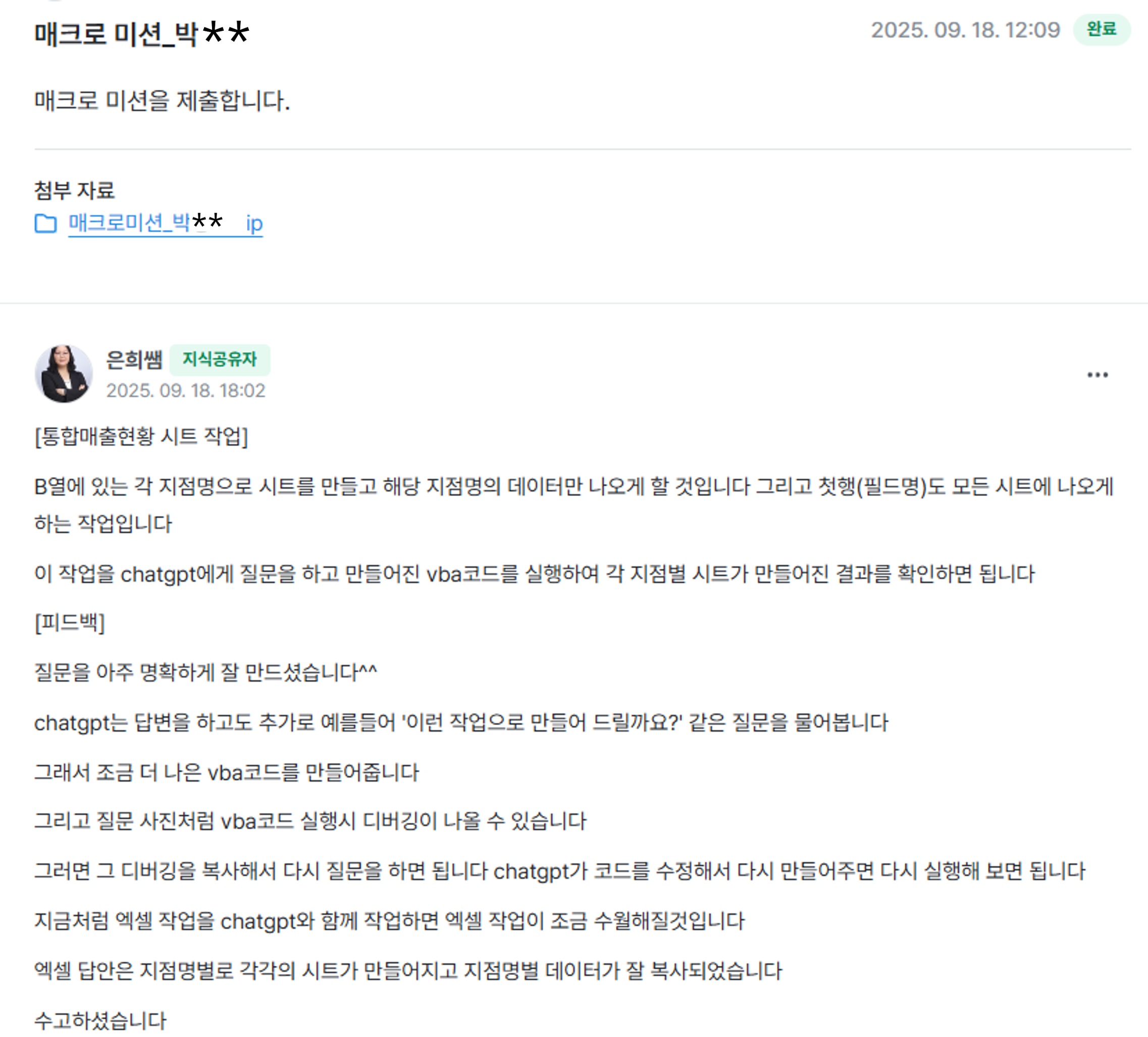
The photo below is an actual example of macro mission feedback from the challenge missions


▣ Then, please tell me specifically in what cases ChatGPT is helpful


1. If you used to search the internet or ask colleagues about Excel functions or features you weren't familiar with while working, now ask ChatGPT.


ChatGPT provides detailed instructions on what to do, so you can just follow them.

For example, when you're unsure which function to use, if you ask a question that fits your specific task, ChatGPT will suggest the appropriate function. Then, you can simply copy and paste the provided function.

Try solving the various problems you encounter in the workplace with ChatGPT. It will save you work time and reduce the instances where you have to feel sorry to colleagues or acquaintances because of Excel.


[Function Task Examples]

Work Situation: I need a function that calculates values based on multiple conditions.

ChatGPT Question:

"How do I write a formula that returns different results based on conditions?
For example, if the value in column B is 'Regular Member', I want to sum the values in column J, and if it's 'Non-member', I want to sum the values in column K."


ChatGPT's response:


2. If you have repetitive tasks in Excel, ask ChatGPT to create VBA code for you.


Did you know you can use VBA code in Excel?

What if you have to perform simple but infinitely repetitive tasks on a large amount of data?

For example, what would you do if you had to insert blank rows throughout more than 1,000 rows of data? Hmm... you'd probably have to give up on leaving work on time.

In this case, VBA code is the answer. If you run it using VBA code, it will be finished in less than a minute
But I don't know VBA code...


Don't worry~~


We have ChatGPT

Even if you don't know VBA code, just tell ChatGPT what you want to do, and it will generate the VBA code for you in an instant.


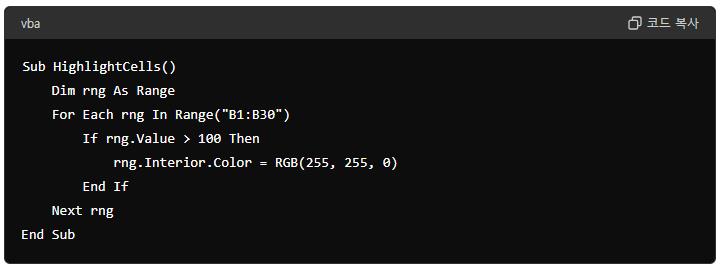
[VBA Code Work Example]

Task Situation: I need to change the background color of cells in column B with values greater than 100 to yellow.


ChatGPT Question:
Please create a VBA code that changes the background color of cells in column B with values greater than 100 to yellow.


ChatGPT's answer:


▣ Is there anything I need to prepare to use ChatGPT?

1. Please prepare Excel 2016 or a later version.

2. Sign up and log in to ChatGPT first. (ChatGPT free version)

https://openai.com/index/chatgpt/

3. Please download Excel Examples.ZIP from the attached files and unzip it in a suitable location.

4. Excel Functions and Macros (VBA Code) using ChatGPT.PDF: It is recommended to download this file and use it like a textbook by either viewing it on your screen or printing it out.


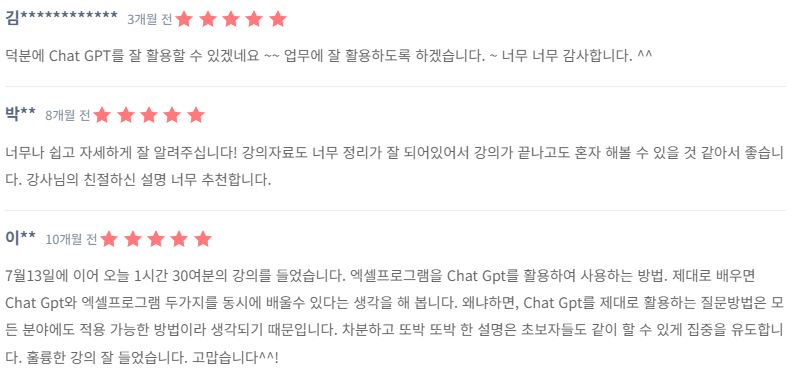
▣ Reviews from those who have already used ChatGPT for Excel
     You can do it too

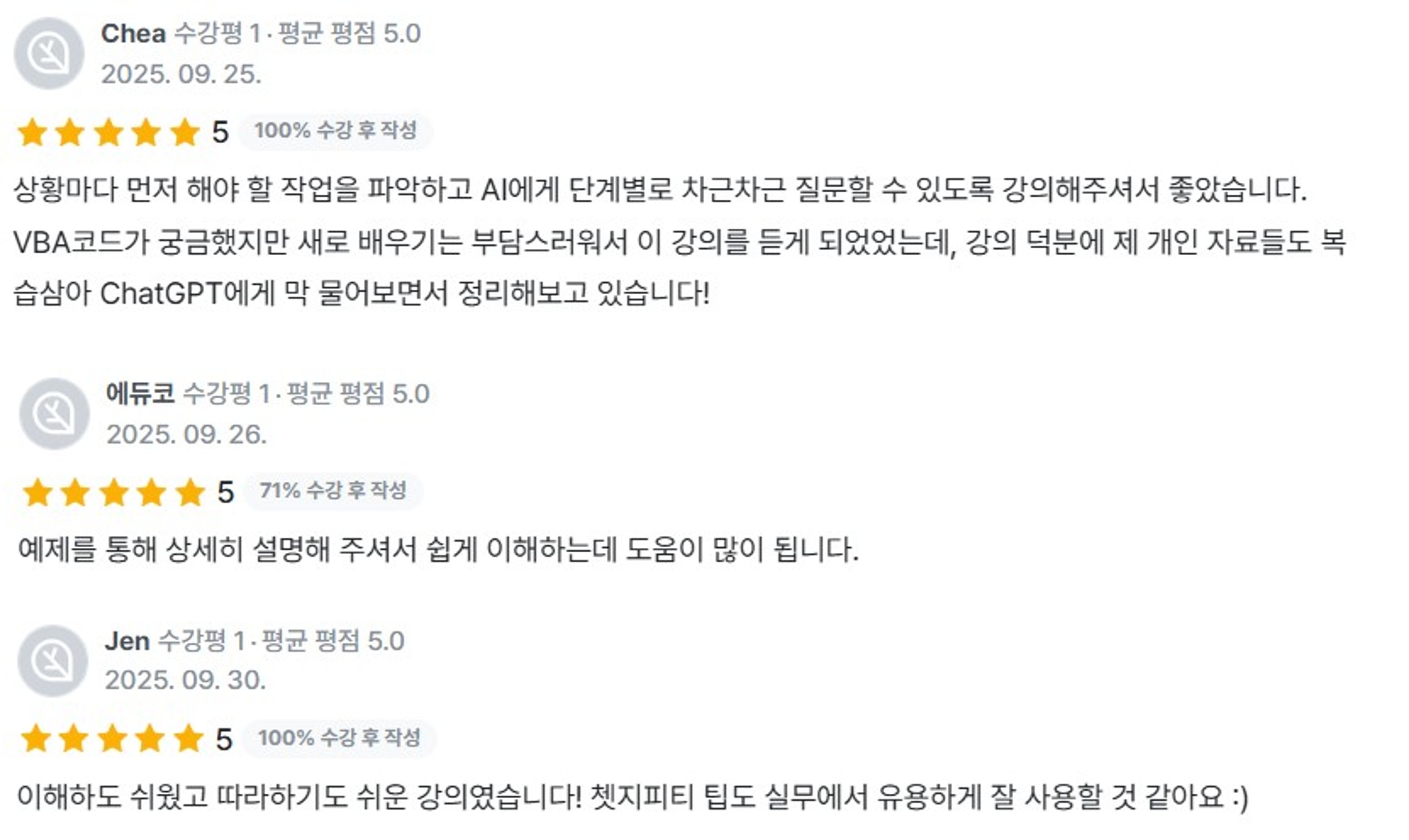
Challenge course reviews


What changes after the challenge

Instead of feeling lost in front of Excel, you will start to think, “I can just ask ChatGPT about this like this.”

Replace repetitive tasks with automation, and Excel will no longer be a time-consuming tool, but a tool that helps you leave work earlier.


🎁 Course Benefits

  • Ask questions anytime during the course → The instructor will answer directly.

  • When you write a course review, you will receive the “Excel Tips to Increase Work Efficiency PDF (100 pages)” e-book and practice exercises.


The ChatGPT I've used feels like a good friend.


It felt like a colleague and a friend who always tries their best to find answers, no matter when or how many times I pester them with questions.
And after asking questions and applying them to real work examples, the formulas and macro problems I was stuck on began to resolve quickly. I felt a huge sense of accomplishment, especially when I completed automation tasks that I wouldn't have even dared to try on my own.
Rather than just becoming better at Excel, the biggest change was that the way I approach Excel work itself has fundamentally changed.
Now, whenever I see a repetitive task, my first thought is, "I can automate this with ChatGPT."

Since Excel tasks vary for every user, please make sure to follow the instructions in the e-book and videos on how to prompt and apply ChatGPT to use it effectively for your Excel work.


Excel tasks you used to struggle with alone,
now complete them from start to finish with ChatGPT.
This challenge will be the starting point for transforming the way you work.


2월

1일

챌린지 시작일

2026년 2월 1일 PM 03:00

챌린지 종료일

2026년 2월 15일 PM 02:30

챌린지 커리큘럼

All

9 lectures ∙ (1hr 24min)

Course Materials:

Lecture resources
챌린지 전용 수업

챌린지에서 배워요

  • You can process repetitive tasks quickly and accurately by utilizing functions and macros with ChatGPT.

  • You will develop the professional capability to find solutions for Excel errors and complex tasks simply by asking questions.

  • You can apply what you learn to your actual work immediately after the course to experience tangible time savings and productivity gains.

Recommended for
these people

Who is this course right for?

  • Office and administrative professionals who frequently work overtime due to repetitive Excel tasks.

  • Those who use functions but gave up because macros were too difficult

  • Office workers who want to automate Excel without coding knowledge.

  • Companies and organizations looking to improve work efficiency and productivity at an organizational level.

Need to know before starting?

  • It is fine even if you only know basic Excel operations such as cell entry, copy and paste, and moving between sheets.

  • Experience with basic functions like SUM and IF is a plus (it's okay if you don't know them perfectly).

Reviews

All

1 reviews

5.0

1 reviews

  • working1604116496님의 프로필 이미지
    working1604116496

    Reviews 1

    Average Rating 5.0

    Edited

    5

    100% enrolled

    I've always been weak at Excel, so it was great to be able to master everything from the basics to using GPT. Just like other reviews mentioned, I highly recommend this if you don't have a solid grasp of Excel fundamentals!

    • dmsgml1030
      Instructor

      I feel truly rewarded to hear that the course helped you organize the basics step-by-step and even utilize GPT, especially when Excel felt difficult for you. I am particularly grateful that you recommended this to those who don't have a solid foundation yet, as that aligns perfectly with the intent of this lecture. Thank you.

이 강의의 지난 수강평

FAQs

취소 및 환불 규정
챌린지는 지식공유자가 설정한 수업 최소 정원이 충족되지 않을 경우, 폐강 안내가 고지되며 결제 내역이 자동취소됩니다.

dmsgml1030's other courses

Check out other courses by the instructor!

$7.70