inflearn logo
Challenge
Ended

ChatGPT×Excel: Functions & Macros Master Challenge Season 3

This is a challenge course where you can learn frequently used Excel functions and macros that reduce repetitive tasks all at once. Using ChatGPT, you'll learn SUM, SUMIF, SUMIFS, IF, and VLOOKUP functions to master essential calculation methods for real work, such as sum calculations, conditional sums, and data lookups. Following that, you'll create VBA code using ChatGPT to automate repetitive tasks in your work. By learning how to calculate quickly with functions and automate repetitive tasks with macros together, you'll acquire practical skills that can significantly reduce work time and increase efficiency. Anyone who can use Excel at a basic level can take on this challenge, and after completing the course, you'll be able to work smarter by freely utilizing functions and macros.

Excel
functions
vba-macros
ChatGPT

6개 수업 학습

3회 미션 수행

성취의 증표, 수료증을 발급해요.

무제한 복습, 내 것으로 만들어요.

지식공유자와 멘토링 혜택!

추가 자료를 통해 학습을 이어나가요.

질문하고 즉시 답을 얻어요.

dmsgml1030님과 함께해요!

477

Learners

55

Reviews

1

Answers

4.9

Rating

20

Courses


I am teaching office certification courses to help students preparing for employment with their self-development.

And I teach practical Excel classes for office workers to help them improve their job competencies

CEO of Eunhee-ssam Class

■ Professional Qualifications

Vocational Training Teacher Level 2 (General Administration & Office Work) Ministry of Employment and Labor

Vocational Training Instructor (Information Technology Operation & Management) Level 3 Ministry of Employment and Labor

Vocational Training Teacher Level 3 (General Administrative Affairs) Ministry of Employment and Labor

Computer Literacy Level 1 Korea Chamber of Commerce and Industry

ITQ Professional Training Instructor (PTI) Korea Productivity Center

ITQ Hangul A, Excel A, PowerPoint A, Internet A Korea Productivity Center

Computer Utilization Ability Level 2 Korea Chamber of Commerce and Industry

Industrial Engineer Information Processing Human Resources Development Service of Korea

■ Publications

85 Excel Functions to Pick and Use Like a Dictionary & Everything About Analysis Tasks (Bookk 2020)

■ Teaching Experience

Taught OA and ITQ certification courses at the Daechi 4-dong Information Education Center in Gangnam-gu as a member of GIT Academy, commissioned by Gangnam-gu Office 2009.03

Lectured on OA and ITQ certifications for people with disabilities and seniors at Gunpo Welfare Center for the Disabled, March 2011

Conducted OA lectures at the Geumcheon-gu Office Computer Training Center as part of Hanbit Computing, entrusted by Geumcheon-gu Office, 2012.03

Taught OA and ITQ certification courses for people with disabilities and seniors at Seodaemun Welfare Center for the Disabled 2013.03

Taught Computer Literacy Level 2 and ITQ OA Master courses for office workers and the general public at the Hwaseong U&I Center (Women's Vision Center) 2015.01

Taught Computer Literacy Level 2 and ITQ OA Master courses as part of the vocational training program for the unemployed at the Gyeonggi Vocational Education Center, 2015.03

Lectured Computer Literacy Level 1 and 2, and ITQ OA Master courses as vocational training programs for the unemployed at Green Computer Academy 2016.04

Obtained "A" grade in Office Administration Trainee Evaluation, Dec 2018

Awarded Star Instructor at Green Computer Academy 2020.10

Selling practical Excel and certification courses on Inflearn 2022.03

[Teacher Eunhee's Class] Launch of an online lecture site specializing in employment certifications, September 2022

[Mapo Youth Naru] Youth Employment Competency ITQ Excel Special Lecture



More


Are your Excel tasks complex and time-consuming?


Excel, Essential for Office Work

ChatGPT×Excel: Functions & Macros Master Challenge

Meet us.


It will become a reliable assistant for your Excel work.


▣ Why did I apply ChatGPT to Excel work?

I teach Computer Specialist Level 1 at a vocational training institution and provide practical Excel training for institutional and corporate employees

Excel is something that students inevitably encounter when they obtain certifications and work at companies, or if they are practitioners at institutions and businesses

Most people only know the Excel functions they need for their work on a partial basis

As work becomes increasingly complex and voluminous, you'll find that your existing Excel knowledge alone isn't enough to meet your needs


How do you solve this situation?


Most people search the internet, look on YouTube, or students who learned from me sometimes contact me via email


However, this method doesn't immediately solve my problem


It takes time to search, and if I check my email late, it's usually already past the time when the issue needed to be resolved

I've always felt sorry about this part


What are some ways to provide immediate help when needed?


I usually make good use of ChatGPT. What if I apply this ChatGPT to Excel?

So when I explained the tasks I needed to ChatGPT and asked about the necessary Excel functions

ChatGPT provides surprisingly accurate answers and even kindly explains how to use them

Among the various Excel features, I found the use of functions and macro work (VBA code) particularly helpful

If you have concerns about Excel functions and macros, ChatGPT can be very helpful

What was created this way is [VOD] Excel Functions and Macros (VBA Code) Using ChatGPT.


This course is not just a lecture you listen to and finish, but is designed so that you can learn by following along with practical examples after listening to the lecture, and make it 'your own' by solving the given missions. And it is structured as a challenge course where you can fill in your weak areas with professional feedback from Teacher Eunhee


'ChatGPT×Excel: Functions & Macros Master Challenge'course consists of the following stages

  1. While taking online classes, I learned how to apply ChatGPT to functions and create macros

  2. I am submitting the mission on functions and macros

  3. You'll learn how to use functions and macros in ChatGPT while receiving professional feedback.


How to Complete the Mission

There is a mission prepared below the Basic Functions and Macros lecture
Read the mission description, download the mission attachment file, solve it according to the instructions, and submit it


Get professional feedback from Teacher Eunhee

When you receive feedback, you can discover shortcomings or habits that you might not notice on your own, and you can find solutions faster through others' opinions rather than struggling alone.
Additionally, positive feedback builds confidence, while advice on areas needing improvement provides motivation for growth.
In other words, you can feel a sense of achievement by reinforcing what you do well and improving what needs work.
Through Teacher Eunhee's thorough feedback on the missions you submit, you can fill in the gaps in your skills.

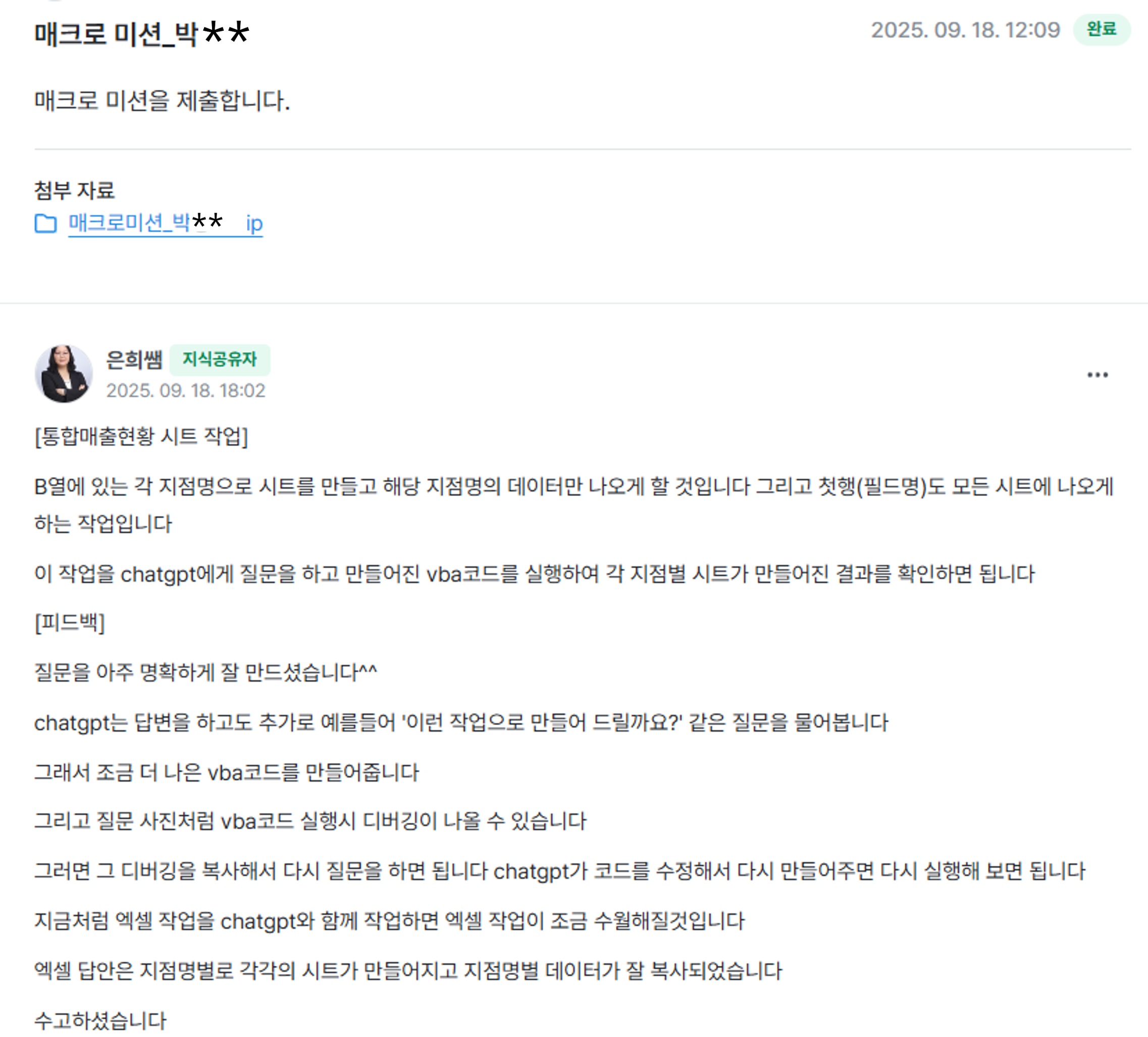
The photo below is feedback on the macro mission from the challenge missions


By the time the challenge course ends, functions and macros that once felt vague will

You will discover that it can be easily solved using ChatGPT

Now you'll be able to finish your work quickly


🎁 Course Benefits

  • You can ask questions anytime during the course → The instructor will answer directly

  • When you write a review, you'll receive the "Excel Tips PDF for Boosting Work Efficiency (100 pages)" e-book along with practice examples


▣ Then please tell me specifically in what cases ChatGPT can be helpful


1. If you've been searching the internet or asking colleagues about Excel functions or features you don't know well while working with Excel, now ask ChatGPT instead.


ChatGPT provides detailed instructions on how to do it, so you can just follow along.

For example, when you're unsure which function to use, you can ask ChatGPT a question that fits your work situation, and it will tell you the appropriate function to use. Then you can simply copy and paste the function it suggests.

Try solving various problems you encounter at work together with ChatGPT. This will reduce your work time and you'll have fewer occasions to feel sorry to colleagues or acquaintances because of Excel.


[Function Work Example]

Task situation: We need a function that calculates values based on multiple conditions.

ChatGPT Question:

"How do I write a formula that returns different results based on conditions?
For example, I want to sum the values in column J if the value in column B is 'Full Member', and sum the values in column K if it's 'Non-member'."


ChatGPT's response:


2. If you have repetitive tasks in Excel, ask ChatGPT to create VBA code for you.


Did you know that you can write VBA code in Excel?

When you need to perform simple but infinitely repetitive tasks on large amounts of data?

For example, if you need to insert flights in the middle of more than 1000 data entries, what should you do? Well..... you'll have to give up on leaving work on time.

In this case, VBA code is the answer. If you write and run VBA code, it will be done in less than a minute.
But what if I don't know VBA code....


Don't worry~~


We have ChatGPT

Even if I don't know VBA code, if I tell ChatGPT what task I want to accomplish, it will quickly create the VBA code for me.


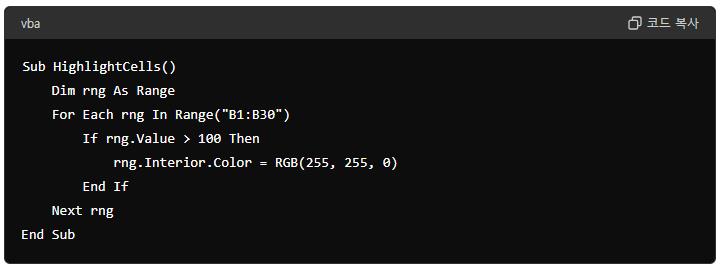
[VBA Code Work Example]

Task Status: Need to change the background color to yellow for cells in column B where the value is greater than 100


ChatGPT Question:
Please create a VBA code that changes the background color to yellow for cells in column B where the value is greater than 100.


ChatGPT's response:


▣ So how can we use ChatGPT effectively?


You need to ask good questions (prompts).

ChatGPT and other generative AI systems produce different results depending on the question asked, which is why techniques for asking appropriate questions are necessary.

Wait a minute!!!

I don't really know how to ask questions?

Don't worry!!!

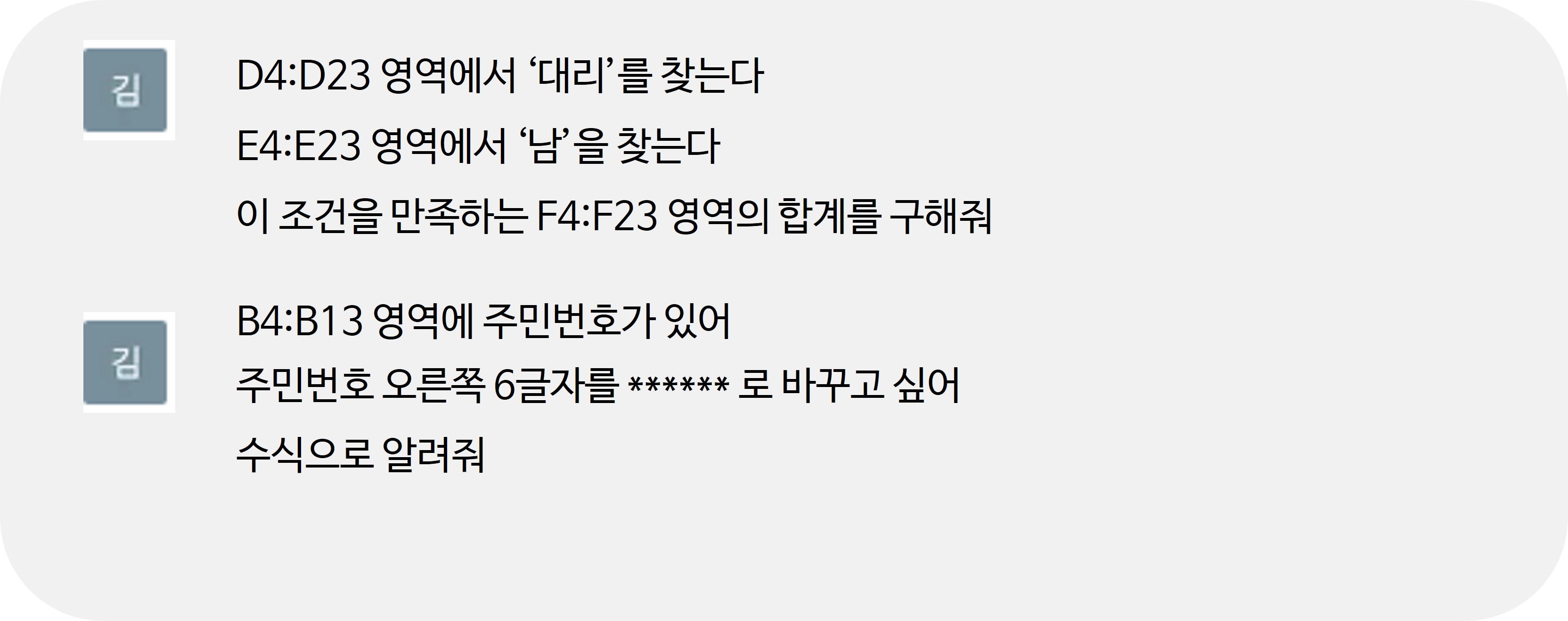
Teacher Eunhee shows you in the e-book how to ask questions about your Excel work to get the answers you want. By following the example questions in the e-book, you'll learn how to ask questions that will get you the answers you're looking for.


[Example Question]


▣ What do I need to prepare to use ChatGPT?

1. Please prepare Excel 2016 or a later version.

2. First, sign up for ChatGPT and log in. (ChatGPT 4o free version)

https://openai.com/index/chatgpt/

3. Among the attached files, download "Excel Example.ZIP" and extract it to an appropriate location.

4. You can download the ChatGPT Excel Functions and Macros (VBA Code).PDF file, display it on your screen, or print it out to use as a textbook.


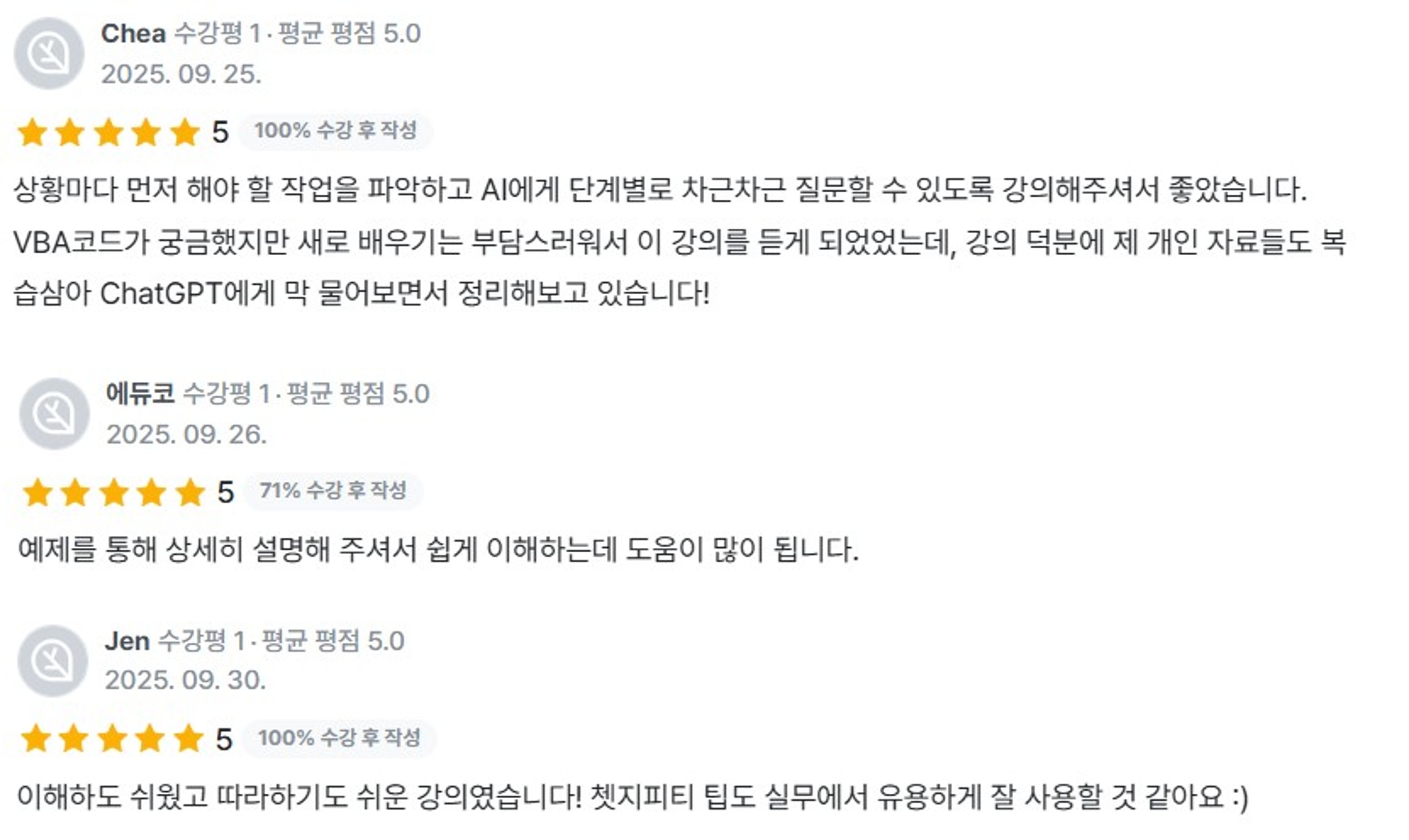
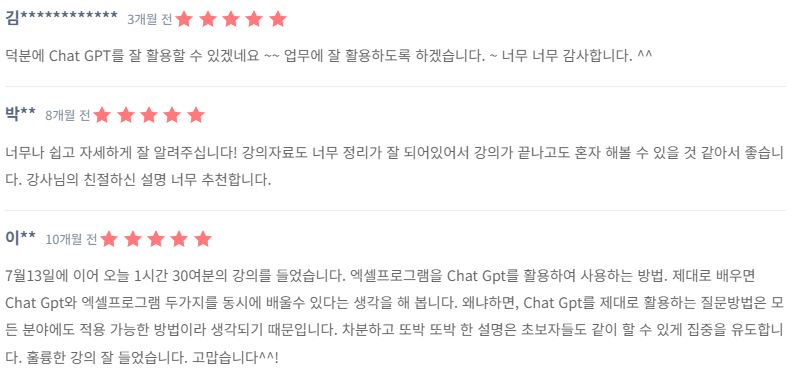
▣ Reviews from those who have already used ChatGPT with Excel
You can do it too

This is a challenge course review.


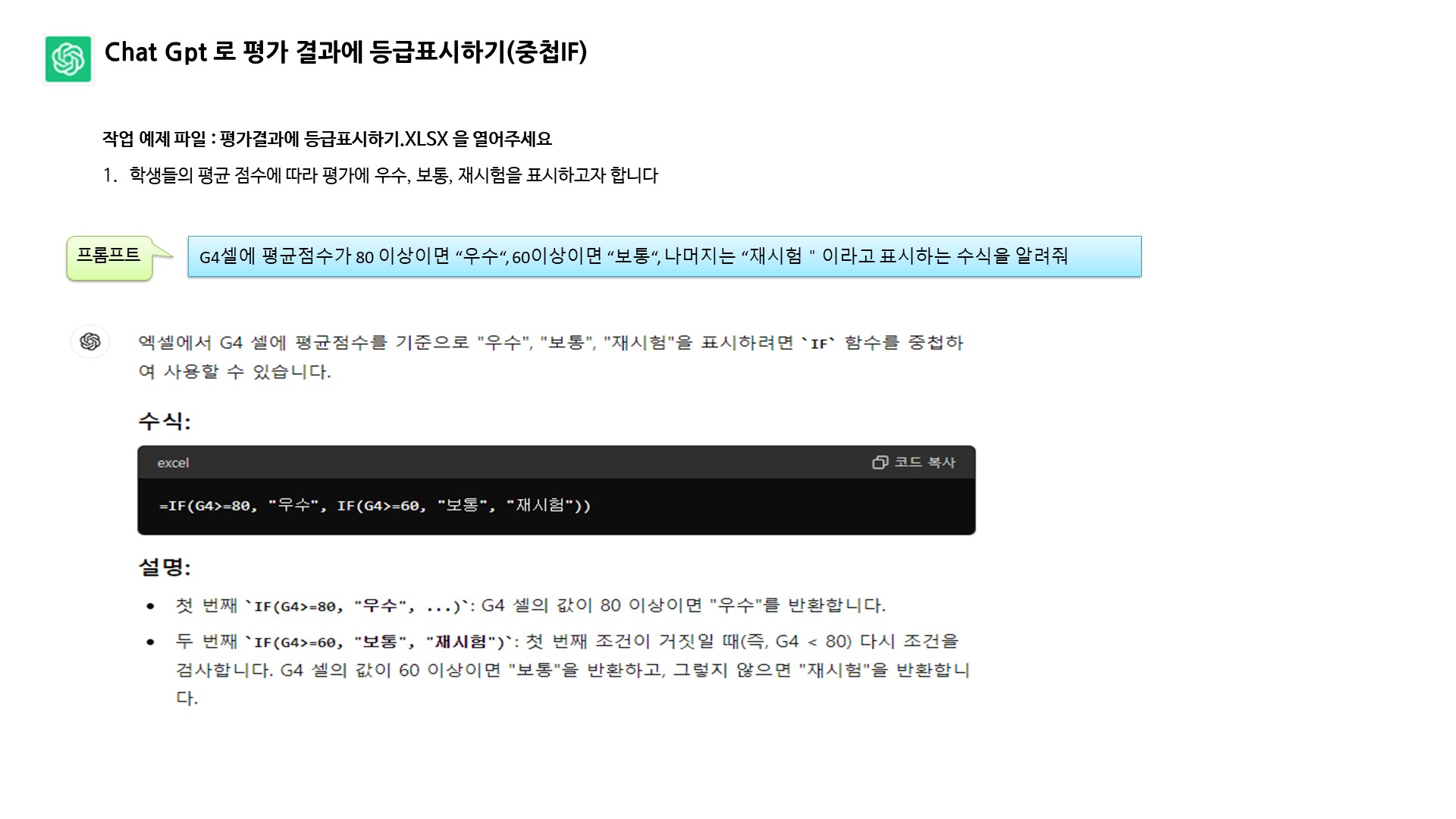
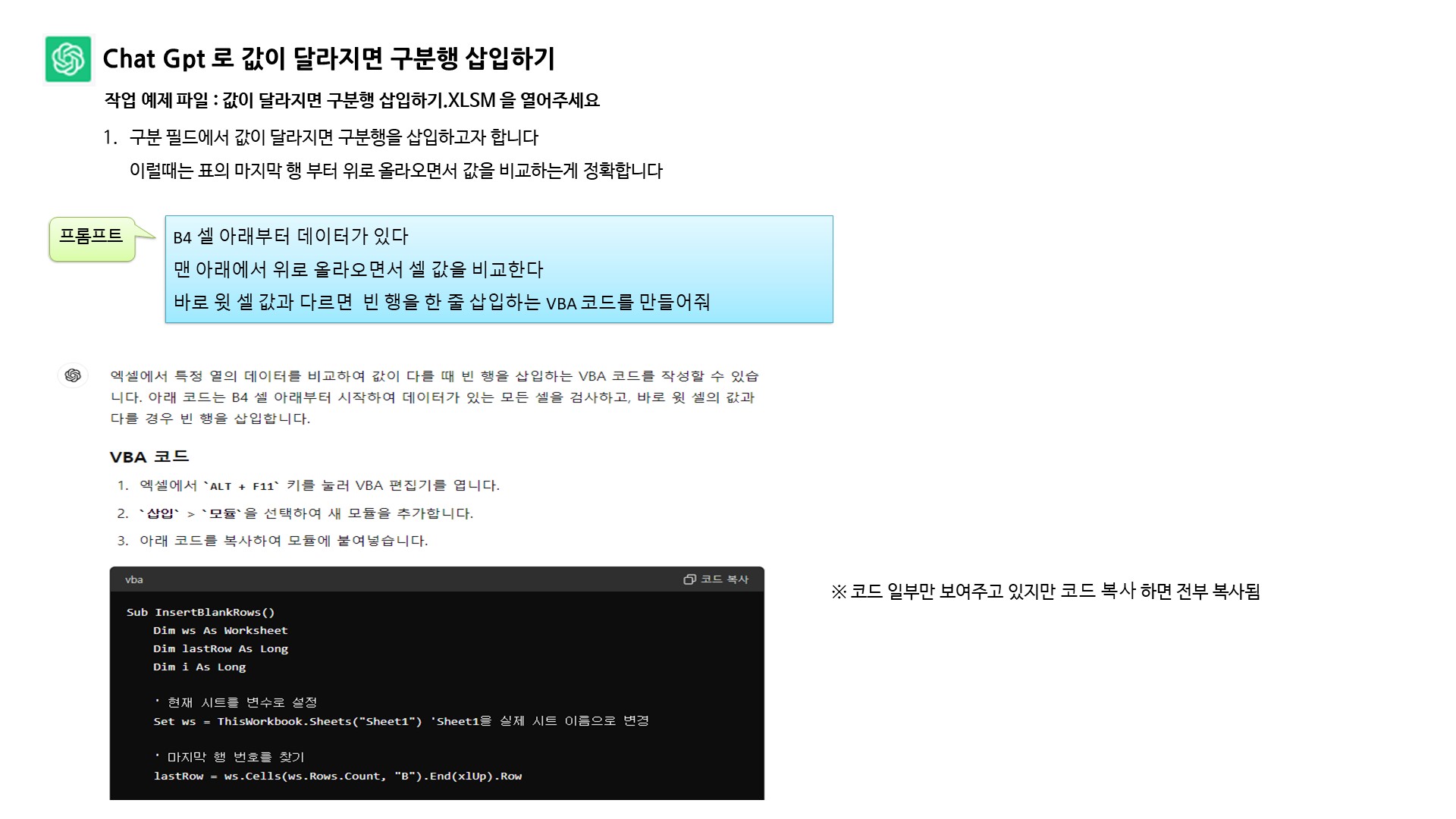
▣ Can I see examples of how the e-book PDF provided with the VOD explains how to use ChatGPT for Excel tasks?

Example of Using ChatGPT for Actual Nested IF Functions

Example of using ChatGPT to create VBA code that adds separator rows when values change

The PDF e-book contains even more examples beyond the situations illustrated above, including functions and VBA code that can be utilized in your work.


▣ How is the VOD structured?

Lesson 1: Explains how to prepare for practice and ask good questions to use ChatGPT in Excel

Lesson 2 Explains how to ask ChatGPT about Excel functions and how to apply the answers in Excel

Lesson 3: When creating macros for repetitive Excel tasks using VBA code, this explains how to have ChatGPT generate the code and then create and execute it as a macro button in Excel


▣ Frequently Asked Questions Q & A

Q. Can non-majors take this course?

Yes. Excel is a program widely used in all types of work, so regardless of your major, it will be useful for anyone to know.


Q. Why should I learn Excel functions?

Learning functions in Excel will enable you to use them in the right situations at work, increasing your work efficiency and allowing you to leave work on time.
In this video, you'll learn how to apply functions using ChatGPT, making it a bit easier and more convenient to implement functions.


Q. What is a macro?

When working with Excel, you'll encounter repetitive tasks. If you create a macro for these repetitive tasks, you can quickly solve them later by running the macro. The macro content is created as VBA code. We use ChatGPT to help with this VBA code.


Q. Does this course provide PDFs for reference and practice examples along with the videos?

Yes, we provide detailed PDF explanations and Excel practice examples together
You can follow along while watching the videos, which will help you understand much faster


The ChatGPT I've used feels like a good friend.


They were like a colleague and friend who always tried hard to find answers, no matter when I asked or how much I bothered them with questions.

Since Excel tasks vary for each user, I strongly recommend following the instructions in the e-book and videos on how to ask questions and apply ChatGPT to Excel work


How about following along with this video and applying ChatGPT to your Excel work?


1월

11일

챌린지 시작일

2026년 1월 11일 PM 03:00

챌린지 종료일

2026년 1월 25일 PM 02:30

챌린지 커리큘럼

All

9 lectures ∙ (1hr 24min)

Course Materials:

Lecture resources
챌린지 전용 수업

챌린지에서 배워요

  • You can learn how to ask ChatGPT questions effectively

  • I can apply the appropriate functions that ChatGPT suggests for my work tasks.

  • ChatGPT can help you apply macro VBA code to your work

Recommended for
these people

Who is this course right for?

  • Office workers who want to increase their Excel productivity speed

  • A workplace where you want to learn functions and macros together

  • Users who want to integrate ChatGPT into their work with Excel

  • Someone who needs a friend who knows Excel well

Need to know before starting?

  • It would be helpful to know about cell selection, data input/editing, and sheet navigation, addition, and deletion.

  • Having experience with simple functions like SUM and AVERAGE will make this even more beneficial

Reviews

All

2 reviews

5.0

2 reviews

  • chairos14722님의 프로필 이미지
    chairos14722

    Reviews 2

    Average Rating 4.5

    5

    100% enrolled

    It was great to learn that I can easily utilize VBA, which I previously thought was difficult, through GPT. I hope there will be an advanced VBA course using GPT. I will definitely take it if such a course becomes available. Thank you.

    • dmsgml1030
      Instructor

      I am delighted to hear that GPT has made VBA feel much easier for you, as it means the intent of the lecture was well-conveyed. Thank you very much for your feedback regarding an advanced VBA course utilizing GPT. I will make sure to prepare an advanced course that focuses on practical workplace automation. Your interest gives me great strength, and I will be sure to keep you in mind as soon as the course opens. I will continue to provide practical, work-oriented content that you can apply immediately to your tasks. Thank you once again.

  • ncy7676님의 프로필 이미지
    ncy7676

    Reviews 7

    Average Rating 5.0

    5

    67% enrolled

    이 강의의 지난 수강평

    취소 및 환불 규정
    챌린지는 지식공유자가 설정한 수업 최소 정원이 충족되지 않을 경우, 폐강 안내가 고지되며 결제 내역이 자동취소됩니다.

    dmsgml1030's other courses

    Check out other courses by the instructor!

    $7.70