titanic_df = pd.read_csv('titanic_train.csv')
print('titanic 변수 type:',type(titanic_df))

---------------------------------------------------------------------------
FileNotFoundError                         Traceback (most recent call last)
C:\Users\ADMINI~1\AppData\Local\Temp/ipykernel_30904/3046420676.py in <module>
----> 1 titanic_df = pd.read_csv('titanic_train.csv')
      2 print('titanic 변수 type:',type(titanic_df))

~\anaconda3\lib\site-packages\pandas\util\_decorators.py in wrapper(*args, **kwargs)
    309                     stacklevel=stacklevel,
    310                 )
--> 311             return func(*args, **kwargs)
    312
    313         return wrapper

~\anaconda3\lib\site-packages\pandas\io\parsers\readers.py in read_csv(filepath_or_buffer, sep, delimiter, header, names, index_col, usecols, squeeze, prefix, mangle_dupe_cols, dtype, engine, converters, true_values, false_values, skipinitialspace, skiprows, skipfooter, nrows, na_values, keep_default_na, na_filter, verbose, skip_blank_lines, parse_dates, infer_datetime_format, keep_date_col, date_parser, dayfirst, cache_dates, iterator, chunksize, compression, thousands, decimal, lineterminator, quotechar, quoting, doublequote, escapechar, comment, encoding, encoding_errors, dialect, error_bad_lines, warn_bad_lines, on_bad_lines, delim_whitespace, low_memory, memory_map, float_precision, storage_options)
    584     kwds.update(kwds_defaults)
    585
--> 586     return _read(filepath_or_buffer, kwds)
    587
    588

~\anaconda3\lib\site-packages\pandas\io\parsers\readers.py in _read(filepath_or_buffer, kwds)
    480
    481     # Create the parser.
--> 482     parser = TextFileReader(filepath_or_buffer, **kwds)
    483
    484     if chunksize or iterator:

~\anaconda3\lib\site-packages\pandas\io\parsers\readers.py in __init__(self, f, engine, **kwds)
    809             self.options["has_index_names"] = kwds["has_index_names"]
    810
--> 811         self._engine = self._make_engine(self.engine)
    812
    813     def close(self):

~\anaconda3\lib\site-packages\pandas\io\parsers\readers.py in _make_engine(self, engine)
   1038             )
   1039         # error: Too many arguments for "ParserBase"
-> 1040         return mapping[engine](self.f, **self.options)  # type: ignore[call-arg]
   1041
   1042     def _failover_to_python(self):

~\anaconda3\lib\site-packages\pandas\io\parsers\c_parser_wrapper.py in __init__(self, src, **kwds)
     49
     50         # open handles
---> 51         self._open_handles(src, kwds)
     52         assert self.handles is not None
     53

~\anaconda3\lib\site-packages\pandas\io\parsers\base_parser.py in _open_handles(self, src, kwds)
    220         Let the readers open IOHandles after they are done with their potential raises.
    221         """
--> 222         self.handles = get_handle(
    223             src,
    224             "r",

~\anaconda3\lib\site-packages\pandas\io\common.py in get_handle(path_or_buf, mode, encoding, compression, memory_map, is_text, errors, storage_options)
    700         if ioargs.encoding and "b" not in ioargs.mode:
    701             # Encoding
--> 702             handle = open(
    703                 handle,
    704                 ioargs.mode,

FileNotFoundError: [Errno 2] No such file or directory: 'titanic_train.csv'
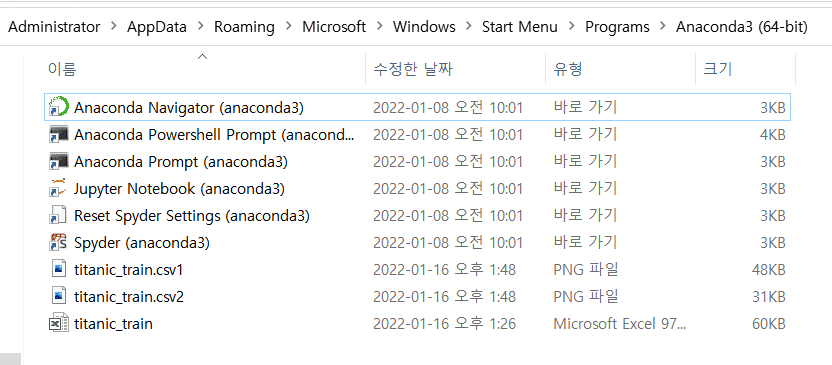
왜 인식이 안되는지 잘 모르겠습니다
밑에 글에 같은 저장공간에 두시라고하셨는데 titanic_train.csv파일을 한 파일 안에 같이 넣었지만 이런 문제가 발생합니다