


css 적용안됨
577
작성한 질문수 1
03.css---------------------
.page-header{
  display: block;
  padding: 1em;
  background: lightgray;
}
.content-container{
 font-size: 0; /*공백 을 0 으로 지정해서 인라인 블록을 붙이기 위해서*/
}
.content-container: after{
  /* css 가상 컨텐트/ content-container: before 로 한다면 의미가 없다  */
 content:  '';
 clear: left;
 display: block;
 height: 0;
 visibility: hidden;
}

.content-section{
  /* float : 아딴 엘리먼트에 적용되면, 지정된 방향에  두고 주변요소들이 감싸고 돌게 된다 . 요소가 씹힌다
  공간을 차지 하지 않는다 */
  float: left;
  padding: 1em;
  font-size: 1rem;
  /* rem: root em : <html>의 폰트사이즈로 맞춘다
<html> 사이즈를 안맞춘다면 defaut로 16px로 맞춰져 있다
  */
}
.content-section-a{
  /* 왼쪽 1em 오른쪽 1em을 뺴라는 것 */
  width: calc(30% -2em );
  background: yellow;
}
.content-section-b{
  float:right;
  width: calc(70%-2em );
  background: pink;
}
.page-footer{
  /* float:left 를 해제되게한다
div가 딱 끝나는 시점에서 float를 해제 시킨다
  */
  clear: left;
  padding: 1em;
  background: yellowgreen;
}

/* 이거 적용안됨 */
.global-menu-link{
  display: block;
  margin-bottom: 5px;
  background: white;
}
.clear{
  clear:left;
}
---------------- reset.css
html, body, div, span, applet, object, iframe,
h1, h2, h3, h4, h5, h6, p, blockquote, pre,
a, abbr, acronym, address, big, cite, code,
del, dfn, em, img, ins, kbd, q, s, samp,
small, strike, strong, sub, sup, tt, var,
b, u, i, center,
dl, dt, dd, ol, ul, li,
fieldset, form, label, legend,
table, caption, tbody, tfoot, thead, tr, th, td,
article, aside, canvas, details, embed,
figure, figcaption, footer, header, hgroup,
menu, nav, output, ruby, section, summary,
time, mark, audio, video {
	margin: 0;
	padding: 0;
	border: 0;
	font-size: 100%;
	font: inherit;
	vertical-align: baseline;
}
/* HTML5 display-role reset for older browsers */
article, aside, details, figcaption, figure,
footer, header, hgroup, menu, nav, section {
	display: block;
}
body {
	line-height: 1;
}
ol, ul {
	list-style: none;
}
blockquote, q {
	quotes: none;
}
blockquote:before, blockquote:after,
q:before, q:after {
	content: '';
	content: none;
}
table {
	border-collapse: collapse;
	border-spacing: 0;
}
css 가 적용이 안되는데 왜이러는 걸까요 ??
01.html-----------------------------------------------------
<!DOCTYPE html>
<html>
<head>
<title>Document</title>
<link rel="stylesheet" href="css/reset.css">
<link rel="stylesheet" href="css/02.css">
</head>
<body>
<article class="page">
<header class="page-header">
<h1 class="page-title">페이지 제목</h1>
<nav class="global-menu">
<a href="#" class="global-menu-link">홈</a>
<a href="#" class="global-menu-link">소개</a>
<a href="#" class="global-menu-link">메뉴</a>
<a href="#" class="global-menu-link">커뮤니티</a>
<a href="#" class="global-menu-link">연락처</a>
</nav>
</header>
<div class="content-container">
<section class="content-section content-section-a">
<p>Lorem ipsum dolor sit amet, consectetur adipisicing elit, sed do eiusmod tempor incididunt ut labore et dolore magna aliqua. Ut enim ad minim veniam, quis nostrud exercitation ullamco laboris nisi ut aliquip ex ea commodo consequat. Duis aute irure dolor in reprehenderit in voluptate velit esse cillum dolore eu fugiat nulla pariatur. Excepteur sint occaecat cupidatat non proident, sunt in culpa qui officia deserunt mollit anim id est laborum.</p>
</section>
<section class="content-section content-section-b">
<p>Lorem ipsum dolor sit amet, consectetur adipisicing elit. Asperiores suscipit eveniet, accusamus, deserunt dolore odit aperiam obcaecati repellendus sunt beatae voluptates alias nihil ut quibusdam dicta quam illum mollitia harum dolores neque quaerat. Quis vel repellat velit animi iure similique sed ipsam delectus maiores mollitia nulla, tempora earum beatae ex. Minima, porro! Doloribus tempore dolorum cupiditate, earum nisi excepturi nihil enim beatae, amet ab nemo porro ratione officia magnam laboriosam. Ea aliquid, repellendus nisi! Mollitia ratione officiis aut. Reprehenderit aperiam nulla distinctio neque totam dolor voluptatum laboriosam placeat temporibus, tempora asperiores maiores quis sint, impedit ullam, aut hic animi debitis.</p>
</section>
<div class="clear"></div>
</div>
<footer class="page-footer">
<p class="copyright">2019 © 안녕하세요</p>
</footer>
</article>
</body>
</html>답변 1
0
안녕하세요, 제주코딩베이스캠프입니다 :)
luciayj님께서 올려주신 코드를 확인해 보니 별다른 문제는 없어보입니다.
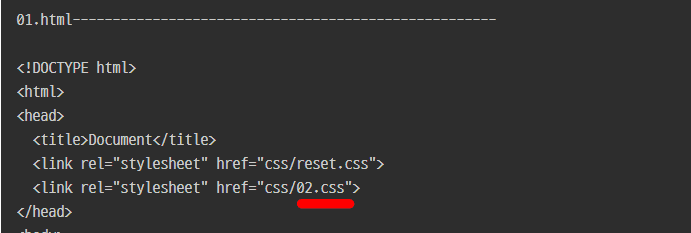
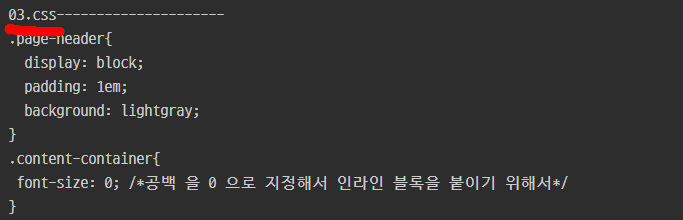
css 파일이 03.css 로 저장되어 있는 것으로 보이는데 파일명과 01.html에서 <head></head>를 한 번 확인해 주시길 바랍니다.
혹시 충분한 답변이 되지 않았거나 추가로 질문이 있으시면 언제든지 답글 부탁드립니다.
감사합니다.
javascript 자동완성 안됨
0
1723
1
css float 이용하기 부분에서 :after 적용이 안됩니다
0
498
1
atom 실행 안됨
0
408
1
혹시 사용하신 지도를 개인 프로젝트에 사용해도 될까요??
0
347
0
reset.css 적용이 안됩니다...
0
550
0
제 코드에 무슨 문제가 있을까요?
0
345
1
Lorem
0
232
0
날짜출력
0
345
1
카페 리스트 띄우기1 에서 cafe list가 웹 화면에 표시가 되지 않습니다.
0
291
1
!ls 가 안되는경우
1
1318
3
indexOf 에 대한 설명중에 궁금한게 있습니다.
0
232
0
Request 결과값이 잘나오지 않는데, 수정해야할 부분이 있을까요?
0
339
0
ajax 수업중 오류
0
232
0
클래스 추가/제거 질문있습니다.
0
299
0
Atom-Live-Server 디렉토리 변경 질문있습니다.
0
691
2
웹페이지 코드는 어디서 받을 수 있을까요?
0
336
1
Django "배포" 부분에서 구름ide에 Connection Refused창이 뜹니다.
0
710
2
Django부분중에 write.html에 대해 질문드립니다.
0
235
0
장고3 으로 강의 따라해도 상관 없는지요?? 그리고 리뉴얼은 언제 하시나요?
0
227
1
화면이 계속 꺼져요.
0
582
3
break_continue 강좌 1분 10초
2
285
2
갑자기 동영상 끊기더니 재접속 안되네요.
0
170
0
django 2.x
1
181
1
38강 jQuery이벤트1 을 듣고 있습니다.
1
334
1