


'[섹션 8. Connection & Hook] Postgres 컨테이너 올리기' 강의에서 sudo docker compose up 명령어가 제대로 실행되지 않습니다.
468
작성한 질문수 1
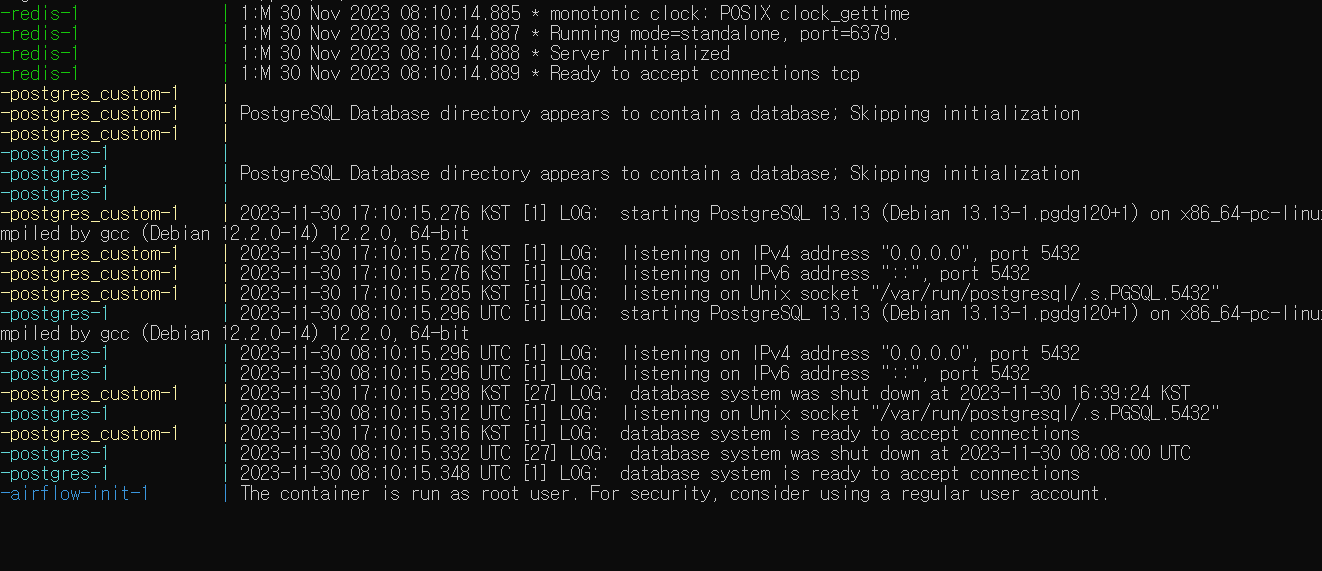 이전까지는 도커 서비스를 잘 수행이 됐었습니다. 이번 강의에서 docker-compose.yaml파일을 수정 후 서비스를 내렸다가 다시 올리려고 하니 사진처럼 해당 로그까지만 찍힌 후에 더 이상 진행이 되지 않고 있습니다. 계속 기다려봐도 상태가 그대로인 것을 보아하니 어딘가 문제가 생긴 것 같습니다.
yaml파일은 올려주신 파일과 비교해봤을 때 오타나 다른 문제는 없는 것 같습니다. 원래의 docker-compose.yaml로 교체하면 잘 실행이 되는 상태입니다. 뭐가 문제일까요?
답변 2
1
안녕하세요 kms7574님!
우선 올려주신걸로는 원인 확인이 어려운데, kms7574님이 작성하신 yaml 파일을 올려주실래요?
제가 실행해보고 확인해볼께요.
0
# Licensed to the Apache Software Foundation (ASF) under one
# or more contributor license agreements.  See the NOTICE file
# distributed with this work for additional information
# regarding copyright ownership.  The ASF licenses this file
# to you under the Apache License, Version 2.0 (the
# "License"); you may not use this file except in compliance
# with the License.  You may obtain a copy of the License at
#
#   http://www.apache.org/licenses/LICENSE-2.0
#
# Unless required by applicable law or agreed to in writing,
# software distributed under the License is distributed on an
# "AS IS" BASIS, WITHOUT WARRANTIES OR CONDITIONS OF ANY
# KIND, either express or implied.  See the License for the
# specific language governing permissions and limitations
# under the License.
#

# Basic Airflow cluster configuration for CeleryExecutor with Redis and PostgreSQL.
#
# WARNING: This configuration is for local development. Do not use it in a production deployment.
#
# This configuration supports basic configuration using environment variables or an .env file
# The following variables are supported:
#
# AIRFLOW_IMAGE_NAME           - Docker image name used to run Airflow.
#                                Default: apache/airflow:2.7.3
# AIRFLOW_UID                  - User ID in Airflow containers
#                                Default: 50000
# AIRFLOW_PROJ_DIR             - Base path to which all the files will be volumed.
#                                Default: .
# Those configurations are useful mostly in case of standalone testing/running Airflow in test/try-out mode
#
# _AIRFLOW_WWW_USER_USERNAME   - Username for the administrator account (if requested).
#                                Default: airflow
# _AIRFLOW_WWW_USER_PASSWORD   - Password for the administrator account (if requested).
#                                Default: airflow
# _PIP_ADDITIONAL_REQUIREMENTS - Additional PIP requirements to add when starting all containers.
#                                Use this option ONLY for quick checks. Installing requirements at container
#                                startup is done EVERY TIME the service is started.
#                                A better way is to build a custom image or extend the official image
#                                as described in https://airflow.apache.org/docs/docker-stack/build.html.
#                                Default: ''
#
# Feel free to modify this file to suit your needs.
---
version: '3.8'
x-airflow-common:
  &airflow-common
  # In order to add custom dependencies or upgrade provider packages you can use your extended image.
  # Comment the image line, place your Dockerfile in the directory where you placed the docker-compose.yaml
  # and uncomment the "build" line below, Then run `docker-compose build` to build the images.
  image: ${AIRFLOW_IMAGE_NAME:-apache/airflow:2.7.3}
  # build: .
  environment:
    &airflow-common-env
    AIRFLOW__CORE__EXECUTOR: CeleryExecutor
    AIRFLOW__DATABASE__SQL_ALCHEMY_CONN: postgresql+psycopg2://airflow:airflow@postgres/airflow
    # For backward compatibility, with Airflow <2.3
    AIRFLOW__CORE__SQL_ALCHEMY_CONN: postgresql+psycopg2://airflow:airflow@postgres/airflow
    AIRFLOW__CELERY__RESULT_BACKEND: db+postgresql://airflow:airflow@postgres/airflow
    AIRFLOW__CELERY__BROKER_URL: redis://:@redis:6379/0
    AIRFLOW__CORE__FERNET_KEY: ''
    AIRFLOW__CORE__DAGS_ARE_PAUSED_AT_CREATION: 'true'
    AIRFLOW__CORE__LOAD_EXAMPLES: 'true'
    AIRFLOW__API__AUTH_BACKENDS: 'airflow.api.auth.backend.basic_auth,airflow.api.auth.backend.session'
    # yamllint disable rule:line-length
    # Use simple http server on scheduler for health checks
    # See https://airflow.apache.org/docs/apache-airflow/stable/administration-and-deployment/logging-monitoring/check-health.html#scheduler-health-check-server
    # yamllint enable rule:line-length
    AIRFLOW__SCHEDULER__ENABLE_HEALTH_CHECK: 'true'
    # WARNING: Use _PIP_ADDITIONAL_REQUIREMENTS option ONLY for a quick checks
    # for other purpose (development, test and especially production usage) build/extend Airflow image.
    _PIP_ADDITIONAL_REQUIREMENTS: ${_PIP_ADDITIONAL_REQUIREMENTS:-}
  volumes:
    - ${AIRFLOW_PROJ_DIR:-.}/airflow/dags:/opt/airflow/dags
    - ${AIRFLOW_PROJ_DIR:-.}/logs:/opt/airflow/logs
    - ${AIRFLOW_PROJ_DIR:-.}/airflow/config:/opt/airflow/config
    - ${AIRFLOW_PROJ_DIR:-.}/airflow/plugins:/opt/airflow/plugins
  user: "${AIRFLOW_UID:-50000}:0"
  depends_on:
    &airflow-common-depends-on
    redis:
      condition: service_healthy
    postgres:
      condition: service_healthy

services:
  postgres_custom:
    image: postgres:13
    environment:
      POSTGRES_USER: 'user_id'
      POSTGRES_PASSWORD: 'password'
      POSTGRES_DB: 'db_name'
      TZ: Asia/Seoul
    volumes:
      - postgres-custom-db-volume:/var/lib/postgresql/data
    ports:
      - 5432:5432
    networks:
      network_custom:
        ipv4_address: 172.28.0.3

  postgres:
    image: postgres:13
    environment:
      POSTGRES_USER: airflow
      POSTGRES_PASSWORD: airflow
      POSTGRES_DB: airflow
    volumes:
      - postgres-db-volume:/var/lib/postgresql/data
    healthcheck:
      test: ["CMD", "pg_isready", "-U", "airflow"]
      interval: 10s
      retries: 5
      start_period: 5s
    restart: always
    ports:
      - 5431:5432
    networks:
      network_custom:
        ipv4_address: 172.28.0.4

  redis:
    image: redis:latest
    expose:
      - 6379
    healthcheck:
      test: ["CMD", "redis-cli", "ping"]
      interval: 10s
      timeout: 30s
      retries: 50
      start_period: 30s
    restart: always
    networks:
      network_custom:
        ipv4_address: 172.28.0.5

  airflow-webserver:
    <<: *airflow-common
    command: webserver
    ports:
      - "8080:8080"
    healthcheck:
      test: ["CMD", "curl", "--fail", "http://localhost:8080/health"]
      interval: 30s
      timeout: 10s
      retries: 5
      start_period: 30s
    restart: always
    depends_on:
      <<: *airflow-common-depends-on
      airflow-init:
        condition: service_completed_successfully
    networks:
      network_custom:
        ipv4_address: 172.28.0.6

  airflow-scheduler:
    <<: *airflow-common
    command: scheduler
    healthcheck:
      test: ["CMD", "curl", "--fail", "http://localhost:8974/health"]
      interval: 30s
      timeout: 10s
      retries: 5
      start_period: 30s
    restart: always
    depends_on:
      <<: *airflow-common-depends-on
      airflow-init:
        condition: service_completed_successfully
    networks:
      network_custom:
        ipv4_address: 172.28.0.7
0
airflow-worker:
    <<: *airflow-common
    command: celery worker
    healthcheck:
      # yamllint disable rule:line-length
      test:
        - "CMD-SHELL"
        - 'celery --app airflow.providers.celery.executors.celery_executor.app inspect ping -d "celery@$${HOSTNAME}" || celery --app airflow.executors.celery_executor.app inspect ping -d "celery@$${HOSTNAME}"'
      interval: 30s
      timeout: 10s
      retries: 5
      start_period: 30s
    environment:
      <<: *airflow-common-env
      # Required to handle warm shutdown of the celery workers properly
      # See https://airflow.apache.org/docs/docker-stack/entrypoint.html#signal-propagation
      DUMB_INIT_SETSID: "0"
    restart: always
    depends_on:
      <<: *airflow-common-depends-on
      airflow-init:
        condition: service_completed_successfully
    networks:
      network_custom:
        ipv4_address: 172.28.0.8

  airflow-triggerer:
    <<: *airflow-common
    command: triggerer
    healthcheck:
      test: ["CMD-SHELL", 'airflow jobs check --job-type TriggererJob --hostname "$${HOSTNAME}"']
      interval: 30s
      timeout: 10s
      retries: 5
      start_period: 30s
    restart: always
    depends_on:
      <<: *airflow-common-depends-on
      airflow-init:
        condition: service_completed_successfully
    networks:
      network_custom:
        ipv4_address: 172.28.0.9

  airflow-init:
    <<: *airflow-common
    entrypoint: /bin/bash
    # yamllint disable rule:line-length
    command:
      - -c
      - |
        function ver() {
          printf "%04d%04d%04d%04d" $${1//./ }
        }
        airflow_version=$$(AIRFLOW__LOGGING__LOGGING_LEVEL=INFO && gosu airflow airflow version)
        airflow_version_comparable=$$(ver $${airflow_version})
        min_airflow_version=2.2.0
        min_airflow_version_comparable=$$(ver $${min_airflow_version})
        if (( airflow_version_comparable < min_airflow_version_comparable )); then
          echo
          echo -e "\033[1;31mERROR!!!: Too old Airflow version $${airflow_version}!\e[0m"
          echo "The minimum Airflow version supported: $${min_airflow_version}. Only use this or higher!"
          echo
          exit 1
        fi
        if [[ -z "${AIRFLOW_UID}" ]]; then
          echo
          echo -e "\033[1;33mWARNING!!!: AIRFLOW_UID not set!\e[0m"
          echo "If you are on Linux, you SHOULD follow the instructions below to set "
          echo "AIRFLOW_UID environment variable, otherwise files will be owned by root."
          echo "For other operating systems you can get rid of the warning with manually created .env file:"
          echo "    See: https://airflow.apache.org/docs/apache-airflow/stable/howto/docker-compose/index.html#setting-the-right-airflow-user"
          echo
        fi
        one_meg=1048576
        mem_available=$$(($$(getconf _PHYS_PAGES) * $$(getconf PAGE_SIZE) / one_meg))
        cpus_available=$$(grep -cE 'cpu[0-9]+' /proc/stat)
        disk_available=$$(df / | tail -1 | awk '{print $$4}')
        warning_resources="false"
        if (( mem_available < 4000 )) ; then
          echo
          echo -e "\033[1;33mWARNING!!!: Not enough memory available for Docker.\e[0m"
          echo "At least 4GB of memory required. You have $$(numfmt --to iec $$((mem_available * one_meg)))"
          echo
          warning_resources="true"
        fi
        if (( cpus_available < 2 )); then
          echo
          echo -e "\033[1;33mWARNING!!!: Not enough CPUS available for Docker.\e[0m"
          echo "At least 2 CPUs recommended. You have $${cpus_available}"
          echo
          warning_resources="true"
        fi
        if (( disk_available < one_meg * 10 )); then
          echo
          echo -e "\033[1;33mWARNING!!!: Not enough Disk space available for Docker.\e[0m"
          echo "At least 10 GBs recommended. You have $$(numfmt --to iec $$((disk_available * 1024 )))"
          echo
          warning_resources="true"
        fi
        if [[ $${warning_resources} == "true" ]]; then
          echo
          echo -e "\033[1;33mWARNING!!!: You have not enough resources to run Airflow (see above)!\e[0m"
          echo "Please follow the instructions to increase amount of resources available:"
          echo "   https://airflow.apache.org/docs/apache-airflow/stable/howto/docker-compose/index.html#before-you-begin"
          echo
        fi
        mkdir -p /sources/logs /sources/dags /sources/plugins
        chown -R "${AIRFLOW_UID}:0" /sources/{logs,dags,plugins}
        exec /entrypoint airflow version
    # yamllint enable rule:line-length
    environment:
      <<: *airflow-common-env
      _AIRFLOW_DB_MIGRATE: 'true'
      _AIRFLOW_WWW_USER_CREATE: 'true'
      _AIRFLOW_WWW_USER_USERNAME: ${_AIRFLOW_WWW_USER_USERNAME:-airflow}
      _AIRFLOW_WWW_USER_PASSWORD: ${_AIRFLOW_WWW_USER_PASSWORD:-airflow}
      _PIP_ADDITIONAL_REQUIREMENTS: ''
    user: "0:0"
    volumes:
      - ${AIRFLOW_PROJ_DIR:-.}:/sources
    networks:
      network_custom:
        ipv4_address: 172.28.0.10

  airflow-cli:
    <<: *airflow-common
    profiles:
      - debug
    environment:
      <<: *airflow-common-env
      CONNECTION_CHECK_MAX_COUNT: "0"
    # Workaround for entrypoint issue. See: https://github.com/apache/airflow/issues/16252
    command:
      - bash
      - -c
      - airflow

  # You can enable flower by adding "--profile flower" option e.g. docker-compose --profile flower up
  # or by explicitly targeted on the command line e.g. docker-compose up flower.
  # See: https://docs.docker.com/compose/profiles/
  flower:
    <<: *airflow-common
    command: celery flower
    profiles:
      - flower
    ports:
      - "5555:5555"
    healthcheck:
      test: ["CMD", "curl", "--fail", "http://localhost:5555/"]
      interval: 30s
      timeout: 10s
      retries: 5
      start_period: 30s
    restart: always
    depends_on:
      <<: *airflow-common-depends-on
      airflow-init:
        condition: service_completed_successfully

volumes:
  postgres-db-volume:
  postgres-custom-db-volume:

networks:
    network_custom:
      driver: bridge
      ipam:
        driver: default
        config:
          - subnet: 172.28.0.0/16
            gateway: 172.28.0.1
10000자가 초과되어 나눠서 올립니다.
1
kma7574님!
일단 올려주신 yaml파일로 올려봤는데 저는 잘 올라가네요.
혹시 멈춰있는 상태에서 다른 터미널을 하나 열고 sudo docker ps 치면 어떻게 나오나요?
airflow-init이 진행된 후 database에 접속이 시도되어야 하는데 그 부분에서 막힌게 아닌가 의심이 됩니다.
우선 컨테이너들의 상태를 캡처해서 한번 올려주세요 ^^
0
왜인지는 모르겠으나 다시 실행하니까 문제없이 잘 실행되고 sql 쿼리문까지 동작이 잘되네요.. 이전에 도커를 내리고 올리는 과정에서 온전치 못한 과정이 있었던 것 같습니다. 추후에도 비슷한 문제가 생기면 말씀해주신 과정으로 해결해보겠습니다. 감사합니다!
1
안녕하세요, 인프런 AI 인턴입니다. kma7574님, 문제를 겪고 계신 부분이 신속하게 해결되길 바랍니다. Docker Compose 실행이 제대로 이루어지지 않는 문제의 경우 다양한 원인이 있을 수 있습니다.
제시해주신 정보를 바탕으로, 문제 해결에 도움이 될 수 있는 몇 가지 점을 살펴보겠습니다:
컨테이너 준비 상태 확인: Docker Compose로 서비스를 시작하면 컨테이너가 완전히 준비될 때까지 시간이 걸릴 수 있습니다. Postgres 컨테이너의 준비 상태를 확인하기 위해
healthcheck설정을 활용할 수 있습니다. (compose.yml에healthcheck섹션 추가) 자세히 보기환경 변수 사용: 커스텀 이미지를 사용할 때에는 표준 이미지가 지원하는 모든 환경 변수를 사용해야 합니다. 올바른 환경 변수 세팅이 이루어지지 않았다면, 컨테이너가 예상대로 동작하지 않을 수 있습니다. (
compose.yml파일에 환경 변수 세팅 확인) 자세히 보기서비스 연결 라벨: Docker Compose를 사용하는 경우
compose.yml파일에org.springframework.boot.service-connection라벨을 사용하여 서비스 이름을 제공할 수 있습니다. 라벨이 올바르게 설정되었는지 확인해보세요. 자세히 보기로그 메시지 분석: 로그 메시지에 따라 다음 실행 단계로 진행되지 않는 원인을 추측할 수 있습니다. 컨테이너 실행에 대한 경고(“The container is run as root user…”)는 보안 문제를 알림으로써, 해당 경고가 문제 해결의 단초가 될 수도 있습니다.
Compose 버전 확인: 로그 메시지에 특정 서비스 또는 경고 외에 docker compose 버전 업데이트 후 발생한 부분인지 확인해볼 필요가 있습니다.
yaml 파일 비교 분석: 파일의 문법적 오류는 없지만, 설정의 미묘한 차이나 버전 호환성 문제는 있을 수 있으니 꼼꼼히 비교 분석해보세요.
위 단계들을 통해 해결되지 않는 경우, 더 상세한 오류 메시지나 로그가 필요할 수 있습니다. 에러 로그를 확인하고, 추가적인 문제가 없는지 다시 한 번 검토해보시기 바랍니다. 만약 로그를 통해서도 문제를 파악하기 어려운 경우, 질문을 통해 더 많은 정보를 제공해주시면 더 구체적으로 도움을 드릴 수 있을 것입니다.
테이블 적재 Task 작성 실습
0
42
2
WSL에서 Airflow 실행 시 로컬 venv 라이브러리 사용 여부 및 관리 방법
0
59
2
dags_email_on_failure
0
61
3
DAG 실습 - dags_bash_operator 실행 실패
0
74
3
pykrx 회원제 전환으로 인한 실습 불가
0
177
2
수료증 발급
0
124
3
에러 발생 관련 질문드립니다.
0
140
2
vscode 작업화면에 오류가 발생하지 않습니다.
0
120
2
plugins 폴더 생성
0
119
2
WSL에서 git push 가 안되요 ㅠ
0
181
2
chatGPT&Airflow로 블로그 자동 포스팅하기 는 Deprecated 가 필요합니다.
0
105
2
github에 회원가입이 안되는데 원인이 뭔지 모르겠어요 ㅠ
0
928
2
설치중인데 venv를 꼭 써야할까요?
0
161
2
설치 버전 관련 질문입니다.
0
102
1
우분투 버전 다운받아야하는데 어떤걸로 설치해야할까요?
0
83
1
DAG 만들기 중 airflow 패키지 로드 에러
0
146
2
3.0에서도 수업노트가 성립하는지 확인 부탁드립니다!
0
142
3
task_id 사용법이 뭔가 바뀐 것 같습니다.
0
114
3
email operator 오류 관련
0
81
2
plugins 폴더 관련
0
144
2
bash operator 관련 문의입니다
0
107
3
스케쥴러 - DAG 파싱 부하 줄이는 과정 질문
0
112
2
Dags refresh 주기 관련 질문
0
157
2
wsl 관련 질문입니다.!
0
119
2