


강의 너무 잘듣고 있습니다. 질문 드립니다.
292
작성한 질문수 3
- 학습 관련 질문을 남겨주세요. 상세히 작성하면 더 좋아요!
- 먼저 유사한 질문이 있었는지 검색해보세요.
- 서로 예의를 지키며 존중하는 문화를 만들어가요.
- 잠깐! 인프런 서비스 운영 관련 문의는 1:1 문의하기를 이용해주세요.
답변 1
0
말씀대로 three.js 특정 버전 이후부터 faces 속성 자체가 없어진 것으로 알고 있습니다. 퍼포먼스 이유였다고 본 것 같은데 정확히 모르겠네요^^; 결국 각 Vertex들을 컨트롤 해야하는데, 다루기가 복잡해서 차라리 CanvasTexture를 이용해서 하는 방법이 어떨까 싶습니다.
(참고로 VertexColors를 컨트롤 하는 부분은 Particle 섹션에 다루는 부분이 있습니다)
여러개의 Material을 적용하는 큐브를 만들고, 각 면에 CanvasTexture를 적용하는 거라고 생각하시면 될 것 같습니다. Material 섹션을 학습하셨다면 아마 두 개념 모두 알고 계실 것 같아요~
이런걸 말씀하신건지 모르겠지만, 질문하신 걸 보고 만들어두면 저도 쓸 일이 있을 것 같아서, 겸사겸사 한번 만들어 봤습니다. 여기에 조금 기능을 붙여서, 강의에 보너스 콘텐츠로 추가 해도 좋을 것 같다는 생각이 드네요^^
값이 클 수록 초록색이 밝게 보이도록 해보았는데요, 그라데이션으로 색상 처리하는 부분을 원하시는 형태로 수정해보시면 될 것 같습니다.
일단 소스코드 공유해 드릴게요-
ex01.js 이런 것 처럼 똑같이 추가해서 같은 방식으로 실행해보시면 됩니다.
아, 참고로 vertexColors를 활용한 큐브 예제는 찾아보니 이런게 있네요.
https://jsfiddle.net/vptec390/2/
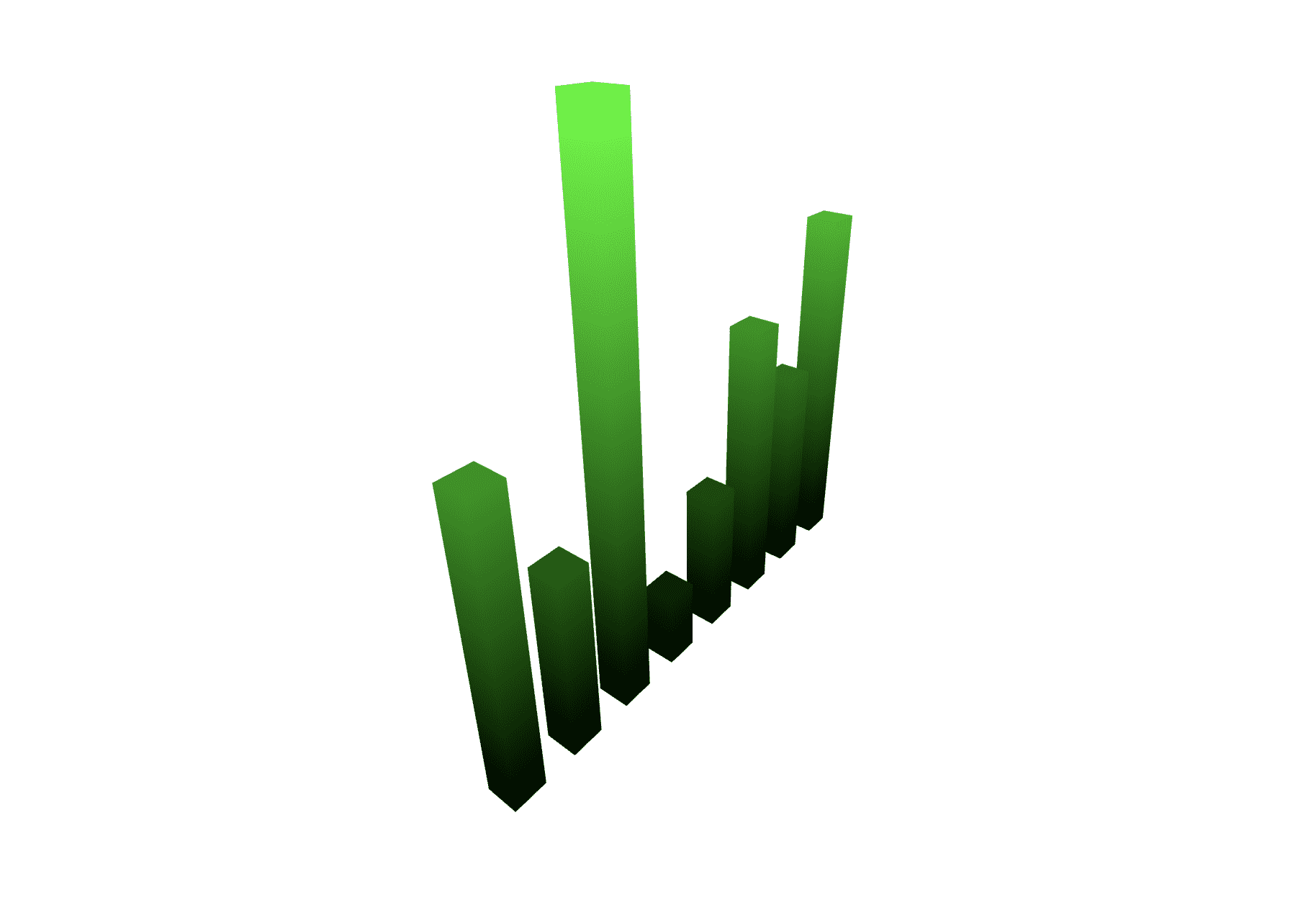
import * as THREE from 'three';
import { OrbitControls } from 'three/examples/jsm/controls/OrbitControls';

// ----- 주제: 여러 개의 CanvasTexture로 막대 그래프 만들어 보기

export default function example() {
	// Renderer
	const canvas = document.querySelector('#three-canvas');
	const renderer = new THREE.WebGLRenderer({
		canvas,
		antialias: true
	});
	renderer.setSize(window.innerWidth, window.innerHeight);
	renderer.setPixelRatio(window.devicePixelRatio > 1 ? 2 : 1);

	// Scene
	const scene = new THREE.Scene();
	scene.background = new THREE.Color('white');

	// Camera
	const camera = new THREE.PerspectiveCamera(
		75,
		window.innerWidth / window.innerHeight,
		0.1,
		1000
	);
	scene.add(camera);

	// Controls
	const controls = new OrbitControls(camera, renderer.domElement);

	const barGroup = new THREE.Group();
	scene.add(barGroup);

	// 샘플 값
	const values = [4, 2.5, 7, 1, 2, 4, 3, 5];
	const maxValue = Math.max(...values);

	const barWidthDepth = 0.5;
	const barDistance = 1;
	const barGeometry = new THREE.BoxGeometry(barWidthDepth, 1, barWidthDepth);
	const maxBarHeight = values.length; // 최대 막대 높이

	camera.position.z = values.length;

	barGroup.position.x = -(barDistance * (values.length - 1)) / 2;
	barGroup.position.y = -maxBarHeight / 2;

	class Bar {
		constructor(info = {}) {
			this.container = info.container;
			this.value = info.value || 0;

			const heightValue = this.value / maxValue * maxBarHeight;

			this.x = info.x || 0;
			this.y = heightValue / 2;
			this.z = info.z || 0;

			this.topCanvas = document.createElement('canvas');
			this.topCanvas.width = 500;
			this.topCanvas.height = 500;
			this.topContext = this.topCanvas.getContext('2d');

			this.bottomCanvas = document.createElement('canvas');
			this.bottomCanvas.width = 500;
			this.bottomCanvas.height = 500;
			this.bottomContext = this.bottomCanvas.getContext('2d');

			this.sideCanvas = document.createElement('canvas');
			this.sideCanvas.width = 500;
			this.sideCanvas.height = 500;
			this.sideContext = this.sideCanvas.getContext('2d');

			const textureTop = new THREE.CanvasTexture(this.topCanvas);
			const textureBottom = new THREE.CanvasTexture(this.bottomCanvas);
			const textureSide = new THREE.CanvasTexture(this.sideCanvas);

			this.materials = [
				new THREE.MeshBasicMaterial({ map: textureSide }),
				new THREE.MeshBasicMaterial({ map: textureSide }),
				new THREE.MeshBasicMaterial({ map: textureTop }),
				new THREE.MeshBasicMaterial({ map: textureBottom }),
				new THREE.MeshBasicMaterial({ map: textureSide }),
				new THREE.MeshBasicMaterial({ map: textureSide })
			];

			this.mesh = new THREE.Mesh(barGeometry, this.materials);
			this.mesh.position.set(this.x, this.y, this.z);
			this.mesh.scale.y = heightValue;

			this.container.add(this.mesh);

			this.draw();
		}

		draw() {
			const colorValue = `${this.value / maxValue * 255}`;

			// 위
			this.topContext.fillStyle = `rgb(0, ${colorValue}, 0)`;
			this.topContext.fillRect(0, 0, this.topCanvas.width, this.topCanvas.height);
			// 바닥
			this.bottomContext.fillStyle = 'black';
			this.bottomContext.fillRect(0, 0, this.bottomCanvas.width, this.bottomCanvas.height);

			// 옆 4면(그라데이션)
			const gradient = this.sideContext.createLinearGradient(0, 0, 0, this.sideCanvas.height);
			gradient.addColorStop(0, `rgb(0, ${colorValue}, 0`);
			gradient.addColorStop(1, 'black');
			this.sideContext.fillStyle = gradient;
			this.sideContext.fillRect(0, 0, this.sideCanvas.width, this.sideCanvas.height);
		}
	}

	// value가 클 수록 색상이 밝음
	values.forEach((value, i) => {
		new Bar({ value, container: barGroup, x: i * barDistance, y: 0, z: 0 });
	});

	// 그리기
	const clock = new THREE.Clock();

	function draw() {

		renderer.render(scene, camera);
		renderer.setAnimationLoop(draw);
	}

	function setSize() {
		camera.aspect = window.innerWidth / window.innerHeight;
		camera.updateProjectionMatrix();
		renderer.setSize(window.innerWidth, window.innerHeight);
		renderer.render(scene, camera);
	}

	// 이벤트
	window.addEventListener('resize', setSize);

	draw();
}
rotation.x 방향
0
83
2
CDN으로 수업을 들을경우
0
82
1
리액트/next.js와 같이 사용하는 강의 계획은 없으신가요?
0
150
1
소스코드 파일이 강의랑 같나요?
0
188
2
materials 배열에 있는 top, bottom ... 들에 대해서
0
158
0
gltf 포맷 사용
0
300
1
점프 애니메이션 stop
0
199
2
사양에 따른 다른 결과
0
163
1
중복 질문 삭제
0
208
1
혹시 이 빛의 범위를 조절할 수 있는 방법이 있나요?
0
176
1
gltf.scene.children 이 없는데도 모델이 화면에 떠요
0
172
2
GLF파일 export한 후에 three.js에서 렌더링 된 모델에는 텍스처 적용이 안되어있습니다..!
0
238
1
일반 유리, 강화 유리 강의에서 Glass 객체의 position X를 -1, 1로 설정한 이유를 모르겠어요
0
115
0
그림자가 다르게 표현됩니다
0
193
1
setAnimationLoop 위치가...
0
153
1
얼굴 그릴 때 붓이 깔끔하게 칠해지지 않고 얼룩덜룩해요
0
192
1
블렌더 texture paint 시 미러모드
0
215
0
DragControls의 인자값을 바꾸지 않았는데 에러가 안떠요!
0
150
1
blender 에서 색칠하기 편 Texter paint slot추가없음
0
1137
2
fin 버전도 그냥 실행이 안돼요
0
448
2
자바스크립트 실행이 안되는 것 같아요
0
479
1
모니터 해상도에 따라 mesh의 크기가 변할 수 있나요?
0
284
1
live server와 localhost:8080
0
401
2
material에 canvas 를 texture 로 넣는방법이 궁금해요
0
312
1