Thank you for explaining it in an easy to understand way.
5.0
주도
100% enrolled
This is a great course for Python beginners to get interested, as it uses various examples and instantly reflects changes with Streamlit!
Thanks to this course, I received a lot of help with using Python, including Streamlit.
Thank you for creating such a great course!
5.0
dreamfctory
61% enrolled
The content is very good.
What you will gain after the course
Design and implementation of business process automation with Python
MongoDB Data Modeling · CRUD · Search · Aggregation Processing
Implement a Streamlit-based web UI with data search, filtering, and visualization
Development of a Practical Automation Service Integrating External APIs and Databases
Want to easily build web services with Python? Take on data analysis and visualization using Streamlit! 🤖
Using the Python Streamlit library for IT security data analysis and automation!
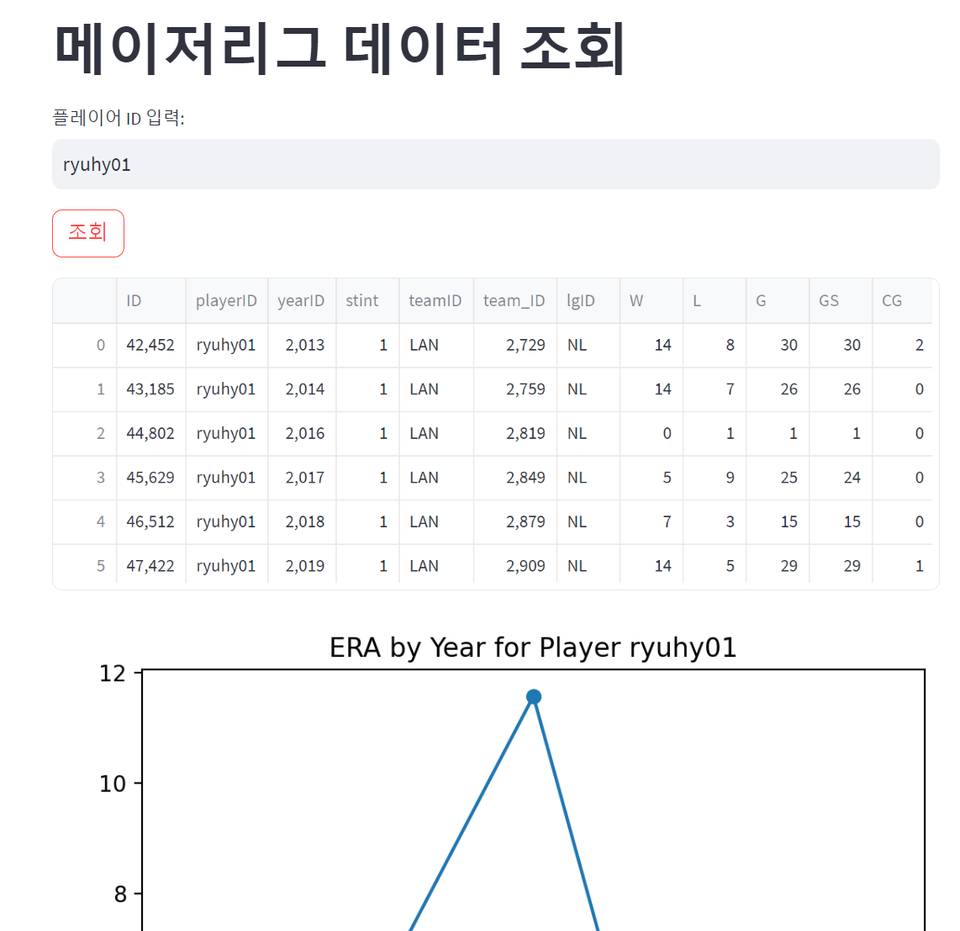
Example of data analysis using the Streamlit library.
The Python Streamlit library is excellent for visualizing the results of data analysis, machine learning, and more on the web. Even without knowing HTML, JavaScript, and other technologies required for front-end development, you can sufficiently present data in a web-based service.
Using Python Flask and Django, you can build web services with scalability, but applying designs, scripts, and styles for front-end development can be challenging. Streamlit minimizes these requirements while allowing you to quickly present the desired data analysis results.
Additionally, whenever the data changes, the updates are reflected in the web service in real time, and data visualizations can be presented in various forms in real time through functional widgets.
What you'll learn 📚
This course covers practical applications of Python Streamlit for easily implementing Python task automation, data analysis, and visualization. Through hands-on exercises, you will learn step by step how to quickly retrieve data in the desired format through web API data crawling, RSS data crawling, and more, and display the results on the web.
By applying this library to your work, you can easily implement an automation service that allows you to process tasks efficiently while sharing it with others via the web.
You can consider and develop task automation for each type of work.
We present a new program by combining Python's Streamlit library.
Learn how to apply data analysis and visualization, as well as task automation.
Course Features 📌
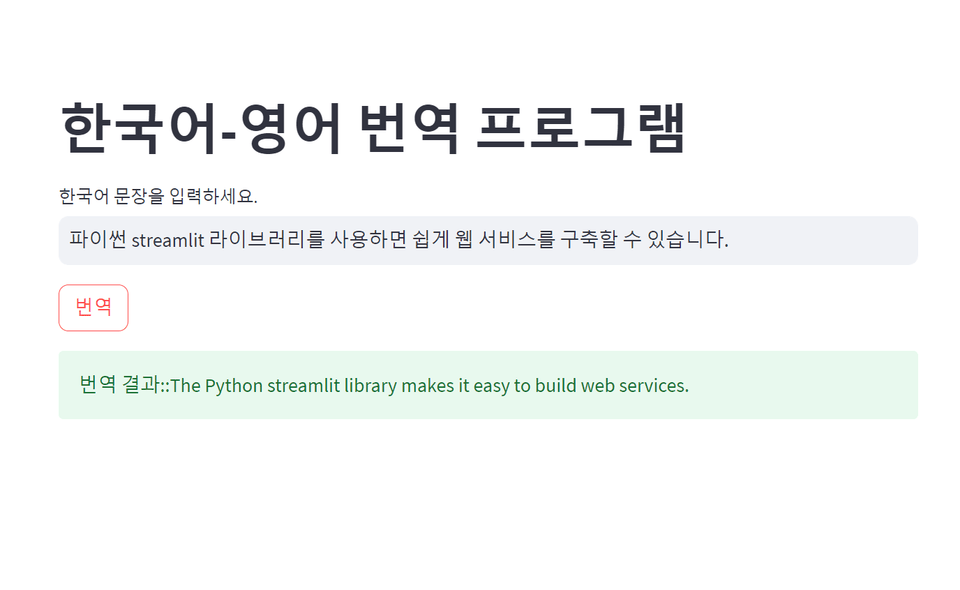
Developing a Web-Based Translation Program Using the Google Translate API
By applying various public APIs to Python Streamlit, you can implement them as web services without knowing HTML or JavaScript. You only need to import and use the Streamlit library.
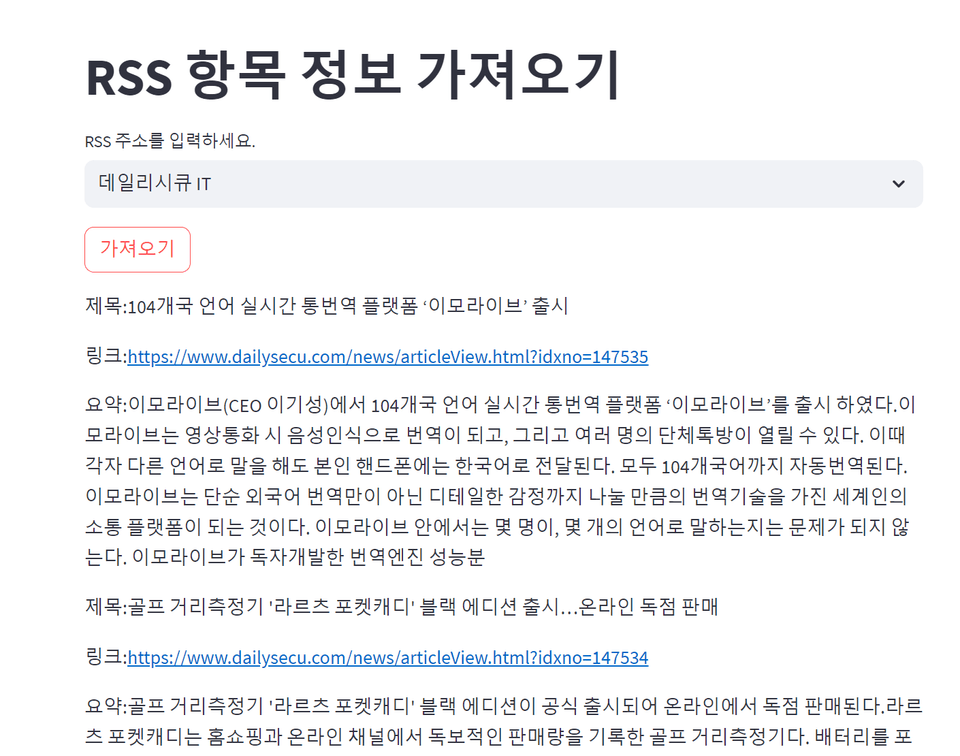
Quickly crawl web RSS information and extract exactly the data you want
After retrieving RSS feed information using Python programming, you can use the Streamlit library to display it beautifully on the web. Crawl the information you want using a library, and take it a step further by applying it to automated tasks to boost your work efficiency!!! Try exporting the results to Excel or even a database as well.!!
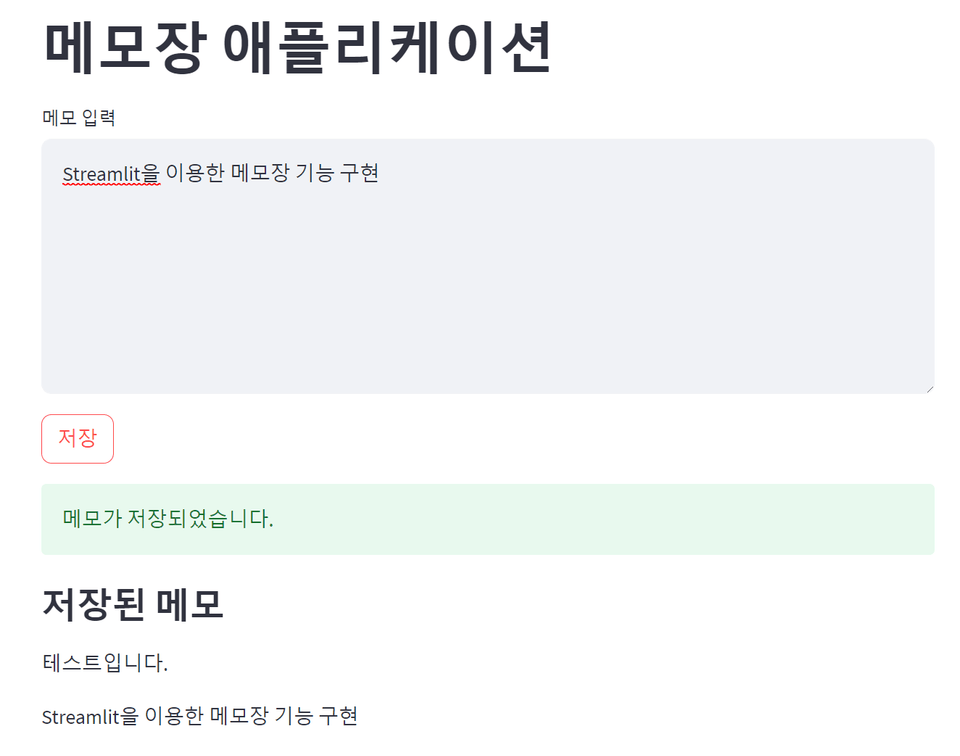
You can even develop a web bulletin board-style memo application!
You can develop and operate a web-based notepad using an SQLite database. Do you need a design? No!! With Streamlit, it’s very simple. Even by applying only the default widget styles, you can create a great notepad web application. You can also use databases such as MongoDB and MySQL to produce results quickly~~
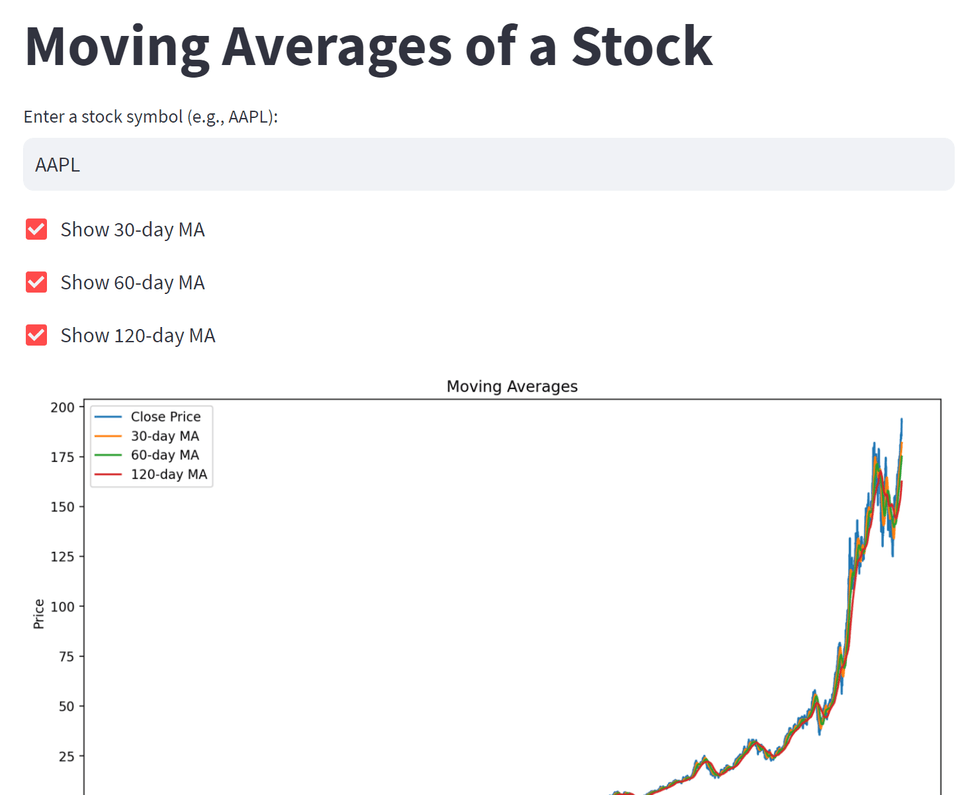
Visualize stock information in your desired format
Develop a web service that quickly visualizes average data and applies the desired visualizations by retrieving the stock information most widely used in data analysis! You can retrieve information on specific stocks through a stock data provider service, generate 30-, 60-, and 120-day moving averages, and even create comparative analysis graphs with stocks you’re interested in!!
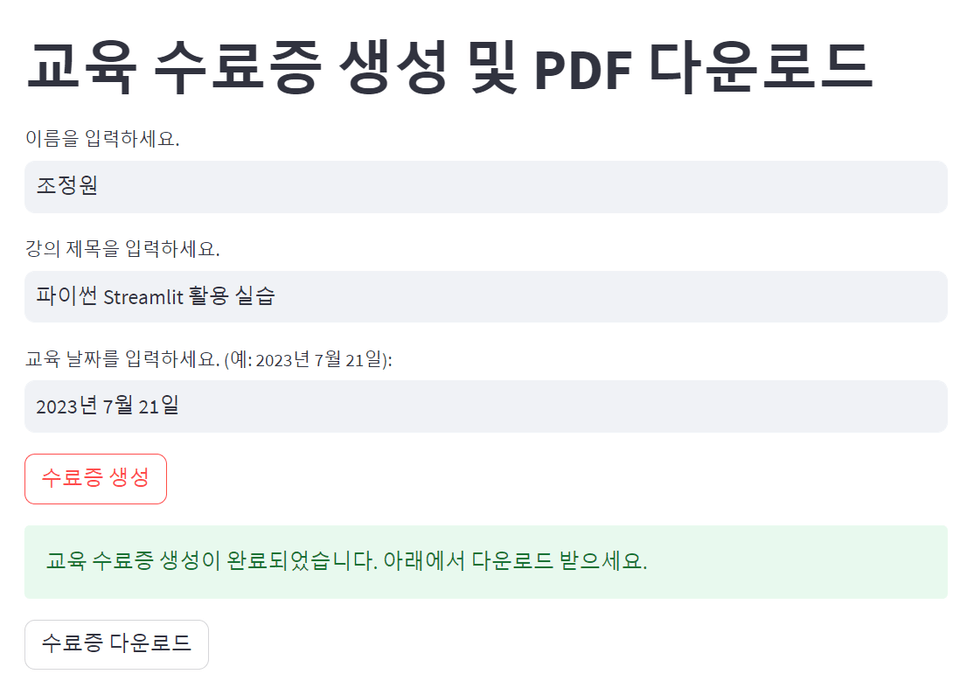
You may have spent a lot of time thinking about automating document-related tasks using Python. With Python Streamlit, you don't have to worry about designing the user input screen. You only need to think about which documents to generate automatically and how to distribute the final results using widgets.!! Automatically generate MS Word and PDF files to create large quantities of training certificates!!
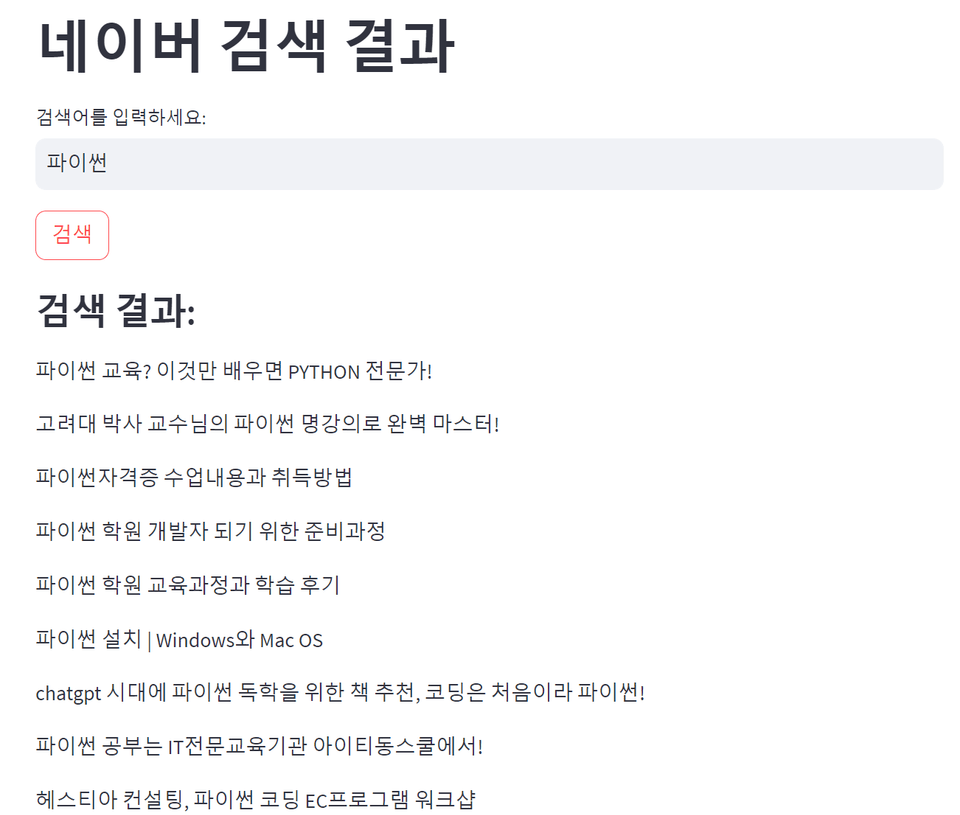
Naver Search Automation Using Selenium for Web Crawling
You can implement the automatic retrieval of important information on Naver search result rankings using the Selenium library used for Python web crawling automation. This can be applied to Python Streamlit to collect desired search results through the web and carry out automated tasks.
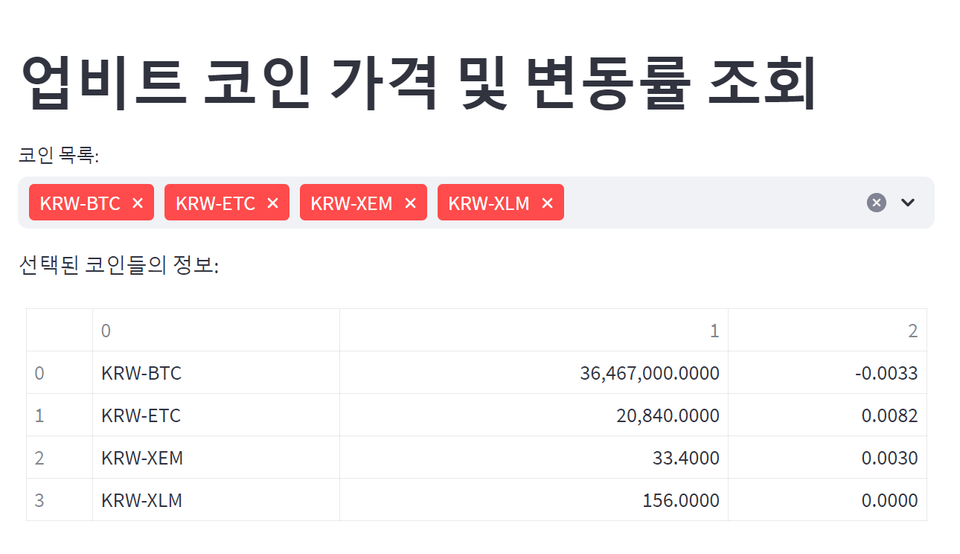
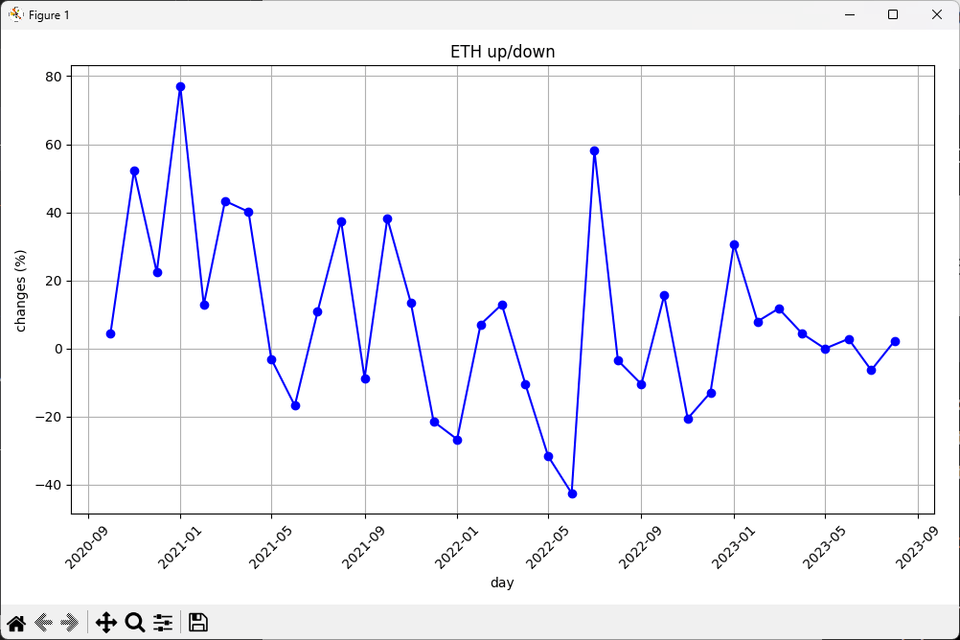
Automating Coin Information Search and Visualization Using the Upbit API
You can collect and preprocess data, as well as visualize data, using a Python program with data provided through the Upbit API. When combined with Python Streamlit, it can help with collecting coin information and automating tasks.
Q&A 💬
Q. Can I take the course even if I haven't worked with HTML or CSS scripting languages?
Yes, not at all. Python Streamlit already incorporates everything into widgets. You just need to think about how the features you add will work and which tasks you want to automate.
Q. I’m new to Python programming. Will I be able to keep up with the course?
A common, essential introductory Python course is included at the beginning of the course. After learning the basic syntax and how to use lists, you can study additional libraries as needed for each situation during the hands-on exercises and create the programs you want.
About the Knowledge Sharer ✒️
- Security Project, Jo Jeong-won
Experience
Security Project Director and CEO
Inflearn IT Professional Online Instructor
SK Shieldus Rookie Program Cloud Security Specialist Instructor
Security consulting and training for over 200 large and small companies
(Former) KB Securities IT Planning, Information Protection Part
(Former) A3 Security Penetration Testing Team
(Former) Multicampus IT Security External Specialist Instructor
Adjunct Professor, Department of Industrial Security, Chung-Ang University
Adjunct Professor at Seoul Digital University
Books
Android Mobile App Penetration Testing (Acorn Publishing, 2017)
Complete Hands-On Web Penetration Testing Using bWAPP (Hanbit Media, 2016)
IT Engineer’s Side Job: Writing Books (B-fan Books, 2015)
Burp Suite Applications and Web Penetration Testing (Hanbit Media, 2015)
WordPress Plugin Vulnerability Analysis and Penetration Testing (Hanbit Media, 2015)
How to Live as an IT Engineer 1 (Bfan Books, 2015)
Android Mobile Malware and Penetration Testing Assessment (Acorn Publishing, 2014)
What Is Penetration Testing (Wikibooks, 2014)
Penetration Testing Using Kali Linux (Acon Publishing, 2014)
The World of Digital Forensics (Infothebooks, 2014)
The Master Detective Hacker Who Catches Crackers (Seongandang, 2010)
Published over 30 other books
Recommended for these people
Who is this course right for?
Those who want to learn the basics of Python syntax and expand them into practical workflow automation services
Those who want to use MongoDB to store, search, and analyze large volumes of data
Those who want to build a web tool with search, filtering, and visualization features using Streamlit
Those who need intermediate-level practical projects and a portfolio after completing a basic course
Practitioners looking to improve repetitive tasks with a database-driven web application
This is a great course for Python beginners to get interested, as it uses various examples and instantly reflects changes with Streamlit!
Thanks to this course, I received a lot of help with using Python, including Streamlit.
Thank you for creating such a great course!


























![Project Structure and Database Handling for Backend Employment [MySQL, Mongo]Course Thumbnail](https://cdn.inflearn.com/public/courses/332866/cover/002e90d9-1412-4a10-a9c6-39aa22d99671/332866.png?w=420)

![Complete Mastery of GraphQL (Full-stack Course Learning by Building a Kiosk) - [2024 Partial Renewal]Course Thumbnail](https://cdn.inflearn.com/public/courses/329186/cover/a63c6c95-2318-4e7a-a4f0-34d4512b3ae6/329186-eng.png?w=420)
![[VANTA] MongoDB on Kubernetes - BasicsCourse Thumbnail](https://cdn.inflearn.com/public/files/courses/341003/cover/01kp0zg5xs18sjqrrm8328n7cs?w=420)
![[AI] Implementing Ideas with Prompts Only_Vibe Coding BasicsCourse Thumbnail](https://cdn.inflearn.com/public/files/courses/336725/cover/01jr2vbd3dr8hh1n4qn2jcyj02?w=420)