

![[Web Publishing Practice] Creating a Responsive SiteCourse Thumbnail](https://cdn.inflearn.com/public/courses/328215/cover/336533da-bae5-46bd-888f-0f5f0fea43cd/328215-eng.png?w=420)
[Web Publishing Practice] Creating a Responsive Site
webstoryboy
Let's create a responsive web that freely changes the screen size according to the mobile, tablet, and web environment.
Basic
Responsive Web
If you have followed the web standards and responsive site creation lectures well, it is now time for practical training! We will learn about creating a movie ticket reservation site divided into design and coding parts.

Reviews from Early Learners
5.0
Jang Jaehoon
Thank you!
5.0
์ด๋ก
I was able to learn well by following the instructions carefully. I have completed the lectures on creating web standard websites and responsive websites, and I am currently taking the lecture. I am very satisfied. Thank you!!!
5.0
์ฌ๋์์ด ์ฝ๋ผ๋ฆฌ
I learned something I didn't know
Designing a site using Photoshop
Create a responsive website
Create image slides using plugins
Get the API and display the video
Implementing functions with JavaScript
Movie ticket reservation site
Tick tock tick tock with my own hands โ๏ธ๐ง
You've come this far, and you're a promising publisher growing fast! Join us for this lecture. ๐ช
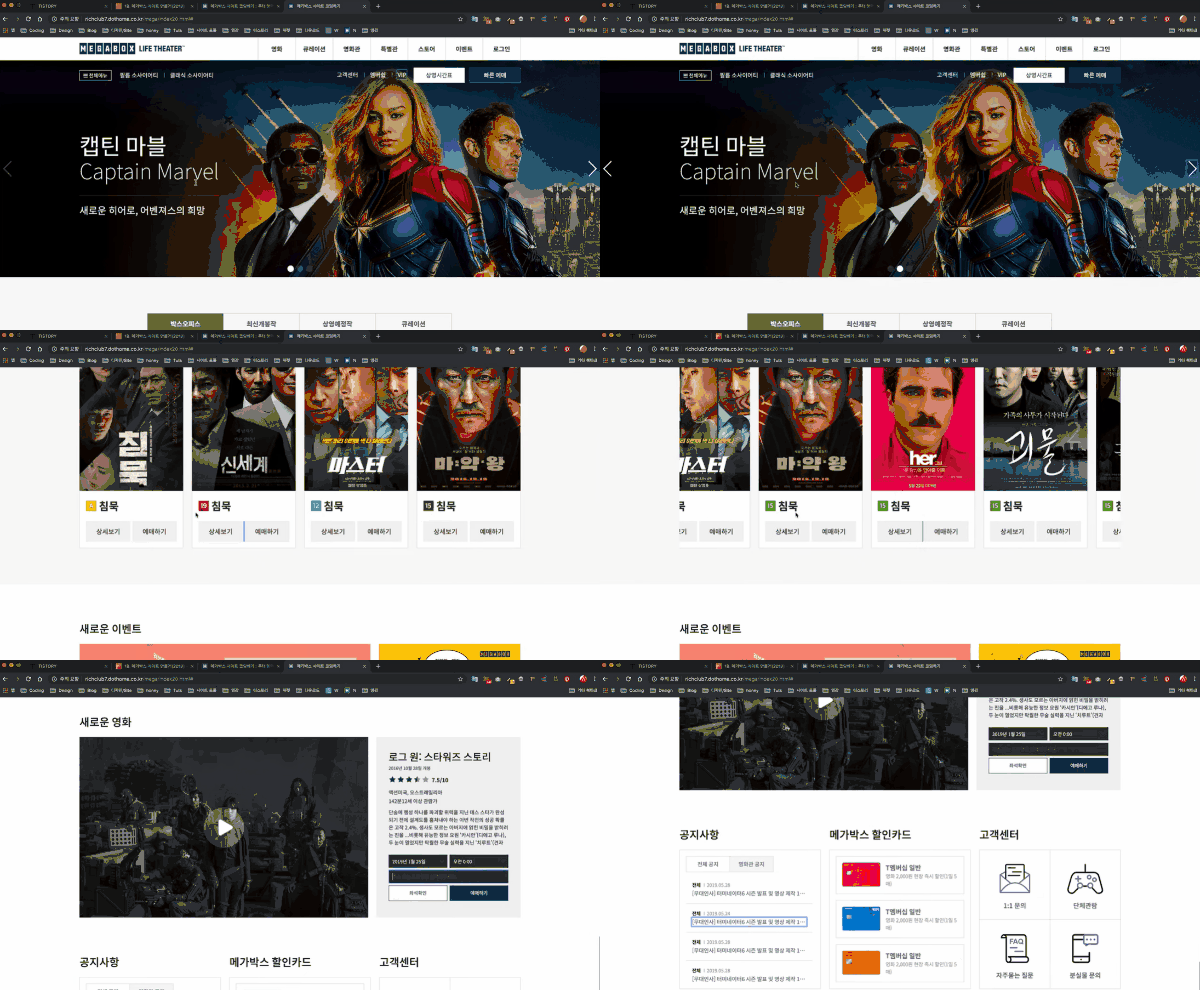
This course is divided into two parts: design and coding for a movie ticket reservation website. We'll create one based on an older version of Megabox's website. This course builds on the website design we learned in the previous lecture and moves on to full-scale publishing. As you follow along step by step, you'll get a feel for how to build a website.
I recommend taking this course after taking "Building Web Standards Sites" and " Building Responsive Sites . " This will help you build a solid foundation and gain a quicker understanding of web standards and responsive design.
Towards the finish line! I'll be rooting for your hard work.๐ง๐ปโโ๏ธ
๐ข Reference materials for class registration
*Click on each image to go to the corresponding lecture page.
1. [Web Publishing Practice] Creating a Web Standard Site
This course will give you a feel for how to create a website.
2. [Web Publishing Practice] Creating a Responsive Site
We create responsive web that freely changes screen size according to the web environment.
3. Creating a Movie Ticket Reservation Site: Design
Now it's time for the real thing! Here's the first part of creating a movie ticket reservation website: design.
4. Creating a Movie Ticket Website: Coding ( Current Course)
Now it's time for the real thing! Part 2 of building a movie ticket reservation website: coding.
Q. Is this a course that non-majors can also take?
Yes! This course covers the basics, so even beginners can easily follow along. ^^
Q. Is there anything I need to prepare before attending the lecture?
All you need to do is prepare your passion.^^
Q. What level of content is covered in the class?
If you can just use HTML and CSS to create a simple layout, you can follow along. ^^
Who is this course right for?
Anyone who wants to create a website from scratch, step by step
Anyone who wants to create a variety of layouts including grids, headers, footers, and banners in a responsive manner
For those who want to learn coding skills by following an actual site
Anyone interested in a web publisher position
Need to know before starting?
Create a web standards site (optional)
Create a responsive website (optional)
Creating a Movie Ticket Booking Site: Design (Optional)
7,559
Learners
104
Reviews
1
Answers
4.9
Rating
4
Courses
Hello! ๐ง๐ปโ๐ป
I have a great interest in the web, and I am currently teaching
Web Storyboy.
On the YouTube channel Webstoryboy,
I create various lectures.
If you don't give up and follow along with me one by one until the last lecture,
you will be one step closer to becoming a web publisher. You must try it yourself to improve your skills.
If you give up because it's difficult, wrong, or you don't understand, it will be hard when you try to build other sites too, right?
If something goes wrong or doesn't work while following along, compare your code with my lecture source
and try to find where the mistake is yourself. That will also be a great way to learn ๐ง๐ปโโ๏ธ
Iโm rooting for your hard work again today. Good luck!
All
23 lectures โ (12hr 22min)
1. Orientation
30:09
2. Basic settings
27:44
3. Header area
43:10
4. Banner area
31:08
6. Swiper.js
26:32
7. Banner responsive
41:21
12. Event Area
23:54
13. Opening area
18:26
15. New Movie Zone 2
52:10
16. announcement
26:58
20. Footer Area
29:45
22. Youtube API
51:59
All
11 reviews
4.9
11 reviews
Reviews 845
โ
Average Rating 4.9
Reviews 99
โ
Average Rating 5.0
Reviews 6
โ
Average Rating 5.0
Reviews 1
โ
Average Rating 5.0
Reviews 4
โ
Average Rating 5.0
Check out other courses by the instructor!
Explore other courses in the same field!
Free