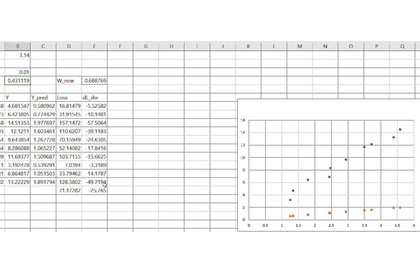
Deep Learning with Excel
hjk1000
$4.40
Beginner / Excel, Deep Learning(DL), VBA
4.8
(24)
500+
Let's learn the principles of deep learning by visualizing them with Excel.

Beginner
Excel, Deep Learning(DL), VBA

Deeply understand the meaning of deep learning by implementing its basics in Excel!
369 learners
Level Basic
Course period Unlimited

Reviews from Early Learners
5.0
yldn12016
Following along step-by-step in Excel like this makes it much easier to understand than just putting in code with Python.
5.0
Eddie Choi
It was very helpful! I can't find the reason why the prediction value keeps converging to a constant in the final using Relu. I would like some help! Updated on 6/27: I sent it again today in case you didn't receive the email. Please check it. Thank you!
5.0
Suit & Coffee
Thank you for showing it step by step in Excel. It was a great help to be able to look into deep learning in such detail!
Deep Learning Basics
Excel
VBA
It is a consideration of how to efficiently contain the ingredients known as data.
Learn the rules of operations that occur when a pile of numbers becomes a matrix ($Matrix$).
Understand data structures not as simple lists, but in terms of their "spatial significance."
We explore the reasons for stacking layers to go beyond simple flavors (linearity) and create complex depth (non-linearity).
Understand the structure of Multi-Layer Perceptron (MLP) and experience firsthand why the model becomes smarter as the layers get deeper.
Design the path for data to flow, from input to output, yourself.
Structure on an Excel sheet where and how much of the seasonings, called weights ($w$) and biases ($b$), should be placed.
It is the mathematical logic of tracing back to identify which ingredient caused the change in the final dish's taste.
Through the chain rule of calculus, we read the flow of change among complexly intertwined functions.
This is the most core 'feedback' process of deep learning, where the initial ingredient proportions are adjusted based on the results (errors).
Clearly understand the process of errors flowing backward and updating weights through mathematical formulas.
Translate all the recipes learned in theory into code within each individual Excel cell ($Cell$).
Without using TensorFlow, you will complete a model that learns and evolves on its own using only Excel formulas.
It is a filtering process that decides whether to enhance or suppress the flavors of the ingredients.
You will learn the principles of how various activation functions, such as Sigmoid and ReLU, breathe 'vitality' into deep learning.
Based on an essential understanding that does not rely on tools, we prepare to venture out into the larger ocean of artificial intelligence.
Summarize how the experience of implementing in Excel becomes a powerful intuition when using Python frameworks in the future.
"The more complex a technology is, the simpler its roots must be."
Author: Wrote "Python Artificial Intelligence TensorFlow"
I have included the know-how to easily explain complex AI algorithms from a beginner's perspective.
Education: Graduated from Hanyang University Graduate School of Artificial Intelligence Convergence
I have researched the core principles of artificial intelligence based on academic depth and practical application.
Strengths: Beyond simply teaching 'how to use' it, I possess exceptional expertise in visualizing the 'internal working principles' of technology and delivering them through Unplugged methods.
Who is this course right for?
Those who are curious about the principles of deep learning
Those who want to implement deep learning while viewing it through Excel
Need to know before starting?
Excel

Career Verified
1,895
Learners
71
Reviews
10
Answers
4.7
Rating
13
Courses
Hello
I am an office worker from a non-major background who is diligently studying deep learning.
I would like to share the things I've felt while studying with all of you.
Thank you.
All
8 lectures ∙ (1hr 40min)
2. Stacking deep
06:45
4. Chain Rule
11:26
5. Backpropagation
15:39
8. Wrapping up
26:53
All
11 reviews
4.6
11 reviews

Reviews 3
∙
Average Rating 5.0
5
Following along step-by-step in Excel like this makes it much easier to understand than just putting in code with Python.
Oh, thank you so much. I hope you understand the principles.
Reviews 1
∙
Average Rating 5.0
5
It was very helpful! I can't find the reason why the prediction value keeps converging to a constant in the final using Relu. I would like some help! Updated on 6/27: I sent it again today in case you didn't receive the email. Please check it. Thank you!
Wow! I think this is the first time you've tried it yourself! Thank you so much! How do you think it will converge to a constant? If you send me the file, I'll figure it out quickly. My email address is hjklllllll@gmail.com
If learning is not going well, Please try again by setting the initial weight values. Since we did not set the initial values separately and SGD itself is not an optimizer that learns well, the learning rate can change significantly depending on the initial values. It would be a good idea to try changing the initial values.
Thank you for your immediate reply. I tried setting the initial value several times and it didn't work, so I asked for the last time. I sent it to you by email, so please check it! I followed the implementation of the deep learning model in Excel and it was easy to see and really easy to understand. Even if it's VBA, if you have some programming experience, the syntax is similar, so you can follow it quickly. However, Excel is too slow and freezes often, so that's a bit disappointing. When I go into image CNN, it's very ㅎㅎ; It was a very refreshing lecture. Thank you.
Uh.. I haven't received the email yet.. hjk Next L(l) is 7
There are a few problems 1. The RAND function remains in the X Y data, so the value changes every time 2. The location of the X data in the getdata function is wrong 3. This is not a big deal, but the running rate is too small.. I will correct these points and send it to you again by email.

Reviews 868
∙
Average Rating 5.0
5
Thank you for the informative lecture. Happy New Year and stay healthy always.
Ah, thank you so much for the course review! I'm a beginner in lectures, so I think it was hard to understand! I'll try to make the lecture with better content.

Reviews 20
∙
Average Rating 4.5
5
Thank you for showing it step by step in Excel. It was a great help to be able to look into deep learning in such detail!
Wow! Thank you so much for the course review! I'm so glad that it helped you understand deep learning models even a little bit! Let's study deep learning together! Thank you
Check out other courses by the instructor!
Explore other courses in the same field!
$4.40


















![[ICT Archive] Big Data Core and Business ModelsCourse Thumbnail](https://cdn.inflearn.com/public/files/courses/338811/cover/01k44rs7zkwq0ehc8vqsy2mdtb?w=420)